

- GoHighLevel now lets you recover failed Social Planner posts with less hassle and fewer wasted steps.
- Quick Summary – Failed Social Posts Essentials
- What’s New With Failed Social Posts
- Why Failed Social Posts Matter
- How to Fix Failed Social Posts in GHL
- Pro Tips for Failed Social Posts
- What Failed Social Posts Mean for Business
- Frequently Asked Questions About Failed Social Posts
- Conclusion
GoHighLevel now lets you recover failed Social Planner posts with less hassle and fewer wasted steps.
Failed social posts can slow down your content schedule fast.
Failed social posts can seem minor at first, but they add up fast when you manage content for several clients. One missed post can mean extra checks, copied content, rebuilt captions, and another publishing attempt. That is time your team should not have to waste.
GoHighLevel now gives you a cleaner way to fix this inside Social Planner. Instead of cloning the post or starting over, you can retry the failed post using the same content, settings, and connected accounts. If the original posting time has passed, you can reschedule it for a new date and time.
It is a simple update, but it solves a real workflow problem. Posts can fail because an account disconnects, a platform rejects the post, or a temporary issue blocks publishing. Now, GHL gives you a faster way to recover and keep your campaign moving.

Failed social posts no longer need to slow down your campaign. With this Social Planner update, you can retry or reschedule failed posts in GHL and keep your content moving with fewer wasted steps.
Quick Summary – Failed Social Posts Essentials
Purpose: This update helps GHL users fix failed social posts directly inside Social Planner without cloning or rebuilding content.
Why It Matters: Failed posts can slow down campaigns, create extra work, and cause missed posting windows for client accounts.
What You Get: You can now use Retry Now to publish the original post again or Reschedule Post to move it to a new future date and time.
Time To Complete: Most failed posts can be retried or rescheduled in under two minutes once you find them in the Planner table.
Difficulty Level: Beginner-friendly. If you can open Social Planner and use the three-dot menu, you can use this update.
Key Outcome: Your team can recover failed social posts faster, keep campaigns moving, and reduce manual cleanup inside GoHighLevel.
What’s New With Failed Social Posts
GoHighLevel has added new recovery actions for failed social posts inside Social Planner. Before this update, fixing a failed post usually meant cloning it, checking the content, and setting it up again. That worked, but it was not exactly smooth.
Now, failed posts have their own recovery options. You can choose Retry Post Now if you want GHL to publish the post again using the original content, settings, and connected accounts. If the retry works, the post moves to the Published state.
Automate marketing, manage leads, and grow faster with GoHighLevel.

You can also choose Reschedule Post if you want to pick a new future date and time. Once confirmed, the failed post moves back to Scheduled and will publish at the new time.These actions are available from the post actions menu in List View, Grid View, and Post Preview. That makes the update easy to find, no matter how your team prefers to review content.
Why Failed Social Posts Matter
Failed social posts are not just a small tech issue. They can break the flow of a campaign, especially when your team is managing content across several client accounts.
A missed post can mean a missed promo, a delayed announcement, or a gap in a client’s content calendar. That may not sound huge, but clients notice when content does not go out on time. And your team feels it when they have to stop what they’re doing to fix it.
This update helps remove that extra cleanup work. Instead of cloning a failed post and rebuilding the setup, you can take action right from Social Planner. That means fewer steps, less confusion, and a faster path back to publishing.
For agencies, this is the kind of simple fix that makes daily work smoother. Your VA can check failed posts, retry what needs another push, and reschedule anything that missed its best time slot.
Less mess. Less backtracking. More control over the content schedule.
How to Fix Failed Social Posts in GHL
The failed social posts update is used inside the Social Planner area in GoHighLevel. In this How-To, we will focus on opening Social Planner, finding a failed post in the Planner table, and using the new Retry Now or Reschedule Post options from the post action menu.
Here are the steps to fix failed social posts.
- Access the Social Planner area in GHL Marketing.
- Find the failed post in the Planner table.
- Open the three-dot action menu.
- Retry the failed post now.
- Reschedule the failed post if needed.
To start, make sure you are logged in to your GoHighLevel sub-account.
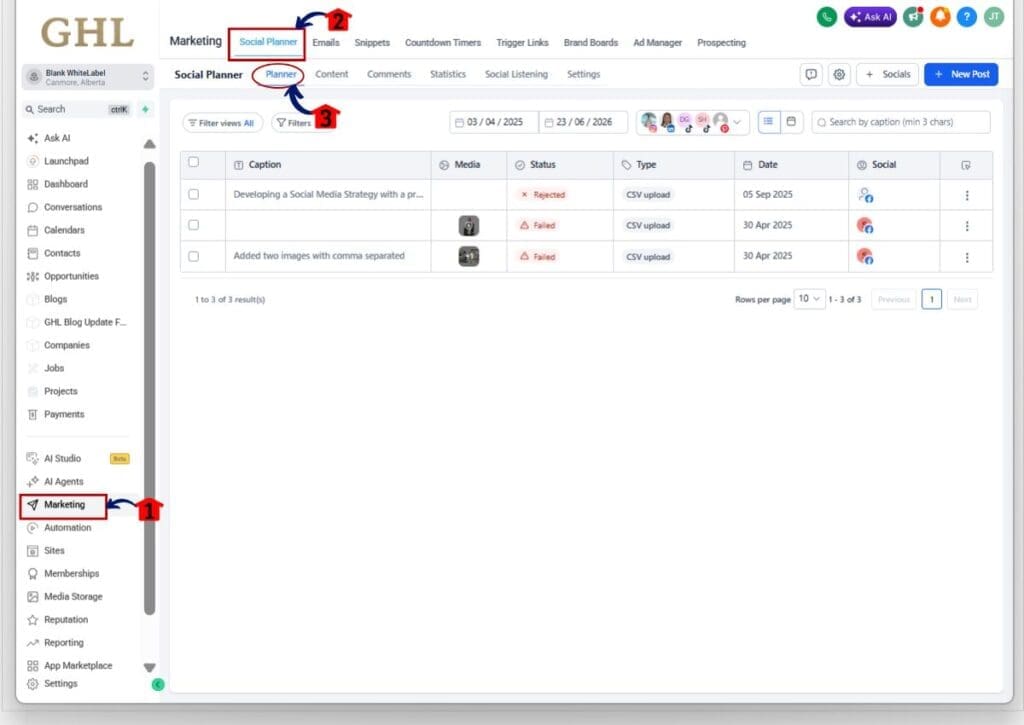
Step 01 – Access the Social Planner area in GHL Marketing
- The main menu on the left side of your screen has the core areas you work in when using GoHighLevel.
1.1 Click Marketing in the left menu.
- This opens the Marketing section in GHL.
1.2 Click Social Planner from the top Marketing menu.
- This opens the Social Planner area.
1.3 Click the Planner tab.
- This shows the main Social Planner table where you can review posts by caption, media, status, type, date, and social account.
Step 02 – Find the failed post in the Planner table
- This is where GoHighLevel shows your posts and their current publishing status.
2.1 Review the Status column in the Planner table.
- Look for posts marked as Failed.
2.2 Find the failed post you want to recover.
- You can review the post by checking the caption, media, date, type, and social account columns.
2.3 Confirm the post is in the Failed state.
- The retry and reschedule options are only meant for posts that failed to publish.

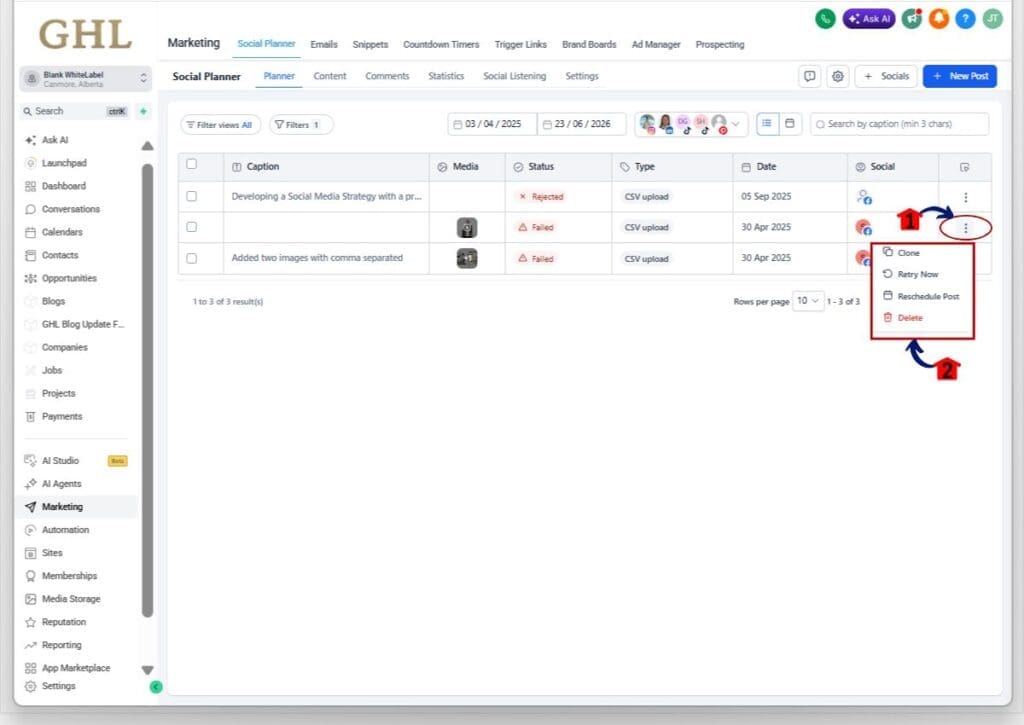
Step 03 – Open the three-dot action menu
- This is where you access the recovery options for the failed post.
3.1 Go to the far-right side of the failed post row.
- You will see a three-dot menu.
3.2 Click the three-dot menu.
- This opens the post action menu.
3.3 Review the available actions.
- You may see options such as:
- Clone
- Retry Now
- Reschedule Post
- Delete
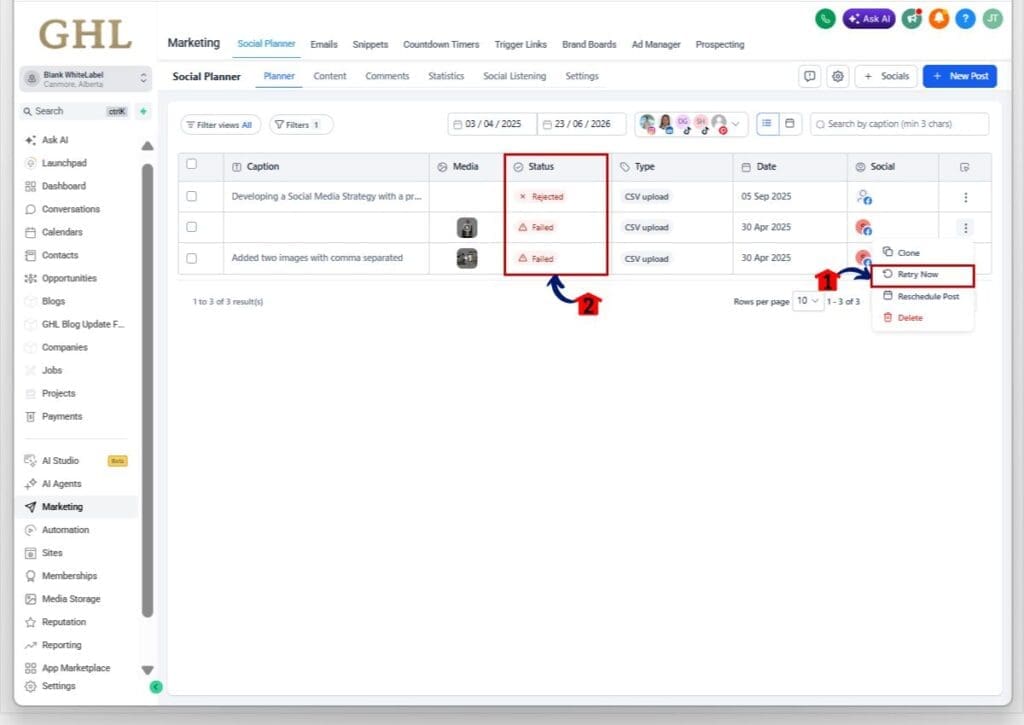
Step 04 – Retry the failed post now
- This option lets GoHighLevel try to publish the same post again.
4.1 Click Retry Now.
- This tells GHL to retry the post using the original content, settings, and connected social account.
4.2 Confirm the retry action if prompted.
- GoHighLevel will attempt to publish the post again.
4.3 Wait for the retry process to finish.
- If the retry works, the post will move out of the Failed state and into Published.
4.4 Check the Status column.
- Confirm the post status has changed.
Step 05 – Reschedule the failed post if needed
- This option is best when the original posting time has already passed.
5.1 Click the three-dot menu on the failed post again if needed.
- This opens the post action menu.
5.2 Click Reschedule Post.
- This opens the scheduling option for the failed post.
5.3 Choose a new future date and time.
- Pick a time that still makes sense for the campaign.
5.4 Confirm the new schedule.
- The failed post will move back to Scheduled and publish at the updated time.

Pro Tips for Failed Social Posts
Failed social posts are easier to fix now, but you still need a simple review process. If you manage content for several clients, check the Status column in Social Planner each day. A quick scan can help you catch failed posts before they turn into missed promos or client questions.
Use Retry Now first when the issue looks temporary. This works best when the post content looks fine and the connected social account is still active. Use Reschedule Post when the original posting time has passed and the content still needs to go out at a better time.
Keep the current limits in mind. Bulk retry is not included, and automatic retries are not supported right now. If a post keeps failing, check the connected account, media format, caption, date, and platform rules before trying again.
What Failed Social Posts Mean for Business
Failed social posts may look like a small task, but they can slow down a busy agency fast. When your team has to clone posts, rebuild captions, and reset publishing times, the work piles up. That is time that could be spent on better content, client strategy, or campaign checks.
This update gives your team a cleaner recovery process. A VA or account manager can open Social Planner, check the Status column, and fix failed posts without digging through old content. That keeps the workflow simple and helps your team stay in control.
For agencies managing many brands, this is the real win. Fewer missed posts. Less manual cleanup. Fewer support questions. Failed social posts still need attention, but now GoHighLevel gives you a faster way to get them back on track.
Frequently Asked Questions About Failed Social Posts
Conclusion
Failed social posts used to mean extra work. Now, GoHighLevel gives you a faster way to clean them up inside Social Planner.
With the new Retry Now and Reschedule Post options, you can recover failed posts without cloning content or rebuilding the post from scratch. That keeps your workflow cleaner and helps your team stay on top of client campaigns.
This is not a flashy update, but it is a useful one. If you manage social content in GHL, start checking the Status column in Social Planner and use these new recovery tools when a post fails.
Have you tried the new retry option for failed social posts yet?
Scale Your Business Today.
Streamline your workflow with GoHighLevel’s powerful tools.


