- Introduction – GHL Appointment Management System
- Quick Summary – Appointment Management System
- Here are this weeks HighLevel Updates
- What Is the New Appointment Management System Update?
- Why the Appointment Management System Matters
- Upcoming Appointments Now Appear First
- Past Appointments Now Show Most Recent First
- View Appointment Details Without Leaving the Appointments Tab
- How to Use the Appointment Management System
- Pro Tips for Getting More From the Appointment Management System
- What This Means for Your Business
- FAQs Appointment Management System
- Conclusion – Appointment Management System
Introduction – GHL Appointment Management System
Appointment Management System updates don’t sound exciting. Until you’re trying to find a customer’s next appointment and end up scrolling through a messy list. You’ve probably been there.
Ever opened a contact and spent longer than you should trying to find the next appointment? You end up scanning the entire list just to work out what’s coming up and what’s already in the past.
You might not notice it once or twice. After checking appointment records all day, though, the extra scrolling starts to become frustrating.
Now that changes. GHL has improved its Appointment Management System by automatically sorting appointments in a way that actually makes sense.
Upcoming appointments now appear nearest first. The next scheduled appointment is always at the top of the list.
Past appointments work the opposite way. The most recent completed appointment appears first, giving you instant access to the latest customer interaction.
There’s another nice bonus too. You can now click View directly from the Appointments tab to see appointment details without jumping around different areas of the platform.
No extra digging. No unnecessary navigation. Just the information you need when you need it.
It’s a simple update. But it’s one you’ll notice almost immediately. Less searching. Faster follow-ups. Better customer conversations.
And for agencies, sales teams, appointment setters, and business owners, that’s exactly how appointment management should work inside GHL.
The latest GoHighLevel Changelog includes several other GHL feature updates that round out your daily workflow:
- New QR Code Styling Options: Shapes, Borders, and Rim Text
- Collapse & Resize Pipeline Stages in Kanban View
- Notes just got smarter for the contacts page!
- New Asana actions in workflows – Find Project and Find section
- Email AI + Knowledge Base Integration 🚀
- Dialer: Auto-minimize, Pin & Drag
- Schema Markup Using AI
Keep reading for much more on all these updates and a deep dive into the Appoinment Management Sytem feature!

Quick Summary – Appointment Management System
Purpose: This guide explains how the new GHL Appointment Management System organizes upcoming and past appointments, making it easier to manage customer interactions.
Why It Matters: Finding the next appointment or reviewing the latest customer activity now takes seconds instead of scrolling through long appointment lists, helping your team work more efficiently.
What You Get: You’ll learn how the new appointment sorting works, where to find it, how to use the new View option, and how these improvements speed up your daily workflow.
Time to Complete: You can understand and start using these improvements in less than 5 minutes since the feature is enabled automatically.
Difficulty Level: Beginner. No setup, configuration, or technical knowledge is required.
Key Outcome: You’ll spend less time searching for appointment information and more time preparing for meetings, following up with customers, and delivering a better client experience using GHL.
Here are this weeks HighLevel Updates
New QR Code Styling Options: Shapes, Borders, and Rim Text
What it does:
Lets you stop using boring QR codes. You can now tweak the shape, style the border, and add text around the edge.
Where in GHL:
Accessible via Sites → QR Codes and within QR tools embedded in Funnel and Website builders.
Automate marketing, manage leads, and grow faster with GoHighLevel.

Impact:
Improves visual presentation and brand alignment while increasing scan appeal.
Best suited for:
Agencies that care about branding, small businesses running local promotions, online stores, and teams pushing QR campaigns.
Collapse & Resize Pipeline Stages in Kanban View
What it does:
Lets you hide pipeline stages you’re not actively using and adjust column widths so your board fits the way you work.
Where in GHL:
Inside Opportunities when you’re viewing your pipeline in Kanban mode.
Impact:
No more dragging your screen forever just to find the deals that matter.
Best suited for:
Owners running multi-stage pipelines, reps working deals every day, and anyone fed up with a messy board.
Notes Just Got Smarter for the Contacts Page
What it does:
Upgrades the notes area so it’s easier to write, review, and keep things organized inside a contact record.
Where in GHL:
Found directly within each contact’s profile under Notes.
Impact:
Makes it simpler to see what’s been discussed and who added what — without digging through clutter.
Best suited for:
Teams collaborating on accounts and businesses that document every client touchpoint.
New Asana Actions in Workflows – Find Project & Find Section
What it does:
Lets your workflow check what already exists in Asana before adding anything new.
Where in GHL:
Go to Workflows, add an action, and choose the Asana integration.
Impact:
No more duplicate projects. No more messy task boards. Just cleaner automation.
Best suited for:
Operations teams and agencies that rely on Asana to manage client delivery.
Email AI + Knowledge Base Integration
- What it does:
Allows Email AI to reference your Knowledge Base for smarter, more accurate responses. - Where in GHL:
Found in Conversations → Email composer with AI enabled and Knowledge Base settings under AI configuration. - Impact:
Smarter email suggestions that understand your business and help you reply quicker. - Best suited for:
Support teams, agencies managing inboxes, and businesses scaling communication with AI.
Dialer: Auto-Minimize, Pin & Drag
- What it does:
Lets you auto-minimize the dialer during calls, pin it in place, and drag it anywhere on screen. - Where in GHL:
Found in Conversations → Dialer. - Impact:
Cleaner workspace and easier multitasking during sales or support calls. - Best suited for:
Sales teams, outbound callers, appointment setters, and agencies making daily calls.
Schema Markup Using AI
- What it does:
Generates structured schema markup automatically using AI for SEO enhancement. - Where in GHL:
Found in Sites → Website or Funnel settings within AI or SEO sections. - Impact:
Improves search visibility without manual coding. - This works well for:
Teams building websites that need stronger search visibility, from agencies to small local businesses.
What Is the New Appointment Management System Update?
Appointment records should make sense the second you open them. You want the next booking near the top, the latest completed meeting close by, and no guessing game in between.
Before this update, appointment lists could feel a little out of sequence. If a contact had several bookings, finding the next meeting or the latest completed appointment sometimes meant scrolling through the entire list.
Nothing was technically wrong with the way it worked. It simply took more effort than it should have to find the appointment you were looking for. This update smooths out that experience.
The appointment list now works more like your brain expects it to. Upcoming bookings start with the next one on the calendar. Past bookings start with the most recent customer interaction.
Think about how most people work.
Sometimes you’re getting ready for an upcoming meeting. Other times you’re trying to remember the last conversation you had with a customer. Either way, the right appointment should be easy to find.
The result is a layout that feels much more intuitive to use. And that’s not the only improvement GHL has slipped into this update.
Users can now access appointment information directly from the Appointments tab using the new View option. Instead of jumping between screens, appointment details are available with a single click.
Small change. Big time saver.
The result is a cleaner experience inside both Contacts and Conversations. Important appointment information is easier to find, customer timelines make more sense, and your team spends less time searching for information before taking action.
For agencies managing multiple clients, sales teams handling daily appointments, or service businesses booking consultations, this update helps keep customer conversations moving without unnecessary friction.
Why the Appointment Management System Matters
Most updates promise to save time. This one actually does.
The new Appointment Management System isn’t introducing flashy automation or a brand-new feature. Instead, it improves something most GHL users do every single day—working with appointments.
The impact becomes obvious once your calendar starts filling up. Looking after a handful of appointments is easy. Managing dozens every day is where small improvements make a noticeable difference.
The appointment that’s coming up next now takes the top spot. Instead of searching through the list, you can see your next meeting the moment you open the record.
The same applies to completed appointments. When reviewing a customer record, the latest interaction is now the first thing you see. That means less digging through history and more context before your next call, email, or follow-up.
For sales teams, this creates faster conversations. For customer service teams, it creates better customer experiences. For agencies, it means account managers can quickly understand where a client relationship stands before jumping into a meeting.
The new sorting structure also feels more natural.
The new layout follows the way most people naturally review their schedule. The next appointment is easy to spot, and your latest customer interaction is never far behind.
The addition of the View button strengthens this even further.
Appointment details are now only a click away. You stay on the same screen, check what you need, and carry on with your work.
These might sound like small improvements. But small workflow improvements compound quickly.
Save 10 seconds here. Save 20 seconds there.
Multiply that across dozens of appointments every day, multiple team members, and hundreds of customer interactions every month.
It’s a small change on paper, but one you’ll probably notice every time you open a contact record.
Upcoming Appointments Now Appear First
What’s the most important appointment in your calendar? Usually the next one.
That’s why this update makes so much sense.
The new Appointment Management System now displays upcoming appointments in ascending chronological order. In plain English, that means the appointment happening soonest appears first.
No more guessing. No more scrolling. No more searching through future bookings to figure out who’s next.
Let’s say a contact has three upcoming appointments:
- June 10
- June 15
- June 20
Under the new system, June 10 appears at the top of the list, followed by June 15 and June 20.
Exactly how most people would expect it to work. This may seem like a small adjustment, but it has a huge impact on daily productivity.
When you’re preparing for sales calls, consultations, onboarding sessions, or client meetings, the next appointment is usually the one that needs your attention right now.
Now it’s the first thing you see. For agencies, this means account managers can quickly identify upcoming client meetings without digging through appointment records.
For appointment setters, it becomes easier to prioritize follow-ups and prepare for upcoming conversations.
For service businesses, it helps staff stay organized during busy schedules where multiple appointments happen throughout the day.
The update also reduces the risk of overlooking important appointments.
When the nearest booking is always displayed first, it’s much easier to spot schedule changes, prepare for meetings, and ensure customers receive a smooth experience.
This new Appointment Management System layout aligns with how teams naturally think and work.
What’s next? Now the answer is sitting right at the top of the screen. No extra clicks required.
Past Appointments Now Show Most Recent First
When you’re reviewing a contact record, what do you usually want to see first?
The latest interaction. Not something that happened months ago. Not the oldest appointment in the history. You want the most recent customer activity right in front of you.
That’s exactly what the new Appointment Management System delivers.
Past appointments are now displayed in descending chronological order. That means the most recently completed appointment appears at the top of the appointment history list.
The latest interaction always gets priority.
For example, if a contact previously had appointments on:
- June 1
- May 25
- May 10
The June 1 appointment will now appear first, followed by May 25 and then May 10.
Simple. Logical. Much easier to work with.
This change becomes especially valuable when you’re preparing for customer conversations.
Before making a follow-up call, sending an email, or reviewing a client account, you can instantly see the latest appointment without scrolling through older records.
That means better context and faster decision-making.
For sales teams, this helps identify the most recent customer touchpoint before reaching out.
For agencies, account managers can quickly review the latest client meeting before discussing campaign performance or next steps.
For service businesses, staff can easily reference the customer’s most recent visit, consultation, or appointment history.
The benefit isn’t just speed. It’s confidence.
When the latest customer interaction is immediately visible, your team spends less time searching and more time having productive conversations.
Combined with the new upcoming appointment sorting, the Appointment Management System now gives users a much clearer picture of both the future and the past.
What’s next. What happened last. Both are now exactly where you’d expect them to be.
View Appointment Details Without Leaving the Appointments Tab
Finding the right appointment is one thing. Opening it should be just as easy.
That’s why GHL added another useful improvement to the Appointment Management System.
You can now view appointment details directly from the Appointments tab using the new View option.
No extra navigation. No jumping between screens. No hunting through different areas of the CRM. Just click View and access the information you need. Simple.
But surprisingly powerful. Think about how often your team reviews appointment information throughout the day.
Sales reps check upcoming demos. Account managers review client meetings. Customer service teams verify appointment details before reaching out.
Every extra click slows that process down. Now those details are available exactly where you’re already working.
The result is a smoother workflow from start to finish.
Instead of opening multiple screens, users can quickly review important appointment information directly from the appointment list itself.
This is especially useful when you’re preparing for a conversation.
Need to confirm appointment details before making a call? Click View.
Need to review information before responding to a customer? Click View.
Need a quick reminder of what was scheduled? Click View. Done.
The feature works hand-in-hand with the new appointment sorting improvements.
First, the Appointment Management System shows you the most relevant appointment based on whether it’s upcoming or completed.
Then it gives you fast access to the details behind that appointment.
Less searching. Less clicking. Less frustration.
For busy teams handling dozens of customer conversations every day, those small workflow improvements quickly add up.
And that’s what makes this update valuable. It’s not trying to reinvent appointment management.
It’s simply making it faster and easier to work with the information that’s already there.
Exactly the kind of improvement users notice every single day.
How to Use the Appointment Management System
The Appointment Management System update is available automatically inside the Contacts and Conversations areas of GoHighLevel. You don’t need to enable any settings or configure the feature before using it.
The steps below will show you where to find the updated appointment list, how upcoming and completed appointments are now displayed, and how to view appointment details directly from the Appointments tab.
- Access the Main Left-Hand Menu in GoHighLevel.
- Review Upcoming Appointments.
- Review Past Appointments.
- Click the view button.
- View Appointment Details.
To start, make sure you are logged in to your GoHighLevel sub-account.
Step 01 – Access the Main Left-Hand Menu in GoHighLevel
- The Main Menu on the left side of your screen contains all the primary areas you’ll use inside GHL.
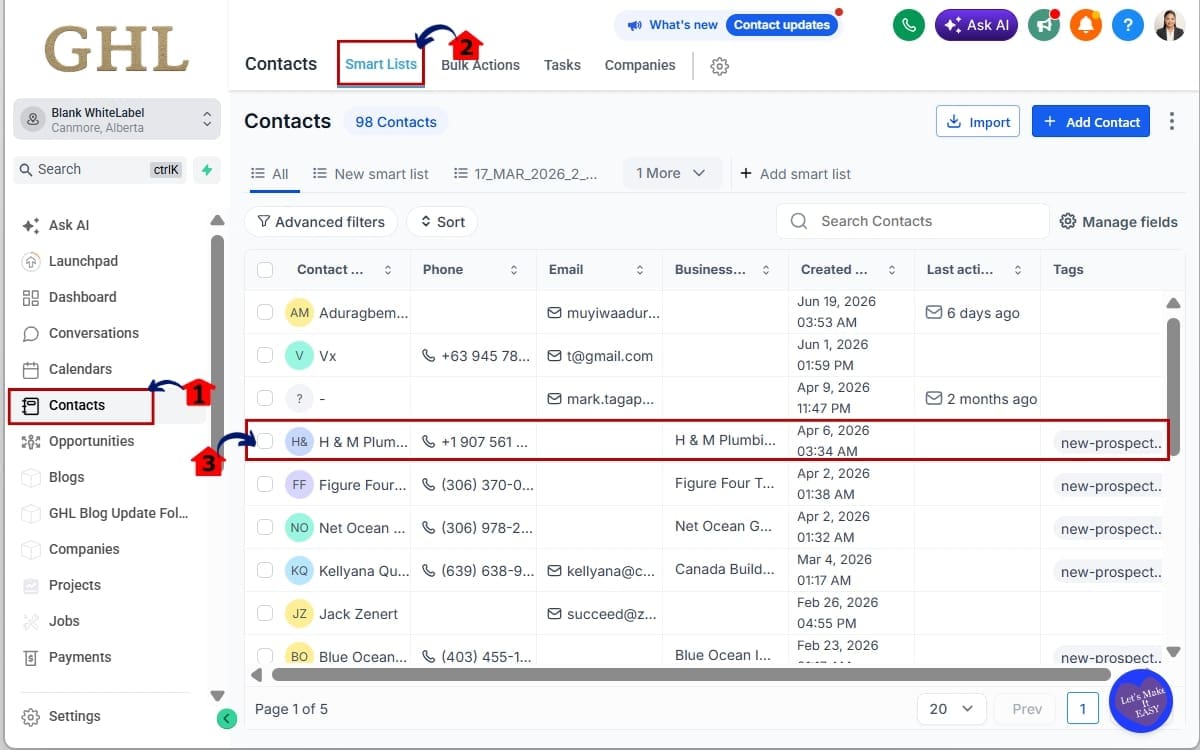
1.1 Click on Contacts
- Open the Contacts section from the left-hand navigation menu.
1.2 Click SmartLists
- Select SmartLists from the top navigation within the Contacts section.
1.3 Select a Contact
- Search for or select a contact that has multiple appointments. Open the contact record.
Step 02 – Review Upcoming Appointments
- The Appointment Management System automatically organizes future appointments.
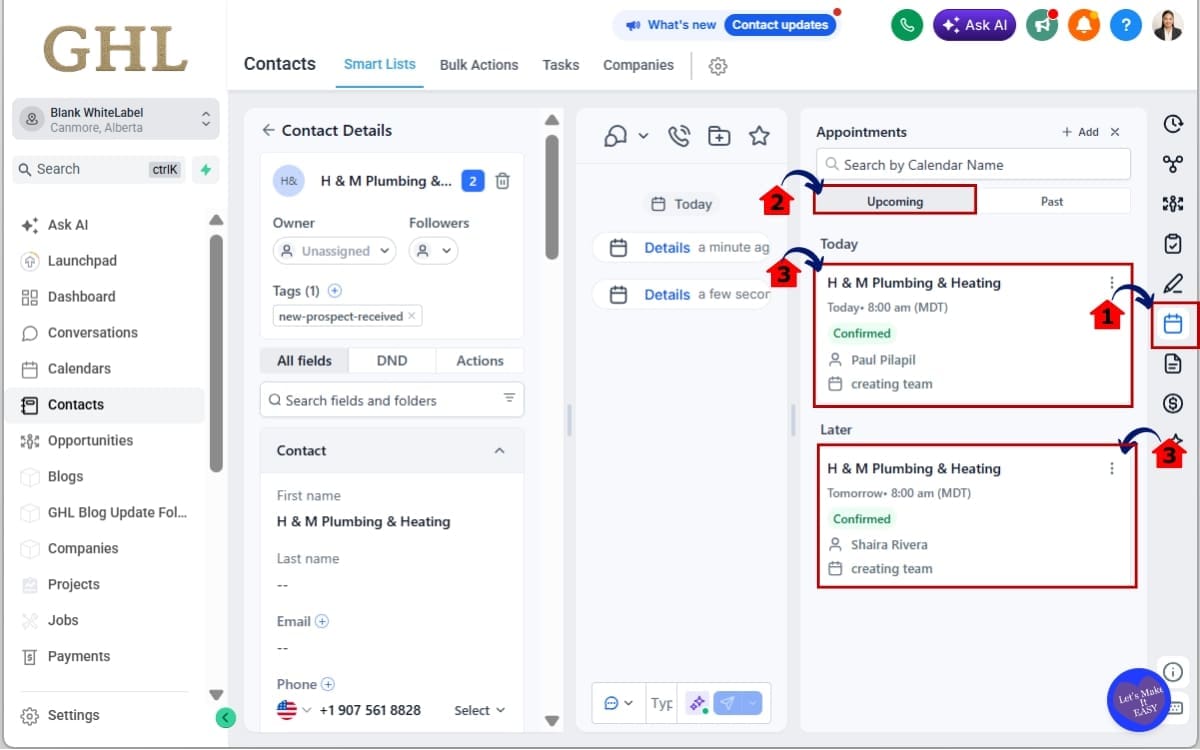
2.1 Locate the Appointments Tab
- Inside the contact record, find the Appointments tab. This is where all upcoming and completed appointments are displayed.
2.2 View Upcoming Appointments
- Scroll to the upcoming appointments section.
2.3 Confirm the New Order
- Notice that appointments are displayed from the nearest date to the furthest date. The next scheduled appointment always appears first.
2.4 Prepare for Your Next Customer Interaction
- Review the next appointment. Use the information to prepare before contacting your customer.
Step 03 – Review Past Appointments
- Completed appointments are now organized differently.
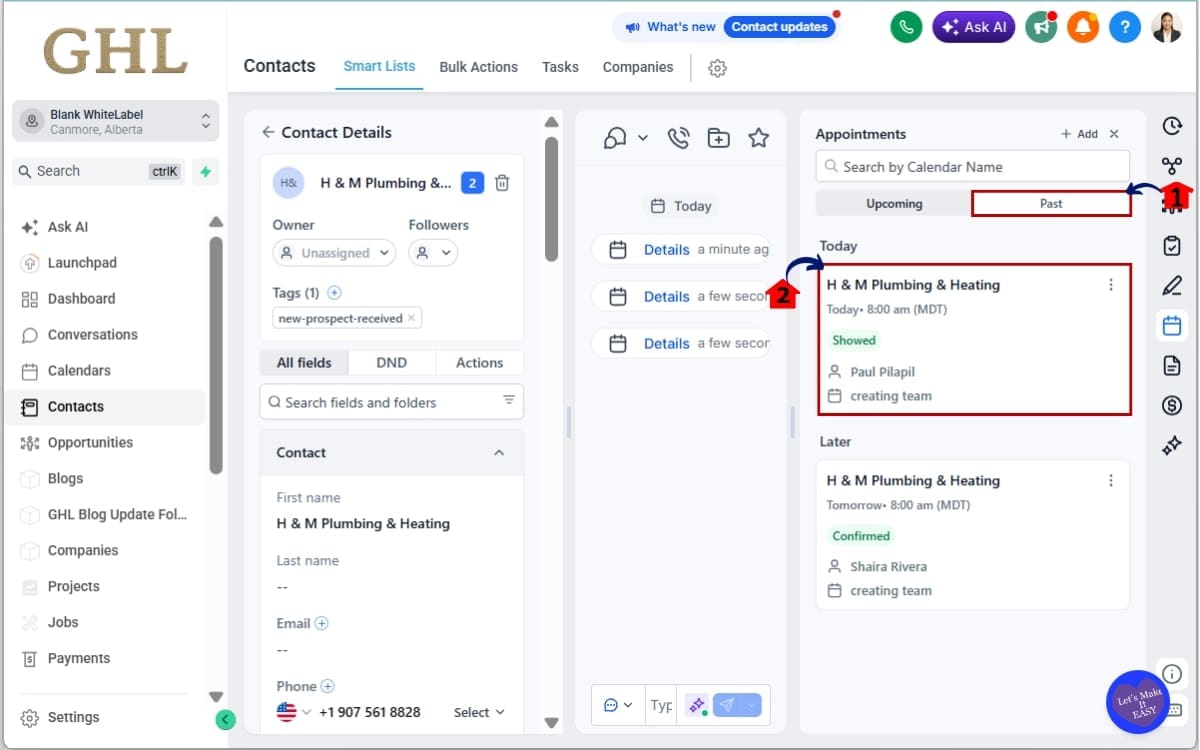
3.1 Scroll to Past Appointments
- Move down to the completed appointment history.
3.2 Check the Appointment Order
- The most recently completed appointment now appears at the top. Older appointments are listed below in chronological order.
Step 04 – Click the view button
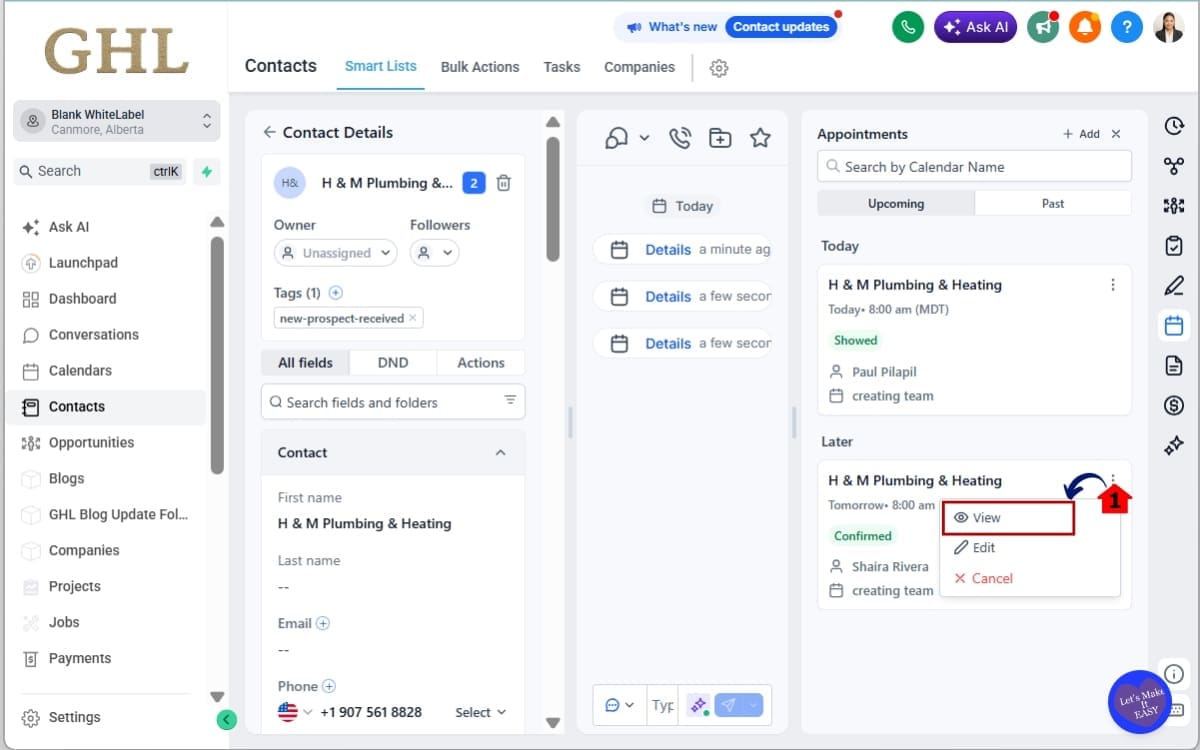
- The View button lets you open an appointment directly from the Appointments tab without navigating to another area of GoHighLevel.
4.1 Find the View Button
- Locate the appointment you want to review. Click View beside the appointment.
Step 05 – View Appointment Details
- You no longer need to leave the Appointments tab to review appointment information.
5.1 Review Appointment Information
- From here you can quickly view important appointment details without navigating elsewhere.
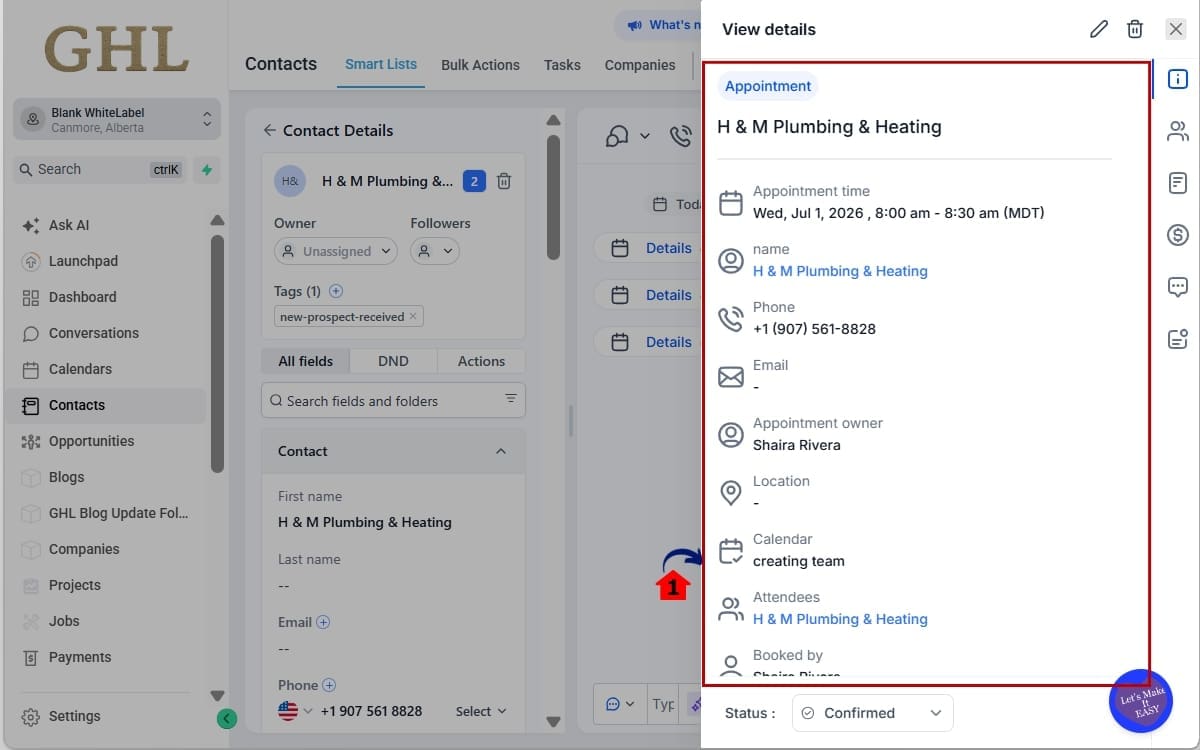
Depending on the appointment, this may include:
- Appointment date and time
- Assigned calendar
- Customer information
- Appointment status
- Other scheduling details
This update requires no additional setup. Simply continue managing appointments as you normally would and let GHL automatically organize them for you.
As your appointment history grows, you’ll immediately notice:
- Less scrolling
- Faster customer lookups
- Better visibility into upcoming meetings
- Easier access to recent customer interactions
- More efficient follow-up conversations
Small workflow improvements like these quickly add up, especially for agencies, sales teams, virtual assistants, and service businesses managing appointments throughout the day.
Pro Tips for Getting More From the Appointment Management System
The new Appointment Management System is designed to work automatically, but a few simple habits can help you get even more value from the update.
Start Every Follow-Up with the Latest Appointment
Before calling or emailing a contact, take a quick look at their most recent completed appointment.
This gives you immediate context about your last interaction, making conversations feel more personal and helping you avoid asking questions your customer has already answered.
Review Upcoming Appointments at the Start of Your Day
Make it a habit to check your upcoming appointments each morning.
Since the nearest appointment now appears first, you can quickly identify your priorities without sorting through your calendar manually.
It’s an easy way to stay organized during busy days.
Use the View Button Before Switching Screens
Need to confirm an appointment time or review meeting details?
Click View first.
There’s no need to jump into other areas of GHL just to verify appointment information. Staying in the Appointments tab keeps your workflow faster and helps you stay focused.
Prepare Before Every Client Conversation
Whether you’re meeting a new lead or an existing client, spend a few seconds reviewing:
- Their next scheduled appointment.
- Their latest completed appointment.
- Any relevant appointment details.
Walking into every conversation with the latest information helps you provide a better customer experience and builds confidence with your clients.
Train Your Team on the New Workflow
If multiple people manage appointments in your business, take a few minutes to show them how the new Appointment Management System works.
Once everyone knows that upcoming appointments appear first and completed appointments are sorted by the latest activity, they’ll spend less time searching and more time helping customers.
Don’t Assume the Order Is Random
If you’ve been using GHL for a while, you may have developed the habit of scrolling through appointment records to find what you need.
You can stop doing that.
The Appointment Management System now does the sorting for you, so trust the order and let the platform surface the most relevant appointment automatically.
Small Changes Create Big Time Savings
This update won’t completely change how you manage appointments.
What it will do is remove dozens of tiny interruptions throughout your day.
Less scrolling.
Fewer clicks.
Faster access to customer information.
Over weeks and months, those small improvements can save hours while helping your team stay focused on what matters most, building stronger customer relationships.
What This Means for Your Business
A Better Appointment Management System Means Better Customer Experiences
Some updates introduce brand-new features.
Others improve the features you already rely on every day.
This Appointment Management System update falls into the second category, and that’s exactly why it’s so valuable.
Your team already works with appointments every day. Now they’ll spend less time looking for information and more time acting on it.
That means faster responses.
Better preparation.
And smoother customer conversations.
For agencies, this makes client management more efficient. Account managers can instantly see upcoming strategy calls or review the latest completed meetings before speaking with a client. That extra context leads to more productive conversations and a more professional experience.
Sales teams benefit just as much.
Before calling a lead, they can immediately identify the next scheduled appointment or review the latest interaction without digging through appointment history. That means less time searching and more time selling.
Service businesses will also notice the difference.
Whether you’re booking consultations, inspections, treatments, or appointments, staff can quickly see what’s coming up next while keeping recent customer history within easy reach. It’s a simple improvement that helps busy teams stay organized throughout the day.
The new View feature adds another layer of efficiency.
Instead of opening multiple screens to confirm appointment information, your team can access the details they need directly from the Appointments tab. It keeps everyone focused and reduces unnecessary interruptions during the workday.
The biggest advantage isn’t just the new sorting order.
It’s the consistency.
Everyone on your team sees appointments organized the same way. Upcoming meetings are always prioritized. Recent interactions are always easy to find. That creates a predictable workflow that reduces confusion and helps new team members get up to speed faster.
At first glance, this may seem like a minor usability update.
In practice, it’s one of those improvements you’ll appreciate every single day.
Because when your Appointment Management System works the way people naturally think, your team spends less time navigating the CRM and more time building stronger customer relationships.
FAQs Appointment Management System
Conclusion – Appointment Management System
A Small Update You’ll Notice Every Day
Not every GHL update needs to reinvent the platform.
Sometimes the biggest improvements come from making everyday tasks faster and easier.
That’s exactly what this Appointment Management System update delivers.
Upcoming appointments now appear where you expect them. Recent customer interactions are easier to find. And with the new View option, appointment details are only one click away.
It all adds up to a smoother experience inside Contacts and Conversations.
Less scrolling.
Less searching.
Less wasted time.
Whether you’re running an agency, managing a sales team, booking appointments, or following up with clients, these improvements help you stay organized and keep customer conversations moving.
The best part?
There’s nothing new to learn and nothing to configure. Simply continue using GHL as you normally would and let the Appointment Management System organize your appointments automatically.
Here at GHL Growth Garage, we’re always excited to see updates like this. They may look small on the surface, but they make a real difference when you’re working inside GoHighLevel every day.
Log in to your GHL account, explore the updated appointment views, and see how much easier it is to manage your customer interactions.
Have you received this update yet?
Let us know whether the new Appointment Management System has made your daily workflow faster. We’d love to hear how you’re using it.
Scale Your Business Today.
Streamline your workflow with GoHighLevel’s powerful tools.