- Reduce carrier rejections, automate consent language, and launch compliant SMS campaigns faster with the new widget-first A2P campaign setup.
- Quick Summary – A2P Campaign Registration at a Glance
- What’s New in the A2P Campaign Registration Flow
- Streamlined Messaging Use Case Selection
- Financial + Marketing Conflict Protection
- Automatic Age-Gating Compliance
- Auto-Generated Compliance Chat Widget
- Locked Widget Structure and Compliance Fields
- Read-Only Widget Preview
- Locked Final Consent Review
- How to Use the New A2P Campaign Registration Flow in GoHighLevel
- What This Means for Agencies and Marketers
- Frequently Asked Questions About A2P Campaign Registration in GoHighLevel
- Conclusion – Faster and Simpler A2P Campaign Registration
Reduce carrier rejections, automate consent language, and launch compliant SMS campaigns faster with the new widget-first A2P campaign setup.
YA2P Campaign Registration can slow down SMS campaigns if it is not done correctly. Many users get rejected because of missing consent language, incorrect opt-in methods, or wrong campaign classification. GoHighLevel now solves many of those problems. The new Pre-Built A2P Campaign Registration (Widget-First) flow automatically creates a compliant campaign setup.
It generates the correct consent language, builds a compliant Chat Widget, and locks the required compliance fields. This means fewer mistakes during campaign setup. Instead of guessing what carriers want, GoHighLevel now guides you through a structured campaign registration process designed to improve approval rates. For agencies and marketers using SMS, this update helps you launch campaigns faster while reducing rejection risk.
The new A2P Campaign Registration flow in GoHighLevel removes the guesswork from SMS compliance. With pre-built campaign templates, automated consent language, and a compliant Chat Widget, agencies can launch messaging campaigns faster while dramatically reducing carrier rejection risk.
Quick Summary – A2P Campaign Registration at a Glance
Purpose:
This guide explains how the new Pre-Built A2P Campaign Registration flow in GoHighLevel simplifies SMS campaign setup by automatically generating compliant opt-in widgets, consent language, and campaign structures.
Why It Matters:
Many SMS campaigns get rejected due to compliance mistakes. This update reduces that risk by enforcing correct opt-in methods, locking disclosure language, and guiding users through a compliant campaign setup.
What You Get:
Users can launch campaigns faster with automated compliance elements including a Chat Widget opt-in, STOP/HELP messaging, data rate disclosures, and message frequency notices built directly into the campaign setup.
Time to Complete:
Most users can complete the new A2P Campaign Registration process in about 10–15 minutes once they have their messaging use case and campaign details ready.
Difficulty Level:
Beginner to Intermediate. The new guided flow makes campaign setup easier, even for users who are new to A2P messaging compliance.
Key Outcome:
You can submit compliant SMS campaigns faster while significantly reducing the risk of carrier rejection during the A2P approval process.
What’s New in the A2P Campaign Registration Flow
GoHighLevel added a Pre-Built Campaign option to simplify A2P Campaign Registration.
When users start campaign registration, they can choose the Pre-Built Campaign (Chat Widget) path. This option automatically creates a compliant campaign structure during setup.
Automate marketing, manage leads, and grow faster with GoHighLevel.

This new workflow removes several manual steps that previously caused campaign rejections.
The system now handles many compliance tasks automatically.
Key Improvements
• Chat Widget enforced as the SMS opt-in method
• Consent disclosure language generated automatically
• Compliance fields locked to prevent edits
• Campaign type classification guided by the system
• Reduced risk of carrier rejection
These changes help ensure campaigns are submitted correctly the first time.
For agencies managing multiple clients, this can save a significant amount of time during A2P Campaign Registration.
Streamlined Messaging Use Case Selection
Selecting the correct messaging type is critical during A2P Campaign Registration.
The new workflow introduces a two-step use case selection system that helps users classify their campaigns properly.
This reduces errors that often lead to campaign rejection.
Step 1 – Select Your Message Type
Users choose one of the following:
• Marketing / Promotional
• Informational / Non-Marketing
This tells carriers the purpose of the messages being sent.
Marketing messages usually include promotions, offers, and announcements.
Informational messages usually include alerts, service updates, or support messages.
Step 2 – Choose the Messaging Use Case
After selecting the message type, the system filters the available use case options.
Common informational use cases include:
• 2FA authentication
• Account notifications
• Customer care messages
• Delivery notifications
• Fraud alerts
• Security alerts
• Public service announcements
This filtering helps prevent incompatible campaign submissions during A2P Campaign Registration.
Financial + Marketing Conflict Protection
Financial campaigns often receive extra scrutiny from carriers.
If a campaign mixes financial services and promotional marketing, it may be rejected.
The new A2P Campaign Registration flow prevents this issue automatically.
If a user selects:
• Marketing / Promotional
AND
• Financial services or loan arrangement
The system blocks the submission.
Users must change the campaign type to Informational before continuing.
This protection prevents high-risk submissions and helps improve approval rates.
Automatic Age-Gating Compliance
Some campaigns require age verification before users can opt in.
GoHighLevel now handles this automatically during A2P Campaign Registration.
Age-gating activates when:
• Age-restricted content is selected
• Financial services messaging is selected
When triggered, the system adds a Date of Birth (DOB) field to the Chat Widget.
The DOB field:
• Is required before opt-in
• Cannot be removed
• Ensures compliance with carrier rules
If age-restricted messaging is not selected, the DOB field does not appear.
This conditional logic helps maintain compliance while keeping the opt-in process simple.
Auto-Generated Compliance Chat Widget
The new A2P Campaign Registration flow automatically creates a compliant Chat Widget for SMS opt-ins.
Instead of building opt-in forms manually, GoHighLevel generates the widget during campaign setup.
The system automatically adds:
• Compliance disclosure text
• STOP / HELP instructions
• Data rate notices
• Message frequency disclosures
• Business name within the disclosure text
The widget is also automatically linked to the campaign.
This ensures the opt-in method meets carrier and CTIA messaging guidelines.
Locked Widget Structure and Compliance Fields
To reduce compliance mistakes, several fields inside the widget are now locked.
Required Fields
The following elements cannot be removed:
• Phone number field
• Compliance disclosure text
• STOP / HELP instructions
• Data rate disclosure
• Message frequency notice
Conditional Fields
The Date of Birth field appears automatically when age verification is required.
Optional Fields
Users can still customize some elements:
• Name field
• Message field
• Widget colors
• Header text
Removed Options
Some options are no longer available to ensure compliance:
• Email field
• Consent checkbox
• Editable disclosure text
• Custom compliance fields
• Alternative opt-in methods
Locking these fields helps prevent campaign rejection during A2P Campaign Registration.
Read-Only Widget Preview
Before submitting a campaign, users can review a preview of the Chat Widget.
The preview shows:
• Widget layout
• Disclosure placement
• Required fields
• DOB field if age-gating is triggered
This preview allows users to confirm how the widget will appear to customers.
The preview is read-only, which ensures compliance elements cannot be edited.
Locked Final Consent Review
Before submission, GoHighLevel performs a final compliance review.
The system automatically prepares:
• Campaign details
• Sample messages
• Opt-in method confirmation
• Compliance checklist
Users must confirm that their website includes the required messaging disclosures.
This step ensures the campaign meets carrier requirements before submission.
How to Use the New A2P Campaign Registration Flow in GoHighLevel
The new A2P Campaign Registration process in GoHighLevel introduces a guided setup that automatically builds a compliant SMS campaign. Instead of manually writing consent language or configuring opt-in methods, the platform now generates a compliant Chat Widget, applies required disclosure text, and locks critical compliance fields during registration.
This step-by-step guide will walk you through how to start a campaign using the Pre-Built Campaign (Chat Widget) registration flow. You will select your messaging type, choose the correct use case, review the automatically generated compliance widget, and submit your campaign for carrier approval.
Here are the steps to complete A2P Campaign Registration using the new pre-built campaign setup inside GoHighLevel.
• Access the A2P Campaign Registration section in GoHighLevel
• Start a new campaign registration
• Select the Pre-Built Campaign (Chat Widget) option
• Choose your message type
• Select your messaging use case
• Review the automatically generated Chat Widget
• Preview the opt-in widget
• Complete the final compliance review
• Submit your campaign for approval
To start make sure you are logged in to your GoHighLevel sub-account.
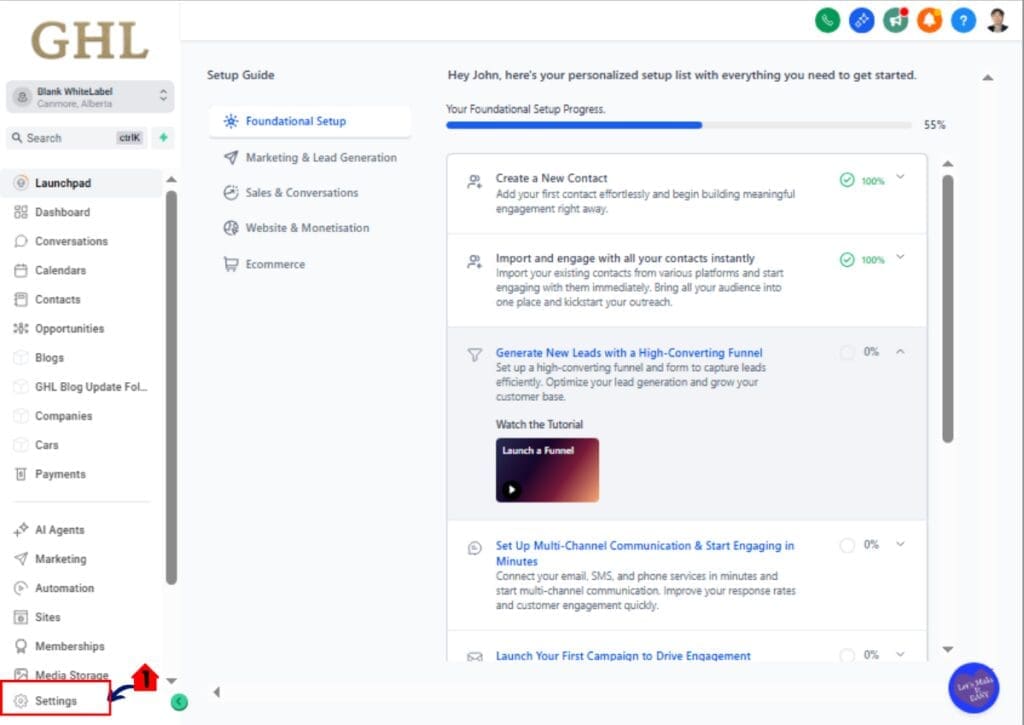
Step 01 – Access the Settings area in GoHighLevel
- Go to the bottom of the Main Menu on the left-hand sidebar.
1.1 Click the Settings gear icon ⚙️.
• This opens the Settings Dashboard where you can access Business Info, Billing, My Staff and other configuration areas.
Step 02 – Open the A2P Campaign Registration Section
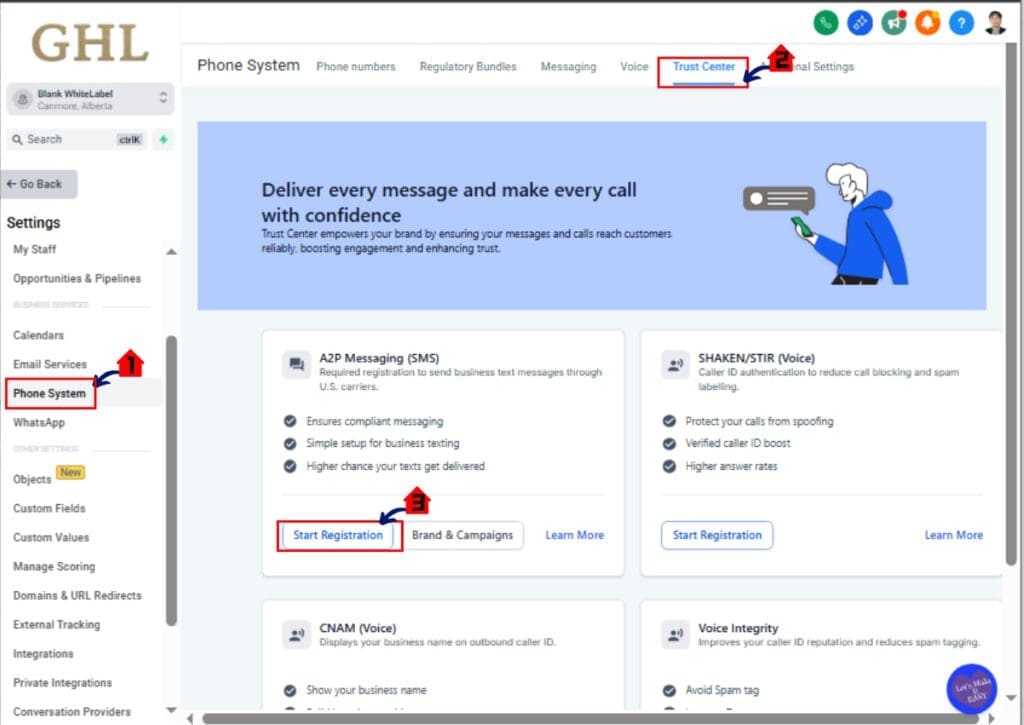
Inside the Settings dashboard you will find the messaging compliance tools used for registering SMS campaigns.
2.1 Scroll down to the Phone Numbers section.
2.2 Click Trust Center
2.3 Click A2P Campaign Registration.
• This opens the A2P Campaign Registration page where all SMS campaigns are created and submitted for carrier approval.
Step 03 – Determine the Profile Need
From the A2P Campaign Registration page you can create a new messaging campaign.
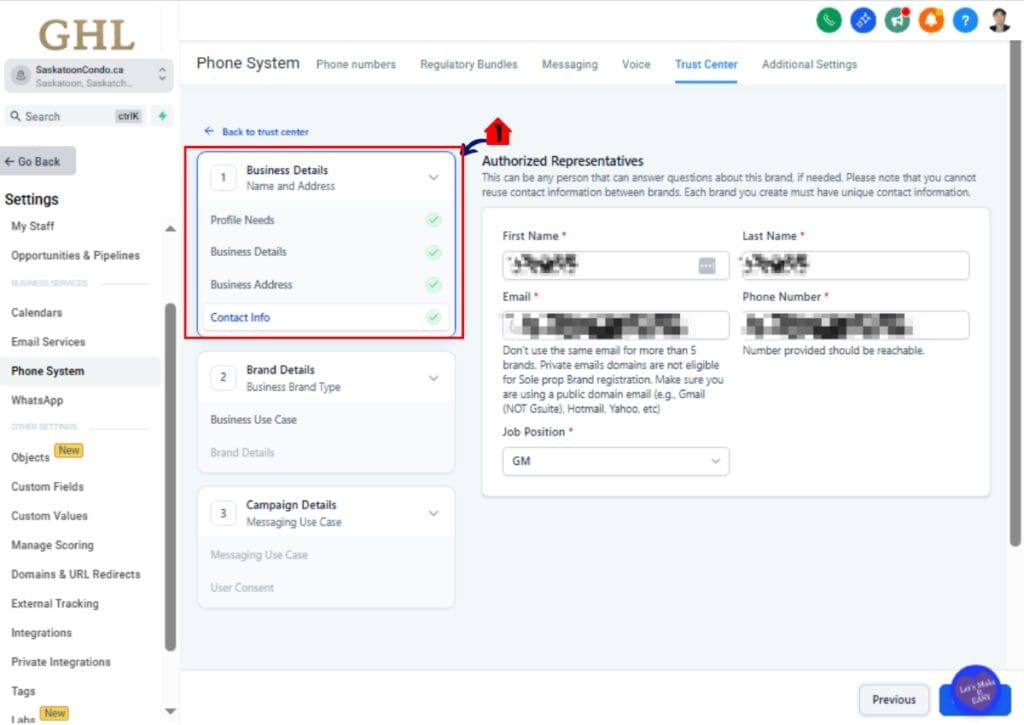
3.1 Fill up Business Details
- This opens Business Details Mini Form and GoHighLevel guides you through the submission process.
- Put where your business entity is registered
- Put Your Business Name
- Put Your Busness Address
- Put Your Business Authorized Representative Contact Info Such as Name, Lastname, Email, Phone Number, and Job Position
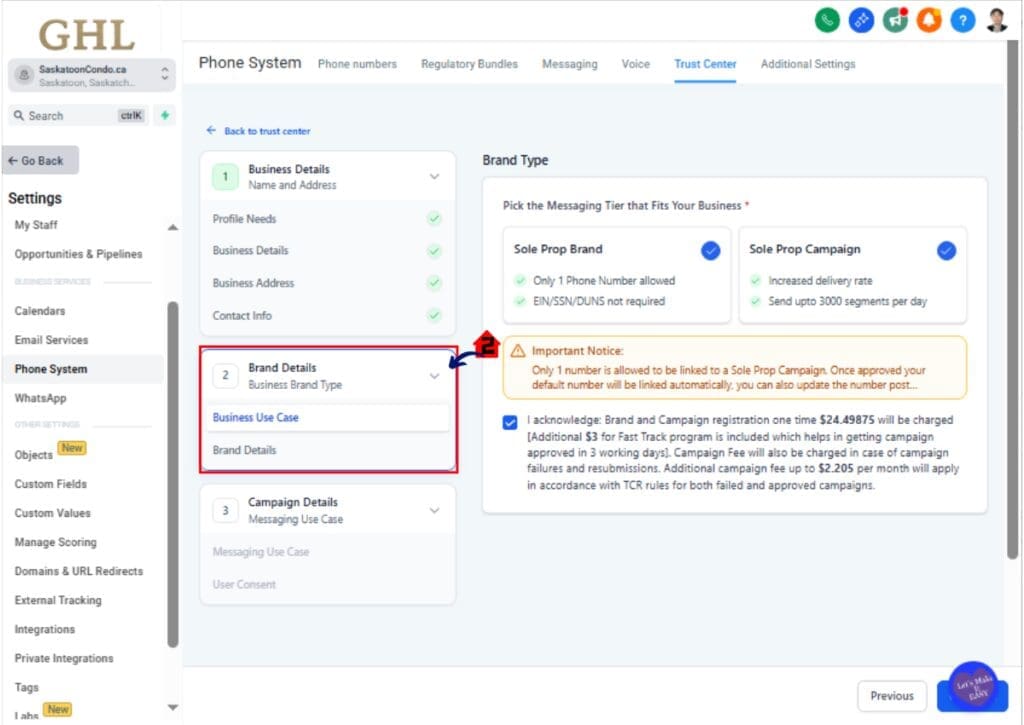
3.2 Select Your Brand Type
- Pick the Messaging Tier that Fits Your Business and click the acknowledgement before proceeding to next step
- Make sure you read all the details and important notes before proceeding to next steps
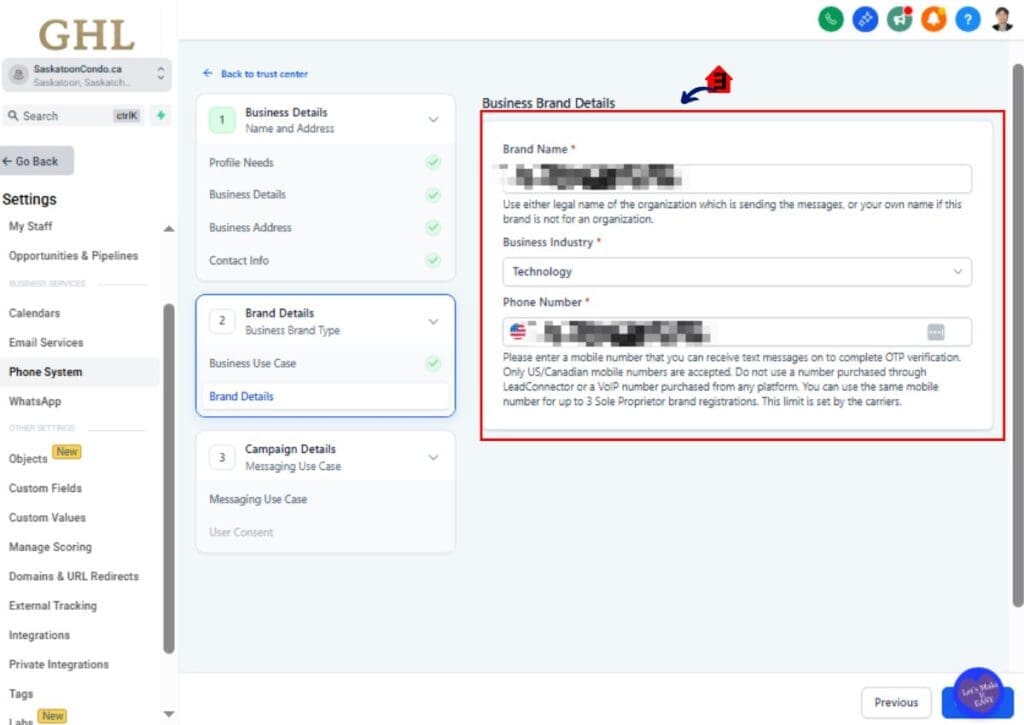
3.3 Fill Up Business Brand Details
- Fill up your Business brand Details such as:
- Brand Name
- Business Industry
- Phone Number
- Phone Number is must be the mobile number that you can receive text messages on to complete OTP verification. Only US/Canadian mobile numbers are accepted. Please do note: You cant use a number purchased through LeadConnector or a VoIP number purchased from any platform. If your all Clear
Step 04 – Select the Pre-Built Campaign (Chat Widget) Option
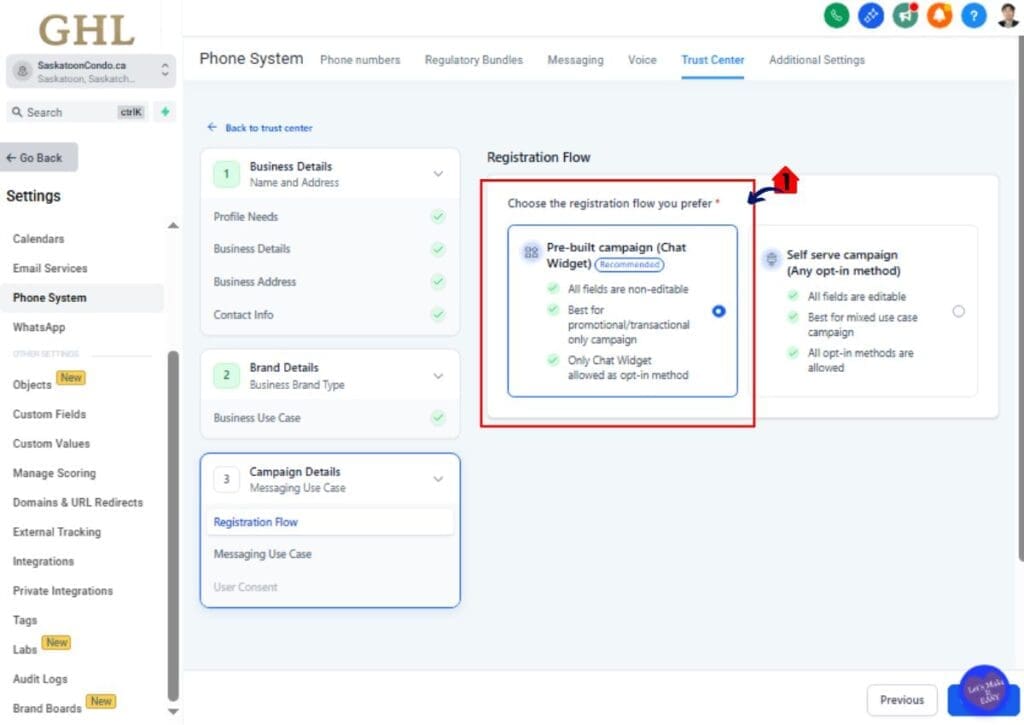
- GoHighLevel now provides a recommended Pre-Built Campaign path designed to reduce compliance errors.
4.1 Select Pre-Built Campaign (Chat Widget).
- This activates the widget-first registration flow.
- The system will automatically generate:
- Compliance disclosure language
- STOP / HELP instructions
- Data rate messaging
- Frequency disclosure
- A compliant Chat Widget for SMS opt-ins.
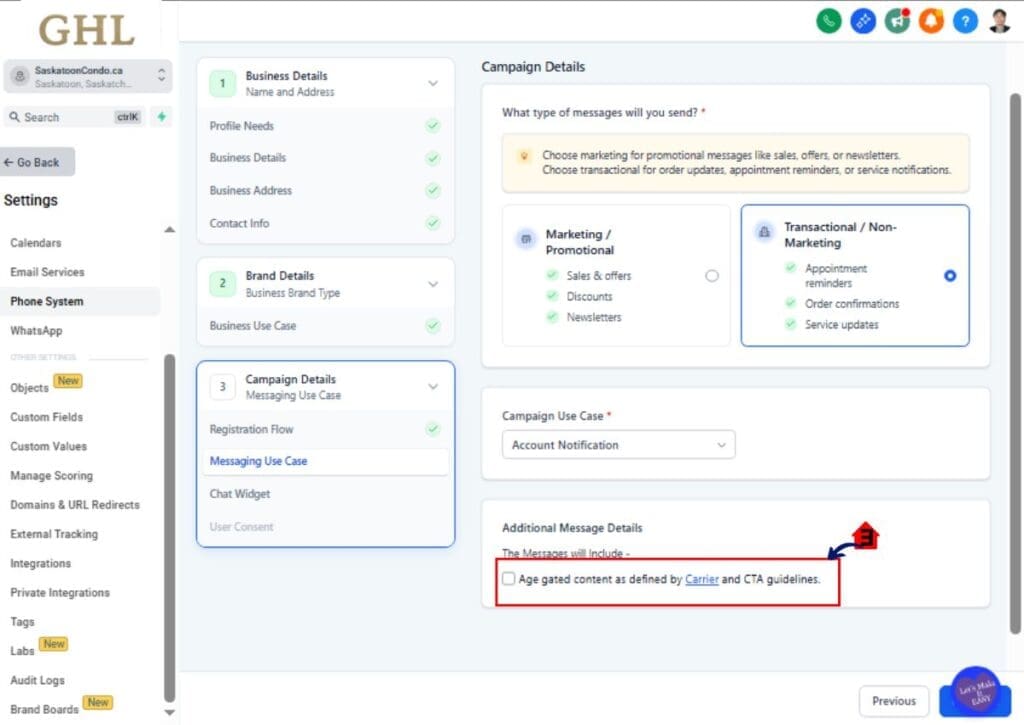
Step 05 – Choose Your Message Type
- The next step is selecting the primary purpose of your SMS campaign.
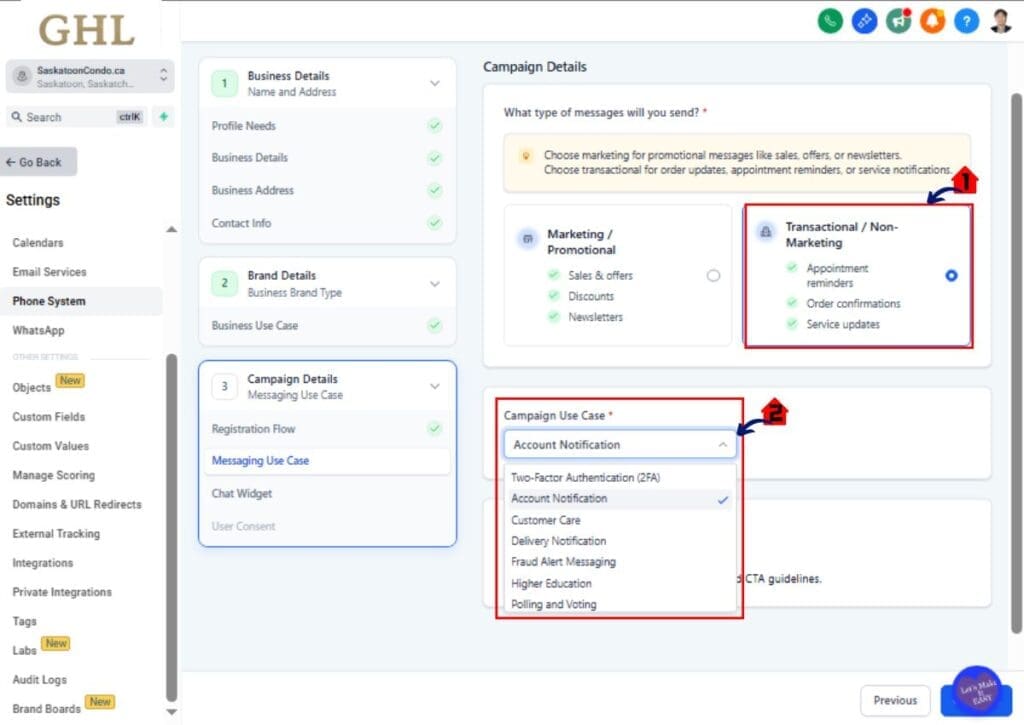
5.1 Select your Message Type.
- Choose Marketing / Promotional if your campaign sends promotions or offers.
- Choose Informational / Non-Marketing if your campaign sends alerts, updates, or service notifications.
- The system uses this selection to determine the allowed messaging use cases.
- After selecting the message type, GoHighLevel displays compatible use case options.
5.2 Select the use case that best describes your messaging.
- Open the Use Case dropdown menu.
- Common informational use cases include:
- 2FA
- Account Notification
- Customer Care
- Delivery Notification
- Fraud Alert
- Security Alert
- Common informational use cases include:
• The dropdown list automatically filters options to prevent incompatible campaign submissions.
5.3 Add Additional Message Details
- Add Additional Message Details if needed, The message include age gated content as defined by Carrier and CTA guidelines
Step 06 – Review the Generated Chat Widget
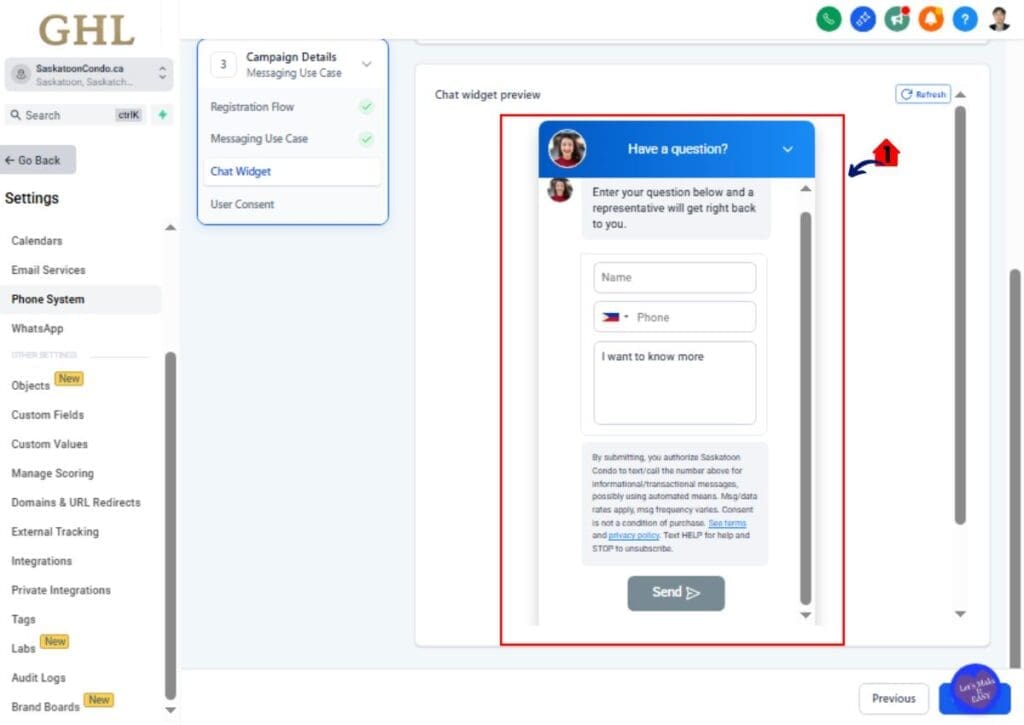
- Once the use case is selected, GoHighLevel automatically generates the SMS opt-in Chat Widget.
6 .1 Review the Widget Preview.
- The widget includes:
- Phone Number field (required)
- Compliance disclosure text
- STOP / HELP language
- Data rate disclosure
- Message frequency notice
- These fields are locked to ensure compliance with carrier rules.
Step 07 – Review User Consent and Complete the Final Compliance Review
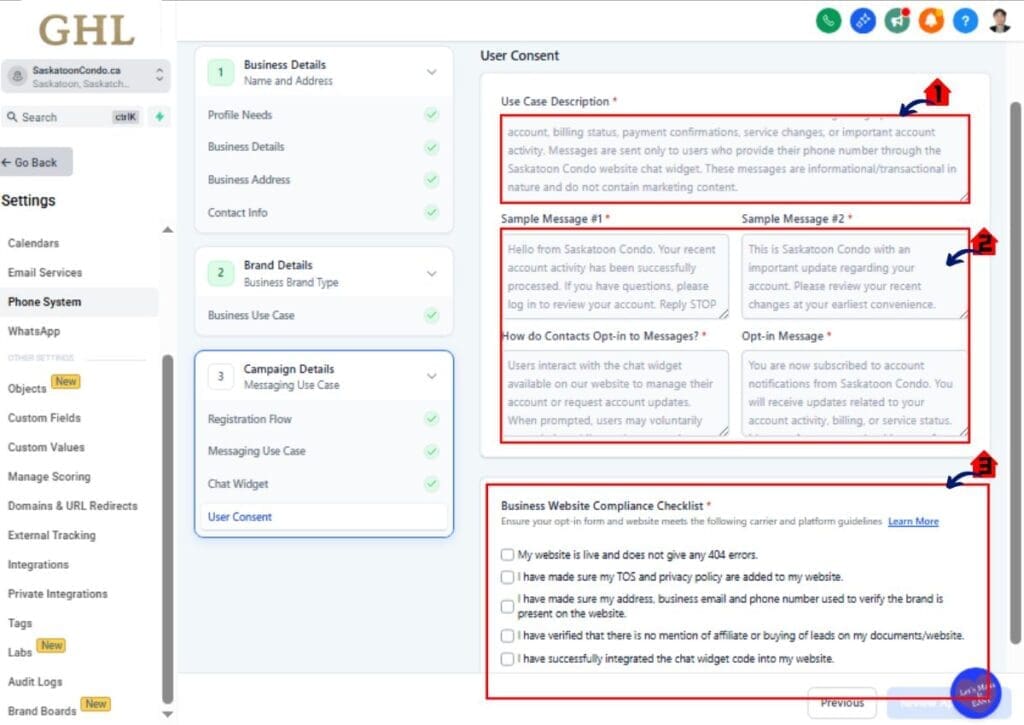
- Before submitting the campaign GoHighLevel performs a final compliance check.
7.1 Review the automatically generated Sample Messages.
7.2 Confirm the Opt-in Method is set to Chat Widget.
7.3 Verify your Website Compliance Checklist.
- This checklist confirms that your website clearly explains how users opt into SMS messaging.
Step 10 – Submit the Campaign for Approval
- Once everything is confirmed you can submit the campaign for carrier review.
10.1 Click Submit Campaign.
- Your A2P Campaign Registration will now be sent to carriers for approval.
- Approval times may vary depending on campaign type and carrier review queues.
Pro Tips to Reduce A2P Campaign Rejections
Even with the new system, following best practices helps improve approval rates.
Use Clear Campaign Descriptions
Explain exactly what messages users will receive.
Avoid vague descriptions like “updates” or “notifications.”
Provide Realistic Sample Messages
Carriers review sample messages during A2P Campaign Registration.
Use real examples such as:
• Appointment reminders
• Delivery notifications
• Service updates
Keep Messaging Frequency Clear
Always explain how often users will receive messages.
Examples include:
• 1–2 messages per week
• Message frequency varies based on account activity
Make Sure Your Website Matches the Campaign
Your website should clearly support the SMS campaign being registered.
Include messaging disclosures and explain how users opt in.
What This Means for Agencies and Marketers
This update makes SMS campaign setup much easier for GoHighLevel users.
The new A2P Campaign Registration workflow reduces manual compliance work and helps prevent common submission mistakes.
For agencies managing multiple client accounts, this creates a more consistent campaign setup process.
The result is:
• Faster campaign launches
• Fewer compliance errors
• Lower rejection rates
• More reliable SMS messaging
As carriers continue tightening messaging rules, tools like this help agencies stay compliant while scaling SMS campaigns.
Frequently Asked Questions About A2P Campaign Registration in GoHighLevel
Conclusion – Faster and Simpler A2P Campaign Registration
The new A2P Campaign Registration update in GoHighLevel removes much of the complexity from SMS campaign compliance.
By introducing a Pre-Built Campaign (Chat Widget) registration flow, the platform now automatically generates compliant opt-in widgets, disclosure language, and campaign structures during setup.
This means agencies and marketers can launch SMS campaigns faster while dramatically reducing the risk of carrier rejection.
If you regularly send SMS messages through GoHighLevel, this update will save time, simplify compliance, and make campaign approvals much smoother.
The team here at GHL Growth Garage will continue sharing guides like this to help you stay ahead of new GoHighLevel updates.
Have you tried the new A2P Campaign Registration flow yet? Let us know how it’s working for you! 🚀
Scale Your Business Today.
Streamline your workflow with GoHighLevel’s powerful tools.