- Reply to comments right inside GoHighLevel’s Social Planner without leaving your dashboard.
- Quick Summary – Social Media Comment Management Essentials
- What’s New: Comment Replies Inside Social Planner
- Why It Matters: Real-Time Engagement Without Leaving GHL
- Step-by-Step Inside Social Planner
- Pro Tips: Make the Most of Comment Management
- Results You Can Expect: Faster Replies, Better Focus
- FAQs: Common Questions About Social Media Comment Management
- A Simple Feature That Saves Time
Reply to comments right inside GoHighLevel’s Social Planner without leaving your dashboard.
Social media comment management is now built directly into GoHighLevel’s Social Planner. This means users can view and reply to Facebook comments without switching platforms. It’s designed to keep everything in one place so teams can respond faster and stay organized.
This update is helpful for anyone managing social media posts inside GHL. Instead of jumping into Facebook for every new comment, replies can happen right from the dashboard. It works inside the post view, includes filters for top or recent comments, and makes engagement part of the publishing flow.
For busy agencies or marketing teams, this saves time and keeps conversations moving. It helps maintain a consistent voice and makes the comment reply process part of the regular routine.
This update helps agencies and marketers reply to Facebook comments faster, stay organized, and engage their audience without jumping between platforms. With social media comment management now built into GoHighLevel, users save time and improve performance all from one dashboard.
Quick Summary – Social Media Comment Management Essentials
Purpose: This feature lets users manage Facebook comments right inside GoHighLevel’s Social Planner.
Why It Matters: It keeps everything in one place. No more switching between platforms just to reply to comments.
What You Get: A built-in Comments tab, reply options for each post, and filters to sort comments by type.
Time To Complete: Takes less than five minutes to start. No setup required if Facebook is already connected.
Difficulty Level: Simple enough for beginners. If you know how to post, you’ll know how to use this.
Key Outcome: Teams can handle social media comment management faster, stay focused, and keep replies consistent across accounts.
What’s New: Comment Replies Inside Social Planner
GoHighLevel has added a new way to handle social media comment management inside the Social Planner. Users can now reply to comments on Facebook posts without leaving the platform.
This update brings a new Comments tab to every post created through Social Planner. Inside that tab, users can read and respond to comments directly.
Automate marketing, manage leads, and grow faster with GoHighLevel.

Here is what’s included in the new feature:
- A Comments tab that shows up on posts published through Social Planner
- A reply box built into the dashboard for quick responses
- Filter options to view either all comments or just the top ones
The layout is simple and built for speed. It helps users follow up faster and keep track of replies without jumping between tabs. It also makes it easier to manage conversations while staying focused on the post itself.
Right now, social media comment management only works with Facebook. Other platforms are expected to be added soon, so users can get started by using it with Facebook today.
Why It Matters: Real-Time Engagement Without Leaving GHL
This update makes social media comment management easier and faster for teams using GoHighLevel. Before, users had to log in to Facebook just to reply to one comment. That meant extra clicks, more distractions, and wasted time.
Now, all comment replies happen inside Social Planner. It keeps the process simple and the tools in one place.
Here is why that matters:
- Users can respond to comments faster without leaving the GHL dashboard
- Less switching between apps helps teams stay focused
- Conversations are easier to track across client accounts
- Everyone works in the same space, which reduces confusion
For agencies, this means less back-and-forth and a smoother system for managing client social media. Keeping publishing and engagement in one place is a small shift that saves time and helps teams work better.
This kind of tool supports better client service and keeps day-to-day work more organized.
Step-by-Step Inside Social Planner
Using the new social media comment management feature inside GoHighLevel is simple. There is no setup needed if your Facebook account is already connected. Everything takes place right inside the Social Planner.
Follow these steps to get started:
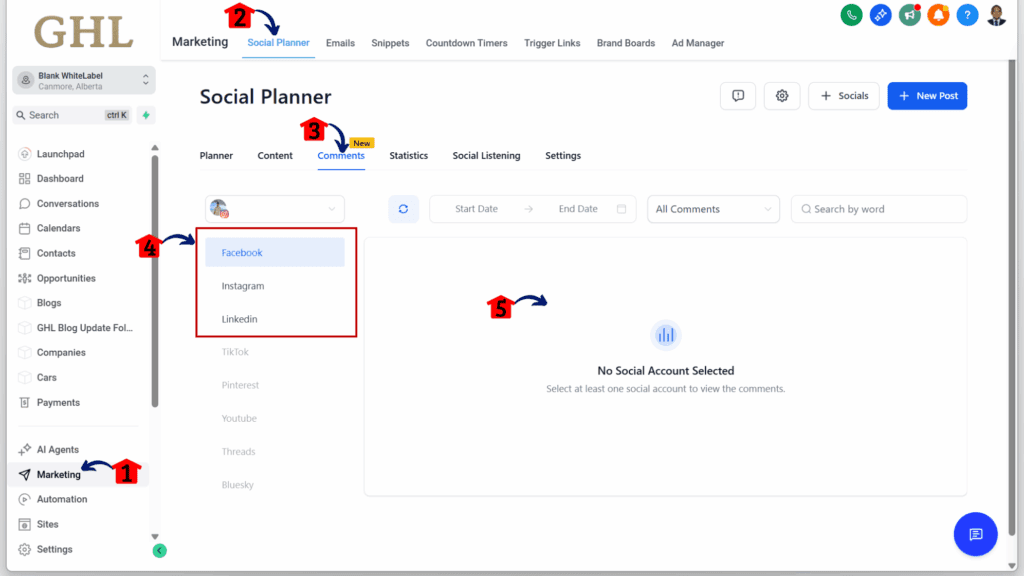
Step 01 – Access the Main Menu in GoHighLevel
- The main menu on the left side of your screen includes all the main areas you work in when using GoHighLevel (GHL).
1.1 Click on the Marketing item to access the Social Planner section.
- You’ll now be in the Marketing section, where you can access the Social Planner tab from the top menu.
1.3 Click the Comments sub tab.
1.4 Select the available social media platform.
- There should be at least one connected account for any supported social media platform.
1.5 The user should now see the comments from the connected social media account.
At this time, social media comment management in GoHighLevel only supports Facebook. More platforms are expected in future updates.
By keeping comment replies in the same place as your publishing tools, it becomes part of the normal process. Teams can stay focused and respond quickly without needing to switch tools.
Pro Tips: Make the Most of Comment Management
Adding social media comment management to GoHighLevel helps teams save time and stay organized. But a few extra habits can make this feature even more useful in daily work.
Here are some practical tips to consider:
- Check comments as part of your routine. Make it a habit to review post comments once a day. It keeps engagement fresh and avoids long delays in replies.
- Use the person’s name in replies. This small touch makes responses feel more personal and less like a copy-paste answer.
- Keep common replies handy. If the same questions come up often, like pricing or store hours, save a few response templates to save time.
- Focus on top comments. Use the filter to spot comments with high interaction. These are often worth a closer look or a thoughtful response.
- Tag contacts in the CRM. If a comment leads to a bigger conversation, tag that person or add a note. It helps when following up later.
These simple steps help users keep engagement smooth and consistent, especially when handling multiple accounts or working with a team. When the process is part of the daily workflow, it becomes easier to manage without missing anything important.
Results You Can Expect: Faster Replies, Better Focus
Adding social media comment management inside GoHighLevel helps teams cut out extra steps and stay on task. It keeps replies close to the post and lets users respond without bouncing between tools.
Here are a few results users may notice:
- Replies happen faster. There is no need to log in to Facebook or use a separate app.
- Nothing slips through the cracks. Comments are all in one place, so it’s easier to stay on top of responses.
- Work is easier to manage. Teams can follow the same process, which cuts down on confusion.
- Clients see better service. Quick replies help build trust and keep followers engaged.
This isn’t a feature that changes everything overnight. But over time, staying consistent and handling comments inside the platform leads to smoother workflows and better results for both users and their clients.
FAQs: Common Questions About Social Media Comment Management
These are the most common questions users have when they start using social media comment management in GoHighLevel. Once it becomes part of the regular workflow, it feels like a natural part of the posting process.
A Simple Feature That Saves Time
The new social media comment management feature in GoHighLevel keeps things easy and practical. It puts replies right where the work happens, inside the Social Planner. No more jumping between tabs just to answer a comment.
This update helps users stay focused and manage posts and conversations in the same place. It saves time, reduces missed comments, and gives teams a smoother way to handle replies.
For agencies, it adds value without adding more steps. Everything stays in one workflow, which makes it easier to train teams and support clients.
Right now, it only works with Facebook, but that’s a solid starting point. Other platforms are expected later, and getting used to the feature now makes it easier to grow with it later.
Scale Your Business Today.
Streamline your workflow with GoHighLevel’s powerful tools.