

- Use the new GHL chat widget setting to delay loading until visitors scroll, click, or tap.
- Quick Summary – Lazy Load Chat Essentials
- What’s New With Lazy Load Chat
- Why Lazy Load Chat Matters to You
- How to Use Lazy Load Chat in GoHighLevel
- Pro / Quick Tips for Lazy Load Chat
- What Lazy Load Chat Means for Your Business
- Frequently Asked Questions About Lazy Load Chat
- Conclusion: Lazy Load Chat Is a Smart Small Fix
Use the new GHL chat widget setting to delay loading until visitors scroll, click, or tap.
Stop Letting Your Chat Widget Slow Down Your Website
Lazy load chat can help your GoHighLevel website feel faster without removing your chat widget. Instead of loading the widget right away, GHL now lets you wait until a visitor scrolls, clicks, or taps on the page before the chat loads.
That matters more than most people think. Every script loading on page open adds weight to your website. On mobile devices, especially, too many scripts can slow things down and hurt the user experience. This new GoHighLevel setting gives you a cleaner way to balance website speed and customer conversations.
The new “Load on user interaction” option inside the GHL Chat Widget Builder is simple to turn on, but it can make a noticeable difference. You still keep your chat available for real visitors while reducing unnecessary loading during the first few seconds of page rendering.

Lazy load chat helps your GHL website load cleaner by delaying the chat widget until a visitor scrolls, clicks, taps, or reaches the fallback delay. It’s a simple way to improve page performance without losing the ability to capture real conversations.
Quick Summary – Lazy Load Chat Essentials
Purpose: This update lets you delay the GHL chat widget until a visitor interacts with your website.
Why It Matters: Lazy load chat can help improve page speed by reducing unnecessary script loading during the first page load.
What You Get: You keep the chat widget available while giving visitors a cleaner, faster first impression.
Time To Complete: Most users can enable and test this setting in about 3 to 5 minutes.
Difficulty Level: Beginner friendly. No custom code is needed.
Key Outcome: Your website can feel faster without losing the ability to capture conversations through GHL chat.
What’s New With Lazy Load Chat
GoHighLevel added a new “Load on user interaction” setting inside the Chat Widget Builder. You’ll find it under the Chat Window tab in the Additional Options area. When this setting is turned on, the chat widget waits before loading until a visitor interacts with the page.
That interaction can be a scroll, click, or touch on the screen. If the visitor does nothing, the widget will still load automatically after around 8 seconds. So your chat still becomes available, but it avoids loading the second the page opens.
Automate marketing, manage leads, and grow faster with GoHighLevel.

Before this update, the chat widget loaded immediately for every visitor, whether they planned to use it or not. Now, GHL gives you more control over how and when the widget appears. Existing widgets will still use the original loading behavior unless you manually enable the new setting.
Why Lazy Load Chat Matters to You
Lazy load chat helps your site do less work when the page first opens. That’s a good thing. The faster your page feels, the better chance visitors will stay long enough to read, click, book, or ask a question.
This update is especially useful on mobile. A chat widget that loads right away can add extra script work during the first few seconds. By waiting for a scroll, click, or tap, GoHighLevel helps reduce that early load while still keeping chat available when it matters.
For agencies, this is a small setting that can make client sites feel more polished. You can improve page experience without removing lead capture tools. That’s a solid win, and you don’t need to rebuild the site to get it.
How to Use Lazy Load Chat in GoHighLevel
Lazy load chat is managed inside the Chat Widget Builder in GoHighLevel. You will open the Chat Widget area, select the widget you want to update, open the Chat Window tab, and then enable the “Load on user interaction” setting. This helps reduce unnecessary widget loading during the first page load while still keeping chat available for visitors.
Here are the steps to enable lazy load chat in GHL.
- Open the Chat Widget area.
- Select the chat widget you want to edit.
- Open the Chat Window tab.
- Enable “Load on user interaction.”
To start make sure you are logged in to your GoHighLevel sub-account.
Step 01 – Open the Chat Widget Area
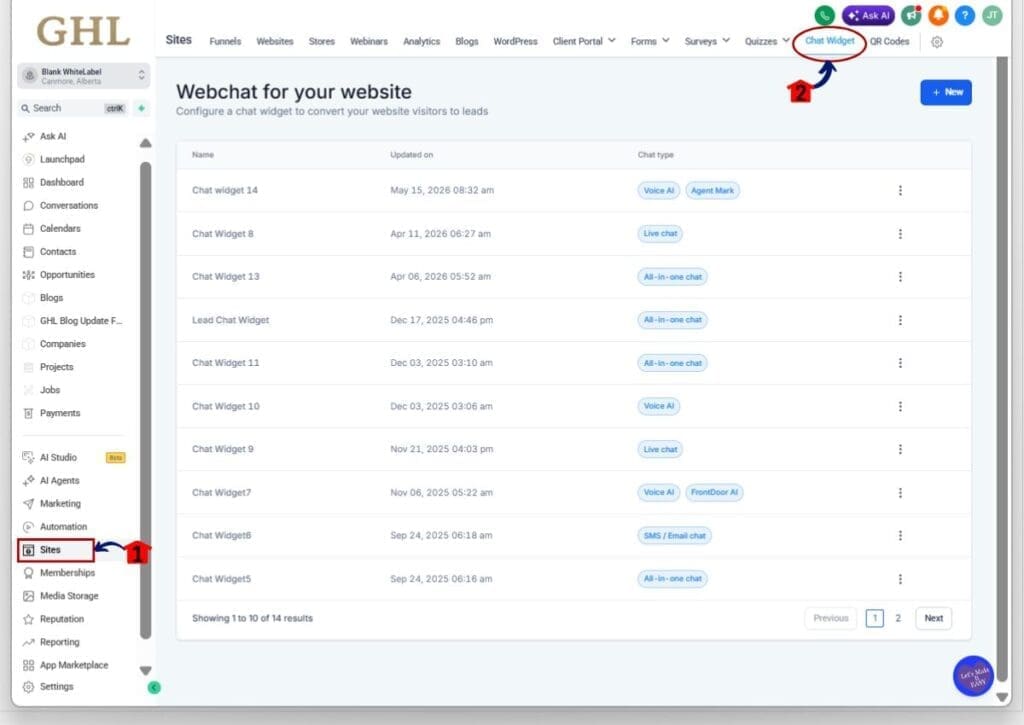
- The Main Menu on the left side of your screen has all the main areas that you work in when using GHL.
1.1 Click Sites in the left-hand menu.
- This opens the Sites section where you can manage websites, funnels, blogs, and chat widgets.
1.2 Click Chat Widget from the top navigation menu.
- This opens the Webchat for your website page where all your chat widgets are listed.
Step 02 – Select the Chat Widget You Want to Edit
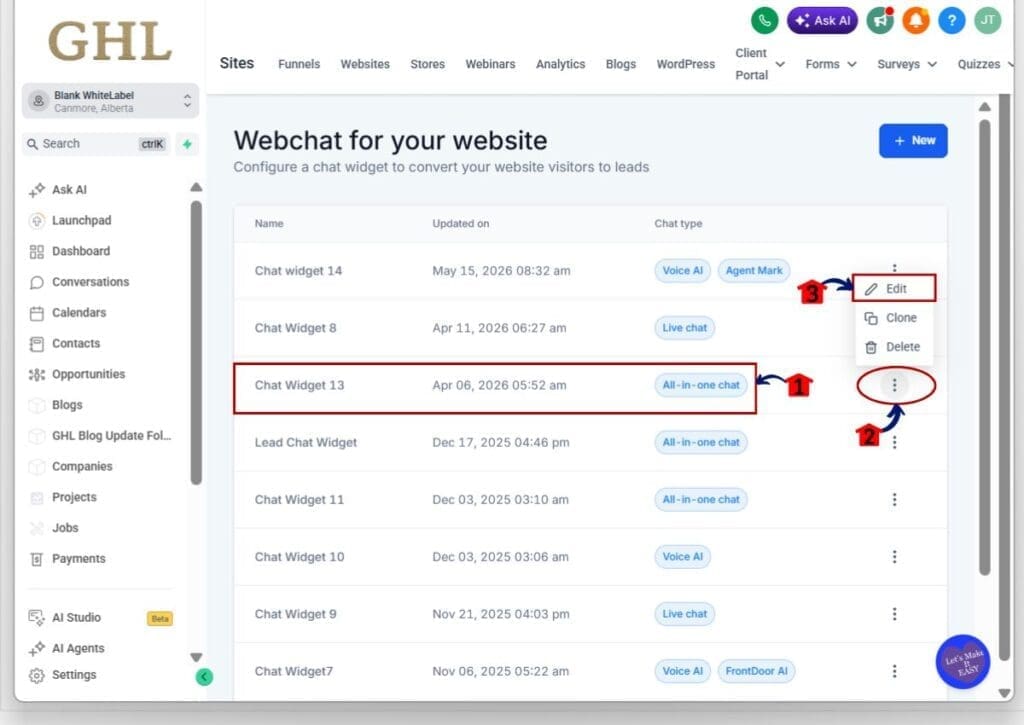
2.1 Find the chat widget you want to update from the widget list.
- This can be an All-in-one chat, Live Chat, SMS / Email chat, or Voice AI widget.
2.2 Click the three-dot menu on the right side of the widget row.
- This opens the widget action menu.
2.3 Click Edit.
- This opens the selected chat widget settings.
Step 03 – Open the Chat Window Tab
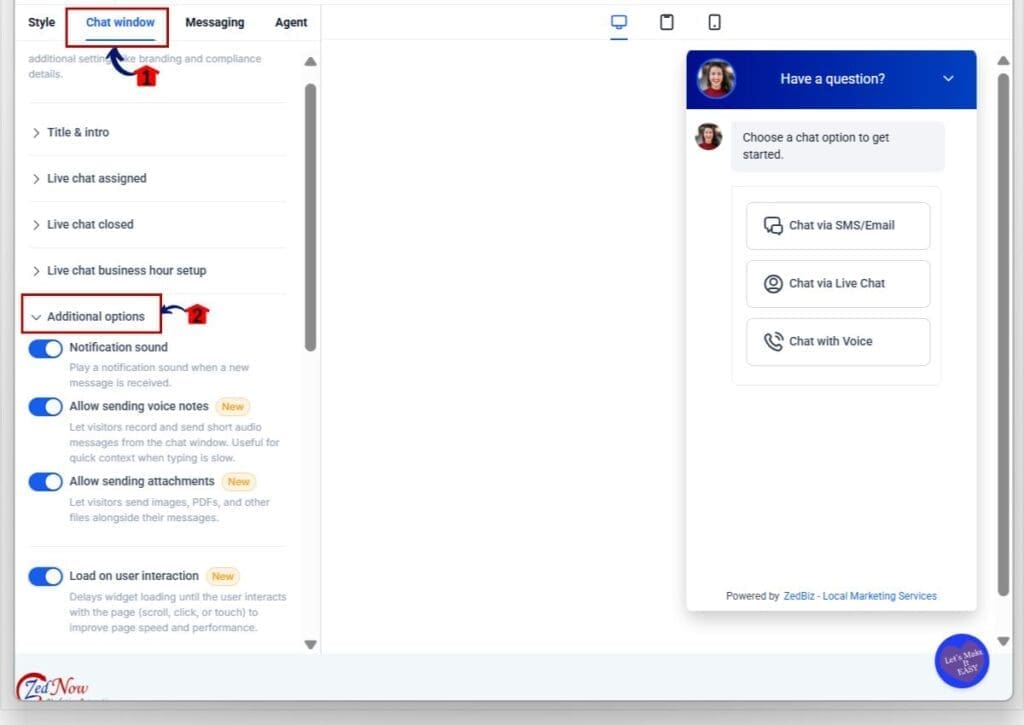
3.1 Click the Chat Window tab near the top of the widget settings.
- This opens the appearance and behavior settings for the widget.
3.2 Scroll down to the Additional Options section.
- This is where the new lazy load chat setting is located.
Step 04 – Enable Lazy Load Chat
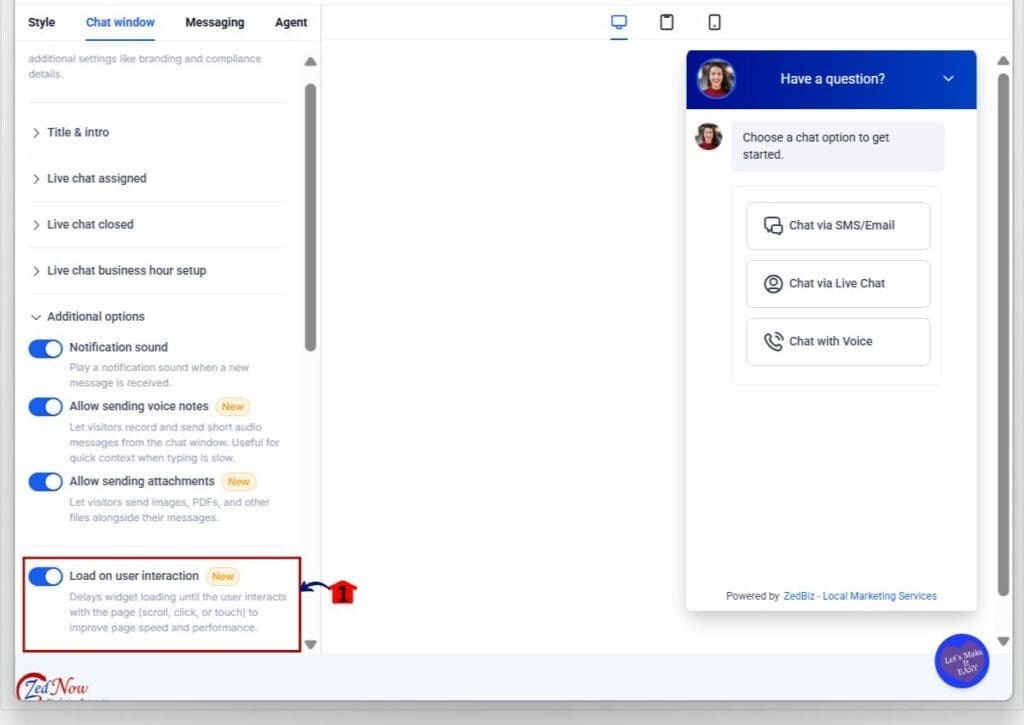
4.1 Find the “Load on user interaction” toggle.
- This setting delays widget loading until the visitor interacts with the page.
4.2 Turn the toggle ON.
- The widget will now wait for a scroll, click, or touch interaction before loading.
4.3 Click Save.
- This applies the new lazy load chat behavior to your website.
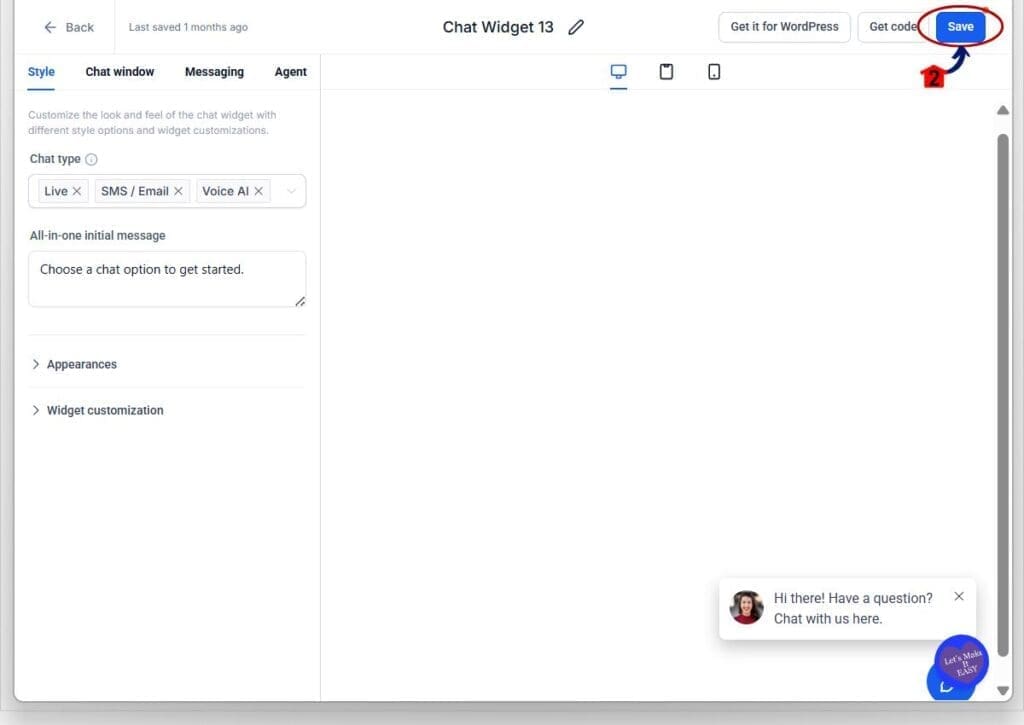
Important note: Existing chat widgets will continue using the original instant-load behavior unless you manually enable the lazy load chat setting.
Pro / Quick Tips for Lazy Load Chat
Lazy load chat works best on websites where speed matters. If you run landing pages, local business sites, or mobile-heavy campaigns, this setting can help reduce unnecessary loading during the first few seconds of the visit.
One smart move is to test the feature on mobile first. Mobile users usually notice slow page loads faster than desktop users. If your site already has videos, tracking scripts, popups, or animations loading on the page open, delaying the chat widget can help the page feel cleaner and more responsive.
You should also think about the type of page you are using. A homepage or long-form sales page is usually a great fit for lazy load chat. But if you rely heavily on instant support or live chat conversions the second someone lands on the page, you may want to compare both loading styles before making it permanent.
A good habit is to check your page speed before and after enabling the setting. Even small improvements in load performance can help keep visitors on the page longer.
What Lazy Load Chat Means for Your Business
Lazy load chat gives your website a better first impression. The page can load with less weight up front, which helps visitors start reading, scrolling, and clicking faster.
For agencies, this is a simple win you can apply across client sites. You are not removing the chat widget. You are just making it load smarter. That means clients can still capture leads while improving the way their website feels to real visitors.
This is also useful when you are selling website optimization or cleanup services. Small settings like this show clients that performance is not always about rebuilding the whole site. Sometimes, it is about fixing the little things that slow it down.
Frequently Asked Questions About Lazy Load Chat
Conclusion: Lazy Load Chat Is a Smart Small Fix
Lazy load chat is not a flashy update, but it is useful. It gives GoHighLevel users a simple way to reduce early page load weight while keeping the chat widget ready for real visitors.
For agencies, this is the kind of setting worth checking on client websites. It can help improve website speed, support a better mobile experience, and give visitors a smoother first impression.Try it on one site first, test the widget behavior, and compare the page experience. Have you enabled lazy load chat in GHL yet?
Scale Your Business Today.
Streamline your workflow with GoHighLevel’s powerful tools.


