

- Create threaded email conversations, automate nurture campaigns, and improve engagement with the new Email Sequences feature now available in Beta Labs.
- Quick Summary – Email Sequences at a Glance
- What Are Email Sequences in GoHighLevel?
- Why Email Sequences Matter
- Key Features Included in Email Sequences
- How to Enable and Create Email Sequences in GoHighLevel
- What Email Sequences Mean for Your Business
- What's Coming Next for Email Sequences
- Frequently Asked Questions
- Conclusion
Create threaded email conversations, automate nurture campaigns, and improve engagement with the new Email Sequences feature now available in Beta Labs.
Email Sequences are now available in GoHighLevel Beta Labs, giving users a simpler way to automate follow-ups and nurture leads. If you’ve ever found workflows too complex for basic email campaigns, this new feature could save you a lot of time. The new Email Sequences tool allows you to create automated email conversations that stay in a single thread. This helps keep communication organized while making your emails feel more personal and natural. Unlike traditional automation setups, Email Sequences focus on simplicity.
You can build follow-up campaigns using delays, sending conditions, smart scheduling, and Stop on Reply automation without creating a full workflow. The feature also includes support for both designed and plain text emails, along with sequence-level and step-level analytics. That means you can track performance and improve your campaigns over time. With more than 60 agencies participating in the Private Beta, early feedback has shown strong demand for a tool that makes email automation easier. Now that Email Sequences are available through Beta Labs, more users can start building follow-up, reminder, and nurture campaigns in just a few minutes. In this guide, you’ll learn what Email Sequences are, why they matter, and how to set up your first sequence inside GoHighLevel.

Email Sequences make it easier to automate follow-ups, nurture leads, and keep conversations organized inside GoHighLevel. With threaded email conversations, smart conditions, and Stop on Reply automation, you can build more effective outreach campaigns without creating complex workflows.
Quick Summary – Email Sequences at a Glance
Purpose: Email Sequences helps you automate follow-up emails inside GoHighLevel using a simple sequence builder instead of complex workflows.
Why It Matters: Consistent follow-up improves engagement and increases the chances of turning leads into customers.
What You Get: You can create threaded email conversations, use conditional sending rules, enable Stop on Reply automation, and track performance with built-in analytics.
Who Should Use It: Agency owners, marketers, sales teams, consultants, and local businesses can all benefit from Email Sequences.
Time to Complete: Most users can enable the feature and build their first Email Sequence in less than 30 minutes.
Difficulty Level: Beginner to Intermediate. The setup process is straightforward and easier than building advanced workflows.
Key Outcome: Email Sequences help you save time, automate communication, and maintain more consistent follow-up with leads and customers.
Expected Result: Better engagement, improved follow-up consistency, and a more organized email automation process.
What Are Email Sequences in GoHighLevel?
Email Sequences are a new email automation tool available in GoHighLevel Beta Labs. They allow you to create a series of automated emails that are sent over time based on rules, delays, and contact activity.
The biggest difference is that Email Sequences keep messages inside a single email thread. Instead of sending separate emails that appear disconnected, every follow-up stays connected to the original conversation. This creates a more natural experience for your contacts.
Automate marketing, manage leads, and grow faster with GoHighLevel.

Email Sequences are designed to make email automation easier. Many users want to build simple follow-up campaigns without creating complex workflows. This feature gives you a faster way to automate communication while still providing powerful options.
You can add delays between emails, send messages based on delivery or open status, and automatically stop the sequence when a contact replies. This helps prevent unnecessary emails and keeps your outreach relevant.
The feature also supports both designed emails and plain text emails. Whether you are running a lead nurture campaign, appointment reminder sequence, or client follow-up process, you can build everything directly inside the Email Sequences builder.
For agencies and business owners, this means less time building automations and more time focusing on conversations that generate results.
Why Email Sequences Matter
Most leads do not respond after the first email. In many cases, it takes several follow-ups before someone books a call, requests information, or makes a purchase. The challenge is staying consistent without spending hours sending emails manually.
Email Sequences solve this problem by automating the follow-up process. Once your sequence is active, GoHighLevel can continue sending emails based on the schedule and conditions you create.
Another major benefit is better engagement. Email Sequences can send emails based on delivery and open activity. This helps you send more relevant messages and avoid contacting people who may not be engaging with your content.
The threaded conversation format is also important. When contacts receive multiple emails in the same thread, it feels more like a real conversation. This can help build trust and increase response rates over time.
The Stop on Reply feature adds another layer of automation. As soon as a contact replies, the sequence can stop automatically. This prevents unnecessary follow-ups and creates a better customer experience.
For agencies, marketers, and local businesses, Email Sequences provide a simple way to automate lead nurturing, appointment reminders, proposal follow-ups, and client communication. You spend less time managing campaigns and more time focusing on the conversations that matter most.
Key Features Included in Email Sequences
Email Sequences come with several powerful features that help automate email communication while keeping the setup process simple.
Single-Threaded Email Conversations
Every email in the sequence stays within the same conversation thread. This helps contacts see the full history of your communication and creates a more personal experience. Instead of receiving separate emails, they see one ongoing conversation.
Conditional Sending Logic
Email Sequences can make decisions based on contact behavior. For example, you can send the next email only if the previous email was delivered or opened. This allows you to create smarter follow-up campaigns without adding complicated automation rules.
Stop on Reply Automation
One of the most useful features is Stop on Reply. When a contact responds to one of your emails, the sequence automatically stops. This prevents contacts from receiving unnecessary follow-ups after they have already engaged.
Designed and Plain Text Emails
You can choose between professionally designed emails or simple plain text emails. Designed emails work well for branded campaigns, while plain text emails often feel more personal and conversational.
Sequence and Step-Level Analytics
Email Sequences include detailed reporting. You can track overall sequence performance and review metrics for each individual email step. This makes it easier to identify what is working and where improvements can be made.
Together, these features help users create better follow-up campaigns, improve engagement, and save time on manual communication.
How to Enable and Create Email Sequences in GoHighLevel
Email Sequences is currently available through Beta Labs. Before you can use this feature, you must enable it in your account settings. Once enabled, you can create automated email follow-up campaigns that use delays, conditions, threaded conversations, and Stop on Reply automation.
The setup process is straightforward. You will first activate the feature in Beta Labs, then create a new sequence, configure your audience and sending rules, build your emails, and launch the sequence. Finally, you can review analytics to measure performance.
Here are the steps to set up Email Sequences inside GoHighLevel:
- Access the Settings area in GoHighLevel.
- Enable Email Sequences in Beta Labs.
- Access the Email Campaigns page.
- Create a new Email Sequence.
- Configure your sequence audience.
- Configure delays and sending conditions.
- Create your email steps.
- Enable Stop on Reply.
- Launch your Email Sequence.
- Review Email Sequence statistics.
Email Sequences is a Beta Labs feature. If you do not enable it first, the Email Sequences option will not appear in your account.
To start make sure you are logged in to your GoHighLevel sub-account.
Step 01 – Access the Settings area in GoHighLevel
Go to the bottom of the Main Menu on the left-hand sidebar.
1.1 Click the Settings gear icon ⚙️.
- This opens the Settings dashboard where you can access Business Info, Billing, My Staff, Beta Labs, and other account settings.

Step 02 – Enable Email Sequences in Beta Labs
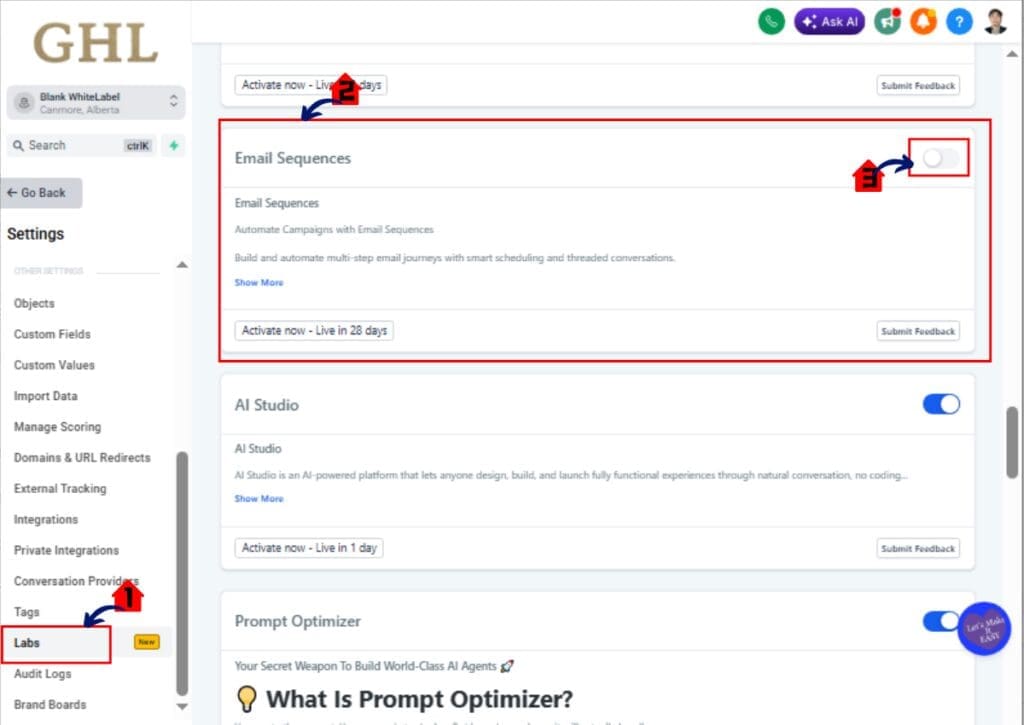
2.1 Click Beta Labs in the Settings menu.
- The Beta Labs page displays available beta features for your account.
2.2 Locate Email Sequences in the feature list.
- Available Beta Labs features are displayed with an enable or disable toggle.
2.3 Turn on the Email Sequences toggle.
- Once enabled, Email Sequences will become available in the Marketing section.
Step 03 – Access the Email Campaigns page
The Main Menu on the left side of your screen contains the primary areas you use inside GoHighLevel.
3.1 Click Marketing in the Main Menu.
- Inside the Marketing section you can access Email, Social Planner, Trigger Links, Affiliate Manager, and other marketing tools.
3.2 Click Email from the top navigation menu.
- The Email section contains your campaigns, templates, and email reporting tools.
3.3 Click Campaigns if it is not already selected.
- The Campaigns page displays your available email campaigns and sequences.
3.4 Click Email Sequence
- This opens email sequence Builder

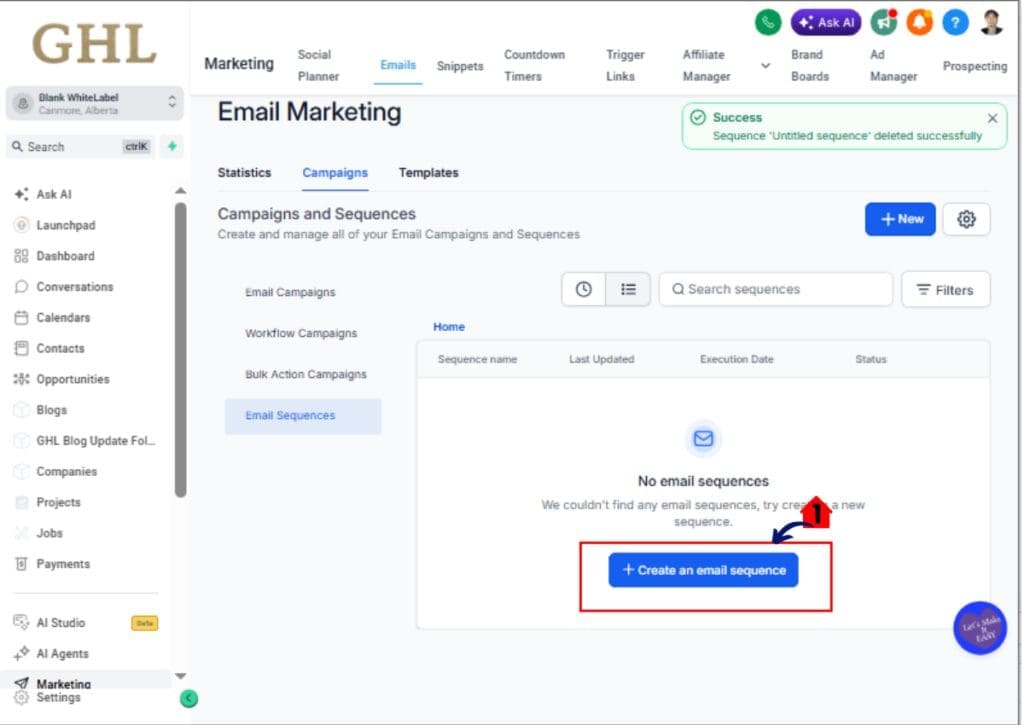
Step 04 – Create a new Email Sequence
4.1 Click Create New Sequence.
- This opens the Email Sequence builder.
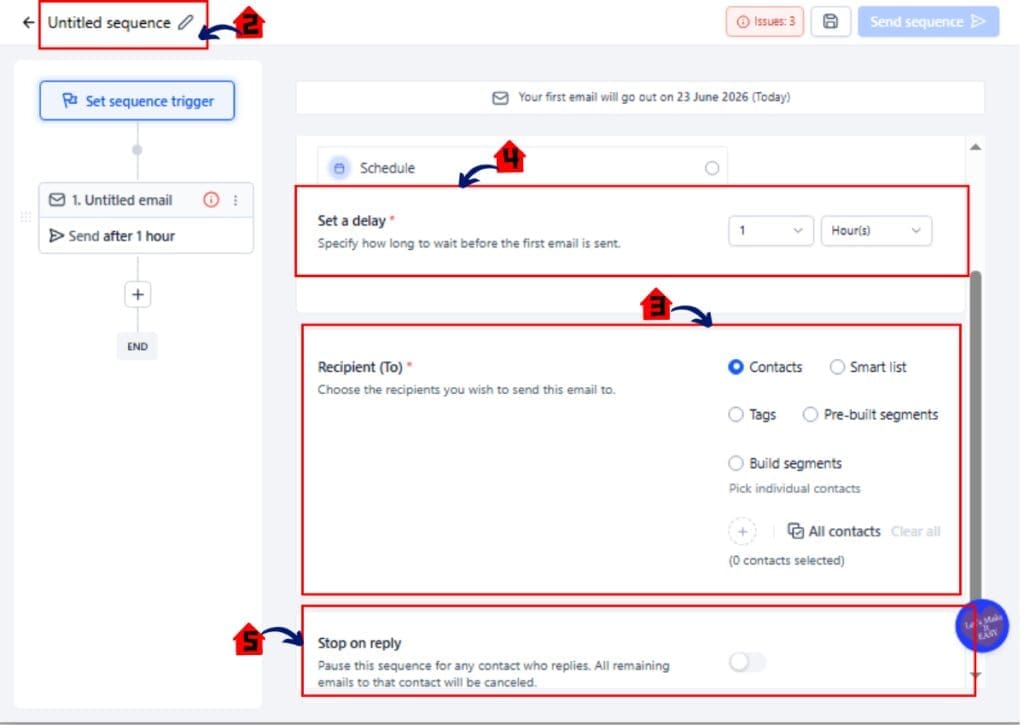
4.2 Enter a name for your Email Sequence.
- Choose a name that clearly identifies the purpose of the sequence.
4.3 Select the contacts you want to include in the sequence.
- You can choose a specific contact group, segment, or filtered audience.
- Review your audience settings.
- Confirm the correct contacts are included before moving forward.
4.5 Select the delay duration.
- You can choose hours, days, or other available scheduling options.
4.6 Add sending conditions if required.
- Conditions can be based reply of the recipients
Step 05 – Create your email steps
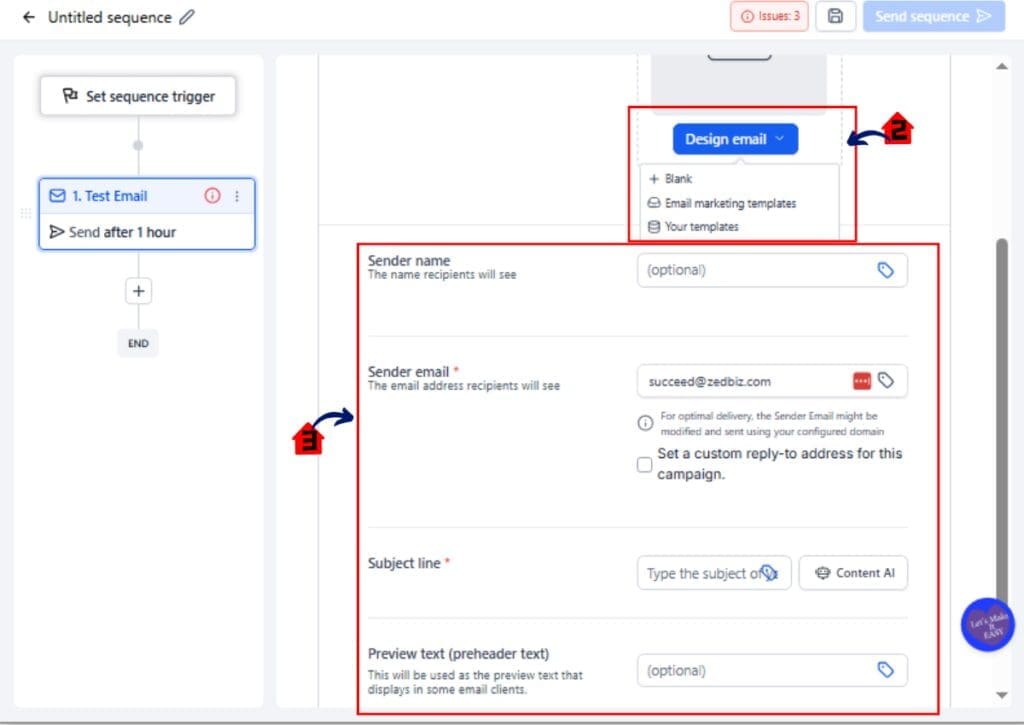
5.1 Click Add Email Step.
- A new email editor will open.

5.2 Choose between a designed email or plain text email.
- Designed emails are ideal for branded campaigns. Plain text emails often feel more personal.
5.3 Enter your subject line and email content.
- Create clear, relevant messages that support your campaign goal.
5.4 Repeat the process for additional emails.
- Continue building your sequence until all follow-up emails have been added.
Step 06 – Launch your Email Sequence
9.1 Review all sequence settings.
- Verify your audience, delays, conditions, and email content.
9.2 Click Launch Sequence.
- The sequence will begin sending emails based on your configured schedule.
9.3 Confirm activation.
- Your Email Sequence is now live.
Pro Tips for Better Email Sequence Performance
Email Sequences are easy to build, but a few best practices can help you get better results. The goal is not to send more emails. The goal is to start more conversations.
Keep Your Email Sequences Short
Many businesses make the mistake of creating long follow-up campaigns. Start with three to five emails and monitor performance before adding more steps.
Use Plain Text When Appropriate
Designed emails look professional, but plain text emails often generate more replies. They feel personal and can blend naturally into a contact’s inbox.
Turn On Stop on Reply
The Stop on Reply setting should be enabled for most Email Sequences. Once a contact responds, there is usually no need to continue sending automated follow-ups.
Focus on One Goal Per Sequence
Each Email Sequence should have a clear purpose. For example:
• Book an appointment.
• Follow up on a proposal.
• Nurture a new lead.
• Re-engage an inactive contact.
Trying to achieve multiple goals in a single sequence can reduce engagement and make your messaging less effective.
Monitor Your Analytics
Review your sequence statistics regularly.
Pay attention to:
• Open rates.
• Reply rates.
• Step-level performance.
• Contact engagement trends.
Small improvements to subject lines and email content can often produce better results over time.
Avoid Overusing Conditions
Conditional sending is powerful, but too many conditions can make a sequence difficult to manage. Start simple and add more advanced logic only when needed.
Test Before Launching
Before launching Email Sequences to a large audience, send test emails to yourself or your team. This helps identify formatting issues, broken links, or messaging mistakes before contacts receive your emails.
The best Email Sequences are simple, relevant, and focused on helping the recipient take the next step.
What Email Sequences Mean for Your Business
Email Sequences give businesses a faster and easier way to stay in front of leads and customers. Instead of manually sending follow-up emails, you can automate the process while keeping conversations personal and organized.
For many businesses, follow-up is where opportunities are lost. A lead fills out a form, requests a quote, or books a consultation, but nobody follows up consistently. Email Sequences help solve this problem by automatically delivering the right message at the right time.
For Agency Owners
Agencies can use Email Sequences to automate lead nurturing, proposal follow-ups, onboarding communication, and client check-ins. This reduces manual work and creates a more consistent experience for prospects and clients.
For Local Businesses
Local businesses can use Email Sequences to send appointment reminders, estimate follow-ups, service reminders, and customer reactivation campaigns. This helps increase engagement without adding extra work to daily operations.
For Sales Teams
Sales teams can use Email Sequences to maintain communication with prospects throughout the sales process. Automated follow-ups help ensure opportunities do not fall through the cracks.
For Marketing Teams
Marketing teams can create nurture campaigns that educate leads and guide them toward a conversion. Because Email Sequences support conditional sending and threaded conversations, campaigns can feel more relevant and personalized.
Real-World Example
Imagine a new lead requests information through your website.
Instead of manually following up, an Email Sequence can:
• Send an introduction email immediately.
• Send a follow-up email two days later.
• Send a case study after four days.
• Stop automatically if the lead replies.
This creates a professional follow-up process that runs automatically while keeping every email inside the same conversation thread.
The result is simple. More consistent communication, less manual work, and more opportunities to turn leads into customers.
What’s Coming Next for Email Sequences
Email Sequences is already a powerful addition to GoHighLevel, but the roadmap shows there is even more functionality on the way. Several highly requested features are currently being developed and will make Email Sequences even more flexible.
Workflow Enrollment
One of the most anticipated updates is the ability to enroll contacts into Email Sequences directly from a workflow.
This will allow users to:
• Trigger Email Sequences based on form submissions.
• Add contacts to sequences after appointments are booked.
• Start nurture campaigns from workflow actions.
• Combine Email Sequences with existing automation systems.
This update will give users more control over when contacts enter a sequence while reducing manual management.
Create Email Sequences Using AI
GoHighLevel has also announced plans to support AI-generated Email Sequences.
This feature is expected to help users:
• Generate email content faster.
• Build complete sequences in less time.
• Create follow-up campaigns with minimal effort.
• Improve productivity for agencies and marketing teams.
For users who struggle with writing email content, this feature could significantly reduce setup time.
A/B Testing for Email Sequence Steps
Another planned enhancement is A/B testing for individual email steps.
This will allow users to test:
• Different subject lines.
• Different email copy.
• Different calls to action.
• Different sequence strategies.
A/B testing can help improve open rates, click rates, and overall campaign performance by identifying which emails produce the best results.
Why These Updates Matter
The current version of Email Sequences already simplifies email automation. These upcoming enhancements will make the feature even more powerful while keeping the setup process easy to manage.
As GoHighLevel continues to develop Email Sequences, users can expect more automation flexibility, smarter campaign creation, and better performance optimization tools.
Frequently Asked Questions
Conclusion
Email Sequences give GoHighLevel users a simpler way to automate follow-up communication. Instead of building complex workflows for every email campaign, you can create structured, threaded email conversations in just a few steps.
With support for conditional sending, Stop on Reply automation, plain text and designed emails, and built-in analytics, Email Sequences help you stay connected with leads while saving time. The feature is easy to learn, easy to manage, and powerful enough for a wide range of marketing and sales campaigns.
Whether you’re an agency owner nurturing leads, a local business sending appointment reminders, or a sales team following up on opportunities, Email Sequences can help you create a more consistent communication process.
The addition of upcoming features like Workflow enrollment, AI-generated sequences, and A/B testing shows that GoHighLevel is continuing to invest heavily in this new tool.
If Email Sequences is available in your Beta Labs section, now is a great time to start testing it. Begin with a simple follow-up campaign, monitor your results, and make improvements using the built-in analytics.
The team here at GHL Growth Garage is excited to see how users apply Email Sequences in real-world campaigns. As the feature continues to evolve, it has the potential to become one of the most useful email automation tools inside GoHighLevel.
Have you enabled Email Sequences yet? What type of campaign are you planning to automate first?
Scale Your Business Today.
Streamline your workflow with GoHighLevel’s powerful tools.


