- A safer, more scalable LinkedIn connection built for future multi-account support
- Quick Summary – LinkedIn Integration Overview
- What’s Changing With the LinkedIn Integration
- Why the LinkedIn Integration Update Matters
- Impact on Existing LinkedIn Connections
- How to Enable the LinkedIn Integration
- Security and Reliability Benefits
- Future Multi-Account LinkedIn Integration
- Quick Tips for the LinkedIn Integration
- What This Update Means for Agencies
- Frequently Asked Questions About the LinkedIn Integration
- A Stronger LinkedIn Integration
A safer, more scalable LinkedIn connection built for future multi-account support
LinkedIn Integration Gets a Stronger Foundation
The LinkedIn integration in GoHighLevel now runs on the Marketplace framework. This update improves security, makes the connection easier to manage, and gives GHL a stronger base for future LinkedIn features.
Most users will not notice a major change in their daily work. Existing connections will keep working, while new connections will use the updated Marketplace setup. That means no rebuild, no forced reconnect, and no extra work for agencies using LinkedIn today.
The new LinkedIn integration also prepares GoHighLevel for future multi-account support. That feature is not live yet, but this update puts the right structure in place. In this guide, you’ll learn what changed, what it means for current users, and how to enable the migration through Labs.

The new LinkedIn integration gives GHL users a safer, more reliable connection without disrupting existing workflows. It also creates the foundation for future multi-account LinkedIn management inside GoHighLevel.
Quick Summary – LinkedIn Integration Overview
Purpose: This update moves new LinkedIn connections onto GoHighLevel’s Marketplace framework.
Why It Matters: The new setup improves security, reliability, and how LinkedIn account access is managed.
What You Get: New LinkedIn connections use the updated Marketplace flow, while existing working connections stay in place.
Time to Complete: Most users can enable the feature and review the connection in about five minutes.
Difficulty Level: Beginner. The setup only requires a few steps inside Settings, Labs, and Integrations.
Key Outcome: You get a stronger LinkedIn integration today and a better foundation for future multi-account support.
What’s Changing With the LinkedIn Integration
LinkedIn integration is moving from the older connection system to GoHighLevel’s Marketplace framework. New LinkedIn accounts will now connect through this updated setup, which gives GHL a more secure and stable way to manage account access.
For users, the process should still feel familiar. You can connect to LinkedIn and keep using the same core tools without changing your normal workflow. Most of the work happens behind the scenes, so this is more of a system upgrade than a feature redesign.
Automate marketing, manage leads, and grow faster with GoHighLevel.

The update is currently available through Labs under “LinkedIn Marketplace Migration.” Once enabled, new LinkedIn connections will use the Marketplace setup. Existing connections will stay on the older system for now and should keep working as expected.
Why the LinkedIn Integration Update Matters
The new LinkedIn integration gives GoHighLevel a safer way to handle account access. Instead of relying on the older setup, new connections will use the Marketplace framework. This improves how GHL manages authentication and reduces the risk of weak or outdated connection methods.
For agencies, this matters because LinkedIn often supports client content, lead generation, and brand activity. A stronger setup means fewer problems behind the scenes and a better base for future updates. It also makes the integration easier for GoHighLevel to maintain as LinkedIn changes over time.
The biggest benefit is that users do not need to rebuild their current process. Existing connections can keep working, while new ones use the updated system. You get a more stable LinkedIn integration without adding more work to your team.
Impact on Existing LinkedIn Connections
Existing LinkedIn connections should keep working as they do now. You do not need to disconnect the account, rebuild the setup, or change your current workflow.
While the LinkedIn integration is still in Labs, older connections will remain on the current system. New connections will use the Marketplace framework once the migration option is enabled.
GoHighLevel plans to move older connections to the new setup later. That migration should happen without user action. For now, the best move is simple. Leave any working LinkedIn connection in place and avoid reconnecting it unless there is a real issue.
How to Enable the LinkedIn Integration
The LinkedIn integration now uses GoHighLevel’s Marketplace framework for new connections. In this section, you’ll see how to enable the migration in Labs, open the LinkedIn integration, connect your account, and review the LinkedIn ad account settings.
The goal is simple: enable the new setup and make sure your LinkedIn account is connected through the correct Marketplace flow.
Here are the steps to set it up:
- Access the Settings area in GoHighLevel.
- Enable LinkedIn Marketplace Migration in Labs.
- Open the LinkedIn integration.
- Connect your LinkedIn account.
- Review LinkedIn Ad Account Settings.
To start, make sure you are logged in to the correct GoHighLevel sub-account.
Step 01: Access the Settings Area in GoHighLevel
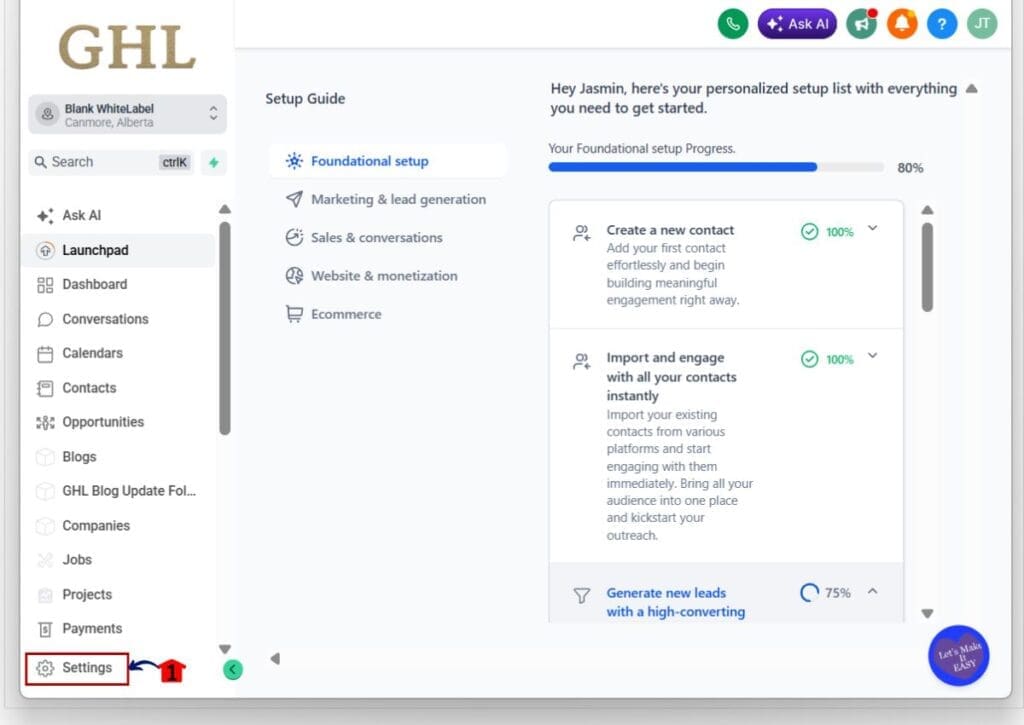
- Go to the bottom of the Main Menu on the left-hand sidebar.
1.1 Click the Settings gear icon ⚙️.
- This opens the Settings dashboard for your sub-account.
Step 02: Enable LinkedIn Marketplace Migration in Labs
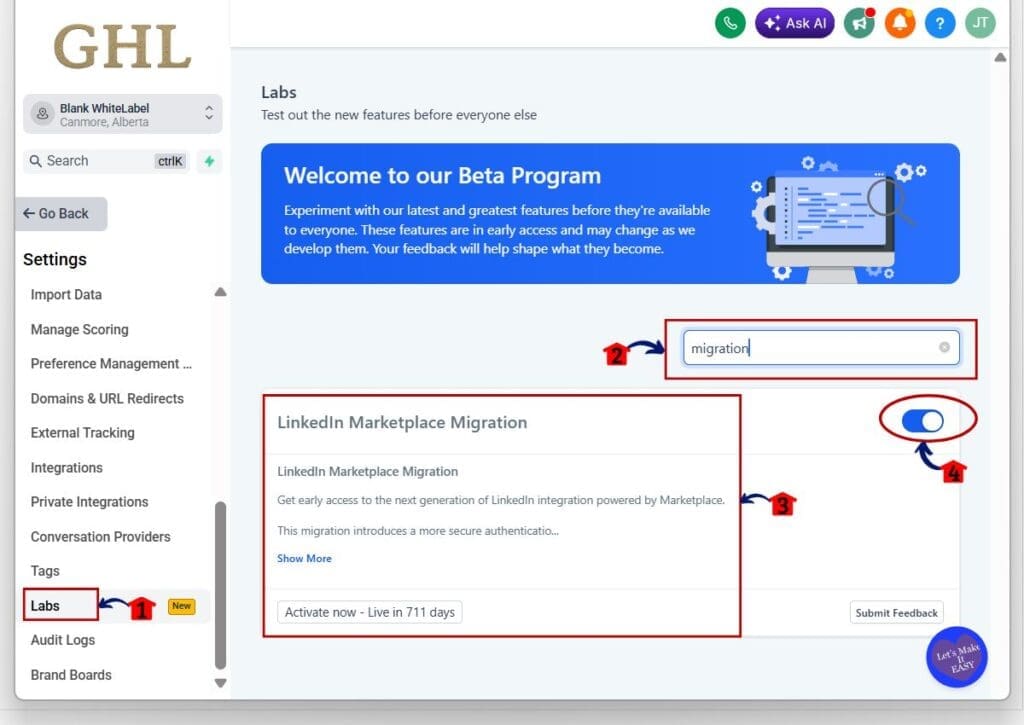
- Inside the Settings area, you will see a menu on the left-hand side.
2.1 Click Labs.
- This opens the Labs page, where you can test features before their full release.
2.2 Enter “migration” in the search box.
- This filters the list and displays the LinkedIn Marketplace Migration feature.
2.3 Review the LinkedIn Marketplace Migration card.
- Click Show More when you need to read the full feature details.
2.4 Turn the feature toggle ON.
- Once enabled, new LinkedIn connections will use the Marketplace framework.
Step 03: Open the LinkedIn Integration
- Stay inside the Settings area.
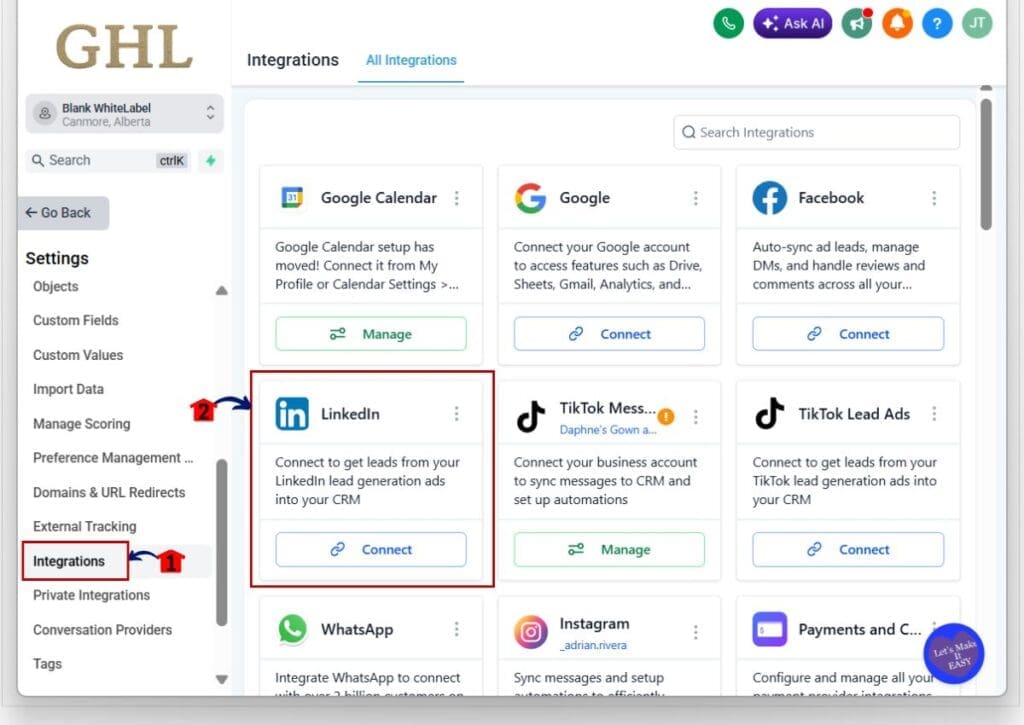
3.1 Click Integrations in the left-hand menu.
- This opens the All Integrations page.
3.2 Find the LinkedIn integration card.
- You can use the Search Integrations field when the card is not visible.
3.3 Click Connect on the LinkedIn card.
- This opens the LinkedIn Marketplace window.
Step 04: Connect Your LinkedIn Account
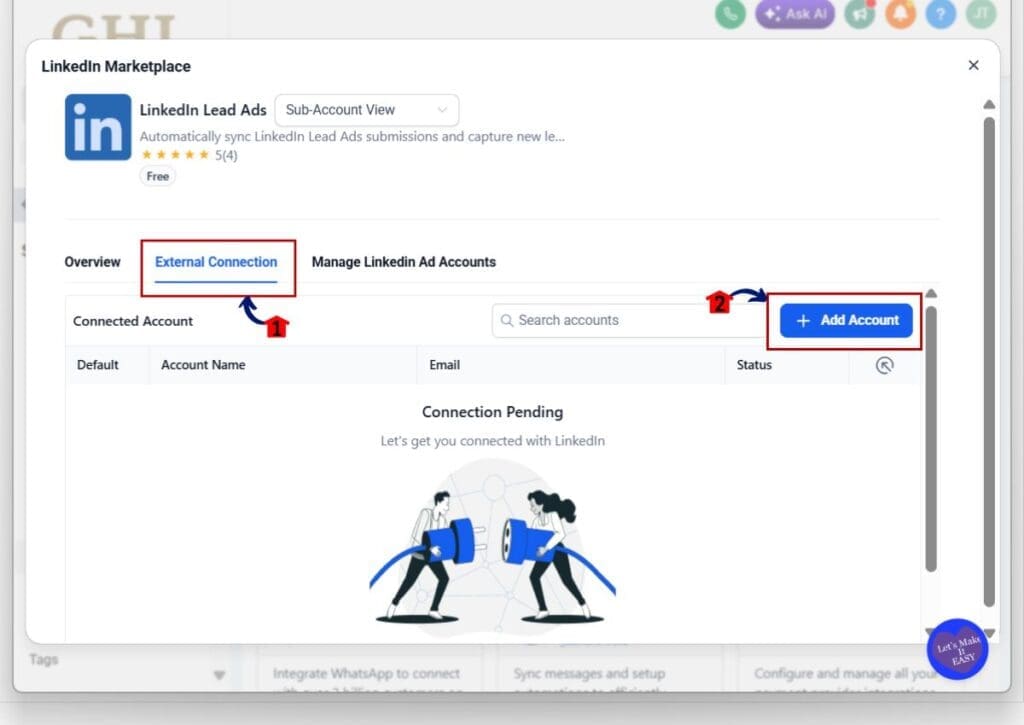
- The LinkedIn Marketplace window includes the tools needed to connect and manage LinkedIn.
4.1 Click the External Connection tab.
- This section displays the LinkedIn accounts connected to the sub-account.
4.2 Click + Add Account.
4.3 Follow the LinkedIn login and permission steps shown on the screen.
4.4 Confirm that you are connecting the correct LinkedIn account.
- Your account may show as Connection Pending until the login and approval process is complete.
Step 05: Review LinkedIn Ad Account Settings
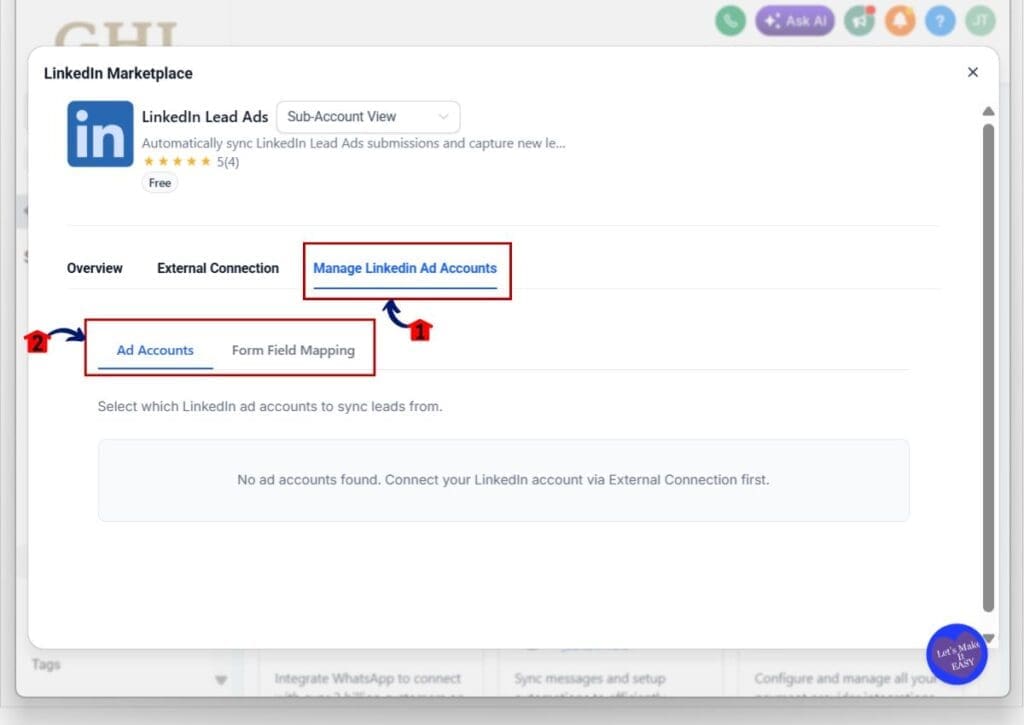
- After connecting your LinkedIn account, use the ad account section to choose what GoHighLevel can access.
5.1 Click Manage LinkedIn Ad Accounts.
- This opens the settings used to manage LinkedIn lead ad accounts.
5.2 Select Ad Accounts.
- This section shows which LinkedIn ad accounts are available for lead syncing.
5.3 Choose the LinkedIn ad accounts you want to connect.
- Your LinkedIn account must be connected through External Connection before ad accounts will appear here.
5.4 Open Form Field Mapping when you need to match LinkedIn lead form fields with fields inside GoHighLevel.
- This helps new LinkedIn leads enter your CRM with the correct contact details.
The new LinkedIn integration is now ready for Marketplace-based connections. Existing working connections should remain in place, while new accounts can use the updated setup for stronger security and future LinkedIn features.
Security and Reliability Benefits
The new LinkedIn integration gives GoHighLevel a safer way to manage account access. New connections now use the Marketplace framework, which improves how login details and permissions are handled.
For agencies, this means fewer weak points behind the scenes. A cleaner setup is easier for GHL to maintain, which can help reduce connection issues and make future updates easier to roll out.
The LinkedIn integration also gives GoHighLevel more room to grow. Existing workflows can keep running, while new connections use the updated system. You get a stronger setup without adding extra work for your team.
Future Multi-Account LinkedIn Integration
The new Marketplace setup prepares the LinkedIn integration for future multi-account support. That feature is not available yet, but the foundation is now in place.
This could help agencies manage more than one LinkedIn account inside the same location. It may be useful for teams that handle several brands, ad accounts, or client campaigns from one GHL account.
For now, the main change is the new connection system. GoHighLevel has not confirmed a release date for multi-account support, so it is best to treat this as a future benefit rather than a feature you can use today.
Quick Tips for the LinkedIn Integration
Test the new LinkedIn integration in one sub-account before using it across every client account. This gives you a simple way to check the connection flow and spot any issues early.
Do not disconnect an older LinkedIn account if it is still working. Existing connections can stay in place, while new accounts use the Marketplace setup. Reconnecting without a clear reason may create extra work.
Keep a record of which sub-accounts have the Labs feature enabled. This will make it easier to track the rollout and prepare for future LinkedIn updates inside GoHighLevel.
What This Update Means for Agencies
For agencies, the new LinkedIn integration means less risk and less cleanup. Existing client connections can keep working, while new accounts move onto the Marketplace framework.
That gives teams a more stable setup for managing LinkedIn across client accounts. It also makes it easier to add future features without forcing agencies to rebuild workflows from scratch.
The real value is long-term reliability. You may not see a major change on day one, but the stronger setup should make LinkedIn account management easier as GoHighLevel adds more tools.
Frequently Asked Questions About the LinkedIn Integration
A Stronger LinkedIn Integration
The LinkedIn integration now has a stronger base inside GoHighLevel. New connections use the Marketplace framework, while existing connections can keep working as they do now.
This update improves security, reliability, and future growth without adding extra work for most users. It also prepares GHL for more advanced LinkedIn features, including possible multi-account support later.
For now, enable LinkedIn Marketplace Migration in Labs, test the new connection flow, and leave any working older connection in place. Have you tested the new LinkedIn setup yet?
Scale Your Business Today.
Streamline your workflow with GoHighLevel’s powerful tools.