- Bring Threads Post Sync Into GHL
- Quick Summary – Threads Post Sync
- Here are this week's HighLevel Updates 🚀
- What’s New With Threads Post Sync
- Why Threads Post Sync Matters
- How to Enable and Use Threads Post Sync
- Quick Tips for Threads Post Sync
- What Threads Post Sync Means for Your Business
- FAQs – Thread Post Sync
- Put Threads Post Sync to Work
Bring Threads Post Sync Into GHL
Threads Post Sync gives you a much easier way to bring your existing Threads content into GoHighLevel. Instead of jumping between Threads and GHL to figure out what you’ve posted, you can bring that content directly into Social Planner.
This gives Social Planner a much better picture of what you’ve been doing on Threads. Your previous text posts and visual content can be brought over, including images, videos, GIFs, carousels, and polls. You’ll also get the engagement information Threads makes available, such as views, replies, likes, shares, reposts, and quotes.
Better yet, you’re not just looking at old content. Supported posts can be cloned inside Social Planner, giving you a quick starting point for repurposing content that worked before.
The feature also keeps doing the heavy lifting after the initial setup. Once enabled, GHL automatically checks for new Threads posts every 24 hours and syncs them into Social Planner.
For agencies and social media managers, that’s the real win. You get a more complete view of your content without manually rebuilding posts or bouncing between platforms just to see what happened.
Threads Post Sync is currently a Beta feature available through Labs, so there are a few limitations we’ll cover in this guide. But if Threads is already part of your social strategy, this update can make managing and reusing that content a whole lot easier.
Threads Post Sync brings your existing Threads content and available engagement data directly into GHL Social Planner. You can spend less time rebuilding old posts and quickly find, clone, and repurpose content that deserves another run.
The latest GoHighLevel Changelog includes several other GHL feature updates that round out your daily workflow:
- Wait Action Enhancement: TikTok DM Replies
- India Recurring Mandate Support for Affiliate Indian Signup Pages
- Housecall Pro – More Workflow Actions & Triggers
- Email Services Dashboard for Agencies
- Email Sequences Now Available in Beta Labs
- Group Your Contacts by Source in Dashboards & Reporting
- MMLite Adoption Banner in Conversations
Keep reading for much more on all these updates and a deep dive into the Threads Post Sync feature!
Quick Summary – Threads Post Sync
Purpose: Threads Post Sync brings your existing Threads posts into GHL Social Planner so you can manage more of your social content from one place.
Why It Matters: You can spend less time jumping between Threads and GoHighLevel to find previous posts, review available engagement, and decide what content is worth using again.
What You Get: Threads Post Sync can import supported text posts, images, videos, carousels, GIFs, and polls along with available captions, media, and engagement details.
Time To Complete: Setup should only take a few minutes, although the initial Threads Post Sync needs time to complete before all available content appears in Social Planner.
Difficulty Level: Beginner. If you already use GHL Social Planner, enabling and managing Threads Post Sync is straightforward.
Key Outcome: You’ll have a more organized Threads content library inside Social Planner, making it easier to find successful posts, clone supported content, and turn proven ideas into fresh social posts.
Here are this week’s HighLevel Updates 🚀
Wait Action Enhancement: TikTok DM Replies
What’s New:
Instead of continuing after a fixed delay, your workflow can pause until someone replies to your TikTok DM.
Where in GHL:
Found in Automation → Workflows using the Wait action after sending a TikTok DM.
Automate marketing, manage leads, and grow faster with GoHighLevel.

Impact:
Your automation responds when someone actually joins the conversation, rather than after a timer runs out.
Recommended For:
Anyone using TikTok DMs to start conversations with potential customers.
India Recurring Mandate Support for Affiliate Indian Signup Pages
What’s New:
Supports recurring payment mandates for Indian affiliates, helping subscriptions comply with local banking requirements.
Where in GHL:
Available on Affiliate Program signup pages for users in India.
Impact:
Creates a smoother signup experience while reducing payment failures for recurring subscriptions.
Recommended For:
Agencies, SaaS businesses, and affiliate programs onboarding customers in India.
Housecall Pro – More Workflow Actions & Triggers
What’s New:
Adds new workflow triggers and actions for the Housecall Pro integration, giving you more ways to automate field service processes.
Where in GHL:
Inside Automation → Workflows when using the Housecall Pro integration.
Impact:
Expands automation possibilities between HighLevel and Housecall Pro, reducing manual work and improving operational efficiency.
Recommended For:
Home service businesses, field service companies, and agencies managing Housecall Pro clients.
Email Services Dashboard for Agencies
What’s New:
Introduces a centralized dashboard where agencies can monitor email services across their accounts.
Where in GHL:
Found in the Agency View under the new Email Services Dashboard.
Impact:
Makes it easier to monitor email health, identify issues, and manage deliverability from one place.
Recommended For:
Agency owners, support teams, and admins managing multiple client email services.
Email Sequences Now Available in Beta Labs
What’s New:
Introduces Email Sequences as a Beta Labs feature, providing another way to create structured email follow-up campaigns.
Where in GHL:
Enable it from Settings → Labs, then access Email Sequences after activation.
Impact:
Cuts down the time spent checking different areas just to see how your email services are performing.
Recommended For:
Marketers, agencies, coaches, and businesses running nurture campaigns or onboarding emails.
Group Your Contacts by Source in Dashboards & Reporting
What’s New:
Lets you organize contact reports based on where your leads originated.
Where in GHL:
Available within Dashboards & Reporting when viewing contact analytics.
Impact:
Makes it easier to compare lead sources and identify which marketing channels are producing the best results.
Recommended For:
Marketing teams, agency owners, and businesses tracking campaign performance across multiple lead sources.
MMLite Adoption Banner in Conversations
What’s New:
Displays a helpful banner inside Conversations to encourage users to adopt the new MMLite messaging experience.
Where in GHL:
Appears within the Conversations module for eligible accounts.
Impact:
Helps users discover and transition to MMLite while highlighting its benefits directly inside the messaging interface.
Recommended For:
Current HighLevel users exploring the latest messaging experience and teams preparing to migrate to MMLite.
What’s New With Threads Post Sync
Threads Post Sync turns Social Planner into a more complete home for your Threads content. Once you enable the Beta feature, GHL can import existing Threads posts into Social Planner instead of making you manage that history separately.
There’s solid content support here. GHL can sync text posts, images, videos, carousels, GIFs, and polls. Synced posts can retain the caption, media previews, thumbnails, and location tags when that information is available.
You also get available engagement data alongside the content. This can include views, likes, replies, reposts, quotes, and shares. That makes it easier to see how previous Threads posts performed without constantly switching back to Threads.
One of the most useful additions is cloning. You can clone supported text, image, video, carousel, and GIF posts from Social Planner. So when you find an old post worth another run, you’ve already got a starting point instead of rebuilding it from scratch.
Threads Post Sync also keeps working after the first import. GHL automatically syncs your Threads content every 24 hours and lets you track the sync progress. If the connected account needs attention, you can also receive a notification telling you it needs to be reconnected.
There are a few Beta limitations. Polls can sync into Social Planner, but you can’t clone them because poll creation isn’t currently supported in the Threads composer. The sync is also one-way from Threads to Social Planner, so deleting the original Threads post won’t automatically remove its synced version from GHL.
It’s not a real-time connection, but it removes a lot of the manual work involved in keeping your Threads history accessible inside GHL.
Why Threads Post Sync Matters
Threads Post Sync matters because managing social media gets messy fast when your content is spread across different platforms. If Threads is part of your strategy, you shouldn’t have to jump back and forth just to find an old post or check how it performed.
With Threads Post Sync, your existing content comes into GHL Social Planner. That gives you one place to review your Threads posts alongside the rest of your social content. For agencies managing several client accounts, that can cut out a lot of unnecessary clicking and searching.
The historical content is useful too. GHL syncs posts from the previous 30 days by default, with older content going back as far as 365 days potentially available when needed. That gives you a bigger pool of content to review instead of starting from zero every time you need another post.
Then there’s engagement. Available views, likes, replies, reposts, quotes, and shares can help you spot the content that actually connected with an audience. Instead of guessing what to reuse, you can look at previous performance and make a better decision.
This is where cloning becomes especially handy. Find a strong Threads post, clone the supported content in Social Planner, and use it as the foundation for something new. Change the hook, update the message, swap the media, or give the idea a fresh angle.
For agency owners, social media managers, marketing teams, and VAs, Threads Post Sync can make content management simpler. You spend less time digging through old posts and more time putting proven ideas back to work.
It also gives agencies a cleaner way to manage client content and available engagement information from one dashboard. When you’re responsible for multiple brands, small time savings like these add up quickly.
How to Enable and Use Threads Post Sync
Setting up Threads Post Sync is pretty straightforward. You’ll enable the feature for the location, let GHL complete the initial import, and then manage your synced Threads content from Social Planner.
Remember, this feature is currently in Beta through Labs. It’s also enabled per location, so agencies will need to set it up separately for each client location where they want to use it.
- Access Social Planner in GoHighLevel.
- Open Social Planner Settings.
- Enable Threads Post Sync in Labs.
- Review Your Synced Threads Posts.
- Clone Threads Content in Social Planner.
- Publish Threads Post Sync.
To start, make sure you are logged in to the correct GoHighLevel sub-account.
Step 01 – Access Social Planner in GoHighLevel
- Start by opening Social Planner from the Marketing section of the GoHighLevel location you want to use with Threads Post Sync.
1.1 Go to the Main Left-Hand Menu in GoHighLevel. Click on Marketing.
- You’ll now be inside the Marketing section of your GoHighLevel sub-account.
1.2 Click on Social Planner.
- This opens the area where you can manage your connected social accounts and social content.
1.3 From Social Planner, open Settings.
- This is where you can access the settings used to manage Social Planner and the Threads Post Sync feature.

Step 02 – Open Social Planner Settings
- Next, head into Social Planner Settings, where you can manage the options related to Threads Post Sync for the current location.
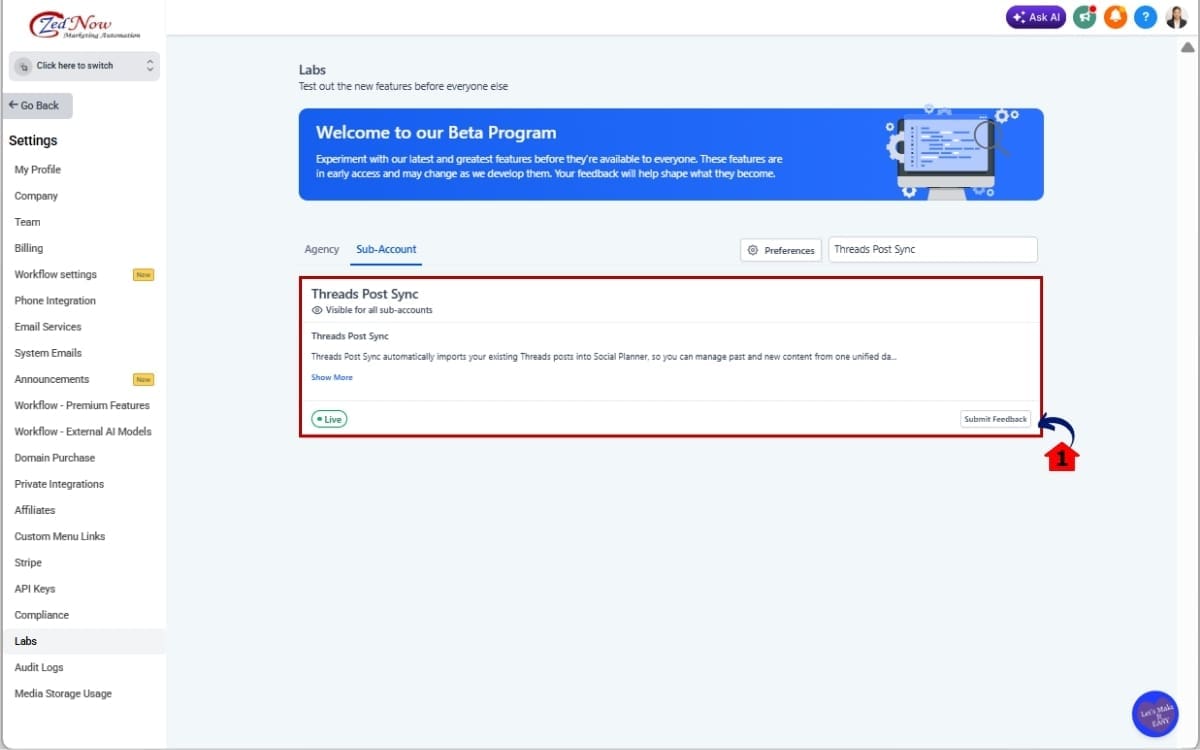
2.1 Enable Threads Post Sync for the location.
- Turn on Threads Post Sync so GoHighLevel can begin bringing supported Threads content into Social Planner.
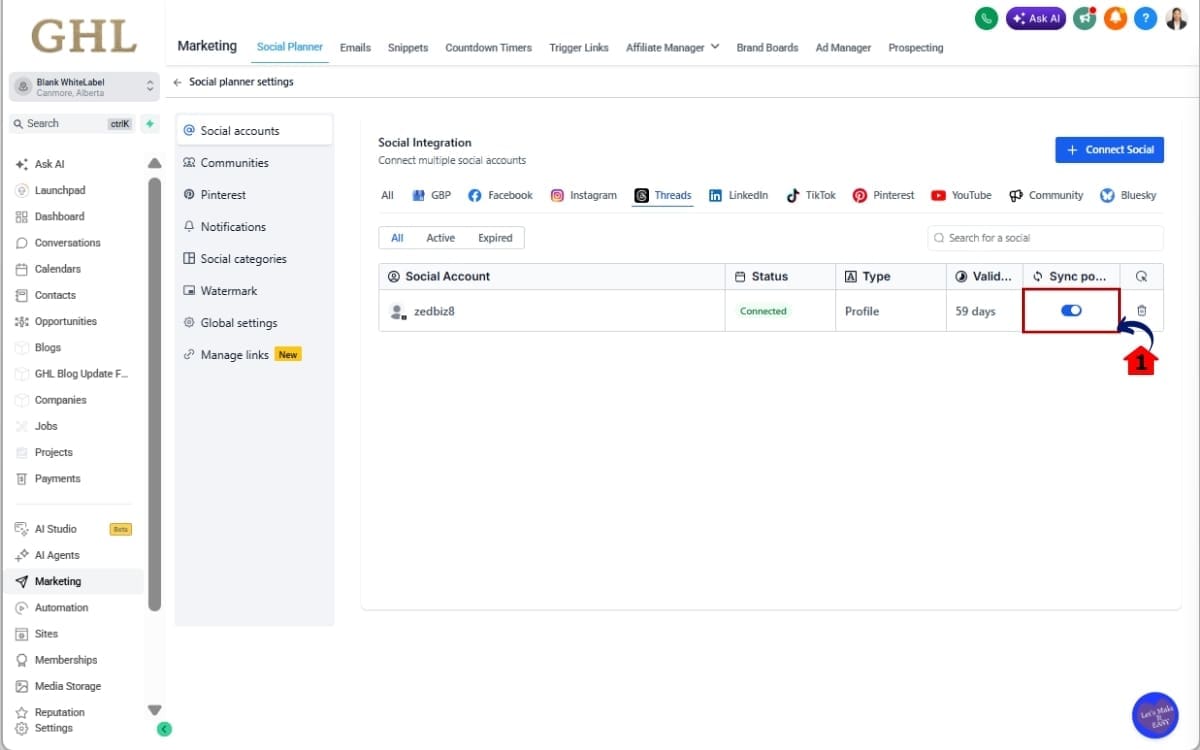
Step 03 – Enable Threads Post Sync in Labs
- Now you’re ready to switch on Threads Post Sync and let GoHighLevel begin bringing your existing Threads content into Social Planner.
3.1 Locate Threads Post Sync through Labs.
- Because the feature is currently in Beta, you’ll need to enable it through Labs before using it.
Step 04 – Review Your Synced Threads Posts
- Return to Social Planner after the initial sync has completed.
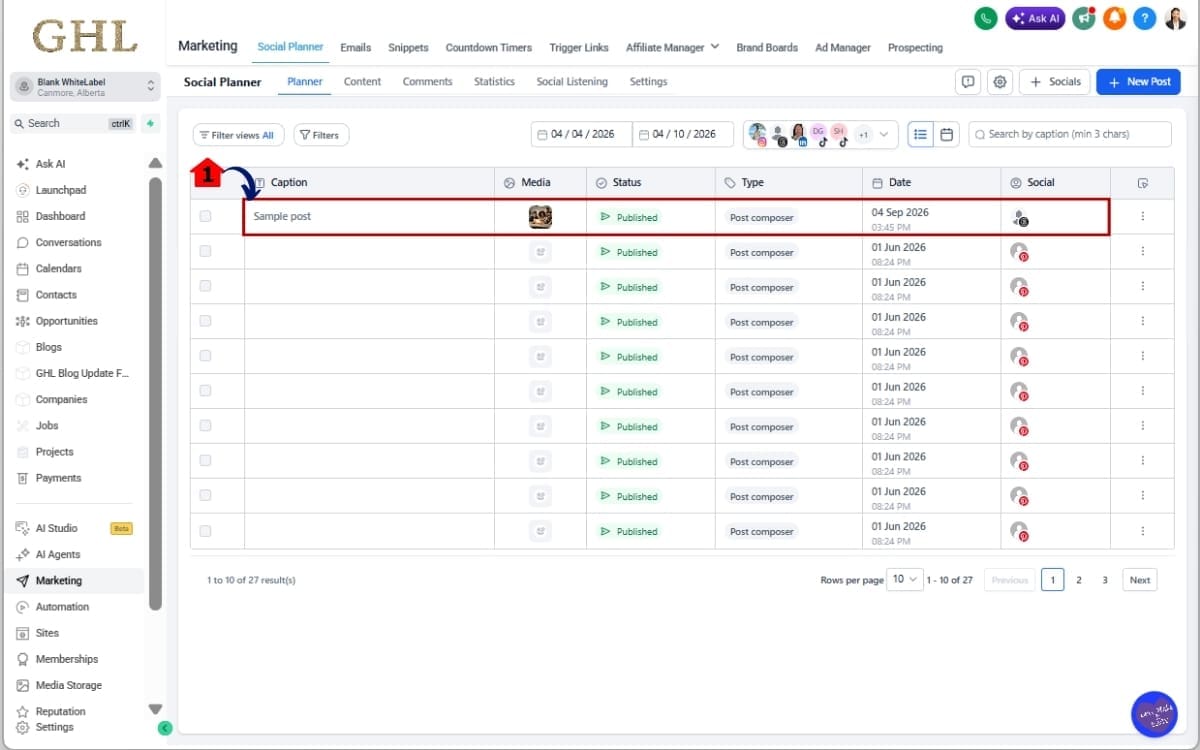
4.1 Locate your imported Threads posts.
- Depending on the original post, you may see text, images, videos, carousels, GIFs, or polls.
Step 05 – Clone Threads Content in Social Planner
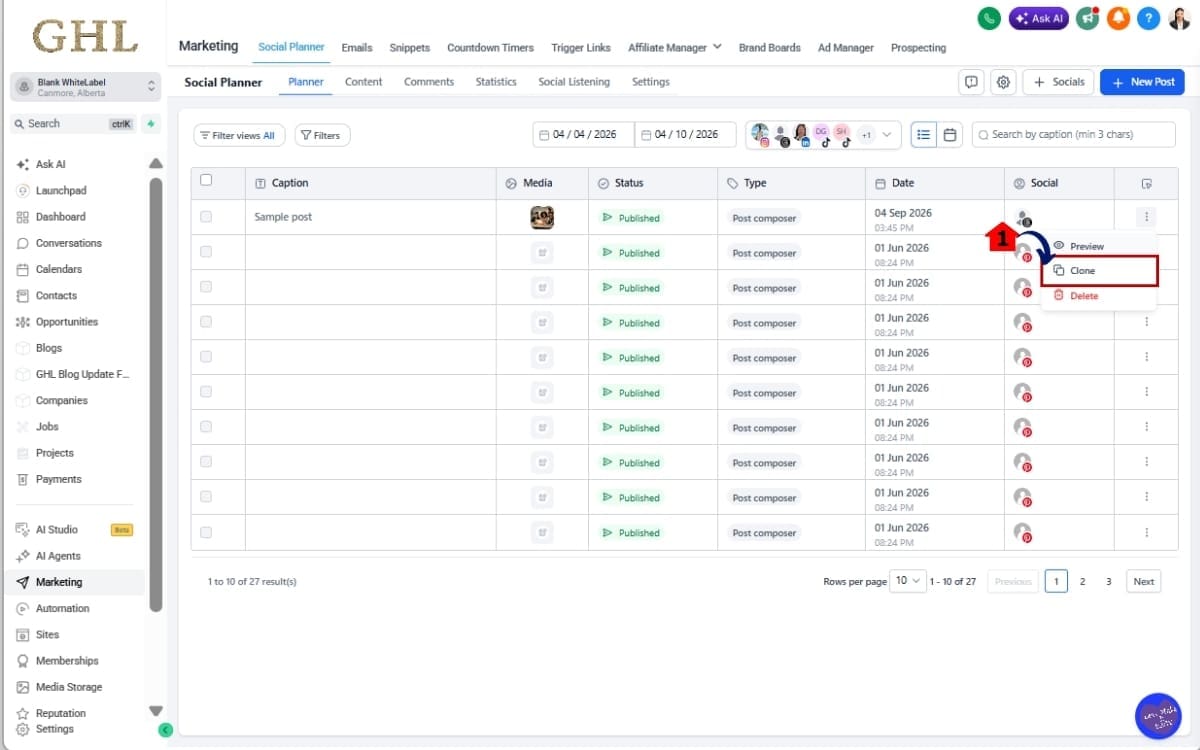
- Look for content that performed well or covers a topic worth sharing again.
5.1 Click clone in the post you selected.
- Don’t just repost everything word for word. Update the hook, refresh the caption, change the media, or adjust the angle when it makes sense.
Step 06 – Publish Threads Post Sync
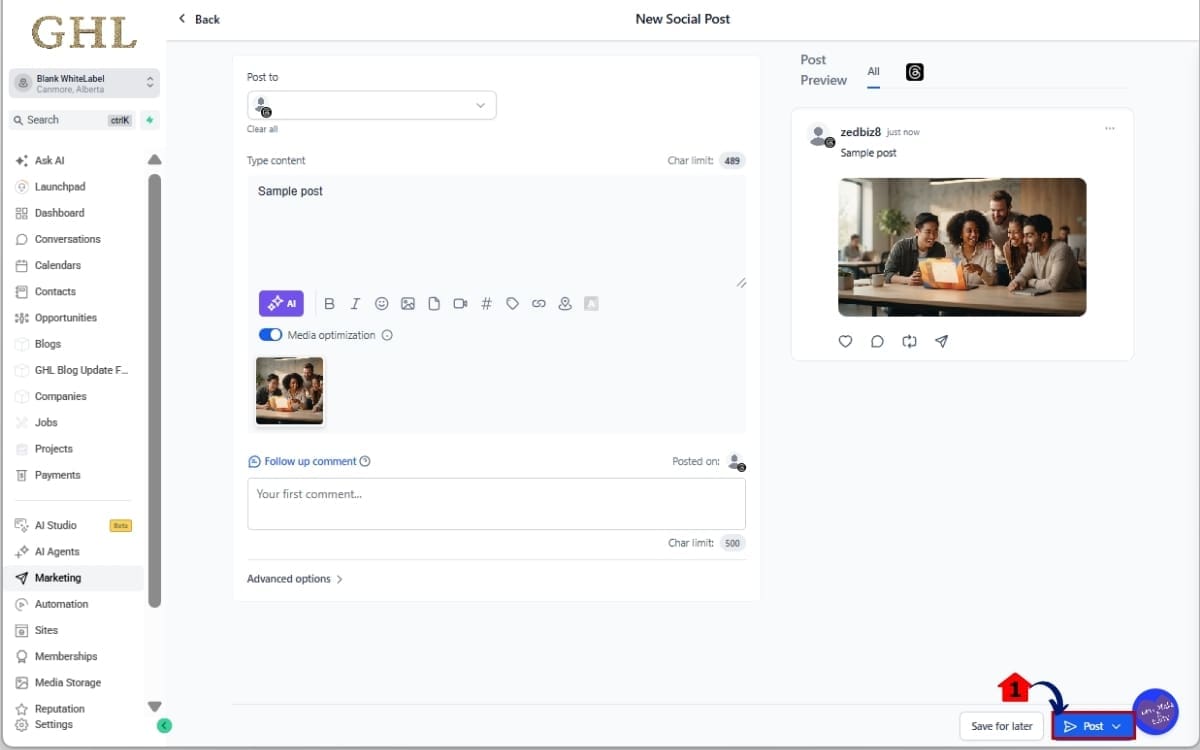
- Before wrapping up, keep an eye on your synced content and make sure everything is ready before publishing or scheduling your updated post.
6.1 Publish or schedule the updated content using your normal Social Planner workflow.
- Once you’re happy with the changes, you can publish the refreshed post right away or schedule it for a later date.
Once everything is running, there isn’t much to babysit. Let the daily sync do its job, then use Social Planner to review, track, and repurpose the Threads content that’s worth another run.
Quick Tips for Threads Post Sync
Threads Post Sync is simple once it’s running, but there are a few details worth knowing. Get these right and you’ll have a much smoother time managing Threads content inside GHL.
First, don’t expect instant updates. Threads Post Sync runs automatically every 24 hours, so a post you just published on Threads may not show up in Social Planner right away. If something seems missing, check the sync status before assuming the connection is broken.
Don’t just clone a post and send the exact same thing out again. Check which Threads posts actually got people watching, liking, replying, or sharing. Start with those, then change up the opening, rewrite the caption, or approach the same idea from a different direction.
You’ll also want to understand the historical limits. GHL syncs Threads posts from the last 30 days by default. Older posts going back as far as 365 days may also be imported when needed. That gives you plenty of previous content to dig through when you’re hunting for ideas worth another run.
There are a few Beta limitations to watch. Polls can be synced and viewed, but they can’t be cloned because poll creation isn’t currently supported in the Threads composer. Text file attachments aren’t supported for syncing or preview either.
Threads Post Sync is also one-way. Content moves from Threads into Social Planner, but changes don’t necessarily flow back the other way. For example, deleting a post from Threads doesn’t remove the synced version from Social Planner.
Finally, don’t panic if every engagement metric isn’t available. Some Threads engagement data may be limited by what the Threads API provides.
For agencies, one more thing matters: Threads Post Sync is enabled per location. If you manage multiple client accounts, make sure you’re working inside the correct location before enabling the Beta or troubleshooting a missing sync.
What Threads Post Sync Means for Your Business
Threads Post Sync isn’t just about keeping old posts organized. The bigger opportunity is using your existing content to make social media management faster and more consistent.
Think about an agency managing Threads for several clients. Before this update, your team might need to jump into Threads, search through previous posts, check engagement, and then manually rebuild anything they wanted to reuse. Do that across a bunch of client accounts and those little tasks start eating up the day.
With Threads Post Sync, much of that content can live inside GHL Social Planner. Your social media manager or VA can review synced posts, check the available engagement data, and find content that deserves another shot.
For example, maybe a client’s Threads post generated more replies and shares than usual. Instead of letting that idea disappear down the feed, your team can clone the supported post in Social Planner and turn it into the starting point for another piece of content.
Change the opening line. Update the message. Swap the media. Give the original idea a different angle.
That’s a much smarter content workflow than constantly staring at a blank composer wondering what to post next.
Threads Post Sync can also make client reporting easier. Having available engagement information alongside historical content gives your team another place to review what has been happening on Threads without constantly bouncing between platforms.
The real value is simple: reuse the work you’ve already done.
For agencies, marketers, and social media teams, Threads Post Sync can help turn old content into an organized library of ideas you can review, learn from, and repurpose. Less digging around. Less rebuilding. More time spent creating content that actually moves the needle.
FAQs – Thread Post Sync
Put Threads Post Sync to Work
Threads Post Sync gives GHL users a simpler way to bring Threads into their everyday social media workflow. Instead of leaving your previous posts sitting on another platform, you can bring that content into Social Planner and put it back to work.
The biggest advantage is having more of your social content in one place. You can review historical Threads posts, see available engagement data, and clone supported content without manually rebuilding everything from scratch.
For agencies, that can mean less time jumping between client accounts and social platforms. Your team can quickly find content that performed well, clone it, give it a fresh angle, and work it back into the content calendar.
Just remember the current limitations. Threads Post Sync is still a Beta feature available through Labs, syncing runs every 24 hours rather than in real time, and it must be enabled per location. Polls can be viewed but not cloned, and some engagement information depends on what the Threads API makes available.
Those limitations aside, this is a useful addition for anyone already using Threads as part of their social strategy.
Enable Threads Post Sync, let the first import finish, and then spend a few minutes looking through your previous posts. You may already have strong content sitting there that deserves another run.
Have you tried Threads Post Sync in GHL yet? More importantly, which of your old Threads posts are worth putting back to work?
Scale Your Business Today.
Streamline your workflow with GoHighLevel’s powerful tools.