- Form Visibility Scheduling: Campaign Timing
- Quick Summary – Form Visibility Scheduling
- Here are this week's HighLevel Updates 🚀
- What’s New With Form Visibility Scheduling
- Why Form Visibility Scheduling Matters
- How to Set Up Form Visibility Scheduling
- Quick Tips for Form Visibility Scheduling
- What Form Visibility Scheduling Means for Your Business
- Real-World Uses for Form Visibility Scheduling
- Form Visibility Scheduling FAQs
- Form Visibility Scheduling Makes Timing Easier
Form Visibility Scheduling: Campaign Timing
There’s now an easier way to manage Forms, Surveys, and Quizzes that only need to be available for a certain period. GoHighLevel’s Form Visibility Scheduling lets you set that window in advance. Once it’s configured, you don’t need to come back later just to manually change access.
Think of it as putting an availability window around your campaign. You decide when people can get in and, if needed, when that access ends. The schedule can follow the time zone you choose. And when somebody lands there too early or after it’s over, you decide where they go next.
This comes in handy when there’s a real cutoff to work around. Think webinar registration, a weekend promotion, contest entries, or a Quiz that should only be available for a few days. Get everything ready in GHL beforehand, set the dates, and you won’t need to come back just to close things down.
Form Visibility Scheduling gives you more control over time-sensitive GHL campaigns without manually opening or closing Forms, Surveys, and Quizzes. Set your availability window in advance, prevent late submissions, and guide visitors to the right message or next step automatically.
The latest GoHighLevel Changelog includes several other GHL feature updates that round out your daily workflow:
- Wait Action Enhancement: TikTok DM Replies
- India Recurring Mandate Support for Affiliate Indian Signup Pages
- Housecall Pro – More Workflow Actions & Triggers
- Email Services Dashboard for Agencies
- Email Sequences Now Available in Beta Labs
- Group Your Contacts by Source in Dashboards & Reporting
- MMLite Adoption Banner in Conversations
Keep reading for much more on all these updates and a deep dive into the Form Visibility Scheduling feature!
Quick Summary – Form Visibility Scheduling
Purpose: Form Visibility Scheduling lets you control when GHL Forms, Surveys, and Quizzes open and close without manually changing their availability.
Why It Matters: You can automate campaign deadlines, prevent late submissions, and give visitors a clear experience before a campaign opens or after it ends.
What You Get: You can set opening and closing dates, choose a time zone, customize unavailable messages, and redirect visitors to another URL.
Time To Complete: Most users should be able to configure Form Visibility Scheduling in just a few minutes once their campaign dates and visitor experience are planned.
Difficulty Level: This is a beginner-friendly GHL feature that requires no advanced workflow setup or technical knowledge.
Key Outcome: Your Forms, Surveys, and Quizzes can follow your campaign schedule automatically, helping your team spend less time managing deadlines manually.
Here are this week’s HighLevel Updates 🚀
Wait Action Enhancement: TikTok DM Replies
What’s New:
Instead of continuing after a fixed delay, your workflow can pause until someone replies to your TikTok DM.
Where in GHL:
Found in Automation → Workflows using the Wait action after sending a TikTok DM.
Automate marketing, manage leads, and grow faster with GoHighLevel.

Impact:
Your automation responds when someone actually joins the conversation, rather than after a timer runs out.
Recommended For:
Anyone using TikTok DMs to start conversations with potential customers.
India Recurring Mandate Support for Affiliate Indian Signup Pages
What’s New:
Supports recurring payment mandates for Indian affiliates, helping subscriptions comply with local banking requirements.
Where in GHL:
Available on Affiliate Program signup pages for users in India.
Impact:
Creates a smoother signup experience while reducing payment failures for recurring subscriptions.
Recommended For:
Agencies, SaaS businesses, and affiliate programs onboarding customers in India.
Housecall Pro – More Workflow Actions & Triggers
What’s New:
Adds new workflow triggers and actions for the Housecall Pro integration, giving you more ways to automate field service processes.
Where in GHL:
Inside Automation → Workflows when using the Housecall Pro integration.
Impact:
Expands automation possibilities between HighLevel and Housecall Pro, reducing manual work and improving operational efficiency.
Recommended For:
Home service businesses, field service companies, and agencies managing Housecall Pro clients.
Email Services Dashboard for Agencies
What’s New:
Introduces a centralized dashboard where agencies can monitor email services across their accounts.
Where in GHL:
Found in the Agency View under the new Email Services Dashboard.
Impact:
Makes it easier to monitor email health, identify issues, and manage deliverability from one place.
Recommended For:
Agency owners, support teams, and admins managing multiple client email services.
Email Sequences Now Available in Beta Labs
What’s New:
Introduces Email Sequences as a Beta Labs feature, providing another way to create structured email follow-up campaigns.
Where in GHL:
Enable it from Settings → Labs, then access Email Sequences after activation.
Impact:
Cuts down the time spent checking different areas just to see how your email services are performing.
Recommended For:
Marketers, agencies, coaches, and businesses running nurture campaigns or onboarding emails.
Group Your Contacts by Source in Dashboards & Reporting
What’s New:
Lets you organize contact reports based on where your leads originated.
Where in GHL:
Available within Dashboards & Reporting when viewing contact analytics.
Impact:
Makes it easier to compare lead sources and identify which marketing channels are producing the best results.
Recommended For:
Marketing teams, agency owners, and businesses tracking campaign performance across multiple lead sources.
MMLite Adoption Banner in Conversations
What’s New:
Displays a helpful banner inside Conversations to encourage users to adopt the new MMLite messaging experience.
Where in GHL:
Appears within the Conversations module for eligible accounts.
Impact:
Helps users discover and transition to MMLite while highlighting its benefits directly inside the messaging interface.
Recommended For:
Current HighLevel users exploring the latest messaging experience and teams preparing to migrate to MMLite.
What’s New With Form Visibility Scheduling
GoHighLevel has added Form Visibility Scheduling to Forms, Surveys, and Quizzes. The new setting lets you control exactly when visitors can access and submit each asset. This means your campaign content no longer needs to stay available indefinitely or rely on you to manually manage access.
When you enable Form Visibility Scheduling, you can choose when your Form, Survey, or Quiz opens. Select Right Away if you want it available immediately, or Pick a Date to schedule a future launch. You can then choose Never for the closing time or Pick a Date if your campaign has a firm deadline.
GHL also lets you select the time zone used for the schedule. This is important when you’re running campaigns for clients or audiences in different locations because the opening and closing times can follow the correct campaign time zone.
What about the people who click your link after everything is over? GHL gives you a couple of ways to handle them. You can leave a message explaining that the campaign has finished, or point them somewhere else entirely. A waitlist, another promotion, or your next landing page could all make sense.
Already have Forms, Surveys, or Quizzes running? Nothing changes unless you decide to use the new scheduling setting. Leave it switched off and everything keeps working the way it does now.
Why Form Visibility Scheduling Matters
Campaign deadlines are easy to set. Remembering to manually close every Form, Survey, or Quiz at exactly the right time isn’t. Form Visibility Scheduling removes that extra task by letting GHL manage the availability window for you.
This matters when a deadline actually means something. An event may have a registration cutoff. A contest may only accept entries for three days. A limited promotion might end at midnight. Without Form Visibility Scheduling, leaving the asset active could allow visitors to keep submitting after the campaign has officially ended.
Agency life makes this even more useful. One client might have a webinar going live Monday, while another has a promotion ending Friday in a completely different time zone. Set those dates while you’re building the campaigns and there’s less for your team to keep track of later.
There’s also a better experience for visitors. Someone arriving too early can see a clear pre-launch message instead of wondering why the campaign isn’t ready. Someone arriving after the deadline can see an expired message or be redirected to another useful page.
Form Visibility Scheduling helps your GHL campaigns follow the timeline you planned. You can prepare them in advance, let them open automatically, stop new submissions at the deadline, and make better use of the traffic that arrives before or after the campaign window.
How to Set Up Form Visibility Scheduling
Form Visibility Scheduling is set up inside the settings of the Form you want to control. You’ll enable Schedule Visibility, choose when the Form opens and closes, and select the time zone the schedule will follow.
Before you begin, log in to the correct GoHighLevel sub-account and locate the Form you want to update. Here are the steps to set up Form Visibility Scheduling in GoHighLevel.
- Open Your Form in Go High Level.
- Enable Form Visibility Scheduling.
- Set the Opening Time in the Forms.
- Set the Closing Time in the Forms.
- Select Your Time Zone in the Settings.
- Preview and Save Your Settings.
To start, make sure you are logged in to your GoHighLevel sub-account.
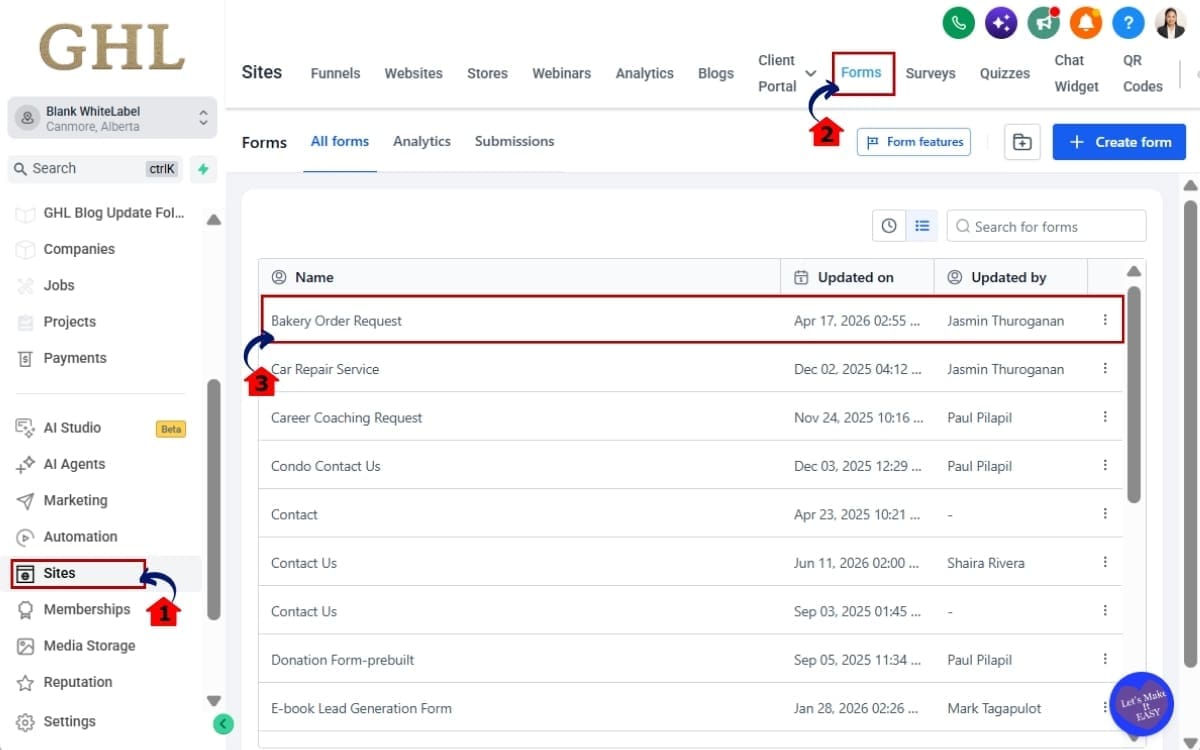
Step 1.0 – Open Your Form in Go High Level
- Start by locating the Form you want to add scheduling to inside your GoHighLevel sub-account.
1.1 Click Sites in the left menu.
- This opens the area where GHL keeps your website, funnel, Form, Survey, and other site-related tools.
1.2 Click Forms in the submenu.
- This takes you to the Forms area where you can view and manage the Forms in your sub-account.
1.3 Find and open the Form you want to schedule.
- Choose the Form connected to the campaign where you want to control the opening and closing times.
Step 2.0 – Enable Form Visibility Scheduling
- Next, head into the Form settings where you’ll find the controls for scheduling when it’s available.
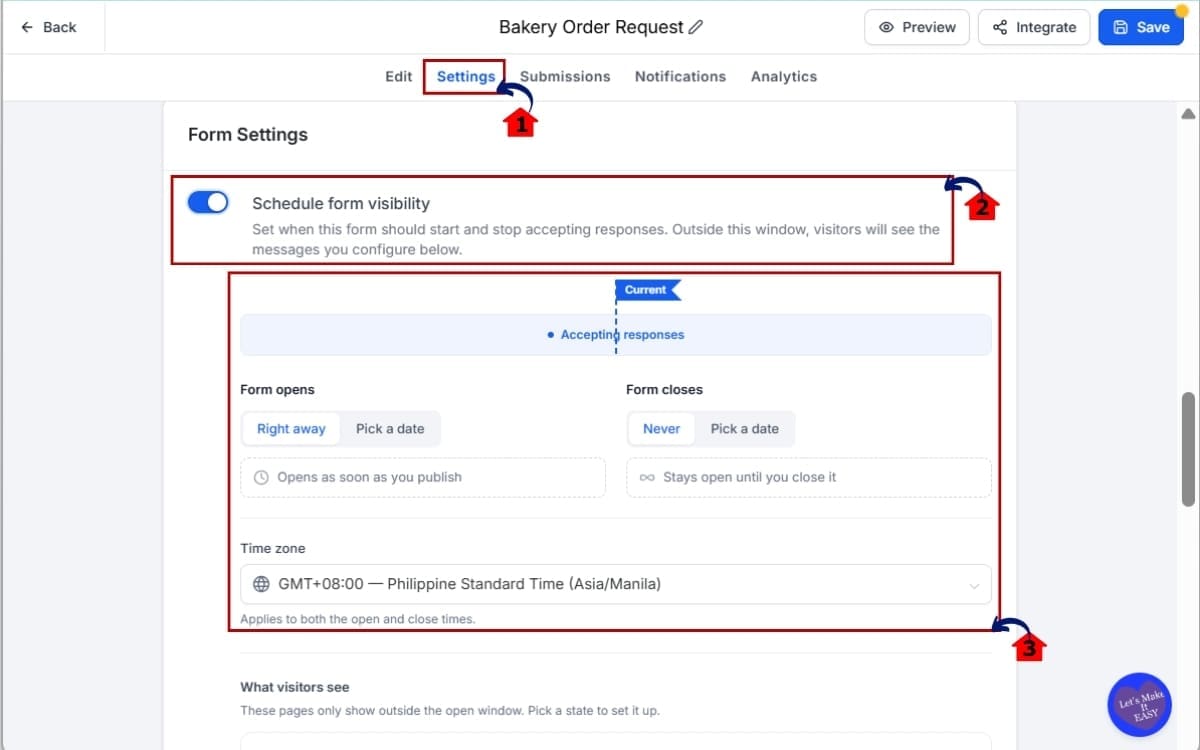
2.1 Open the Form you want to update and navigate to its settings.
- Make sure you’re editing the correct Form before changing its availability settings.
2.2 Find the Schedule Visibility setting and enable it.
- Turning this setting on gives you access to the scheduling options for the Form.
2.3 Once enabled, GHL will display the options used to control when the Form is available.
- From here, you can start setting when the Form should open, when it should close, and what happens outside that window.
Step 3.0 – Set the Opening Time in the Forms
- Choose when you want your Form to become available so visitors can start viewing and submitting it at the right time.
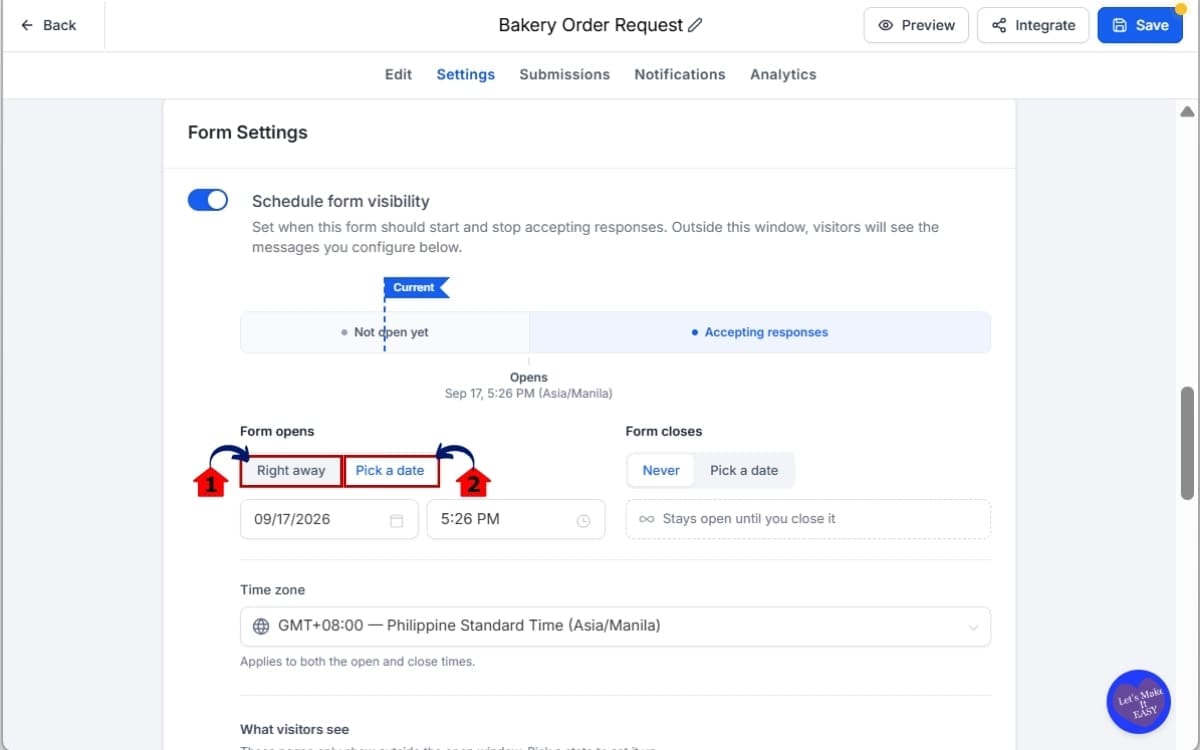
3.1 Choose Right Away if you want the Form to become available immediately.
- Use this option when there’s no future launch date and you want visitors to have access as soon as the Form is published.
3.2 Choose Pick a Date if you want to schedule it to open at a specific date and time.
- This is useful when you want to build and publish a campaign before registrations, entries, or submissions officially begin.
Step 4.0 – Set the Closing Time in the Forms
- Next, decide whether your Form should stay open or stop accepting submissions after a certain date.
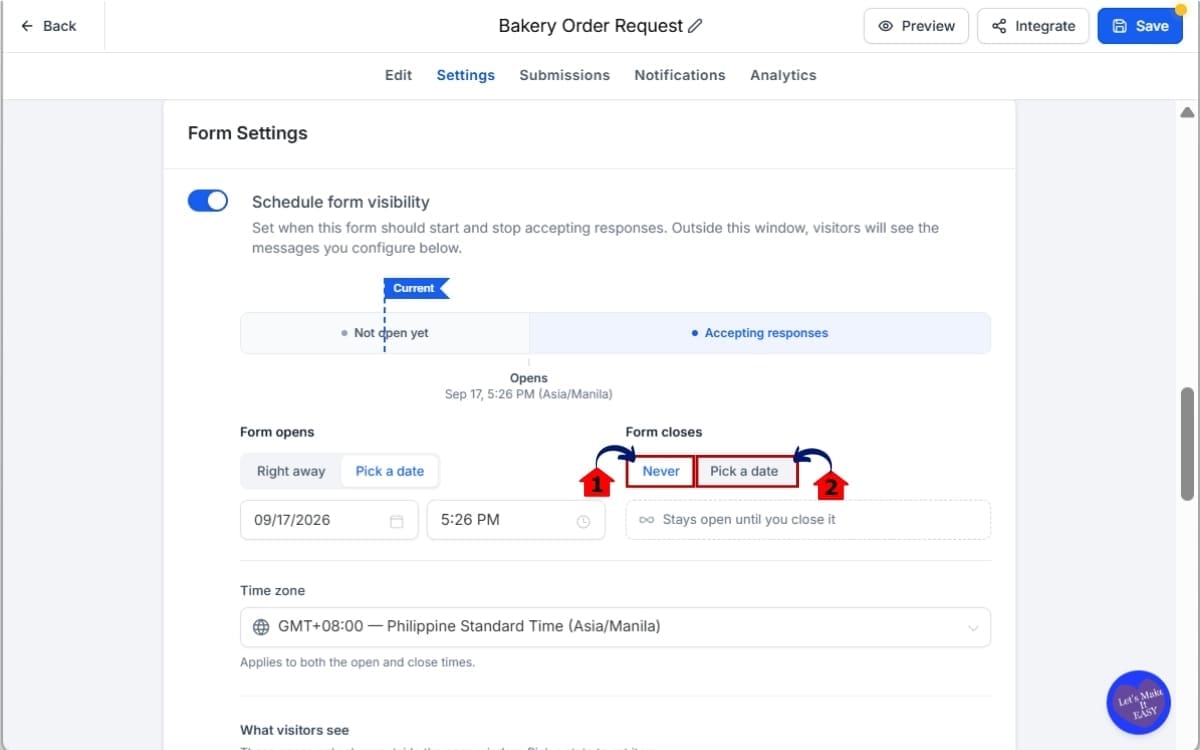
4.1 Select Never if you don’t need the Form to expire.
- Choose this option when you want the Form to remain available without setting an automatic closing date.
4.2 Select Pick a Date when your campaign has a specific closing date and time.
- Once the scheduled closing time arrives, GHL blocks new submissions automatically.
Step 5.0 – Select Your Time Zone in the Settings
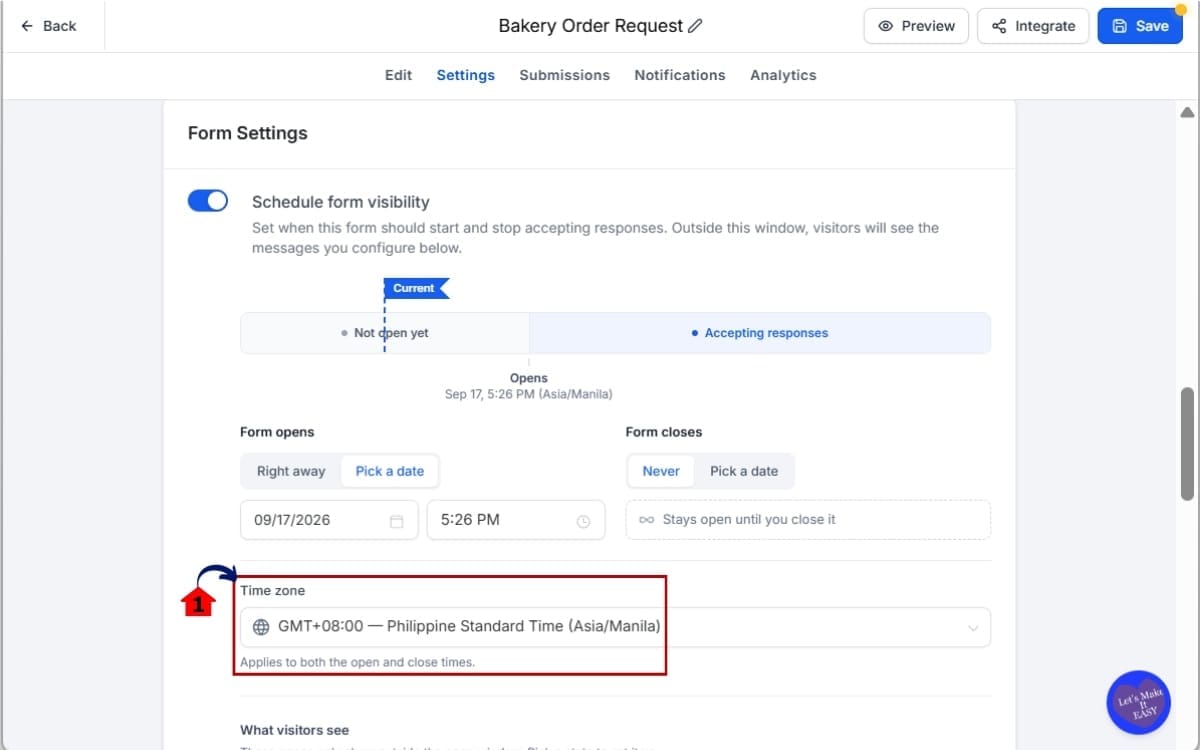
- Set the time zone your Form schedule should follow so the opening and closing times match your campaign plan.
5.1 Choose the time zone that should control your Form Visibility Scheduling.
- Select the time zone that matches the location or audience your campaign dates are based on.
Step 6.0 – Preview and Save Your Settings
- Before finishing, review your scheduling setup to make sure the Form will open and close when you expect it to.
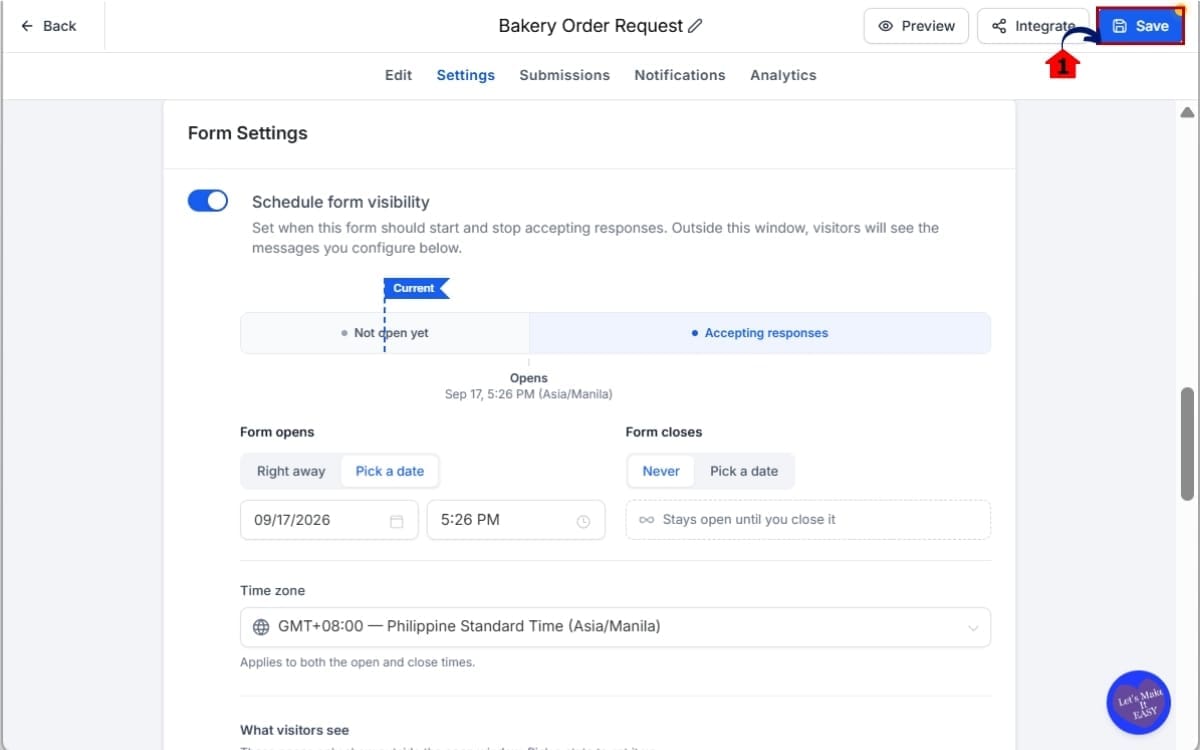
6.1 Save the forms, quiz or survey
- Review your dates, times, time zone, messaging, and redirect destination before relying on the schedule.
Once everything is configured, Form Visibility Scheduling handles the availability automatically. At the opening time, your Form, Survey, or Quiz begins accepting responses. At the closing time, GHL blocks new submissions and shows the unavailable experience you configured.
Quick Tips for Form Visibility Scheduling
Form Visibility Scheduling can remove several manual tasks from your GHL campaigns, but a few simple checks can help you get more from the feature. Start with the time zone. Before publishing, confirm that the selected time zone matches the campaign schedule, especially when your agency and client work in different locations.
Next, test what visitors will see outside the active window. Your pre-launch message should clearly explain when the Form, Survey, or Quiz becomes available. After the deadline, use a simple expired message that tells visitors what happened and what they can do next.
Don’t waste traffic after a campaign closes. The Open a Link option can redirect visitors to a waitlist, another offer, a landing page, or an upcoming event. This lets Form Visibility Scheduling turn expired campaign traffic into another useful opportunity instead of leaving visitors at a dead end.
It’s also a good idea to preview the unavailable page before your campaign launches. Check your dates, messaging, links, and visitor experience while you still have time to fix mistakes.
Finally, avoid manually disabling an asset when Form Visibility Scheduling is already set to close it. Let the schedule do the work. The goal is to reduce the number of campaign deadlines your team has to remember while keeping the visitor experience clear from launch through expiry.
What Form Visibility Scheduling Means for Your Business
It’s one of those small jobs that’s easy to forget when the day gets busy. Instead of asking someone to jump back into GHL later to open or close a Form, Survey, or Quiz, you can sort out the dates while you’re setting everything up.
This becomes useful pretty quickly once your campaign calendar fills up. You could have an event closing registrations today and another client launching a promotion tomorrow morning. If the availability is already scheduled, nobody on the team has to remember to jump into GHL at exactly the right time.
It can also reduce problems caused by late submissions. If registration closes at midnight, Form Visibility Scheduling can stop new responses at the scheduled time. You don’t have to check the campaign manually or explain why someone was able to submit after the advertised deadline.
Just because a campaign has finished doesn’t mean people stop clicking the links. An old email might get opened weeks later, or someone could stumble across a social post you forgot was still out there. Rather than dropping those visitors onto something that’s already closed, send them somewhere that still makes sense.
For agencies, that means cleaner campaign management and a more consistent visitor experience. You can prepare campaigns earlier, automate another piece of the campaign lifecycle, and spend less time watching the clock.
Real-World Uses for Form Visibility Scheduling
Form Visibility Scheduling becomes especially useful when your campaign has a real start or end date. Instead of relying on your team to make changes at the right moment, you can prepare the campaign in GHL and let the availability settings handle the timing.
For event registrations and webinars, you can publish the registration Form ahead of time and show a “Registration Opens Soon” message until the scheduled opening. When registration closes, GHL can automatically stop new submissions and display an expired message.
Say you’re running a coupon that’s only good until Sunday night. There’s no reason the Form should still be taking entries on Monday morning. Set the campaign window ahead of time and, once Sunday’s cutoff hits, GHL can stop any new submissions from coming through.
Quizzes and contests can work the same way. Set a fixed participation window so entries open and close at the times you choose. This helps keep deadline-based campaigns consistent without someone manually monitoring the Quiz.
You can also put expired traffic to work. After a campaign ends, redirect visitors to a waitlist, another landing page, a future event, or your next offer. For agencies running multiple campaigns, this creates a smoother transition between promotions while reducing manual updates.
The goal is simple: match the availability of your GHL Forms, Surveys, and Quizzes to the actual lifecycle of your campaign.
Form Visibility Scheduling FAQs
Form Visibility Scheduling Makes Timing Easier
Once you’ve set the dates, there’s not much left to babysit. Your Form, Survey, or Quiz can become available when you want it to, stop taking responses at the cutoff, and deal with anyone who arrives outside those times. GHL handles those pieces based on the schedule you’ve already put in place.
For agencies, this can remove another small but important task from campaign management. Build the campaign, set the correct dates and time zone, configure your visitor experience, and let GHL handle the timing automatically.
The feature can also help you create a cleaner experience after a campaign ends. Rather than leaving an expired Form active or sending visitors to a dead end, you can display a clear message or redirect that traffic to a waitlist, upcoming event, landing page, or another relevant offer.
If there’s a firm date attached to the campaign, this feature is worth a look. Webinar sign-ups, event registrations, contests, short promotions, and lead campaigns can all open and close around the timeline you’ve already advertised.
Before building anything new, check what you already have running. Maybe there’s a webinar Form someone closes by hand every month or a Quiz that needs to disappear after a certain date. Those little manual jobs are good candidates for scheduling.
Scale Your Business Today.
Streamline your workflow with GoHighLevel’s powerful tools.