

- GHL Email Attachment Permissions Are Changing
- Quick Summary – Email Attachment Permissions
- Here are this week's HighLevel Updates 🚀
- What’s Changing With Email Attachment Permissions
- Why Email Attachment Permissions Matter
- Who Email Attachment Permissions Affect
- How to Prepare for Email Attachment Permissions
- Email Attachment Permission Tips
- What Email Attachment Permissions Mean for Agencies
- FAQs About Email Attachment Permissions
- Email Attachment Permissions: Final Takeaway
GHL Email Attachment Permissions Are Changing
GHL email attachment permissions are getting a major security upgrade. HighLevel is changing how email conversation attachments are accessed so sensitive files are better protected when apps try to open or display them outside the platform.
Right now, some applications rely on attachment links that can be accessed directly. That’s changing. HighLevel is moving toward a permission-based model where apps must have the proper file access permission and use authenticated access before retrieving an attachment.
For most everyday HighLevel users, this won’t change how you work inside GHL. You’ll still be able to view and manage email conversation attachments as normal.
Marketplace apps are where this update could cause the most work. If an app accesses email attachments outside HighLevel, the developer may need to add new permissions, adjust how the files are retrieved, and have users reapprove access.
The deadline matters too. Existing attachment links will continue working only until November 30, 2026. After that, apps that haven’t been updated could run into broken attachment previews, failed downloads, or access errors.
In this guide, we’ll break down what the new GHL email attachment permissions mean, who needs to take action, and how developers can prepare before the cutoff date.
The latest GoHighLevel Changelog includes several other GHL feature updates that round out your daily workflow:
- Wait Action Enhancement: TikTok DM Replies
- India Recurring Mandate Support for Affiliate Indian Signup Pages
- Housecall Pro – More Workflow Actions & Triggers
- Email Services Dashboard for Agencies
- Email Sequences Now Available in Beta Labs
- Group Your Contacts by Source in Dashboards & Reporting
- MMLite Adoption Banner in Conversations
Keep reading for much more on all these updates and a deep dive into the Email Attachment Permissions feature!

Quick Summary – Email Attachment Permissions
Purpose: This update changes how external apps access GHL email conversation attachments by moving to a permission-based and authenticated access model.
Why It Matters: Email attachments can contain sensitive customer information, so tighter access controls help reduce unnecessary exposure and improve file security.
What You Get: Developers get a more secure way to retrieve attachments, while most everyday HighLevel users should see little to no change in how they work inside GHL.
Time To Complete: Most developers should first review their attachment workflows, permissions, and reauthorization process before making any required updates.
Difficulty Level: Moderate. The change mainly affects marketplace developers and third-party apps that access or display email attachments outside HighLevel.
Key Outcome: Updating GHL email attachment permissions before November 30, 2026 helps prevent broken attachment access and keeps affected integrations working under the new security model.
Here are this week’s HighLevel Updates 🚀
Wait Action Enhancement: TikTok DM Replies
What’s New:
Instead of continuing after a fixed delay, your workflow can pause until someone replies to your TikTok DM.
Where in GHL:
Found in Automation → Workflows using the Wait action after sending a TikTok DM.
Automate marketing, manage leads, and grow faster with GoHighLevel.

Impact:
Your automation responds when someone actually joins the conversation, rather than after a timer runs out.
Recommended For:
Anyone using TikTok DMs to start conversations with potential customers.
India Recurring Mandate Support for Affiliate Indian Signup Pages
What’s New:
Supports recurring payment mandates for Indian affiliates, helping subscriptions comply with local banking requirements.
Where in GHL:
Available on Affiliate Program signup pages for users in India.
Impact:
Creates a smoother signup experience while reducing payment failures for recurring subscriptions.
Recommended For:
Agencies, SaaS businesses, and affiliate programs onboarding customers in India.
Housecall Pro – More Workflow Actions & Triggers
What’s New:
Adds new workflow triggers and actions for the Housecall Pro integration, giving you more ways to automate field service processes.
Where in GHL:
Inside Automation → Workflows when using the Housecall Pro integration.
Impact:
Expands automation possibilities between HighLevel and Housecall Pro, reducing manual work and improving operational efficiency.
Recommended For:
Home service businesses, field service companies, and agencies managing Housecall Pro clients.
Email Services Dashboard for Agencies
What’s New:
Introduces a centralized dashboard where agencies can monitor email services across their accounts.
Where in GHL:
Found in the Agency View under the new Email Services Dashboard.
Impact:
Makes it easier to monitor email health, identify issues, and manage deliverability from one place.
Recommended For:
Agency owners, support teams, and admins managing multiple client email services.
Email Sequences Now Available in Beta Labs
What’s New:
Introduces Email Sequences as a Beta Labs feature, providing another way to create structured email follow-up campaigns.
Where in GHL:
Enable it from Settings → Labs, then access Email Sequences after activation.
Impact:
Cuts down the time spent checking different areas just to see how your email services are performing.
Recommended For:
Marketers, agencies, coaches, and businesses running nurture campaigns or onboarding emails.
Group Your Contacts by Source in Dashboards & Reporting
What’s New:
Lets you organize contact reports based on where your leads originated.
Where in GHL:
Available within Dashboards & Reporting when viewing contact analytics.
Impact:
Makes it easier to compare lead sources and identify which marketing channels are producing the best results.
Recommended For:
Marketing teams, agency owners, and businesses tracking campaign performance across multiple lead sources.
MMLite Adoption Banner in Conversations
What’s New:
Displays a helpful banner inside Conversations to encourage users to adopt the new MMLite messaging experience.
Where in GHL:
Appears within the Conversations module for eligible accounts.
Impact:
Helps users discover and transition to MMLite while highlighting its benefits directly inside the messaging interface.
Recommended For:
Current HighLevel users exploring the latest messaging experience and teams preparing to migrate to MMLite.
What’s Changing With Email Attachment Permissions
The biggest change with GHL email attachment permissions is how apps get access to files.
HighLevel is moving away from attachment links that can be opened directly. Instead, applications will need the correct file access permission and authenticated access before they can retrieve or display an email attachment.
That means developers can no longer assume that having the attachment URL is enough. The app will need to confirm it has permission before trying to access the file.
HighLevel is also moving attachment links to a new, more secure format. This creates tighter control over who can access files and helps protect customer information stored inside email conversations.
For now, this update only applies to email conversation attachments. HighLevel plans to extend the same approach to other conversation channels and file-based custom fields in future phases.
Developers have some breathing room before the change fully kicks in. The current attachment links will still work through November 30, 2026, so there’s time to update permissions, adjust the app, and make sure everything works properly before the old setup is retired.
If your application doesn’t access conversation attachments, you don’t need to make any changes.
Why Email Attachment Permissions Matter
GHL email attachment permissions are changing for one main reason: better protection for sensitive customer files.
Email conversations can include contracts, documents, screenshots, invoices, and other information that shouldn’t be exposed through a simple direct link. HighLevel is tightening access so attachments are only available to users and applications with the right permissions.
That matters because direct-access links give developers less control over who can retrieve a file. With the new permission-based model, apps need to prove they’re allowed to access the attachment before the file is delivered.
The agency side gets stronger protection around files shared with connected apps. The developer side gets a clearer standard for how those files should be accessed.
HighLevel already uses granular authorization rules and role-based access controls in other parts of the platform, so this change fits with its broader approach to protecting customer data.
The practical takeaway is simple: if your app handles email attachments outside GHL, this isn’t an update to ignore. Updating your access flow now can help prevent broken downloads and permission errors later.
Who Email Attachment Permissions Affect
GHL email attachment permissions will not affect most users in a noticeable way.
If you’re using HighLevel normally and viewing email attachments inside the platform, your day-to-day experience should stay the same. There’s no major workflow change for standard users.
The people who need to pay attention are marketplace developers and third-party apps that access or display email conversation attachments outside HighLevel.
This could mean changing the app’s existing file workflow, requesting the new level of access, and making sure attachments are no longer being fetched through an open link.
People already using the app might have to approve access again before the new permission works. So developers should think beyond the technical update and make the reconnect process easy for current users.
If your app does not access conversation attachments, there’s nothing you need to change.
It’s a good idea for agencies to review their connected apps and see whether email attachments are part of the workflow. If they are, check that the app developer is working toward the November 30, 2026 deadline.
How to Prepare for Email Attachment Permissions
GHL email attachment permissions will require affected developers to review how their apps access and display email conversation files. The key goal is simple: stop relying on directly accessible attachment links and make sure your app has the correct permission and authenticated access in place before November 30, 2026.
Because the update notice does not provide the exact API endpoints or developer-screen locations for this change, the steps below focus only on the migration actions HighLevel has confirmed.
- Check Whether Your App Uses Email Attachments.
- Review Your App Permissions.
- Update How Attachments Are Retrieved.
- Plan for User Reauthorization.
To start, make sure you are logged in to your GoHighLevel sub-account.
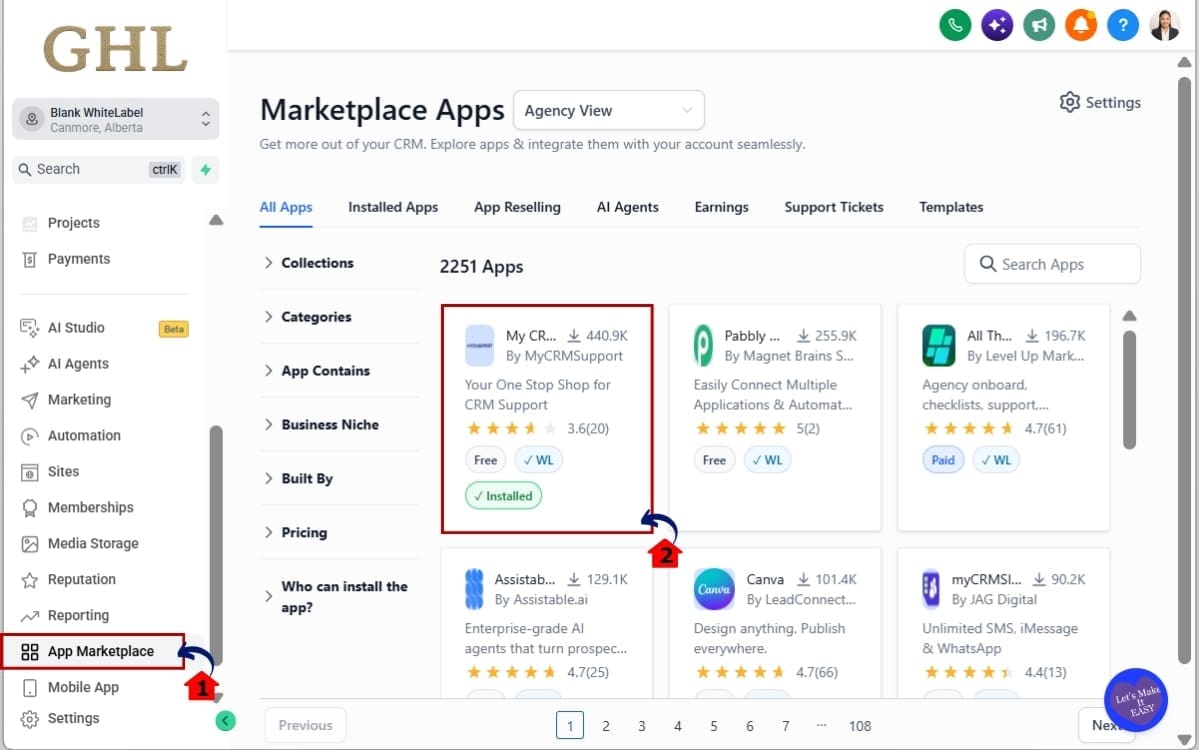
Step 01 – Check Whether Your App Uses Email Attachments
- Check whether your app opens, downloads, displays, or stores email attachments.
1.1 Open app marketplace.
• Look for any feature that retrieves, previews, downloads, forwards, or displays email conversation attachments outside HighLevel.
1.2 Confirm whether action is required.
• If your app does not access conversation attachments, you do not need to make changes for this phase.
Step 02 – Review Your App Permissions
- Review your app’s permissions and make sure it has the file access needed for email attachments.
2.1 Check whether your app has the required file access permission.
• HighLevel is introducing an additional file access permission for conversation attachments.
2.2 Identify existing users who may need to grant that permission.
• Developers should expect affected users to reauthorize their application.

Step 03 – Update How Attachments Are Retrieved
- HighLevel is moving attachment links to a more secure format.
3.1 Make sure attachment requests use authenticated access.
• Your app should verify that it has permission before retrieving or displaying the file.

Step 04 – Plan for User Reauthorization
- Identify existing installations that use email attachments.
4.1 Explain why the new permission is being requested.
• Keep the message simple. The permission is needed so the app can continue accessing email conversation attachments securely.

The main thing is not to leave this until the last minute. If email attachments are part of your app, this should be treated as a required migration rather than an optional improvement.
Email Attachment Permission Tips
GHL email attachment permissions are mostly a developer change, but a few practical checks can save a lot of trouble before the deadline.
Don’t count on the current attachment links lasting forever. They’ll only be supported until November 30, 2026, and any app still using them after that could start seeing files fail to load.
Test every workflow that touches an email attachment. That includes previews, downloads, file displays, forwarding, and any process that stores an attachment link for later use.
When attachment access fails, the app should say why. A short message asking the user to reconnect or reauthorize is a lot better than a dead download button.
Don’t request extra permissions if your app doesn’t need them. If your application never accesses conversation attachments, there is no action required for this phase.
It’s also smart to document which parts of your app depend on email attachments. That will make future updates easier, especially because HighLevel plans to extend this access model to other conversation channels and file-based custom fields later.
Finally, keep an eye on future HighLevel developer updates. This email attachment change is only the first phase, so developers with file-heavy integrations should expect similar permission requirements in other areas over time.
What Email Attachment Permissions Mean for Agencies
GHL email attachment permissions won’t create a major day-to-day change for most agencies.
If your team only opens attachments from inside HighLevel, you probably won’t notice much of a difference. The real issue is with outside apps or integrations that try to pull those files beyond GHL.
Agencies using marketplace or custom apps should find out whether those tools rely on attachment access. If they do, the provider may need to update both permissions and the file retrieval setup.
That matters because an outdated integration could create real workflow problems. Attachment previews may stop loading. Downloads may fail. A connected system may no longer be able to retrieve files it used to access through a direct link.
The good news is that this change is designed to improve security without creating unnecessary disruption for normal users. HighLevel is putting tighter controls around sensitive files while keeping the standard in-platform experience familiar.
Agencies should take a minute to check which integrations depend on attachments. If any do, make sure the developer is already working on the new access setup before it becomes an issue.
FAQs About Email Attachment Permissions
Email Attachment Permissions: Final Takeaway
GHL email attachment permissions are moving toward a more secure, permission-based access model.
Most people using HighLevel day to day probably won’t notice much of a difference. The bigger changes are for marketplace apps and outside tools that pull email attachments from GHL.
Developers have until November 30, 2026 to get everything in place. That includes the new file permission, a revised way of pulling attachments, and a reauthorization step for users if needed.
This isn’t just a technical cleanup. It gives HighLevel tighter control over sensitive files and creates a safer way for connected applications to handle customer attachments.
If your app touches email attachments, review it now. Test the workflow, confirm permissions, and get ahead of the deadline before old attachment links stop working.
And if you’re an agency using marketplace apps, it’s worth checking with your app providers to make sure they’re ready too.
Scale Your Business Today.
Streamline your workflow with GoHighLevel’s powerful tools.


