

- Simplify setup, unlock Venmo support, and future-proof your payments with PayPal’s new keyless OAuth connection.
- Quick Summary – Keyless PayPal Setup at a Glance
- What’s New – OAuth + SDK for Simpler Setup
- What’s Changed – From Manual to Magical
- Why This Matters – Real Results for Agencies
- How to Use – Activate Keyless PayPal Step by Step
- Step 01 – Access the Main Left Hand Menu in GoHighLevel
- What This Means – Bigger Picture PayPal Strategy
- Conclusion – Time to Make the Switch
Simplify setup, unlock Venmo support, and future-proof your payments with PayPal’s new keyless OAuth connection.
Let’s be real: connecting PayPal in GoHighLevel used to be a chore. Hunting down API credentials, copying and pasting keys, and praying nothing breaks along the way? Not exactly the smoothest onboarding experience for your clients. That changes now. GoHighLevel has rolled out a brand-new PayPal integration using keyless OAuth and PayPal’s latest SDK. This isn’t just a backend update—it’s a total upgrade for how fast, simple, and powerful your checkout experience can be.
This means no more credential digging, instant connection in just a few clicks, and support for modern options like Venmo and Pay Later—right inside your existing GHL payment flows. Whether you’re managing one subaccount or hundreds, this move to OAuth means better conversions, less setup drama, and a payments experience that’s finally future-proof.

This new PayPal integration eliminates API headaches, adds Venmo support, and makes future payment features easier to adopt—all with a few clicks. If you’re serious about faster checkouts and better conversion rates, this update is a must.
Quick Summary – Keyless PayPal Setup at a Glance
Purpose:
This update replaces the old PayPal API key setup with a keyless OAuth integration that is faster, more secure, and easier to manage.
Why It Matters:
It allows agencies and clients to connect PayPal in seconds, offer more payment methods like Venmo, and future-proof their checkout systems.
What You Get:
One-click PayPal connection, automatic support for Pay Later and Venmo, and a foundation for Apple Pay, Google Pay, and direct card processing.
Time to Complete:
Under 2 minutes for new or existing accounts to connect or reconnect PayPal using OAuth.
Difficulty Level:
Super easy—no developer setup or API keys required.
What’s New – OAuth + SDK for Simpler Setup
GoHighLevel’s new PayPal integration is built on OAuth—and if that word sounds technical, don’t worry. All it means is: no more API keys, ever.
Instead of digging through your PayPal account to find client IDs or secret keys, you (or your clients) can now connect PayPal to a GHL subaccount with a few simple clicks. That’s because this integration uses PayPal’s official OAuth flow, which securely authenticates and links the account without needing any manual config.
Automate marketing, manage leads, and grow faster with GoHighLevel.

But there’s more.
This update also includes PayPal’s latest SDK (software development kit). That’s geek-speak for “we can now tap into more advanced features faster.” You’re getting a modern, flexible connection that will keep up as PayPal adds new global payment methods over time.
Here’s what’s new in plain English:
- One-click PayPal connection from inside GHL
- No need for API keys or developer credentials
- Fully secure OAuth flow, built directly into the interface
- A new SDK foundation for future payment features
Less setup. More power. No hassle.
What’s Changed – From Manual to Magical
- If you’ve ever walked a client through connecting PayPal in GoHighLevel before, you know the drill:
- Create a PayPal app.
- Copy the client ID.
- Find the secret key.
- Paste everything into the right fields.
- Hope it works.
That’s gone.
Now, with the keyless OAuth integration, connecting PayPal is as easy as logging in. Subaccounts just click “Connect,” authorize the app via PayPal, and boom—they’re ready to take payments. No copy/paste, no dev settings, no client confusion.
And here’s the best part:
This isn’t just about easier setup. The checkout page itself gets a boost too.
Once connected via the new method, buyers can now see:
- PayPal
- Pay Later
- Venmo (when available for the buyer)
This gives your clients more flexibility, especially if their audience skews younger or mobile-first. Venmo isn’t just trendy—it’s frictionless. And when it shows up at checkout, conversion rates go up.
So what’s changed?
- Setup time drops from 10+ minutes to 10 seconds
- Checkout options expand without any extra configuration
- Support requests from clients trying to “make PayPal work” basically vanish
Why This Matters – Real Results for Agencies
Let’s talk about what really counts: results.
This PayPal update isn’t just a nicer setup flow—it solves real agency pain points. Whether you’re onboarding dozens of clients or supporting a few high-ticket retainers, anything that saves time, reduces support, and improves performance is a win. This is one of those wins.
Here’s how it helps you, the agency owner:
- Faster Onboarding = Faster Revenue
No more delays waiting for clients to find API keys or send login access. They can connect PayPal in seconds. That means you can launch faster, get paid sooner, and keep momentum high. - Better Conversion Rates
Buyers don’t want friction. With PayPal, Pay Later, and Venmo all showing at checkout (when available), you’re giving them more ways to say “yes” without digging for their wallet. That translates to fewer cart abandons and more completed checkouts. - Future-Proof Simplicity
This SDK-based integration is built to grow. As PayPal releases more tools—like Apple Pay, Google Pay, and direct card support—GHL can plug into them with less work on your end. Your clients stay current without major rebuilds. - You Look Like a Pro
Less support drama, smoother launches, better checkout UX? You look like you know what you’re doing. Because you do.
Bottom line: This isn’t just a technical improvement. It’s a strategic one.
How to Use – Activate Keyless PayPal Step by Step
Getting started with the new PayPal integration is surprisingly easy—and it doesn’t matter whether you’re working with a brand new subaccount or updating an existing one. Here’s exactly how to roll it out:
Step 01 – Access the Main Left Hand Menu in GoHighLevel
- The Main Menu on the Left side of your screen has all the main areas that you work in when using GHL
1.1 Click on the Payments Menu Item.
- Access the ‘Payments’ section of GoHighLevel
- You’ll now be in the ‘Payments’ section of GHL, where you can access the “Integration” section from the top menu:
1.2 Click on the ‘Integration menu link.
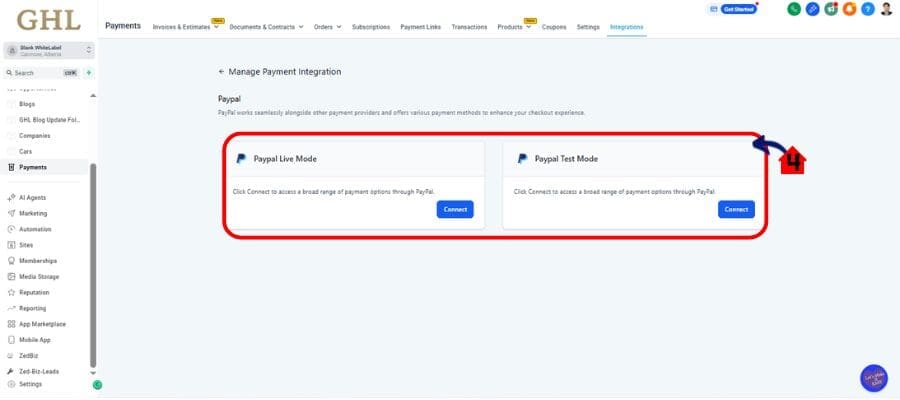
1.3 Click Paypal
- Click Paypal and Connect it.

1.4 Paypal Connections:
- If the subaccount was created after this feature rolled out, the keyless integration is already available by default.
- Just head to Payments > Integrations > PayPal, click “Connect,” log into PayPal, and authorize the connection.
- Done in under 30 seconds.
For Existing Accounts:
- Go to Payments > Integrations > PayPal in the subaccount.
- Click the Manage button next to the existing PayPal connection.
- You’ll see an option to Reconnect—click it.
- You’ll be redirected to PayPal to complete the OAuth authorization.
- Once authorized, your old connection is upgraded. New features like Venmo will automatically show when eligible.
Note – This feature is available in Labs now and will be generally available. To enable it for subaccounts, go to Agency Dashboard, open Agency Settings, select Labs, open the Subaccounts tab, find PayPal Keyless Integration, and activate it.
Pro Tip: Test this in a staging account first so you can build SOPs or client instructions.
Pro Tips – Agency Use Cases
This update isn’t just for convenience—it’s a revenue-building tool for savvy agencies. Here’s how to turn this integration into an advantage inside your systems and offers:
1. Bake It Into Your Onboarding SOPs
Don’t wait for clients to ask how to connect PayPal. Add this step into your standard setup process and show off how seamless payments can be. It makes you look dialed-in and proactive—because you are.
2. Sell It as a Feature in Your Offer Stack
Use language like “Accept PayPal, Venmo & more in under a minute” when pitching your SaaS or done-for-you services. Instant connection + familiar payment methods = more conversions, happier clients.
3. Use Payment Flexibility as a Differentiator
Clients want more sales. Highlight how the ability to offer Venmo, Pay Later, and eventually Apple Pay can directly boost conversion rates—without changing their checkout pages.
4. Prepare for Future Monetization Features
With Apple Pay and card-on-file subscriptions coming soon, start mapping out use cases now. Workflows with off-session charges and retry logic are prime opportunities for automated upsells.
5. Offer Payment Optimization as a Service
Go beyond “set it and forget it.” Start offering conversion-focused checkout audits. With more payment methods and easier integration, you can now position yourself as a strategic payments expert, not just a builder.
This is where agencies move from being tech helpers to strategic partners.
What This Means – Bigger Picture PayPal Strategy
This PayPal update is more than a feature refresh—it’s a clear signal of where payments are headed in the GHL ecosystem.
GoHighLevel isn’t just making it easier to connect PayPal. They’re laying the foundation for a more flexible, future-ready checkout infrastructure across the entire platform. This means less reliance on clunky third-party setups, and more native tools that keep your clients competitive.
Here’s what this really means for you:
1. You’re Future-Proofing Your Payment Stack
The SDK approach allows GoHighLevel to plug into new PayPal features faster—without needing major updates on your end. You’ll get access to tools like Apple Pay, Google Pay, iDEAL, and card-on-file subscriptions the moment they’re ready.
2. Checkout Is Becoming a Conversion Tool
It’s not just about accepting payments anymore. With smoother flows, familiar options like Venmo, and fewer redirects, your clients’ checkout pages become conversion assets—not friction points.
3. Less Tech Overhead, More Scale
Simplifying payment setup reduces support tickets, client hand-holding, and launch delays. That means you can onboard more subaccounts faster—and spend your energy where it actually grows your business.
4. It Aligns With GHL’s Bigger Move Toward SaaS Mode
For SaaS-mode agencies, simplified payments are key. Every manual setup step you eliminate is a margin booster—and this PayPal update checks all the right boxes.
This isn’t just a technical upgrade. It’s a strategic one.
Results You Can Expect – Speed, Sales, Simplicity
When you flip the switch on this new PayPal integration, the benefits aren’t theoretical—they’re immediate, measurable, and agency-impacting.
Here’s what you can expect to see right away:
1. Faster Launches
Subaccounts can connect PayPal in seconds. That means your workflows, funnels, and checkout pages can start processing payments without a tech delay. The faster you launch, the faster your clients earn—and the faster you get paid too.
2. More Completed Checkouts
With PayPal, Pay Later, and Venmo available at checkout, buyers have options they already trust. That trust removes friction—and friction is the #1 killer of conversion. More choices = more completed transactions.
3. Less Support and Confusion
You’re not walking clients through API key creation anymore. You’re not dealing with credential errors, mismatches, or “why isn’t PayPal working?” tickets. That’s time back on your calendar—and fewer headaches for your team.
4. Happier Clients and Stronger Retention
Clients don’t just want features—they want outcomes. Faster setup, more sales, and modern payment options make you look like the hero. That drives long-term loyalty, upsells, and referrals.
5. Positioned for Growth
This integration sets the stage for even bigger payment capabilities (like native card support and off-session billing). When those go live, you’ll already be aligned—and ahead of your competitors.
Speed. Sales. Simplicity. That’s what this update delivers.
Conclusion – Time to Make the Switch
The old way of integrating PayPal is officially obsolete.
With GoHighLevel’s new keyless OAuth integration, you and your clients get a smoother setup, more flexible checkout options, and a future-ready payments experience that can scale with your business.
- No more API keys.
- No more delays.
- No more payment method FOMO.
Whether you’re setting up a brand-new subaccount or upgrading an existing one, this update gives you the power to launch faster, convert more buyers, and keep clients happy—with almost zero effort.
Here’s what to do next:
- For new accounts, use the default PayPal integration—it’s already keyless.
- For existing accounts, go to Payments > PayPal > Manage and hit Reconnect.
- For agencies, activate it in Labs > Subaccounts Tab > PayPal Keyless Integration.
This is the kind of update that saves hours now and adds serious value later. Go flip the switch.
Scale Your Business Today.
Streamline your workflow with GoHighLevel’s powerful tools.


