

- Build pages and funnels using simple prompts
- Quick Summary – AI Studio Builder Overview
- Video Guide to Using AI Studio Builder in GHL
- What is the AI Studio builder in GHL?
- What AI Studio builder does
- AI Studio builder vs GHL AI builder tools
- How to use AI Studio builder
- Tips for AI Studio builder results
- Using AI Studio builder for your business
- Results from AI Studio builder
- AI Studio builder common questions
- Final thoughts on AI Studio builder
Build pages and funnels using simple prompts
The AI Studio builder in GHL is an easy way to create websites step by step using simple prompts. You enter a clear instruction, generate your pages, review the layout, make edits, and publish. This method removes manual setup and helps beginners build working sites and funnels in minutes.
When I tested this inside a new sub-account, the biggest shift was how little setup I needed. Instead of building sections one by one, I focused on writing a clear prompt. The better the prompt, the better the result. Most beginners get stuck because they overthink the design, not the instruction.
AI website tools are growing fast, with over 60 percent of small businesses now using AI to support content or site creation. GHL brings this into one place, which saves time and reduces tool switching. That matters if you are building for clients or trying to launch quickly.
In this guide, you will learn how to use AI Studio builder step by step, from writing your first prompt to publishing your site. By the end, you will know how to create clean, functional pages without needing design or coding skills.
Quick Summary – AI Studio Builder Overview
Purpose: This guide shows you how to use AI Studio builder in GHL to create websites using clear prompts instead of manual setup.
Why It Matters: AI Studio builder helps you avoid slow page building and gives you a working layout that you can adjust right away.
What You Get: You get a simple step-by-step process to build, edit, and publish websites using AI Studio builder inside GoHighLevel.
Time To Complete: You can create your first site in a few minutes, then spend extra time reviewing and improving each section.
Difficulty Level: This is beginner-friendly and works even if you have no design or coding experience.
Key Outcome: You will be able to create and launch a functional website or funnel faster using AI Studio builder in GHL.
Video Guide to Using AI Studio Builder in GHL
Create websites faster using simple prompts in GHL. This video shows you how to go from idea to a live page without manual setup.
Inside this video:
Automate marketing, manage leads, and grow faster with GoHighLevel.

- How to open the AI Studio builder in your GHL account.
- How to generate a website using a detailed prompt and assets.
- How to review and edit each section step by step.
- How to publish your site and make it live.
What is the AI Studio builder in GHL?
AI Studio builder in GHL gives you a simple way to build websites and funnels using clear prompts. You are not dragging blocks or guessing layouts. You just describe what you want, and the system builds the structure for you. This makes it easier to get started, even if you have never built a site before.
You can find the AI Studio builder inside your GoHighLevel dashboard. Once you open it, you enter a prompt based on your goal, and it generates a working site. You are not starting from scratch. You are starting with something usable that you can review and improve right away.
What makes the AI Studio builder different is how it cuts out the manual work. You focus on the idea and let the tool handle the setup. Here’s what you can expect:
- Build full websites and funnels from one clear prompt.
- Create multi-page layouts with a clean structure.
- Add key sections like services, about, and booking pages.
- Edit content using simple instructions.
- Make updates using text prompts or screenshots.
What AI Studio builder does
AI Studio builder in GHL takes your idea and turns it into a working website or funnel. You are not staring at a blank page trying to figure things out. You give clear direction, and the tool builds the first version for you. This helps you move faster and focus on what the site should do.
When you use the AI Studio builder, you are guiding the build with simple prompts. The clearer you are, the better the result. You do not need to plan every section in advance. The system gives you a structured layout, and you adjust it based on your goal.
Here’s what the AI Studio builder helps you do:
- Build full websites and funnels from one clear prompt.
- Create multi-page sites for services or local businesses.
- Generate key sections like home, services, and contact.
- Add booking or lead capture pages when needed.
- Start with a full layout instead of building from scratch.
- Edit content using simple instructions.
- Make changes by pointing to sections or using screenshots.
AI Studio builder vs GHL AI builder tools
If you’ve used the AI tools inside GHL before, you might think they work the same as AI Studio builder. But once you try both, you’ll notice a clear difference. The way you build is not the same.
With the standard AI tools in GHL, you are still working inside the manual builder. The AI helps you write text or create sections, but you are doing the setup. You decide the layout, the flow, and how everything connects. It works well if you already know how to build pages.
The AI Studio builder changes that process. You are not building step by step. You give a clear prompt, and it creates the first version for you. You start with a full layout, then adjust it based on your goal. Here’s a simple way to see the difference:
GHL AI funnel and website tools:
- You build pages manually inside the builder
- AI helps with text and section ideas
- You control the structure and layout
- Best if you already understand the builder
AI Studio builder:
- You create sites using one clear prompt
- It builds pages, layout, and structure for you
- You review and refine instead of starting from zero
- Best if you want a faster and simpler setup
The main advantage of the AI Studio builder is how it removes the blank page problem. You start with something real, not an empty screen. That makes it easier to launch, test, and improve without getting stuck in the early steps.
How to use AI Studio builder
Using the AI Studio builder in GHL to create a website follows a clear, prompt-based process. You will access the AI Studio area, enter a detailed prompt, generate your site, review the output, and make edits before publishing. This approach helps you move from idea to a working website without manual setup.
In the steps below, you will open AI Studio, guide the build using simple instructions, check each section of your site, and apply updates to match your goal. This keeps the process simple and gives you control over the final result.
- Access the AI Studio builder on your GHL sub-account.
- Type in the prompt in the prompt box to generate the website.
- Configure and confirm questions from the AI builder.
- Write prompts to edit specific sections or elements on the website.
- Review and apply changes to the SEO and website info.
- Set the website domain and URL before publishing.
To start, make sure you are logged in to your GoHighLevel sub-account.
Step 01 – Access the AI Studio builder on your GHL sub-account
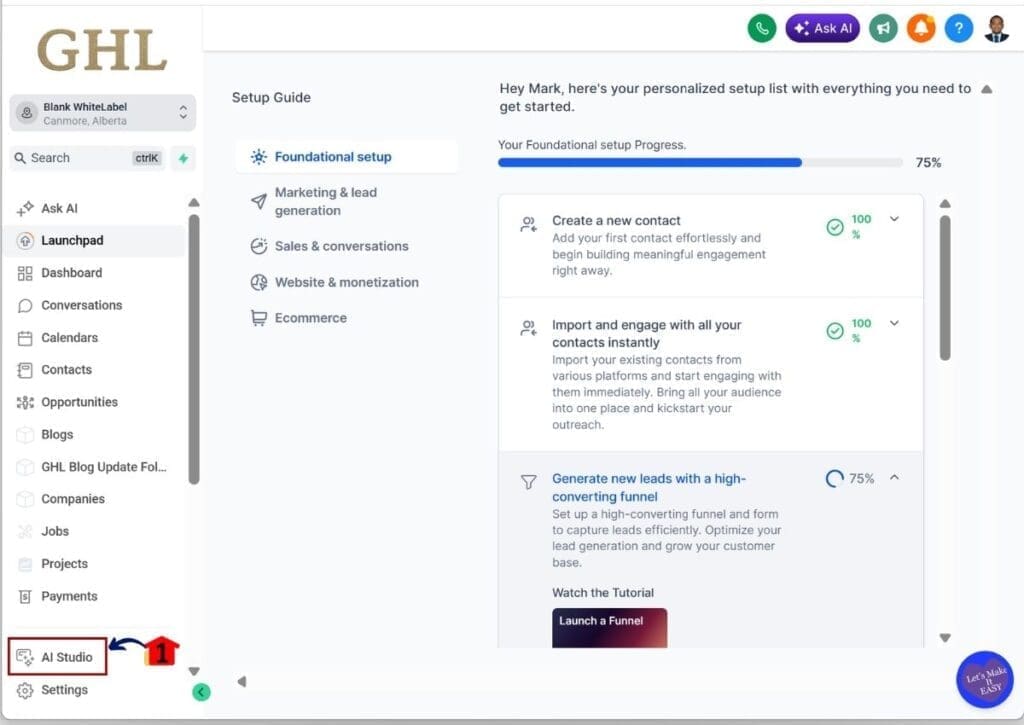
- The AI Studio builder is located in your main GoHighLevel menu.
1.1 Click the AI Studio
- You will be taken to the AI Studio builder screen.
- You will see the prompt box where you can start building your website.
Step 02 – Type in the prompt in the prompt box to generate the website
- You will use a detailed prompt to create your website.
2.1 Type the detailed prompt into the prompt box
- Make sure your prompt is clear and includes workflows, tags, and other GHL elements if needed.
- You can attach images by clicking the + button in the lower left of the prompt box.
- You can also paste a live website URL. The AI builder will recreate or modify it based on your prompt.
2.2 Click the Generate button
- The AI builder will create the layout, pages, text, and other elements for your website.

Step 03 – Configure and confirm questions from the AI builder
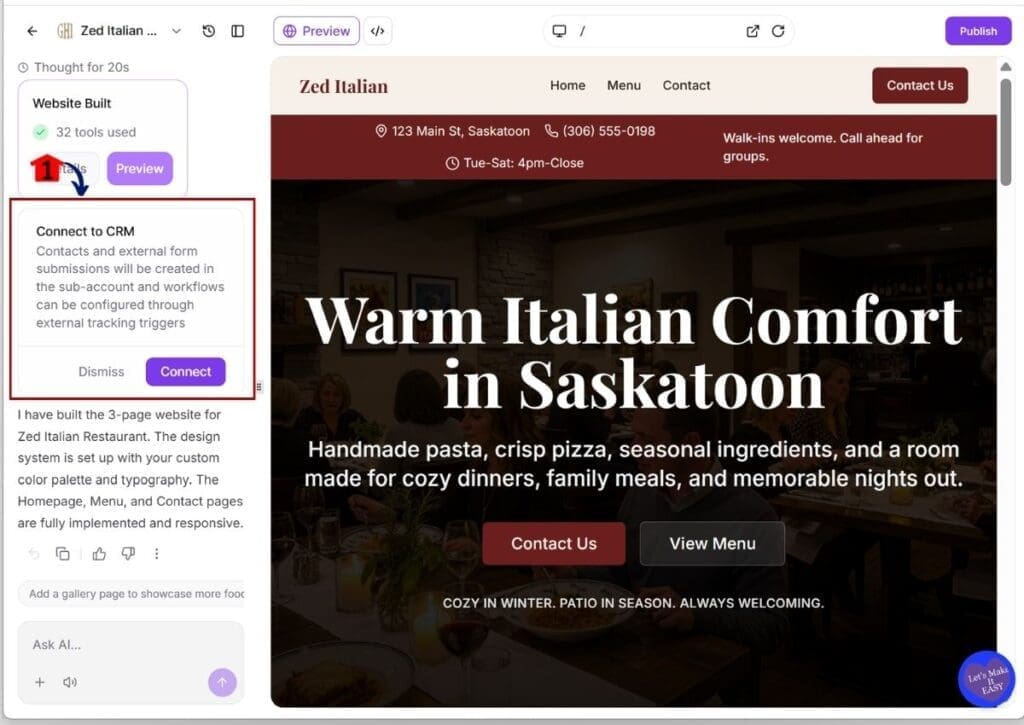
- The AI builder may ask questions based on your prompt.
- These may include connecting to a CRM, calendar, or form.
3.1 Click the Connect or Dismiss button
- Review each question carefully.
- Confirm or dismiss each option so the AI builder can give a better result.
Step 04 – Write prompts to edit specific sections or elements on the website
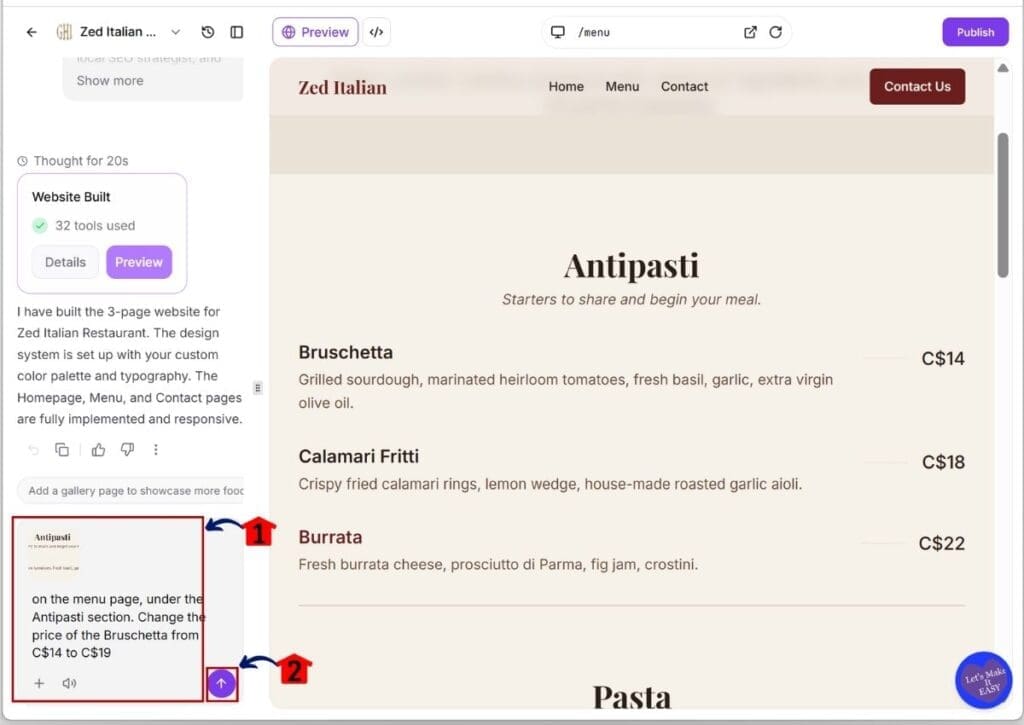
- You can revise any part of your website using clear instructions.
4.1 Write a detailed prompt to guide the AI Studio builder
- Describe the changes you want for a section or element.
- You can attach a screenshot to show the exact area you want to update.
4.2 Click the Generate button
- This is inside the prompt box.
Step 05 – Review and apply changes to the SEO and website info
- You should check your website details before publishing.
5.1 Click the Publish button
- The website info box will appear.
- You can edit and apply your changes here.
5.2 Edit the Icon, Title, Description, and Social image
- Upload images if needed.
- The AI builder may also generate these for you.
5.3 Click the Apply Changes button
- The website address box will appear.
- You can edit the website URL here.

Step 06 – Set the website domain and URL before publishing
- Make sure your website URL is correct before going live.
6.1 Change the URL if needed
- Make sure your custom domain is connected to your GoHighLevel sub-account.
- By default, the vibepreview.com subdomain is used.
6.2 Click the Publish button
- The publish box will appear.
- You can preview your website in a new tab.

Tips for AI Studio builder results
AI Studio builder in GHL works best when you give clear and simple instructions. You are not guessing your way through the build. You are guiding the result with intent. When your prompt is focused, the output becomes easier to work with and requires fewer changes.
In practice, most results improve after a few small edits. You do not need to start over each time. You review what the AI Studio builder creates, adjust specific parts, and refine the structure based on your goal. This keeps your workflow simple and controlled.
Here are practical tips to help you get better results with the AI Studio builder:
- Write clear prompts that explain the business and goal.
- Avoid vague phrases that do not give direction.
- Include details like audience, service, or offer.
- Review each section before making changes.
- Edit content using short and direct instructions.
- Use screenshots when you need precise updates.
- Focus on small improvements instead of full rewrites.
Using AI Studio builder for your business
AI Studio builder in GHL gives you a simple way to build websites without slowing down your work. You are not spending time setting up every section. You start with a complete layout and adjust it based on your goal. This helps you stay focused on the outcome instead of the process.
If you work with clients, the AI Studio builder helps you move faster without cutting corners. You can create a base website in minutes, then refine it to match the client’s business. This keeps your workflow clean and makes it easier to handle more projects.
If you are building your own site, this tool helps you get online without delay. You do not need to wait or learn everything at once. You can launch a simple version, test what works, and improve it over time.
Here are practical ways you can use the AI Studio builder in your business:
- Build client websites with a clear starting structure.
- Create funnels for lead capture and bookings.
- Launch simple sites without a long setup time.
- Test new offers with quick page builds.
- Update pages by generating new sections when needed.
Results from AI Studio builder
AI Studio builder in GHL changes how you handle website creation from the start. You are not building everything step by step anymore. You begin with a full layout, then adjust it based on your goal. This makes the process easier to manage, especially when you are working on multiple pages.
In your day-to-day work, you will notice the time savings right away. Tasks that used to take hours can now be done much faster. You are still reviewing and refining, but you are not doing the heavy setup. This helps you stay consistent and avoid delays.
You also get a more structured result with each build. The AI Studio builder gives you a clear starting point, so you are not guessing what to add next. This keeps your pages focused and easier to improve over time.
Here are the main results you can expect when using AI Studio builder:
- Faster website and funnel creation.
- Less manual setup during the build process.
- More consistent page structure across projects.
- Easier scaling when working with multiple clients.
- Quicker testing of ideas, offers, and layouts.
AI Studio builder common questions
AI Studio builder in GHL is simple to use, but you may still have a few questions as you get started. Most of these come from how the tool builds pages and how much control you have after the first version is created. The answers below will help you use the AI Studio builder with more confidence.
Final thoughts on AI Studio builder
AI Studio builder in GHL gives you a simple way to create websites without getting stuck in the setup. You are not working from a blank page. You start with a full layout and adjust it based on your goal. This helps you stay focused on the outcome instead of the build process.
As you continue using the AI Studio builder, you will notice your results improve with better prompts. You do not need to get everything right on the first try. You review what is created, make small changes, and refine the structure step by step.
This approach works well if you want to move faster or build for clients without adding more work. The AI Studio builder helps you stay consistent and reduces the time spent on setup. You can focus more on the message and function of your pages.
If you have not used the AI Studio builder yet, open it inside your GHL account and test a simple prompt. Start small, review the result, and improve it from there.
Scale Your Business Today.
Streamline your workflow with GoHighLevel’s powerful tools.


