- Use rich formatting inside Workflow notes to highlight, organize, and link your key updates with ease.
- Quick Summary – Formatted Workflow Notes Essentials
- What’s New – Rich Formatting in Workflow Notes
- What’s Changed – From Plain Text to Polished Notes
- Why This Matters – Clearer Collaboration and Faster Follow-Ups
- How to Use Formatted Workflow Notes in GHL Workflows
- Pro Tips – Get More from Formatted Workflow Notes
- What This Means for Agencies – Cleaner Notes, Better Hand-Offs
- Results You Can Expect – Faster Work and Fewer Mistakes
- Frequently Asked Questions – Common Questions About Formatted Workflow Notes
- Use Formatted Workflow Notes Today
Use rich formatting inside Workflow notes to highlight, organize, and link your key updates with ease.
Why This Feature Matters Now
Formatted workflow notes just made life a lot easier inside GHL.
If you’ve ever scrolled through a long string of notes in a contact record and had to guess what’s important, you know the pain. Everything looked the same. No bold, no bullet points, no quick links, just a wall of plain text.
Now, you can format your notes right inside a workflow. That means clearer updates for your team, easier follow-ups, and no more missed details because someone skimmed past a key line.
This update is simple, but it’ll save you time and frustration. Let’s walk through what changed and how to use it.

GHL now lets you format workflow notes with bold, italics, bullets, and links. This means clearer updates, better team collaboration, and faster follow-ups using formatted workflow notes.
Quick Summary – Formatted Workflow Notes Essentials
Purpose: This update adds rich text editing to the “Add to Notes” action in GHL workflows, allowing teams to use formatted workflow notes.
Why It Matters: Formatted workflow notes make updates easier to read, helping teams avoid mistakes and speed up communication.
What You Get: A full formatting toolbar inside the workflow note editor, including bold, italics, lists, and link options.
Time to Complete: Less than 2 minutes to add a formatted note in any existing workflow.
Difficulty Level: Very easy. If you can write an email, you can use formatted workflow notes.
Key Outcome: Cleaner, structured notes that help your team move faster and stay on the same page.
What’s New – Rich Formatting in Workflow Notes
You can now use formatted workflow notes inside the “Add to Notes” action in GHL.
This new update adds a simple toolbar to your workflow notes. You can bold key points, use bullet or numbered lists, add links, or underline things that matter. The notes look cleaner and are easier to scan.
Automate marketing, manage leads, and grow faster with GoHighLevel.

Before, everything was plain text. Now, you can structure your notes in a way that makes sense at a glance. Whether you’re tracking follow-ups or logging updates, formatted workflow notes help your team move faster and miss less.
It’s not fancy. It’s just better.
What’s Changed – From Plain Text to Polished Notes
Formatted workflow notes are now easier to read and use.
Before, your notes were just plain text. You couldn’t bold anything. You couldn’t add bullet points or links. Everything blended together and made it hard to find what mattered.
Now, formatted workflow notes let you break things up. You can add structure with headings, lists, bold text, and links. That means you can highlight the most important parts without writing long paragraphs.
This change helps teams scan notes faster and act quicker. Instead of digging through a block of text, they see what they need right away.
Why This Matters – Clearer Collaboration and Faster Follow-Ups
Formatted workflow notes are about saving time and avoiding confusion.
When notes are clear, your team doesn’t have to waste time reading through long blocks of text. With formatted workflow notes, you can highlight what matters. Use bold to call out key points. Add lists to break down steps. Drop in links to help your team find the right info fast.
This helps everyone stay on the same page. Whether you’re working with a sales team, support staff, or VAs, formatted workflow notes make sure tasks are easy to follow and updates are easy to track.
Good notes mean fewer mistakes and faster results.
How to Use Formatted Workflow Notes in GHL Workflows
Structure your notes with bold, bullets, links, and more right inside any workflow.
Formatted workflow notes are now built into the “Add to Notes” action. There’s nothing to activate or install. Just follow these steps to start using rich text inside your workflow automations.
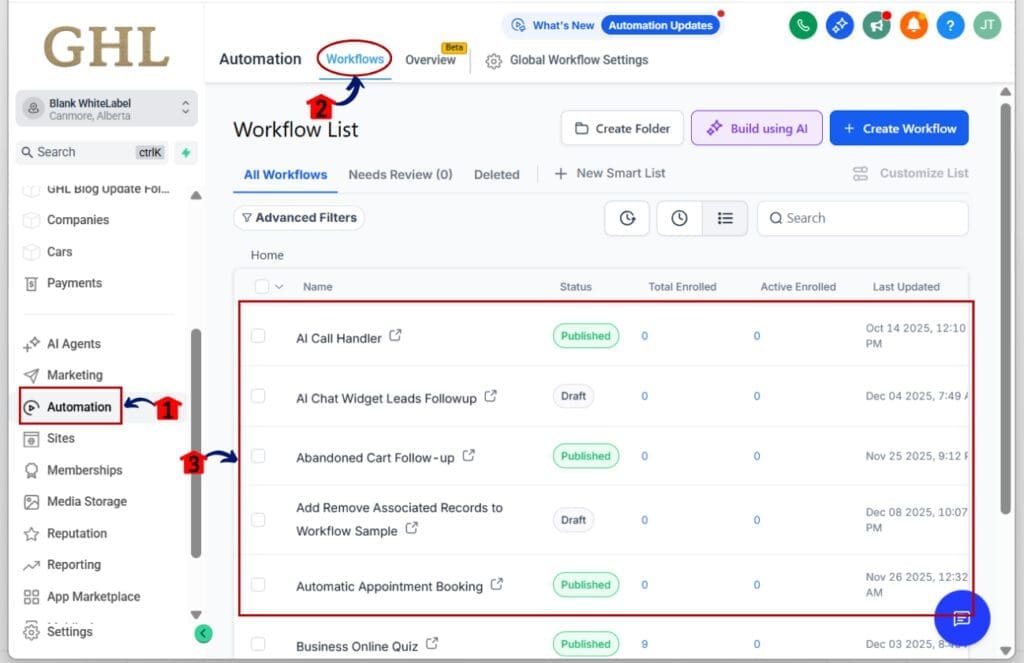
Step 01: Access the Main Left Hand Menu in GoHighLevel
- The Main Menu on the Left side of your screen has all the main areas that you work in when using GHL
1.1 Click on the Automation Menu Item.
- Access the ‘Automation’ section of GoHighLevel
1.2 Click on the Workflows Menu
- this will open the workflows dashboard where you can access the available workflow
1.3 Open an existing workflow or create a new one
- Pick a workflow where your team uses notes to track updates or follow-ups.
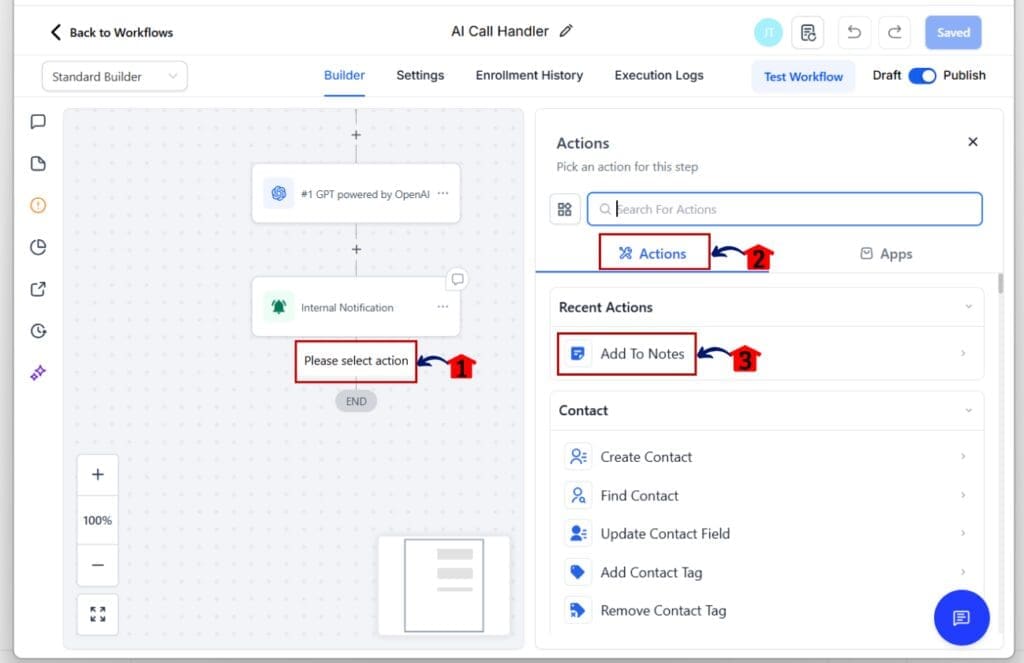
Step 02: Add the “Add to Notes” Workflow Action
- This is where you’ll enter your formatted note.
2.1 Click the + Add Action button, or hover over an existing action to see the notes icon appear.
- Search or scroll to find “Add to Notes” in the list.
2.2 Click into the message box
- You’ll see a new toolbar appear with formatting options.
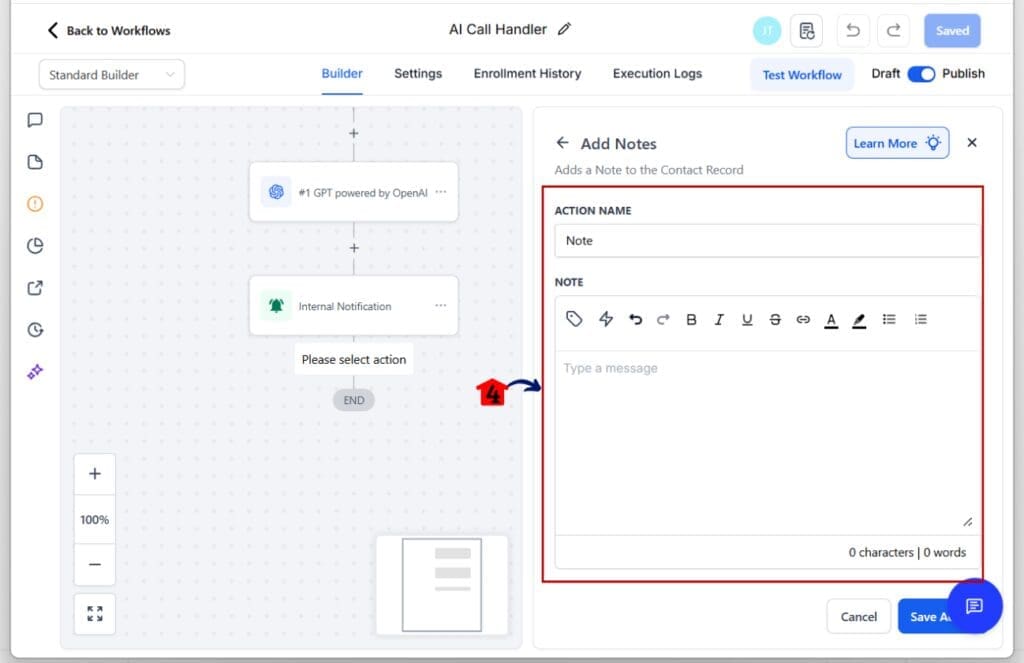
Step 03: Use the Toolbar to Create Formatted Workflow Notes
- Now you can add structure to your notes.
3.1 Use bold, italic, underline, or strikethrough for emphasis
- Helpful for callouts or key details.
3.2 Create task lists using bullets or numbers
- Great for follow-up steps or SOP checklists.
3.3 Add clickable links
- Use this to link out to docs, shared folders, or client info.
3.4 Click Save after finalizing your notes
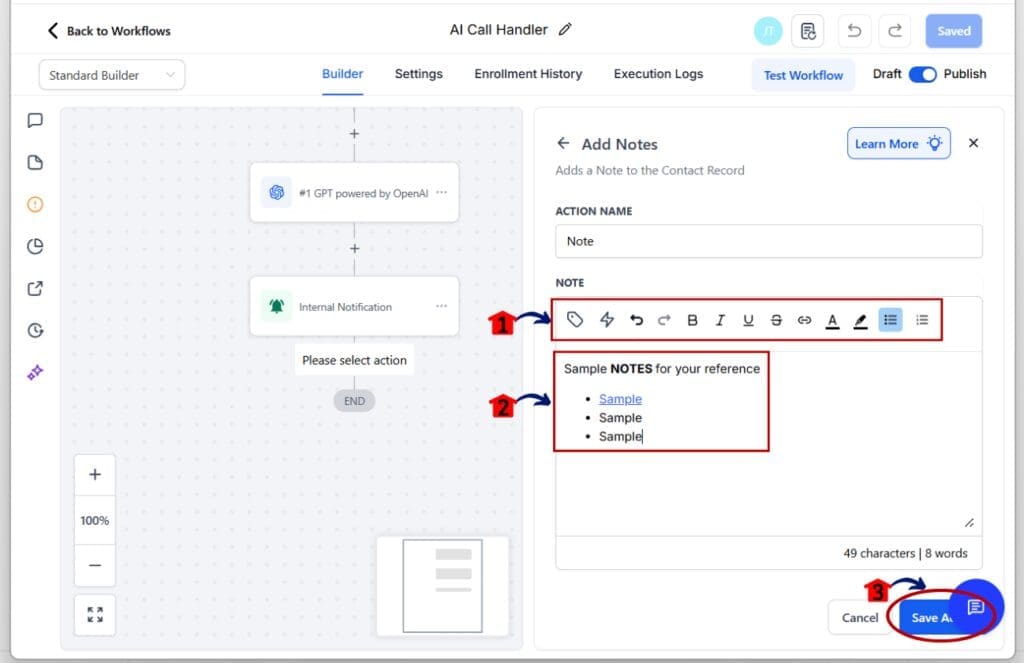
That’s it. Formatted workflow notes are a simple way to clean up your automations, add clarity to updates, and help your team move faster in GoHighLevel.
Pro Tips – Get More from Formatted Workflow Notes
Formatted workflow notes give you more control over how your team shares and reads information. Here are a few practical ways to make the most of them.
Start with a simple format
- Use bold text to label sections like “Next Steps” or “Meeting Recap.” This helps keep your formatted workflow notes clean and easy to scan.
Add bullet points for quick tasks
- Bullets are great for breaking things down. Use them to list follow-ups, reminders, or things someone else needs to handle.
Drop in helpful links
- If your team needs to check a doc or file, just add a link right in the note. Formatted workflow notes make it easier to connect people to the right info without extra steps.
Stick to one style
- Agree on a format your whole team can follow. If everyone uses formatted workflow notes the same way, they’re faster to read and easier to trust.
Use underline or bold for key info
- Need to highlight a date, task, or deadline? Use formatting to make it stand out so nothing gets missed.
Formatted workflow notes aren’t just about making text look nice. They help your team stay organized and cut down on confusion.
What This Means for Agencies – Cleaner Notes, Better Hand-Offs
Formatted workflow notes make things easier for agencies that work with teams, clients, and tasks every day.
When notes are clear, your team can get the message fast. You don’t have to explain things twice. With formatted workflow notes, you can bold what matters, list out next steps, and link to the right tools or files.
This helps with hand-offs between staff, especially in busy pipelines. Everyone sees the same format and the same details. That means fewer mistakes and better results.
For white-label agencies, formatted workflow notes also make your system look more professional. Notes feel more like a tool and less like a random text box.
It’s a small change that makes your whole setup easier to use and manage.
Results You Can Expect – Faster Work and Fewer Mistakes
Formatted workflow notes help you move quicker and avoid confusion.
When notes are easy to read, your team doesn’t waste time trying to figure out what’s going on. The bold text, bullets, and links help them see what matters and take action right away.
You’ll see fewer missed tasks and cleaner hand-offs. It also helps when someone new jumps into a project. They can look at the notes and understand the flow without needing a full walkthrough.
Over time, formatted workflow notes help your system feel more organized. It becomes easier to track updates, follow up with leads, and keep clients in the loop.
Frequently Asked Questions – Common Questions About Formatted Workflow Notes
Use Formatted Workflow Notes Today
Formatted workflow notes help you work with more clarity and less confusion.
You can now highlight key points, break things into lists, and add links where your team needs them. This makes your notes easier to read and easier to follow. It also cuts down on back-and-forth and missed steps.
You do not need to change how your workflows run. Just start using formatted workflow notes where they make sense. Over time, your notes will be more useful, and your team will be quicker to respond.
Start using formatted workflow notes today and make your updates easier for everyone to understand.
Scale Your Business Today.
Streamline your workflow with GoHighLevel’s powerful tools.