- AI Course Builder That Changes Everything
- Quick Summary – AI Course Builder
- Here are this weeks HighLevel Updates
- What’s New with AI Course Builder
- Why AI Course Builder Matters for Agencies
- How to Use AI Course Builder in GHL
- Pro Tips to Maximize AI Course Builder
- AI Course Builder for Business Growth
- AI Course Builder in Real Workflows
- FAQs related to AI Course Builder
- AI Course Builder Changes the Game
AI Course Builder That Changes Everything
Building AI Course Builder used to mean one thing. Manual work. If you’ve built courses inside GHL, you know the process.
Create course. Add module. Add lesson. Write content. Format it. Build quiz. Set drip. Create offer. Publish.
Need another course? Start again. It worked. But it wasn’t fast.
And when you’re building courses for multiple niches, multiple clients, or multiple offers, “just build it manually” isn’t a system.
It creates bottlenecks. It creates delays. It burns creative energy. AI Course Builder fixes that gap.
Instead of structuring everything yourself, you now use AskAI directly inside the course builder. One prompt. Full outline. Modules created. Lessons generated. Quizzes built. Settings configured.
Need edits? Chat. Need assessments? Chat. Need offers? Chat. And here’s the part agencies will love.
Built-in guardrails protect you. Confirmation prompts. Risk warnings. Restricted delete actions. You move fast without breaking things.
AI Course Builder makes course creation faster, cleaner, and easier to scale inside GHL.
Less manual work. Less friction. More leverage.
The latest GoHighLevel Changelog includes several other GHL feature updates that round out your daily workflow:
- New QR Code Styling Options: Shapes, Borders, and Rim Text
- Collapse & Resize Pipeline Stages in Kanban View
- Notes just got smarter for the contacts page!
- New Asana actions in workflows – Find Project and Find section
- Email AI + Knowledge Base Integration 🚀
- Dialer: Auto-minimize, Pin & Drag
- Schema Markup Using AI
Keep reading for much more on all these updates and a deep dive into the AI Course Builder feature!
Quick Summary – AI Course Builder
Purpose: This guide shows you how to use the AI Course Builder inside GHL to create, structure, and launch online courses using AskAI.
Why It Matters: Building courses manually slows you down and limits how many products you can launch. AI Course Builder removes that bottleneck so you can build faster and scale smarter.
What You Get: You’ll learn how to generate course outlines, create lesson content in HTML format, build quizzes, configure drip schedules, and publish offers with built-in guardrails.
Time To Complete: Most users can generate and configure a full course structure in under 30 minutes once they understand the workflow.
Difficulty Level: Beginner to Intermediate. If you can navigate the GHL course area, you can use AI Course Builder effectively.
Key Outcome: You walk away with a fully structured, automation-ready course that can be monetized, connected to workflows, and scaled across multiple niches or client accounts.
Here are this weeks HighLevel Updates
New QR Code Styling Options: Shapes, Borders, and Rim Text
What it does:
Lets you stop using boring QR codes. You can now tweak the shape, style the border, and add text around the edge.
Where in GHL:
Accessible via Sites → QR Codes and within QR tools embedded in Funnel and Website builders.
Automate marketing, manage leads, and grow faster with GoHighLevel.

Impact:
Improves visual presentation and brand alignment while increasing scan appeal.
Best suited for:
Agencies that care about branding, small businesses running local promotions, online stores, and teams pushing QR campaigns.
Collapse & Resize Pipeline Stages in Kanban View
What it does:
Lets you hide pipeline stages you’re not actively using and adjust column widths so your board fits the way you work.
Where in GHL:
Inside Opportunities when you’re viewing your pipeline in Kanban mode.
Impact:
No more dragging your screen forever just to find the deals that matter.
Best suited for:
Owners running multi-stage pipelines, reps working deals every day, and anyone fed up with a messy board.
Notes Just Got Smarter for the Contacts Page
What it does:
Upgrades the notes area so it’s easier to write, review, and keep things organized inside a contact record.
Where in GHL:
Found directly within each contact’s profile under Notes.
Impact:
Makes it simpler to see what’s been discussed and who added what — without digging through clutter.
Best suited for:
Teams collaborating on accounts and businesses that document every client touchpoint.
New Asana Actions in Workflows – Find Project & Find Section
What it does:
Lets your workflow check what already exists in Asana before adding anything new.
Where in GHL:
Go to Workflows, add an action, and choose the Asana integration.
Impact:
No more duplicate projects. No more messy task boards. Just cleaner automation.
Best suited for:
Operations teams and agencies that rely on Asana to manage client delivery.
Email AI + Knowledge Base Integration
- What it does:
Allows Email AI to reference your Knowledge Base for smarter, more accurate responses. - Where in GHL:
Found in Conversations → Email composer with AI enabled and Knowledge Base settings under AI configuration. - Impact:
Smarter email suggestions that understand your business and help you reply quicker. - Best suited for:
Support teams, agencies managing inboxes, and businesses scaling communication with AI.
Dialer: Auto-Minimize, Pin & Drag
- What it does:
Lets you auto-minimize the dialer during calls, pin it in place, and drag it anywhere on screen. - Where in GHL:
Found in Conversations → Dialer. - Impact:
Cleaner workspace and easier multitasking during sales or support calls. - Best suited for:
Sales teams, outbound callers, appointment setters, and agencies making daily calls.
Schema Markup Using AI
- What it does:
Generates structured schema markup automatically using AI for SEO enhancement. - Where in GHL:
Found in Sites → Website or Funnel settings within AI or SEO sections. - Impact:
Improves search visibility without manual coding. - This works well for:
Teams building websites that need stronger search visibility, from agencies to small local businesses.
What’s New with AI Course Builder
AI Course Builder isn’t just content generation. It’s full course control through chat.
Start with a simple idea. AskAI builds your entire course outline.
Modules? Done. Lessons? Structured. Flow? Organized. Then it goes deeper.
You can generate full lesson content in clean HTML format. That means formatted headings, paragraphs, and structure ready to publish. No copy-paste gymnastics. No messy formatting cleanup.
Need assessments? Ask for quizzes. AI Course Builder creates questions, answers, and structured evaluations automatically. You can adjust scoring or regenerate instantly.
But it doesn’t stop at content. You can manage course settings directly through chat. Set drip schedules. Lock lessons. Adjust publishing status. Add instructor details. Update branding. And here’s where it becomes powerful for monetization.
You can create and configure offers inside the same workflow. Pricing. Access rules. Product connection. All handled without bouncing between tabs.
Plus, built-in guardrails protect you. Confirmation prompts for sensitive changes. Risk warnings before big actions. Delete protections to prevent accidental content loss.
It’s not just faster course creation. It’s structured, protected, scalable course creation inside GHL.
Why AI Course Builder Matters for Agencies
AI Course Builder is not just a time-saver. It’s a scale multiplier.
If you run an agency, you already know the pain. Clients want onboarding courses. Training portals. Mini-courses. Certification programs. Lead magnets. Paid programs.
And every single one takes time.
Structure it. Write it. Format it. Test it. Launch it. Now imagine doing that for five clients at once.
AI Course Builder removes that bottleneck. Instead of spending days building frameworks, you spend minutes refining them. You move from creator to director. The AI handles the heavy lifting. You guide the strategy.
This changes how you productize. You can:
- Build white-label courses faster.
- Create niche-specific training at scale.
- Launch paid programs quickly.
- Test new offers without massive effort.
And here’s the real advantage. Speed compounds.
When you can create faster, you can launch faster. When you launch faster, you test faster. When you test faster, you grow faster.
AI Course Builder gives agencies leverage inside GHL.
Less manual labor. More strategic control. More scalable revenue.
How to Use AI Course Builder in GHL
The AI Course Builder is used inside the Online Courses area of your GHL sub-account. You will access it from the Memberships section, generate your course outline using AskAI, build lessons and quizzes, and then configure publishing settings with built-in safeguards.
Below are the step-by-step instructions to create and publish a course using AI Course Builder in GoHighLevel.
- Launch AI Course Builder with AskAI.
- Generate Lesson Content with AI Course Builder.
- Create Quizzes and Assessments.
- Configure Course Settings Structure.
- Create and Configure an Offer for the Course.
To start, make sure you are logged in to your GoHighLevel sub-account.
Step 01 – Launch AI Course Builder with AskAI
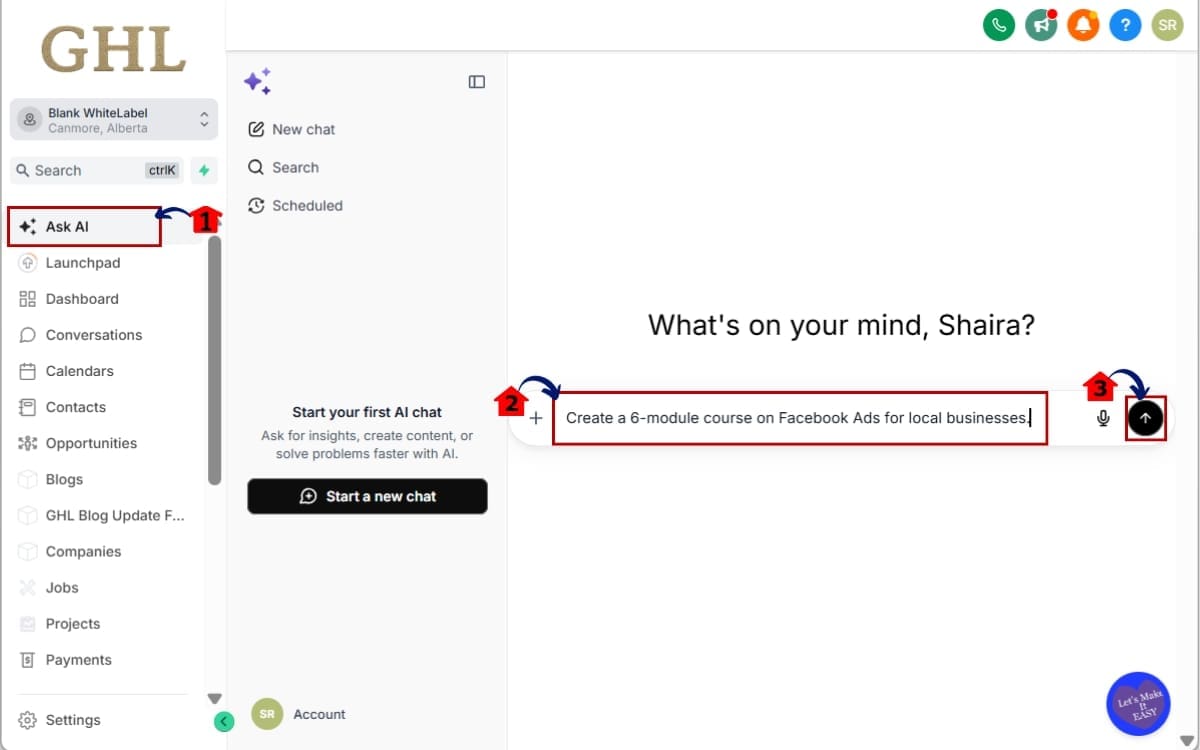
- Now you’ll activate the AI inside the course experience.
1.1 Locate the AskAI chat interface in the main menu of GHL.
- It appears as a chat panel where you can enter prompts.
1.2 Type your course topic into the chat.
- Example: “Create a 6-module course on Facebook Ads for local businesses.”
1.3 Click Generate.
- AI Course Builder will automatically create modules and lessons.
Step 02 – Generate Lesson Content with AI Course Builder
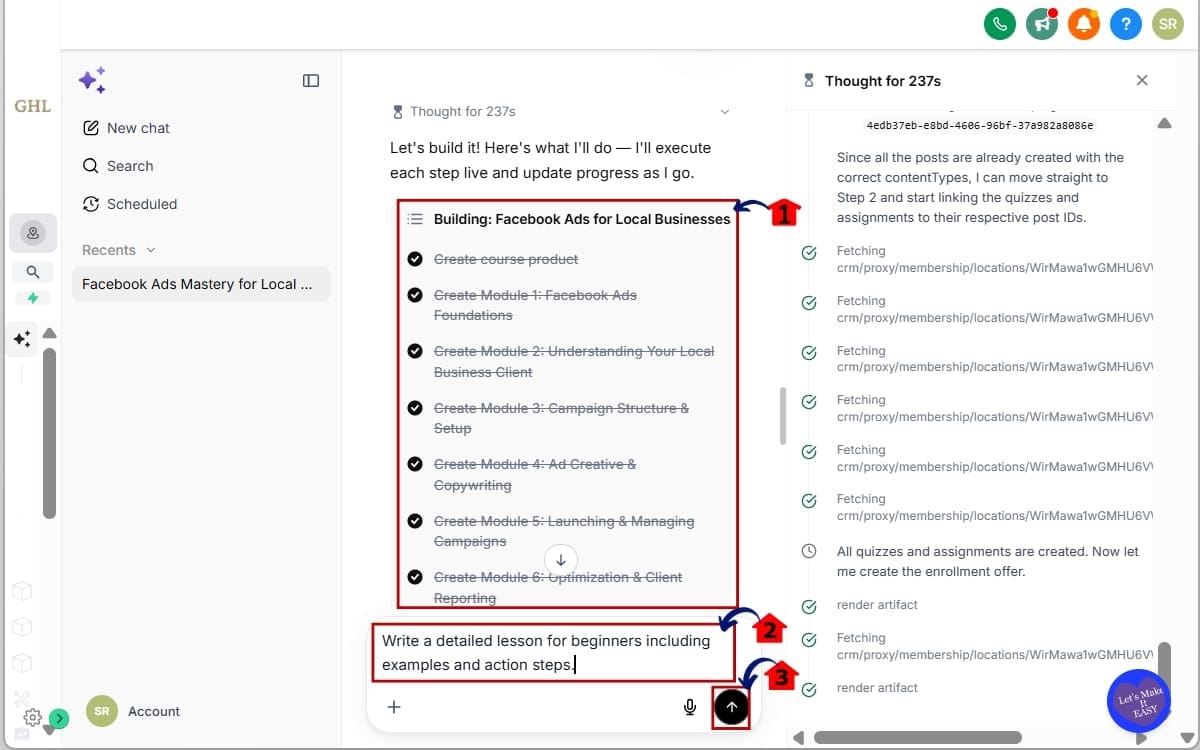
- This step walks you through reviewing the structure and generating full lesson content using AskAI.
2.1 Review the generated outline.
- You can edit module names manually or ask AI to refine the structure.
2.2 Type a clear instruction.
- Example: “Write a detailed lesson for beginners including examples and action steps.”
2.3 Click Generate.
- AI Course Builder will create structured HTML lesson content.
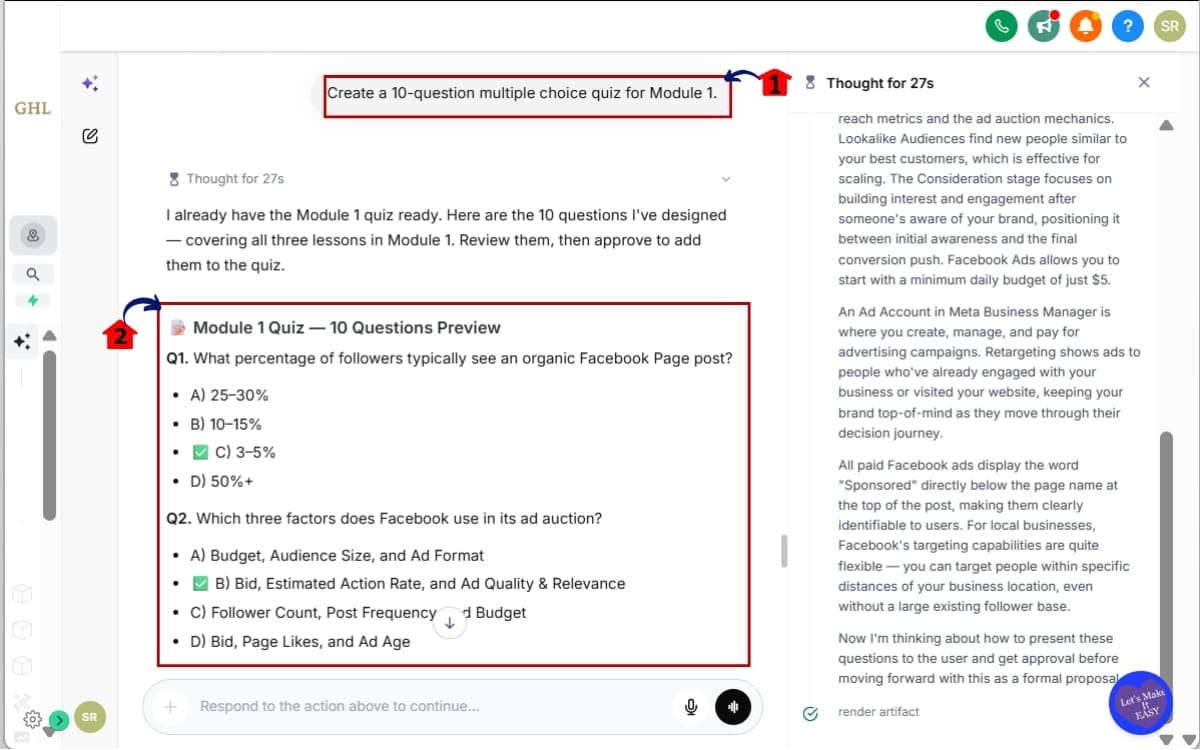
Step 03 – Create Quizzes and Assessments
- Quizzes can also be generated automatically.
3.1 Open AskAI and request quiz creation.
- Example: “Create a 10-question multiple choice quiz for Module 1.”
3.2 Review the generated questions.
- Check answers for accuracy. Adjust scoring if needed.
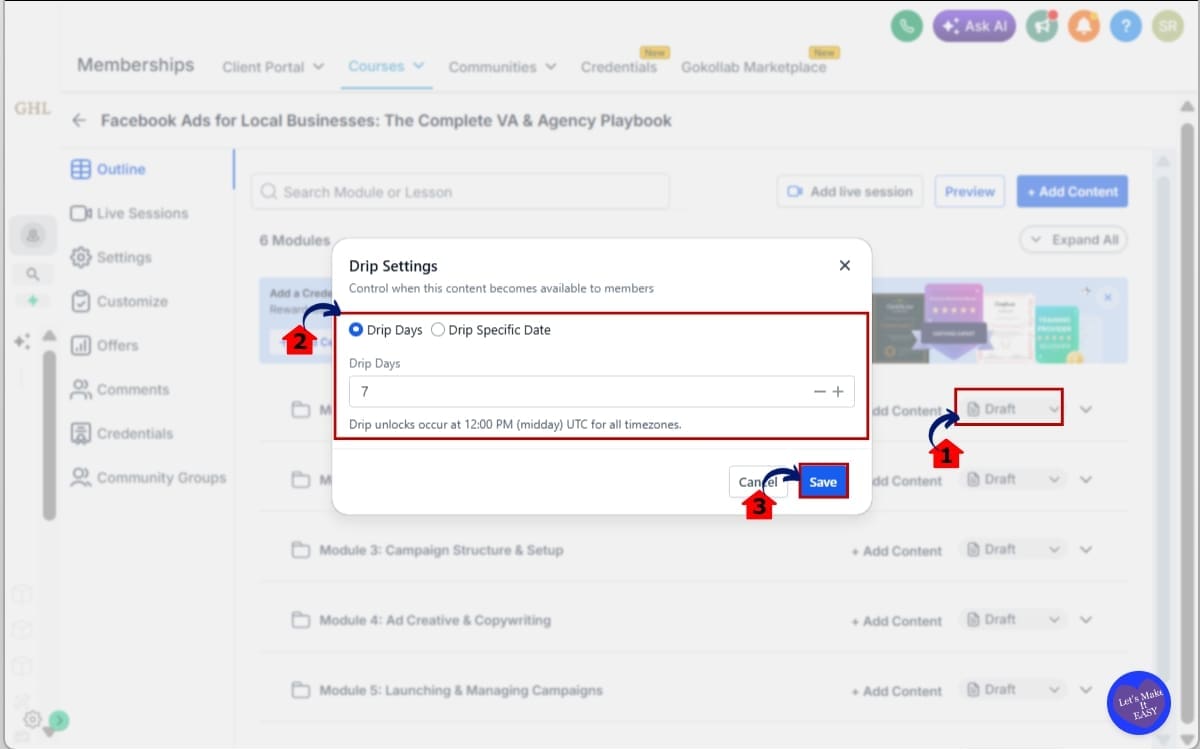
Step 04 – Configure Course Settings Structure
- AI Course Builder also helps manage your course structure and access.
4.1 Click draft dropdown.
- Look for options like Drip, Locks, and Publishing.
4.2 Edit Drip Settings schedule.
- Example: “Release one module every 7 days.”
4.3 Click Save
- Always save your changes to prevent losing updated settings.
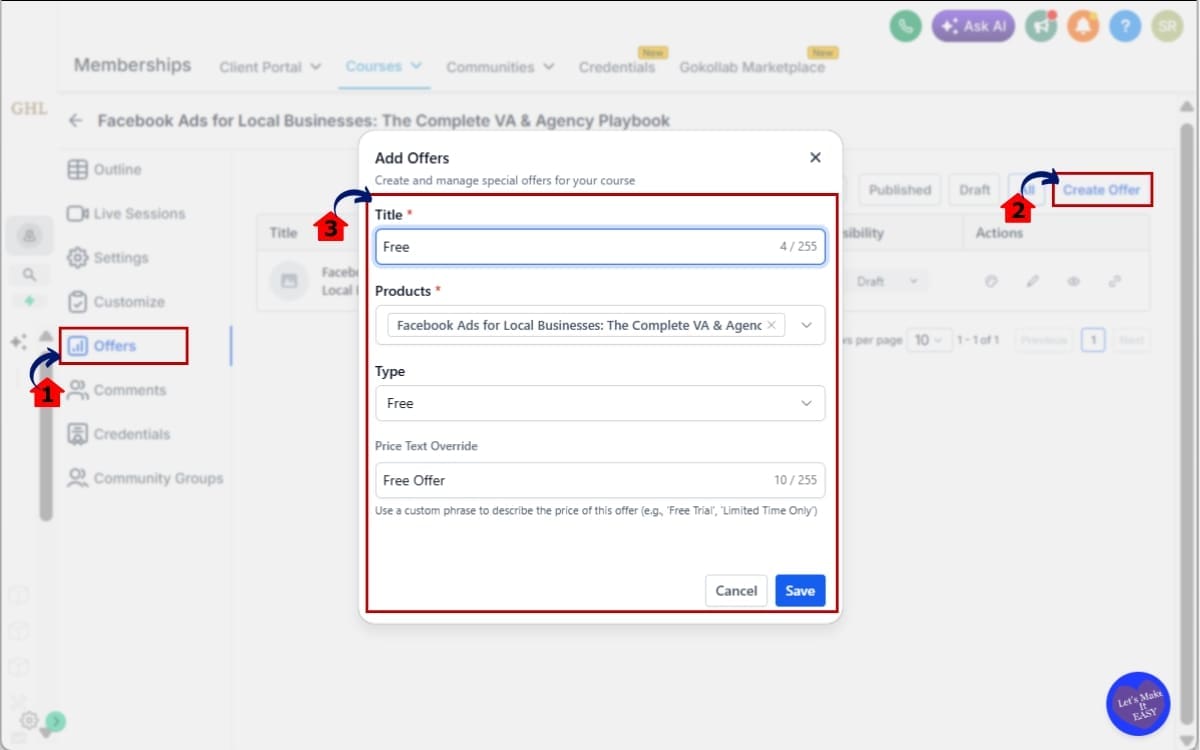
Step 05 – Create and Configure an Offer for the Course
- This step allows you to connect your course to a paid offer so students can purchase access.
5.1 Go to the Offers section inside your course area.
- This is where pricing, payment connections, and access rules are managed.
5.2 Click Create Offer.
- Define pricing structure.
5.3 Publish the offer.
- Attach the offer to your course.
Once these steps are complete, your course is fully structured, configured, and ready to launch inside GHL.
Pro Tips to Maximize AI Course Builder
AI Course Builder is powerful. But the results depend on how you use it. Start with better prompts.
Keep it focused. Rather than asking for a general marketing course, outline the niche and outcome, for example, a five-module beginner course on lead generation for real estate professionals with practical exercises.
Detail makes the difference. The clearer your direction, the stronger the result. Before you publish, tweak the tone, add real examples, and work in client stories so it actually sounds like you, not a template.
Use AI Course Builder for version testing. Create two variations of a course outline. Compare flow. Merge the best parts. This helps you build stronger programs faster.
Also, connect it to workflows.
After someone buys the course:
- Trigger onboarding emails.
- Tag them in CRM.
- Move them to a pipeline stage.
- Send upsell offers automatically.
One more tip. Never delete without reviewing. Guardrails protect you, but always duplicate important content before major edits.
AI Course Builder gives you speed. Strategy gives you results. Use both.
AI Course Builder for Business Growth
AI Course Builder is not just about convenience. It’s about leverage.
Think about how you normally build digital products. It takes planning. Writing. Structuring. Testing. Then revisions. Then publishing.
Now compress that timeline. Instead of weeks, you build in hours. That changes cash flow.
You can launch a paid mini-course as a lead qualifier. You can create a client onboarding program in one afternoon. You can build a certification program without hiring extra writers.
And because this lives inside GHL, it connects directly to your marketing engine. Someone buys your course? They enter a workflow. They get tagged. They move through a pipeline. They receive upsells automatically.
AI Course Builder turns courses into automated revenue systems. For agencies, this means new offers. You can package “Course Creation” as a service. You can build niche-specific training snapshots. You can resell white-label education products.
Speed creates opportunity. Opportunity creates revenue. AI Course Builder gives you both inside GHL.
AI Course Builder in Real Workflows
AI Course Builder becomes powerful when you connect it to automation.
Here’s a simple example.
You create a paid course using AI Course Builder. It includes modules, quizzes, and a structured drip schedule.
Now connect the offer to a workflow. When someone purchases:
- They get tagged as “Student.”
- They enter an onboarding email sequence.
- They receive login instructions automatically.
- They get reminder emails when new modules unlock.
If they finish the course? Trigger a certificate. Move them to a new pipeline stage. Send an upsell for advanced training. Now imagine this for client onboarding.
A new client signs your contract. They automatically receive access to a training course. That course walks them through expectations, communication rules, and next steps.
No manual explanation. No repeated Zoom calls. No confusion. AI Course Builder builds the asset. Workflows turn it into a system.
That’s the difference between selling courses and building automated education funnels inside GHL. One creates content. The other creates recurring leverage.
FAQs related to AI Course Builder
AI Course Builder Changes the Game
AI Course Builder removes the hardest part of building courses. The blank page. The structure. The slow setup.
Instead of building everything manually, you guide the direction. AskAI handles the heavy lifting. Modules. Lessons. Quizzes. Offers. Even publishing controls.
That changes your speed. And speed changes everything.
You can test new offers without hesitation. You can build client onboarding portals in hours. You can launch paid education products without hiring writers.
Inside GHL, this isn’t just a feature. It’s a production engine.
If you run an agency, sell info products, or build training systems for clients, AI Course Builder gives you leverage. The kind that compounds.
Less friction. More output. More scalable revenue. Now it’s your move.
Log into your sub-account. Open Courses. Try one prompt. Build one outline. See how fast it moves.
Have you tested AI Course Builder yet? What kind of course are you building first?
And as always, check back with GHL Growth Garage for more practical GoHighLevel feature guides that help you move faster.
Scale Your Business Today.
Streamline your workflow with GoHighLevel’s powerful tools.