

- GHL Funnel QR Code Just Leveled Up Your Funnels
- Quick Summary – Funnel QR Code Overview
- Here are this weeks HighLevel Updates
- What the GHL Funnel QR Code Actually Does
- Why the GHL Funnel QR Code Matters for Agencies
- How to Generate a Funnel QR Code in GHL Step-by-Step
- Pro Tips for Using Your GHL Funnel QR Code the Right Way
- How to Use a GHL Funnel QR Code in Real Campaigns
- Funnel QR Code FAQs for GHL Users
- Why the GHL Funnel QR Code Is a Smart Move
GHL Funnel QR Code Just Leveled Up Your Funnels
Funnel QR Code used to mean extra steps. Copy the link. Open a QR generator. Paste the URL. Download the file. Hope you didn’t grab the wrong funnel step.
If you’ve built funnels inside GHL, you know the routine. It worked. But it wasn’t efficient.
And when you’re managing multiple funnels, multiple steps, multiple campaigns, “I’ll generate the QR later” isn’t a strategy.
It creates mistakes. It links to the wrong page. It slows your workflow down. The new GHL Funnel QR Code feature fixes that gap.
Instead of leaving Funnel Builder to create a QR code, GHL now generates your Funnel QR Code directly beside your funnel URL.
Current step? Linked. Right domain? Confirmed. Download format? Your choice. PNG. SVG. PDF. Done.
And here’s the part agencies will love.
No new software. No extra tabs. No complicated setup.It lives right inside Funnel Builder.
Smarter promotion. Cleaner workflow. Better leverage inside GHL.
The latest GoHighLevel Changelog includes several other GHL feature updates that round out your daily workflow:
- New QR Code Styling Options: Shapes, Borders, and Rim Text
- Collapse & Resize Pipeline Stages in Kanban View
- Notes just got smarter for the contacts page!
- New Asana actions in workflows – Find Project and Find section
- Email AI + Knowledge Base Integration 🚀
- Dialer: Auto-minimize, Pin & Drag
- Schema Markup Using AI
Keep reading for much more on all these updates and a deep dive into the Funnel QR Code feature!
Quick Summary – Funnel QR Code Overview
Purpose: This update allows you to generate a Funnel QR Code directly inside GHL Funnel Builder, linked automatically to the exact funnel step you are working on.
Why It Matters: It removes extra tools, prevents wrong-link mistakes, and makes it easy to connect offline marketing efforts to your online funnels.
What You Get: Built-in QR code generation, automatic step linking, PNG/SVG/PDF downloads, and quick customization options without leaving Funnel Builder.
Time to Complete: Creating and downloading your Funnel QR Code takes less than one minute once your domain is connected.
Difficulty Level: Beginner-friendly. If you can build a funnel in GHL, you can generate this QR code.
Key Outcome: Turn flyers, signage, packaging, and event materials into direct funnel entry points that feed straight into your automations.
Here are this weeks HighLevel Updates
New QR Code Styling Options: Shapes, Borders, and Rim Text
What it does:
Lets you stop using boring QR codes. You can now tweak the shape, style the border, and add text around the edge.
Where in GHL:
Accessible via Sites → QR Codes and within QR tools embedded in Funnel and Website builders.
Automate marketing, manage leads, and grow faster with GoHighLevel.

Impact:
Improves visual presentation and brand alignment while increasing scan appeal.
Best suited for:
Agencies that care about branding, small businesses running local promotions, online stores, and teams pushing QR campaigns.
Collapse & Resize Pipeline Stages in Kanban View
What it does:
Lets you hide pipeline stages you’re not actively using and adjust column widths so your board fits the way you work.
Where in GHL:
Inside Opportunities when you’re viewing your pipeline in Kanban mode.
Impact:
No more dragging your screen forever just to find the deals that matter.
Best suited for:
Owners running multi-stage pipelines, reps working deals every day, and anyone fed up with a messy board.
Notes Just Got Smarter for the Contacts Page
What it does:
Upgrades the notes area so it’s easier to write, review, and keep things organized inside a contact record.
Where in GHL:
Found directly within each contact’s profile under Notes.
Impact:
Makes it simpler to see what’s been discussed and who added what — without digging through clutter.
Best suited for:
Teams collaborating on accounts and businesses that document every client touchpoint.
New Asana Actions in Workflows – Find Project & Find Section
What it does:
Lets your workflow check what already exists in Asana before adding anything new.
Where in GHL:
Go to Workflows, add an action, and choose the Asana integration.
Impact:
No more duplicate projects. No more messy task boards. Just cleaner automation.
Best suited for:
Operations teams and agencies that rely on Asana to manage client delivery.
Email AI + Knowledge Base Integration
- What it does:
Allows Email AI to reference your Knowledge Base for smarter, more accurate responses. - Where in GHL:
Found in Conversations → Email composer with AI enabled and Knowledge Base settings under AI configuration. - Impact:
Smarter email suggestions that understand your business and help you reply quicker. - Best suited for:
Support teams, agencies managing inboxes, and businesses scaling communication with AI.
Dialer: Auto-Minimize, Pin & Drag
- What it does:
Lets you auto-minimize the dialer during calls, pin it in place, and drag it anywhere on screen. - Where in GHL:
Found in Conversations → Dialer. - Impact:
Cleaner workspace and easier multitasking during sales or support calls. - Best suited for:
Sales teams, outbound callers, appointment setters, and agencies making daily calls.
Schema Markup Using AI
- What it does:
Generates structured schema markup automatically using AI for SEO enhancement. - Where in GHL:
Found in Sites → Website or Funnel settings within AI or SEO sections. - Impact:
Improves search visibility without manual coding. - This works well for:
Teams building websites that need stronger search visibility, from agencies to small local businesses.
What the GHL Funnel QR Code Actually Does
The GHL Funnel QR Code feature is built directly into Funnel Builder. It allows you to generate and download a QR code for the exact funnel step you are working on.
No guessing. No manual link copying. No third-party tools.
When you open a funnel step inside GHL, you’ll now see a QR code icon beside the Funnel URL at the top of the page. That QR code is automatically linked to the current funnel step.
Not the funnel homepage. Not another step. The exact page you’re editing.
Once clicked, you can:
- Generate a QR code instantly
- Download it as PNG
- Download it as SVG
- Download it as PDF
- Or select “Edit QR” to customize it further
There’s one important requirement. The Funnel QR Code option only appears when a domain is connected or hosted. If your funnel doesn’t have a connected domain, the QR icon won’t show.
That’s intentional. It ensures your QR code always points to a valid, live domain.
This update brings QR code creation directly into the same place you build your funnels. That means less switching tabs and fewer errors in your marketing process.
Simple feature. Big impact.
Why the GHL Funnel QR Code Matters for Agencies
The GHL Funnel QR Code isn’t just a convenience feature. It removes friction from your marketing workflow.
Before this update, creating a QR code meant leaving Funnel Builder. That meant extra tabs. Extra tools. Extra room for mistakes.
Now it’s built in.That saves time. Especially if you’re managing multiple funnels for multiple clients.
No more copying the wrong step URL. No more generating a QR code for a draft page. No more pasting the wrong domain.
It’s automatically tied to the exact funnel step you’re working on. That alone reduces errors.
But here’s where it really gets powerful. Offline marketing just became easier.
Agencies and local businesses can now turn any funnel step into a scannable promotion instantly.
Running an event? Add the Funnel QR Code to signage.
Launching a new offer? Print it on flyers.
Selling products? Add it to packaging.
Real estate agent? Put it on yard signs.
Restaurant? Place it on table displays.
This feature creates a clean bridge between offline attention and online conversion.
And because it lives inside GHL, it keeps everything centralized.
Less chaos. More control. Better execution.
This isn’t a flashy update, but you’ll feel the difference every time you build a campaign. Especially for agencies scaling client campaigns.
How to Generate a Funnel QR Code in GHL Step-by-Step
The Funnel QR Code feature is accessed directly from Funnel Builder while viewing a funnel step. You can generate a QR code for the current page, download it in multiple formats, or customize it further without leaving the builder.
Before getting started, make sure your funnel has a connected domain, as the QR code option only appears on hosted or connected URLs. The following steps will show you how to generate, customize, and download a Funnel QR Code in GoHighLevel.
- Access the Sites Menu in GoHighLevel
- Open and edit the Funnel Step
- Generate the Funnel QR Code
- Download the Funnel QR Code
- Customize the Funnel QR Code
- Adjust the QR settings
To start make sure you are logged in to your GoHighLevel sub-account.
Step 01 – Access the Sites Menu in GoHighLevel
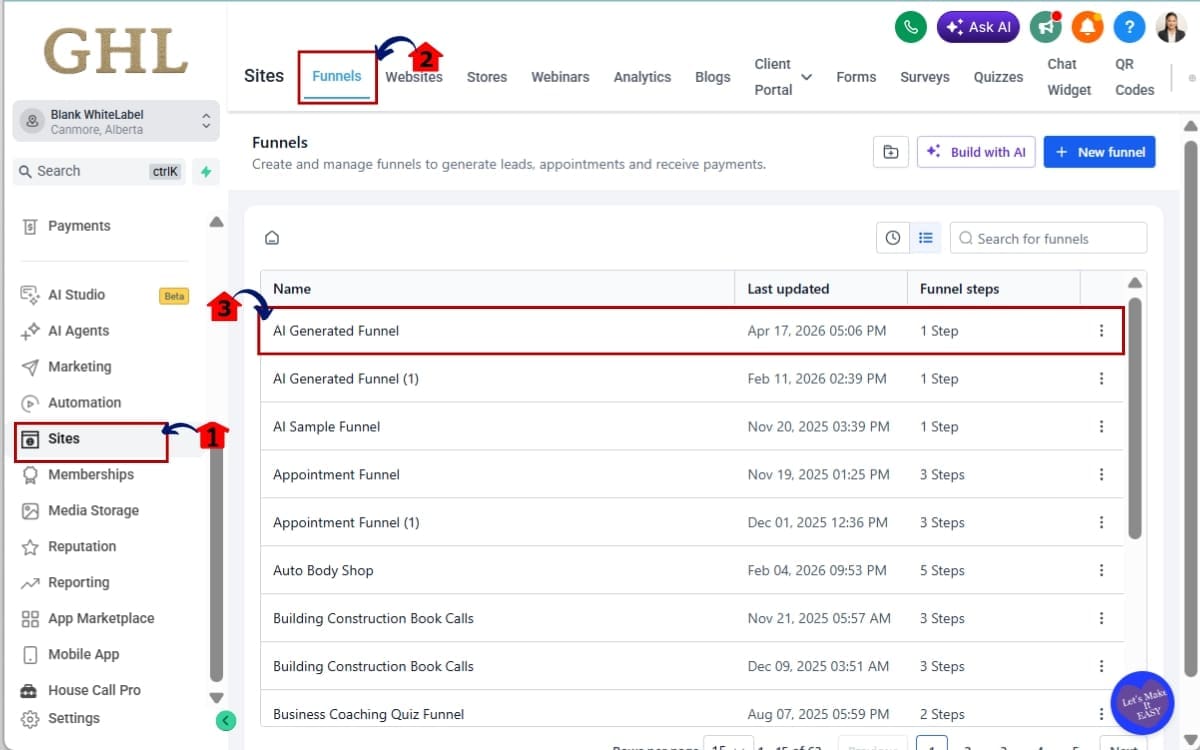
- The Main Menu on the left side of your screen contains all the core areas you use inside GHL.
1.1 Click on the “Sites” menu item.
- This is where all websites, funnels, and blogs live.
1.2 Click on “Funnels” from the top navigation.
- You’ll now see your list of funnels inside your sub-account.
1.3 Select the funnel you want to work with.
- Open the funnel where you would like to create a Funnel QR Code.
Step 02 – Open and edit the Funnel Step
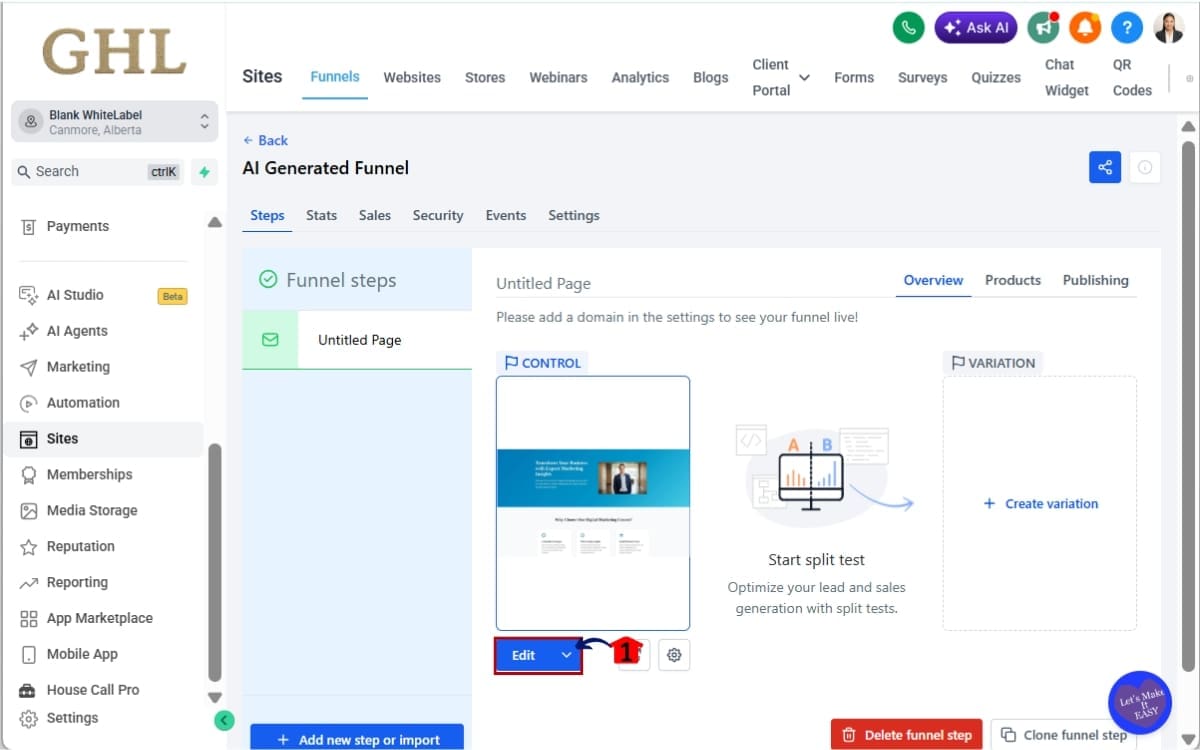
- Open the funnel step where you want to create and download a Funnel QR Code.
2.1 Click on the specific funnel step where you want to generate the Funnel QR Code.
- This could be an opt-in page, sales page, booking page, or thank-you page.
Step 03 – Generate the Funnel QR Code
- Generate a QR code for the current funnel step directly from the Funnel Builder.
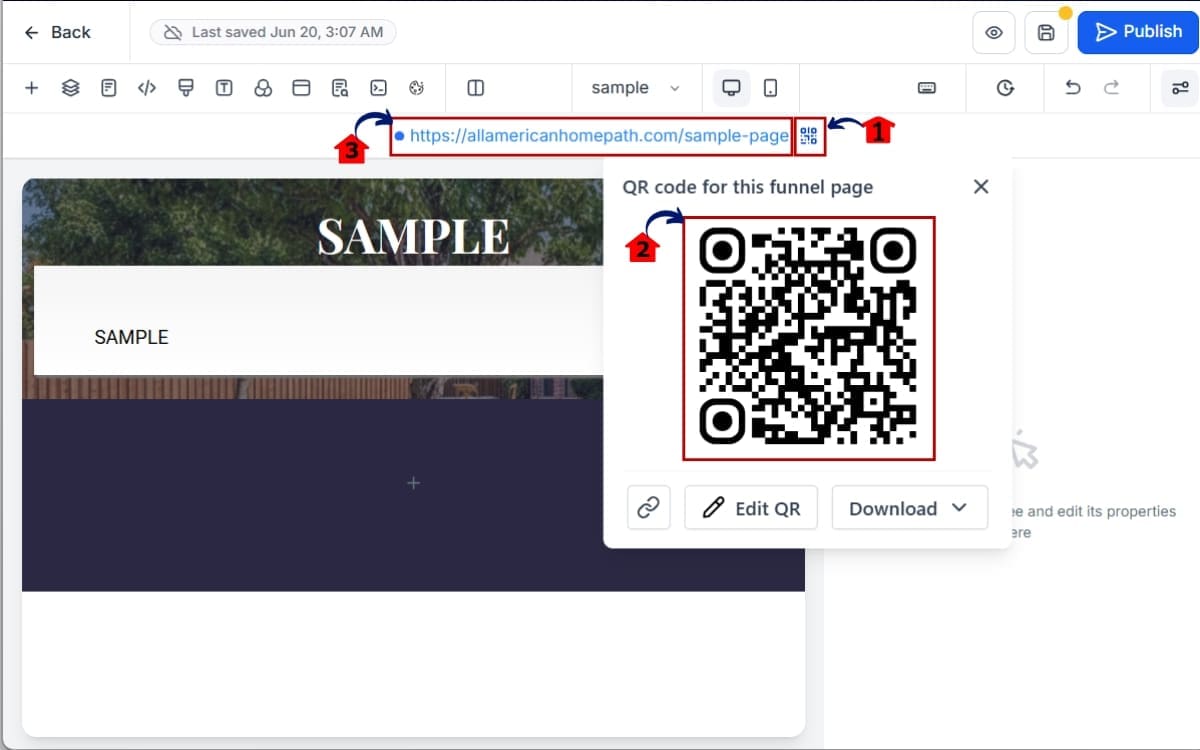
3.1 Locate the Funnel URL at the top of the page editor and click the QR Code icon.
- The QR Code icon appears beside the Funnel URL when a connected or hosted domain is available.
3.2 Review the QR Code preview window.
- A QR Code linked to the current funnel step will be generated automatically.
3.3 Confirm the destination URL is correct.
- The QR Code will point to the funnel step you are currently editing.
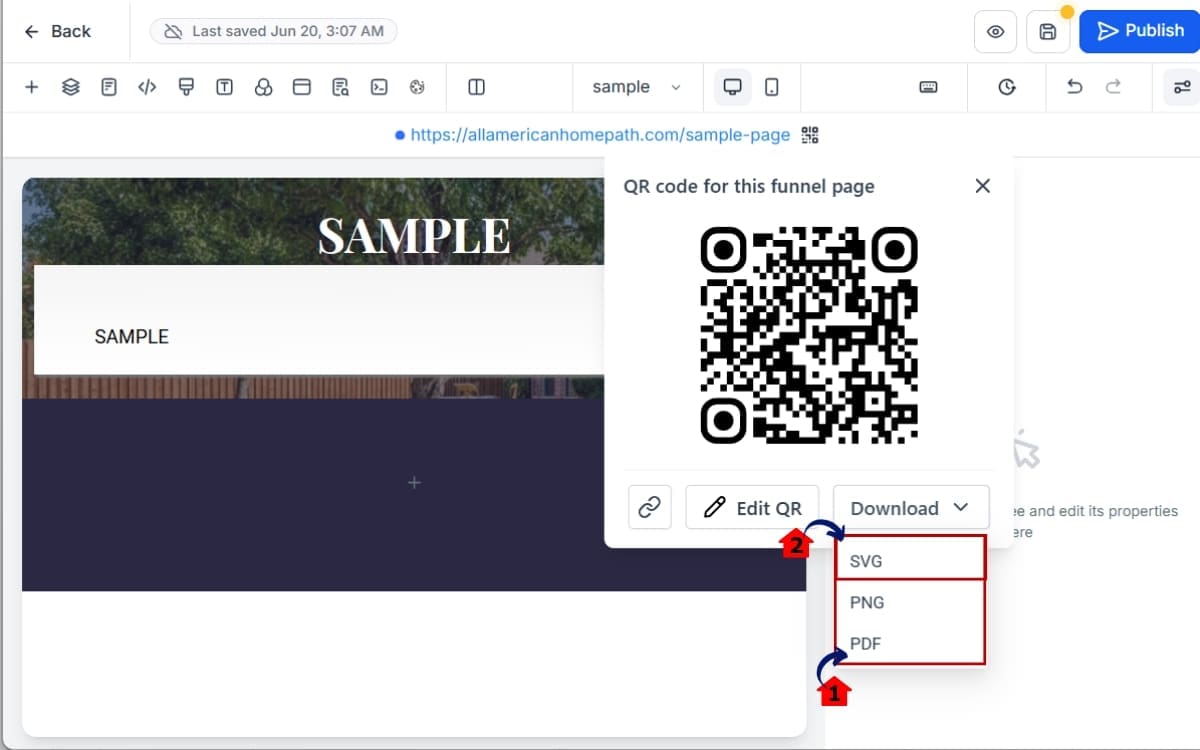
Step 04 – Download the Funnel QR Code
- Choose the file format that best fits how you plan to use your Funnel QR Code.
4.1 Inside the QR preview window, choose your download format.
You’ll see three options:
- PNG – Best for digital use and quick sharing
- SVG – Best for high-quality print materials
- PDF – Ideal for print-ready assets
4.2 Click your preferred format.
- The file will download directly to your device.
Step 05 – Customize the Funnel QR Code
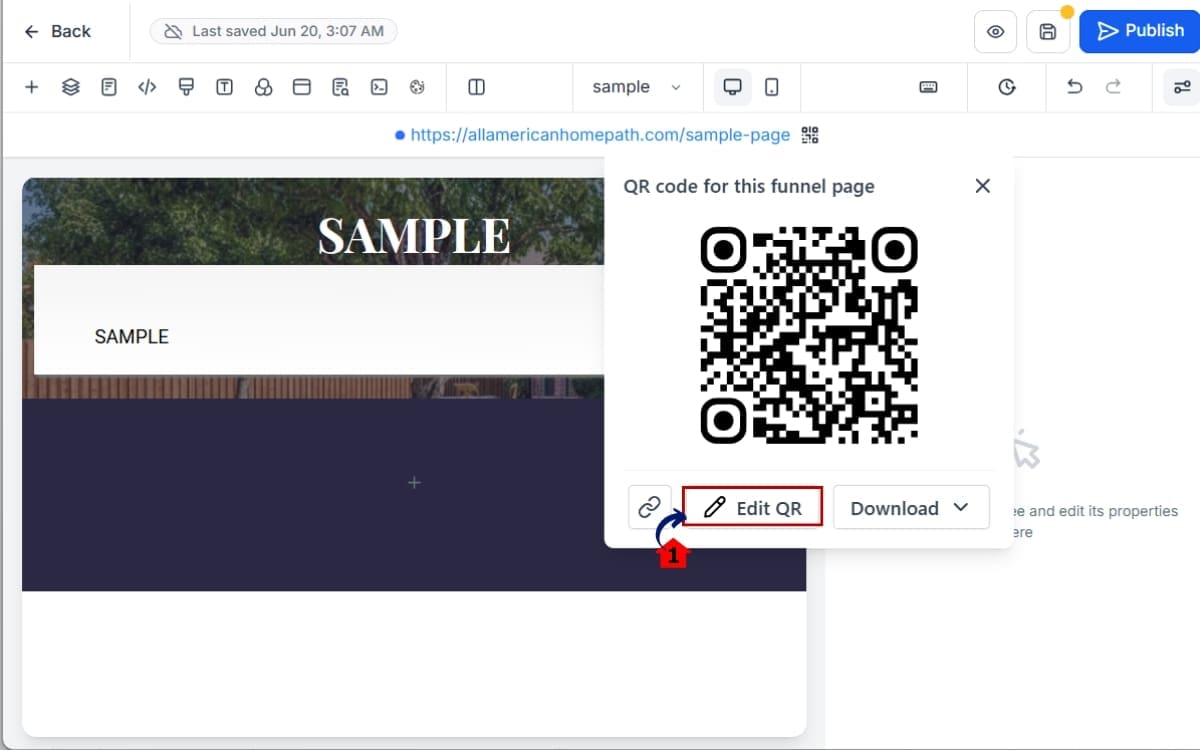
- Access the QR Code editor to modify the appearance of your Funnel QR Code before downloading it.
5.1 Click “Edit QR” inside the preview window.
- This opens additional customization options.
Step 06 – Adjust the QR settings
- Customize the QR Code appearance to better match your brand and marketing materials.
6.1 Adjust the design settings as needed.
- Update the QR Code style, colors, and other design options available in the editor.
6.2 Save and re-download your updated Funnel QR Code.
- Download the customized QR Code in your preferred file format for use in digital or printed marketing assets.

No extra tools. No extra software. No link confusion. Just a direct Funnel QR Code created inside GHL.
Pro Tips for Using Your GHL Funnel QR Code the Right Way
Most people will click it, download it, and move on. The smart ones will use it to drive more leads.
Before you start using it, keep these tips handy.
Use SVG for Print Materials
If you’re printing anything larger than a business card, use SVG.
Why? SVG files scale without losing quality. That means your Funnel QR Code will stay sharp on banners, posters, trade show booths, and window signage.
Blurry QR codes don’t scan well. SVG keeps it clean.
Always Connect a Branded Domain
Yes, the feature requires a connected domain. But don’t just connect any domain.
Use your branded domain.
Scanning a QR code that opens a generic URL reduces trust. A branded domain increases credibility and conversion rates.
Small detail. Big difference.
Test Before You Print
This sounds obvious. But people skip it.
Always scan your Funnel QR Code with at least two different devices before sending anything to print.
Make sure it loads:
- The correct funnel step
- The correct domain
- The correct offer
Printing 1,000 flyers with the wrong link is not fun.
Create Separate Funnel Steps for Tracking
Want smarter tracking? Instead of using one generic funnel step, duplicate the step and use a dedicated Funnel QR Code for:
- Events
- Packaging
- Direct mail
- Yard signs
That way, you can track traffic inside GHL and see which offline source performs best.
Offline marketing becomes measurable. That’s powerful.
Pair It with Automation
The Funnel QR Code drives traffic. But automation converts it.
After someone scans:
- Trigger a workflow
- Send a follow-up SMS
- Send a confirmation email
- Add them to a nurture campaign
QR code = entry point.
Workflow = revenue engine.
Agencies that combine both win.
Put It Where People Will Notice It
A QR code by itself isn’t enough.
Add clear copy:
- “Scan to Book.”
- “Scan for 10% Off.”
- “Scan to Claim Your Spot.”
Tell people what happens when they scan. Clarity increases action. And action drives conversions.
How to Use a GHL Funnel QR Code in Real Campaigns
The GHL Funnel QR Code isn’t just a cool feature. It’s a bridge. It connects offline attention to online conversion.
Here’s how smart agencies and business owners are using it right now.
Local Gym Free Trial Campaign
A gym runs a 7-day free pass funnel inside GHL.
Instead of telling people to “visit our website,” they print the Funnel QR Code on:
- Window signage
- Front desk posters
- Handouts at local events
People scan. They land directly on the opt-in page. Automation kicks in. Simple. Clean. Trackable.
Real Estate Yard Signs
Real estate agents can attach a Funnel QR Code to yard signs.
Instead of just listing a phone number, the sign says:
“Scan for Full Property Details.”
The QR code links to a property funnel with:
- Photo gallery
- Booking calendar
- Lead capture form
Now that yard sign becomes a lead generation machine.
Event Booth Lead Capture
Trade shows are noisy. People don’t want to type long URLs.
Place a Funnel QR Code on:
- Booth banners
- Table stands
- Business cards
Let visitors scan and instantly enter a giveaway funnel or booking page.
Then trigger an automation:
- Thank you email
- SMS reminder
- Special event-only offer
Offline traffic. Automated follow-up. Zero manual work.
Restaurant Table Promotions
Restaurants can place a Funnel QR Code on tables with copy like:
“Scan for Today’s Special Offer.”
The funnel can:
- Capture emails
- Offer a discount
- Promote a loyalty program
- Book catering consultations
Every table becomes a digital entry point.
Product Packaging Upsells
Ecommerce and physical product businesses can print a Funnel QR Code directly on packaging.
After purchase, customers scan and land on:
- An upsell funnel
- A review request page
- A referral program
- A VIP membership offer
That box in their hand just became a marketing asset.
The big shift here? Offline assets are no longer static.
With the GHL Funnel QR Code, they become interactive conversion tools. That’s leverage.
Funnel QR Code FAQs for GHL Users
Why the GHL Funnel QR Code Is a Smart Move
The GHL Funnel QR Code feature may look simple on the surface.
But it solves real problems. No more switching tools. No more copying and pasting links. No more sending traffic to the wrong funnel step.
You can now generate a Funnel QR Code directly inside Funnel Builder, tied to the exact page you’re working on.
That means:
- Faster execution
- Fewer mistakes
- Cleaner workflows
- Better offline-to-online marketing
For agencies, this compounds. You’re managing multiple clients. Multiple funnels. Multiple campaigns.
Agency work is full of small tasks. Remove enough of them and your day starts looking a whole lot better. Now it’s easier to turn everyday marketing materials into another source of leads.
Offline attention becomes trackable traffic. Traffic becomes leads. Leads become revenue.
No fireworks. Just a smarter way of working. Open up Funnel Builder on your next campaign and take it for a spin.
It takes seconds. And it could seriously upgrade how you promote funnels in the real world.
Have you started using Funnel QR Codes in your client campaigns yet? What’s your favorite use case so far?
Check back to the GHL Growth Garage blog for more GoHighLevel feature guides and tactical breakdowns like this one. 🚀
Scale Your Business Today.
Streamline your workflow with GoHighLevel’s powerful tools.


