

- GHL Image Alt Text That Just Leveled Up Your Store
- Quick Summary – Image Alt Text Essentials
- Here are this weeks HighLevel Updates
- What’s New With GHL Image Alt Text
- Why Image Alt Text Improves Ecommerce SEO
- How Image Alt Text Is Automatically Generated in GHL
- How to Use Image Alt Text in GHL
- Pro / Quick Tips for Maximizing Image Alt Text
- What This Means for Agencies and Ecommerce Businesses
- Frequently Asked Questions About GHL Image Alt Text
- Conclusion – Why GHL Image Alt Text Is a Quiet SEO Win
GHL Image Alt Text That Just Leveled Up Your Store
Image Alt Text used to mean one thing. Manual work. If you’ve built Ecommerce stores inside GHL, you know the process.
Upload product. Add image. Forget alt text. Or tell yourself you’ll fix it later. Most people didn’t. It worked. But it wasn’t optimized.
And when you’re managing multiple products, multiple variants, multiple collections, “I’ll add alt text later” isn’t a strategy.
It creates SEO gaps. It hurts accessibility. It leaves traffic on the table. GHL Image Alt Text automation fixes that gap.
Instead of manually writing alt descriptions for every product image, GHL now generates Image Alt Text automatically using your product name, variant name, collection name, store name, and element context.
Main images? Handled. Gallery images? Indexed. Variants? Covered. Upsells and bundles? Done.
And here’s the part agencies will love. No new settings. No new workflow. No design changes.
It runs quietly in the background, improving Ecommerce SEO and accessibility without adding work to your team.
Smarter structure. Cleaner optimization. Better leverage inside GHL.
The latest GoHighLevel Changelog includes several other GHL feature updates that round out your daily workflow:
- New QR Code Styling Options: Shapes, Borders, and Rim Text
- Collapse & Resize Pipeline Stages in Kanban View
- Notes just got smarter for the contacts page!
- New Asana actions in workflows – Find Project and Find section
- Email AI + Knowledge Base Integration 🚀
- Dialer: Auto-minimize, Pin & Drag
- Schema Markup Using AI
Keep reading for much more on all these updates and a deep dive into the Image Alt Text feature!

Quick Summary – Image Alt Text Essentials
Purpose
This update automatically generates Image Alt Text for Ecommerce products, collections, and store elements inside GHL using existing metadata.
Why It Matters
Most stores forget to optimize image alt attributes. This automation strengthens SEO structure and accessibility without adding manual workload.
What You Get
Your product images, variants, bundles, cart items, and checkout thumbnails now use structured Image Alt Text pulled directly from your product and store naming.
Time to Complete
No setup required. Review and optimize your product naming in under 30 minutes for stronger long-term results.
Difficulty Level
Beginner-friendly. The automation runs in the background, and improvements only require better product naming.
Key Outcome
Cleaner technical SEO, improved accessibility, and scalable Image Alt Text optimization across your entire GHL Ecommerce store.
Here are this weeks HighLevel Updates
New QR Code Styling Options: Shapes, Borders, and Rim Text
What it does:
Lets you stop using boring QR codes. You can now tweak the shape, style the border, and add text around the edge.
Where in GHL:
Accessible via Sites → QR Codes and within QR tools embedded in Funnel and Website builders.
Automate marketing, manage leads, and grow faster with GoHighLevel.

Impact:
Improves visual presentation and brand alignment while increasing scan appeal.
Best suited for:
Agencies that care about branding, small businesses running local promotions, online stores, and teams pushing QR campaigns.
Collapse & Resize Pipeline Stages in Kanban View
What it does:
Lets you hide pipeline stages you’re not actively using and adjust column widths so your board fits the way you work.
Where in GHL:
Inside Opportunities when you’re viewing your pipeline in Kanban mode.
Impact:
No more dragging your screen forever just to find the deals that matter.
Best suited for:
Owners running multi-stage pipelines, reps working deals every day, and anyone fed up with a messy board.
Notes Just Got Smarter for the Contacts Page
What it does:
Upgrades the notes area so it’s easier to write, review, and keep things organized inside a contact record.
Where in GHL:
Found directly within each contact’s profile under Notes.
Impact:
Makes it simpler to see what’s been discussed and who added what — without digging through clutter.
Best suited for:
Teams collaborating on accounts and businesses that document every client touchpoint.
New Asana Actions in Workflows – Find Project & Find Section
What it does:
Lets your workflow check what already exists in Asana before adding anything new.
Where in GHL:
Go to Workflows, add an action, and choose the Asana integration.
Impact:
No more duplicate projects. No more messy task boards. Just cleaner automation.
Best suited for:
Operations teams and agencies that rely on Asana to manage client delivery.
Email AI + Knowledge Base Integration
- What it does:
Allows Email AI to reference your Knowledge Base for smarter, more accurate responses. - Where in GHL:
Found in Conversations → Email composer with AI enabled and Knowledge Base settings under AI configuration. - Impact:
Smarter email suggestions that understand your business and help you reply quicker. - Best suited for:
Support teams, agencies managing inboxes, and businesses scaling communication with AI.
Dialer: Auto-Minimize, Pin & Drag
- What it does:
Lets you auto-minimize the dialer during calls, pin it in place, and drag it anywhere on screen. - Where in GHL:
Found in Conversations → Dialer. - Impact:
Cleaner workspace and easier multitasking during sales or support calls. - Best suited for:
Sales teams, outbound callers, appointment setters, and agencies making daily calls.
Schema Markup Using AI
- What it does:
Generates structured schema markup automatically using AI for SEO enhancement. - Where in GHL:
Found in Sites → Website or Funnel settings within AI or SEO sections. - Impact:
Improves search visibility without manual coding. - This works well for:
Teams building websites that need stronger search visibility, from agencies to small local businesses.
What’s New With GHL Image Alt Text
This update expands Image Alt Text coverage across your entire Ecommerce store.
Before, many store images either had missing alt text or required manual entry. Now GHL automatically generates Image Alt Text using existing product and store metadata.
Here’s exactly what’s now covered.
Automatic Image Alt Text for Product Images
Your core product visuals are now optimized automatically.
- Product main images use the product name
- Product gallery images use the product name plus image index
- Variant images use the product name and variant name
- Upsell and bundle images use the product name
That means if your product is called “Premium Leather Backpack,” your Image Alt Text reflects that automatically.
No more blank attributes. No more missed SEO signals.
Alt Text for Collections and Branding
This update also applies to storefront structure and branding elements.
- Collection cover images use the collection name
- Header logos use the store name if no alt text is present
This is important because collection pages often rank in search engines. Now those pages send clearer context signals through Image Alt Text automatically.
Even your branding elements are now contributing to structured accessibility.
Image Alt Text for Store Elements
This is where it gets powerful. GHL now applies product-based Image Alt Text across store components like:
- Product cards
- Featured Product sections
- Related Products blocks
- Cart item images
- Checkout product thumbnails
Even components inside store elements use their component name where applicable.
This means your Image Alt Text is no longer isolated to product pages. It’s layered across the entire buying experience.
Search engines see more structure. Accessibility improves. Your store becomes technically stronger without extra effort.
Why Image Alt Text Improves Ecommerce SEO
Here’s the deal. Without Image Alt Text, search engines are guessing what your image represents.
Without it, Google sees a file. With it, Google sees context.
That context matters. When GHL automatically generates Image Alt Text, your product images become readable to search engines. That improves how your store pages are understood, categorized, and ranked.
Here’s what that means in real terms.
Better Product Visibility
Search engines use Image Alt Text to understand what your product is. When your alt text includes product names and variants, your pages send stronger keyword signals.
That increases your chances of ranking for product-related searches.
More Structured Image Indexing
Google indexes images separately. When your Image Alt Text is clear and descriptive, your products have a better chance of appearing in:
- Google Image results
- Visual search
- Product-based search listings
That’s traffic most stores ignore.
Accessibility Compliance
Image Alt Text isn’t only about rankings. Screen readers use it to explain images to people who can’t see them. When GHL fills this in automatically, your store becomes more inclusive without you lifting a finger.
That improves user experience. It improves professionalism. And it reduces risk for accessibility-related complaints.
Stronger Technical Foundation
Most store owners focus on:
- Design.
- Pricing.
- Offers.
Few focus on structure. But search engines care about structure.
GHL Image Alt Text automation strengthens the technical layer of your Ecommerce store without adding work to your team. It removes weak spots in your SEO foundation.
And when you stack small improvements like this across dozens of products, the compound effect matters. Agencies especially benefit here.
Because now you can tell clients: “Your product images are SEO-optimized automatically.” That’s leverage.
How Image Alt Text Is Automatically Generated in GHL
Here’s where this gets smart. GHL doesn’t guess randomly.
It uses the metadata you already entered inside your store to generate Image Alt Text automatically.
That means the system pulls from:
- Product name
- Variant name
- Collection name
- Store name
- Element context
- Fallback translation support
It builds structured Image Alt Text using what already exists.
No AI prompt required. No manual writing required. No new UI fields added.
How Product Images Are Handled
For product-level images:
- Main product image → Uses the product name
- Gallery images → Uses product name + image index
- Variant images → Uses product name + variant name
Upsells and bundles → Uses product name
If your naming is clean, your Image Alt Text is clean. That’s important.
Because your SEO output now depends directly on how well you name your products and variants.
How Collections and Branding Work
For storefront structure:
- Collection cover images → Use collection name
- Header logos → Use store name (if alt text is missing)
This keeps branding elements accessible and structured. Even if you never thought about adding alt text to a logo before.
How Store Components Are Covered
GHL now applies Image Alt Text inside:
- Product cards
- Featured Product blocks
- Related Products
- Cart images
- Checkout thumbnails
Components inside store elements use their component name where applicable.
That means your entire Ecommerce flow — not just product pages — benefits from structured Image Alt Text.
And here’s the key detail. There is:
- No new manual alt text field in this version
- No workflow changes
- No storefront redesign
This runs automatically in the background. Store design stays the same. User experience stays the same. SEO structure improves quietly.
If your product metadata is strong, your Image Alt Text is strong. Simple as that.
How to Use Image Alt Text in GHL
This update does not require you to enable anything inside GHL. Image Alt Text is generated automatically using your existing product names, variant names, collection names, and store information. However, because the system pulls directly from your metadata, the quality of your naming now directly affects your SEO results.
In this section, you will review where Image Alt Text pulls its information from, how to check and improve your product and collection naming, and how to confirm the automation is working correctly. Follow the steps below to ensure your store data is structured properly so the generated Image Alt Text supports your Ecommerce SEO efforts.
- Access the Main Left Hand Menu in GoHighLevel.
- Review and Edit Product Variants.
- Review Collections in the Products.
- Test Your Storefront based on the alt text.
To start make sure you are logged in to your GoHighLevel sub-account.
Step 01 – Access the Main Left Hand Menu in GoHighLevel
- The Main Menu on the left side of your screen has all the main areas that you work in when using GHL.
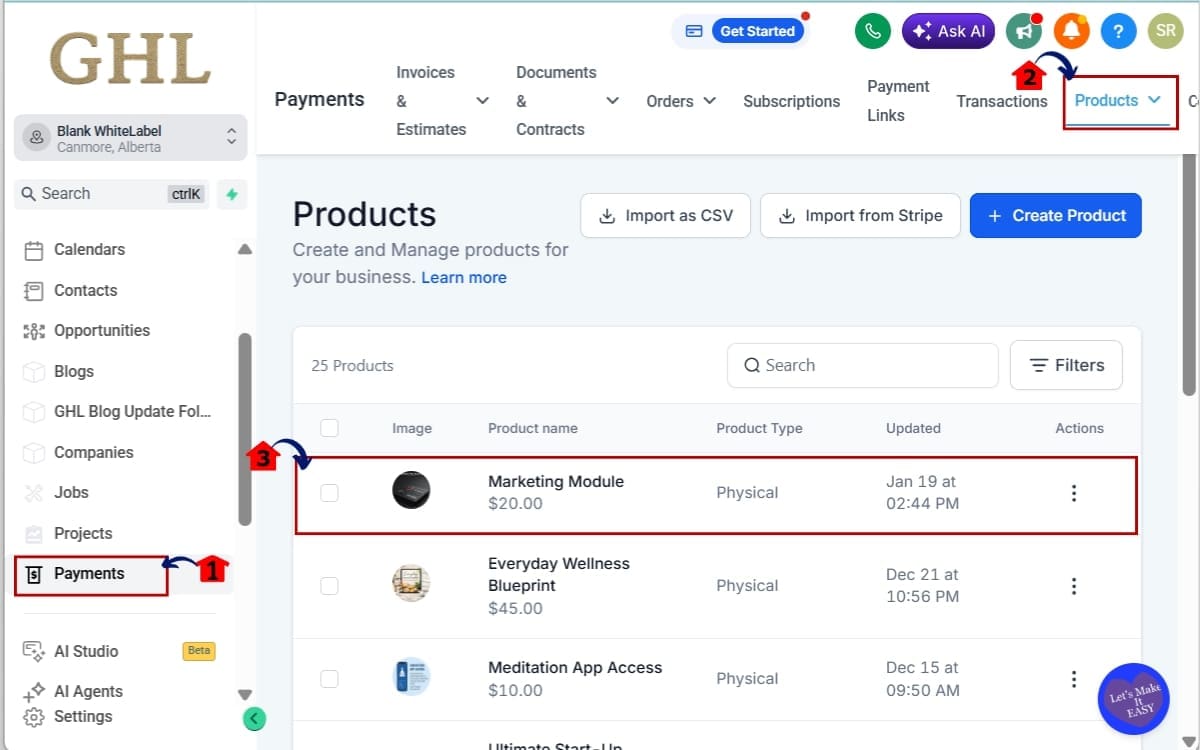
1.1 Click on the Payments menu item.
- This is where Products, Orders, and your Product Catalog live.
1.2 Click on “Products.”
- You’ll now see your full product list inside GHL.
1.3 Click the existing products you will edit
- Review your product names carefully. Because your main product name becomes your Image Alt Text for primary product images.
Step 02 – Review and Edit Product Variants
- This ensures your variant naming supports strong, automatic Image Alt Text generation.
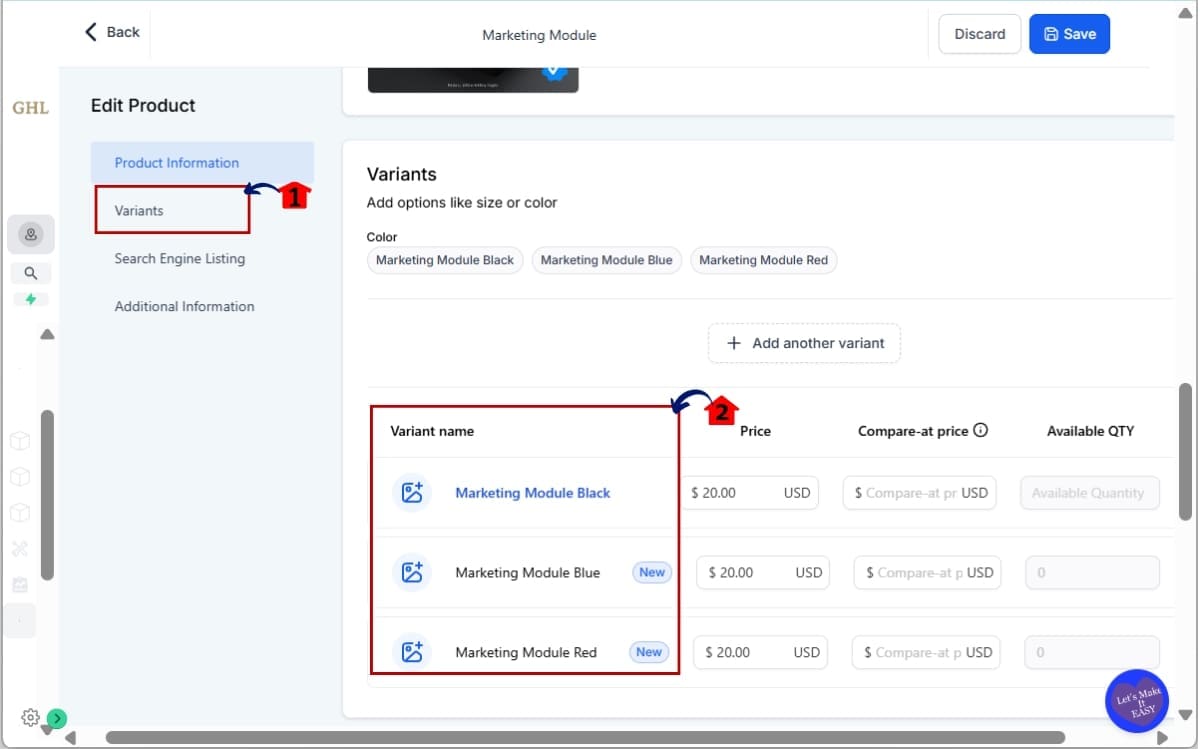
2.1 Click on “Variants” in Edit Product
- This is where you manage size, color, package type, and other product options.
Example: Size, Color, Package Type.
2.2 Review the Variant Names.
- Variant images use product name + variant name for Image Alt Text. This means whatever you type here directly becomes part of your alt text.
If your variant is called “Option 1,” that’s what your alt text will reflect.
Rename vague variants into descriptive ones.
- Descriptive names improve clarity for both search engines and customers.
Example: Instead of “Blue,” use “Marketing Module Blue”
Step 03 – Review Collections in the Products
- This ensures your collection naming supports strong, automatic Image Alt Text generation.
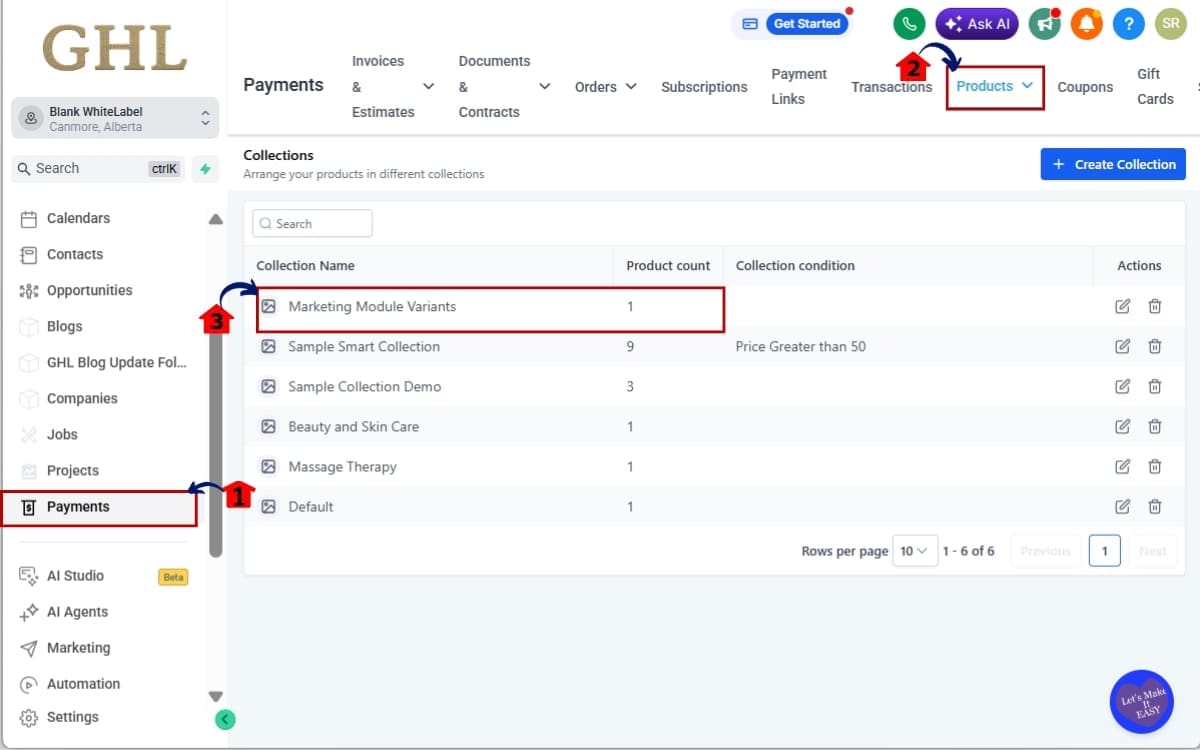
3.1 Go back to the main left menu. Click on Payments.
- This is where your Products and Collections are managed inside GHL.
3.2 Click on Products – Collections.
- You will now see all existing collections used in your store.
3.3 Make sure to use descriptive collection names.
- Collection cover images use the collection name for Image Alt Text.
Make sure your collections are descriptive. Clear naming improves category-level SEO and image structure.
Avoid: “Collection 1”
Use: “Marketing Module Variants”
Your collection names now influence SEO structure. Clean metadata strengthens automated Image Alt Text across your store.
Step 04 – Test Your Storefront based on the alt text
- This step confirms your product updates are live and reflected in your store.
4.1 Click Store.
- This opens your live storefront view inside GHL.
4.2 Go to Products.
- This displays all products currently visible in your store.
4.3 Check if your edited product is there.
- This confirms your changes were saved and are active on the storefront.
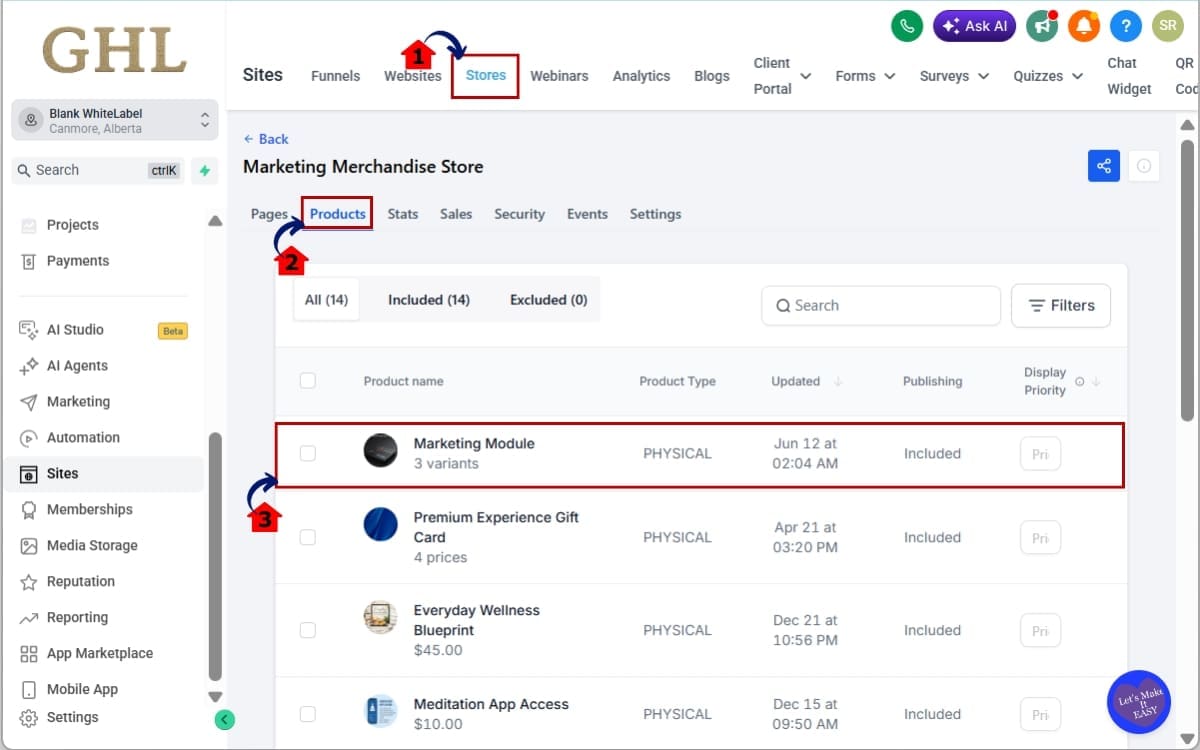
This confirms your Image Alt Text is being generated automatically. Remember. GHL is doing the automation. Your job is to make sure the source data is strong. Strong inputs create strong Image Alt Text outputs.
Pro / Quick Tips for Maximizing Image Alt Text
Now that GHL is generating Image Alt Text automatically, small tweaks in your naming strategy can create bigger SEO gains. Most users will ignore this. Smart agencies won’t.
Here’s how to get more leverage from the automation.
Use Descriptive Product Names
Your product name is now your primary Image Alt Text.
That means:
- Bad example: “Water Bottle”
- Better example: “32oz Stainless Steel Water Bottle with Straw Lid”
Search engines understand the second one better. So do customers.
Avoid Generic Variant Labels
Variant images combine product name + variant name.
If your variant says: “Red”
That’s weak.
Instead use:
- “Red – 32oz”
- “Red Matte Finish”
Clear variant naming improves structured Image Alt Text automatically.
Think Like a Search Engine
Ask yourself: If someone searched this product, would my product name match that intent?
Because your Image Alt Text now mirrors that structure. No extra effort required.
Don’t Keyword Stuff
More isn’t better. Stuffing product names with 10 keywords creates ugly alt text and weakens credibility.
Keep it natural. Keep it readable. Keep it structured.
Use Collections Strategically
Collection names now influence Image Alt Text for cover images.
Instead of: “Featured”
Use:
- “Best-Selling Fitness Gear”
- “Luxury Leather Backpacks”
This helps with category-level SEO.
Quick Agency Advantage
If you manage multiple client stores:
- Audit product names
- Standardize nam/ing structure
- Create a naming SOP
- Position this as built-in SEO optimization
You’re now selling technical SEO improvements without adding billable hours. That’s leverage.
What This Means for Agencies and Ecommerce Businesses
This is one of those updates that looks small… But compounds fast.
GHL Image Alt Text automation quietly strengthens every product page, every collection, and every checkout experience inside your store. And it does it without adding workload.
For Ecommerce Store Owners
If you sell physical or digital products inside GHL, this means:
- Your product images now carry structured SEO signals
- Your collections are more search-friendly
- Your store is more accessible
- Your technical foundation just improved
You didn’t redesign anything. You didn’t hire an SEO specialist. You didn’t touch code.
But your Image Alt Text is now automatically optimized using your own product data. That’s a silent win.
For Agencies Managing Multiple Stores
This is where it gets strategic. If you manage 10… 20… 50 stores… Manual alt text writing would be a nightmare.
Now? It scales automatically.
You can:
- Clean up product naming across accounts
- Standardize variant structure
- Improve collections
- Instantly upgrade Image Alt Text across all products
That’s leverage. You’re improving on-page SEO structure across dozens of SKUs without touching each image manually.
Real-World Scenario
Let’s say you manage a supplement brand with:
- 30 products
- 5 variants each
- 3 collections
- Upsells and bundles
That’s easily over 200+ image instances across the store.
Before? You’d manually optimize those.
Now? Once your naming is clean, GHL handles the Image Alt Text automatically.
Multiply that by 10 client stores. Now you’re talking about serious time savings.
Positioning Advantage
This also becomes a sales angle. When clients ask: “What are you doing for SEO?”
You can explain:
- Structured product naming
- Automated Image Alt Text
- Storewide optimization
- Accessibility improvements
You’re not just building pages. You’re building optimized assets. And because GHL runs this automatically, your execution stays clean.
Less manual work. Less friction. More scalable SEO infrastructure.
Frequently Asked Questions About GHL Image Alt Text
Conclusion – Why GHL Image Alt Text Is a Quiet SEO Win
GHL Image Alt Text automation might not look flashy. There’s no new dashboard. No shiny toggle. No dramatic UI redesign.
But it fixes something most Ecommerce stores ignore. Structure.
Your product images now carry meaningful, metadata-driven Image Alt Text across:
- Product pages
- Collections
- Variants
- Bundles
- Cart views
- Checkout
Automatically. No extra clicks. No manual writing. No workflow changes.
That means better accessibility. Stronger SEO signals. Cleaner technical structure.
And if you’re running multiple stores inside GHL? This compounds.
Because once your product naming is optimized, your Image Alt Text scales across every image instance in your store.
That’s leverage. That’s systems thinking. That’s how smart agencies win long-term.
This update rewards clean naming, structured product data, and organized Ecommerce builds.
If you haven’t reviewed your product titles and variants recently, now is the time. Clean inputs. Automated outputs.
Have you reviewed your store naming structure since this update rolled out? If not, start there.
And check back to the GHL Growth Garage blog for more GoHighLevel mini-guides that turn small updates into serious leverage.
Scale Your Business Today.
Streamline your workflow with GoHighLevel’s powerful tools.


