

- A Tiny UI Tweak That Instantly Cleans Up Your Biggest Automation Mess
- Quick Summary – Workflow Trigger Name Readability Upgrade
- The Workflow Builder Problem Solved
- The New UI Improvement Explained
- How to Use the New Workflow Trigger Names: The Instant Readability Upgrade
- Results You Can Expect
- Frequently Asked Questions about Workflow Trigger Names
- Stop Guessing, Start Growing
A Tiny UI Tweak That Instantly Cleans Up Your Biggest Automation Mess
Stop Wasting Clicks: Instant Clarity for Your Complex Automations
If you are managing complex automations, the length of your Workflow trigger names can cause major headaches. You know the drill. You stare at the Workflow Builder, forced to click and click again. That half-readable, clipped text wastes your time. This clicking and guessing slows down your entire team. When you handle a high volume of client accounts, visual clarity is not optional. It is essential for a profitable agency.
GHL just fixed this annoying bottleneck. This update is small, but it is a massive quality-of-life improvement. They refined the way those long names appear in the builder. The new system cleanly truncates the text. This keeps your workspace organized. It gives you the neat, uncluttered look you deserve. Visual chaos is now officially eliminated.
The real game-changer is the hover to reveal function. Need the full context of a trigger? Just move your cursor over the clipped name. The full description instantly appears in a clean tooltip. This simple movement saves you time and clicks. It delivers clarity. You get the perfect balance of a clean interface and immediate, complete information for all your automations.
This update instantly saves you time and reduces errors by giving you a clean, intuitive way to see the full details of any Workflow trigger name without ever having to open the settings panel.
Quick Summary – Workflow Trigger Name Readability Upgrade
Purpose: This update makes reading and verifying long Workflow trigger names simple, eliminating visual clutter and the need to click into trigger settings.
Why It Matters: It stops the frustrating “click and guess” game, instantly improving team efficiency, audit speed, and accuracy in managing complex automations.
What You Get: Clean truncation of long trigger names and the Hover to Reveal function that displays the full name in an instant, non-intrusive tooltip.
Time to Complete: Zero setup time. The UI feature is applied automatically and is live across all sub-accounts immediately.
Difficulty Level: Easy. It’s an intuitive hover function.
Key Outcome: Massive time savings, reduced errors, and effortless visual clarity for all your Workflow trigger names.
The Workflow Builder Problem Solved
The Workflow Builder is the engine room of every serious GHL business. It is where raw effort turns into automated profit. But even the best engine can have a bottleneck. For too long, that bottleneck was simple visual clutter. When you created a specific automation, the Workflow trigger names got cut off.
Think of it: you needed a long, descriptive name to be sure of the logic. Something like Tag Applied: High-Value-Client-Webinar-Purchase. The old builder would clip it, leaving you to guess. This meant you had to stop your work, click the trigger, wait for the settings window, read the name, and close it. This little ritual happened constantly.
Automate marketing, manage leads, and grow faster with GoHighLevel.

Every click is wasted time, and wasted time is wasted money. This old process slowed down every single agency team trying to build, audit, or debug complex automations. Maximizing the use of Workflow trigger names while keeping the workspace clean was the fundamental conflict. Now, that conflict is solved. GHL fixed the visual part of the workflow.
The New UI Improvement Explained
This latest update is designed to eliminate that friction by giving you instant, visual clarity without sacrificing the detail you need in your Workflow trigger names. The GHL team delivered a two-punch solution: Neat Truncation and the Hover-to-Reveal magic.
First, Neat Truncation keeps the builder looking clean. Instead of clunky text wrapping or confusing cut-offs, long trigger names are now gracefully shortened to fit perfectly inside the initial trigger node. The visual clutter is gone. This is a massive win for your sanity when viewing a complicated workflow map. It makes the entire canvas feel professional and easy to navigate at a glance.
Second, the Hover to Reveal feature is the real secret sauce that makes this update essential. You no longer have to click into the trigger configuration to see the full name. Now, simply floating your cursor over the truncated trigger name instantly displays the full text in a clean, elegant tooltip.
This mechanism gives you full context verification in a millisecond. You get the benefit of a clean, minimalist interface while retaining instant access to the full, descriptive name.
This small design change instantly increases your speed, reduces cognitive load, and transforms the workflow audit process from a chore into a seamless experience.
How to Use the New Workflow Trigger Names: The Instant Readability Upgrade
This update is a pure quality-of-life feature: an automatic improvement baked right into the Workflow Builder. Because there is no new setting to toggle, the key is knowing exactly where to look for the change and how to use the new hover function.
This How-To will quickly guide you to your Workflows and show you the simple cursor movement that reveals the full, descriptive Workflow trigger names, instantly boosting clarity for your most complex automations.
Here is the simple, step-by-step process for leveraging this UI improvement in your Workflows:
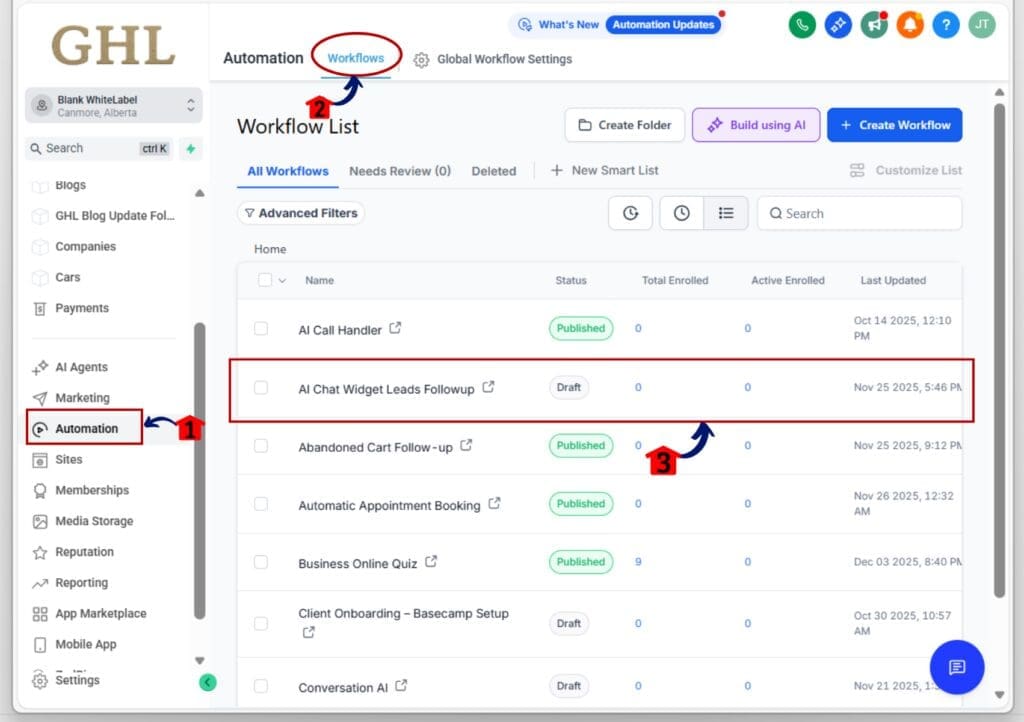
Step 01: Access the Main Left Hand Menu in GoHighLevel
- The Main Menu on the Left side of your screen has all the main areas that you work in when using GHL
1.1 Click on the Automation Menu Item.
- Access the ‘Automation’ section of GoHighLevel
1.2 Click on the Workflows Menu
- this will open the workflows dashboard where you can access the available workflow
1.3 Click on the workflow name to open the Workflow Builder canvas.
- Choose any existing workflow you know has a long trigger name.
Step 02: Locate the shortened Trigger Name
- Once your workflow opens, look for the first step where the automation begins.
2.1 Look at the very first step, the Trigger node.
- This node is where you will see the full benefit of the UI change.
2.2 Identify a long Workflow trigger name.
- If the name is long, you will see the text is now cleanly shortened to fit neatly inside the trigger box.
2.3 Move your cursor over the truncated text displayed in the trigger header.
- Do not click. Just hover your mouse over the short text.
2.4 Observe the full, descriptive name instantly appear.
- A clean, non-intrusive tooltip will show the complete, detailed name of the trigger.
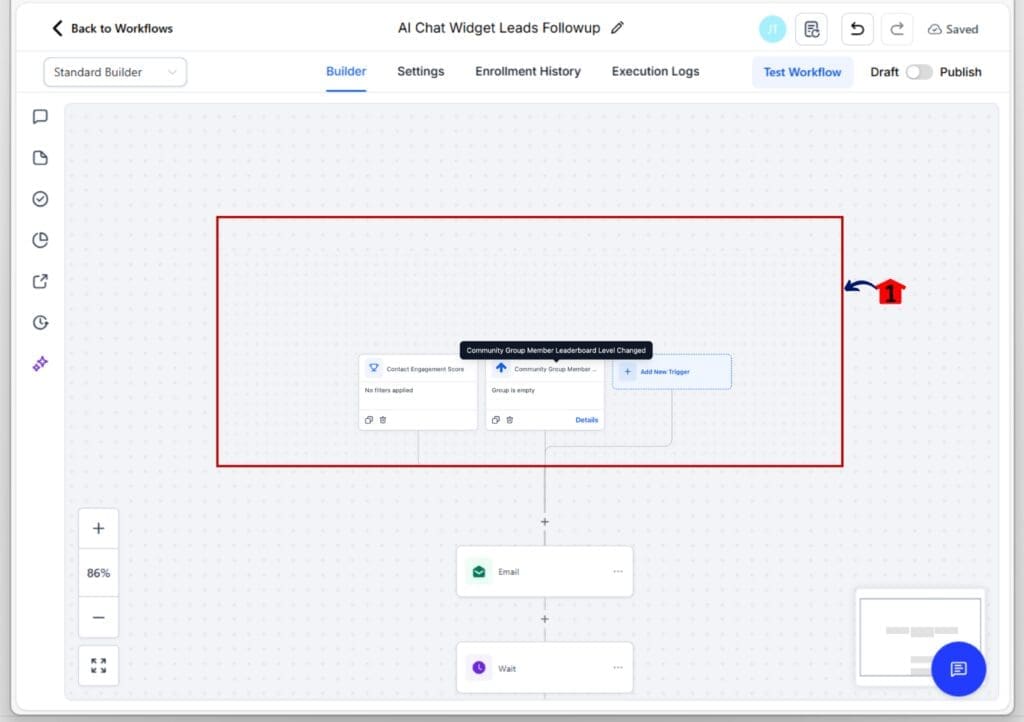
That is, it. This simple UI change eliminates unnecessary clicks and lets you manage your most complex automations with effortless visual clarity.
Results You Can Expect
Forget the small stuff. This tiny UI update gives you three massive, core wins for your business immediately:
- Speed is Money: You just saved dozens of clicks on every workflow audit. That time you save is time you can spend on sales or client work. You will never again waste a second on simple verification of Workflow trigger names.
- Eliminate Clutter: Your most complex automations will finally look clean. The neat truncation handles the visual noise so your workflow map is easy to read. Clean workflows mean less stress and faster building. This visual upgrade makes managing detailed Workflow trigger names completely effortless.
- Zero Errors: Instant context means fewer mistakes. You can instantly check every long, detailed Workflow trigger names with a mouse hover. This drastically lowers the risk of misreading a trigger and breaking a critical automation. Clarity prevents those costly errors.
Frequently Asked Questions about Workflow Trigger Names
Stop Guessing, Start Growing
GHL always focuses on improvements that matter. This new update proves that small changes bring big wins. The Workflow Builder UI now features clean text and the smart Hover to Reveal function. This quality-of-life update makes GHL a great platform. It stops the guessing game. It gives you a smarter experience that saves time. If you use complex automations, this is a huge win.
This feature makes managing detailed Workflow trigger names much easier. Your team gets instant speed and clarity. Now, go try it out. Open your Automation tab now. Find your busiest workflow. Hover your cursor over the Workflow trigger names.
See how much easier it is to manage your automations. The frustrating “click and guess” game is finally gone. Go streamline those automations and put that time back into growing your business!
Scale Your Business Today.
Streamline your workflow with GoHighLevel’s powerful tools.


