- Find deals faster with a cleaner contact layout and quicker opportunity visibility (before the Actions menu option goes away on Apr 08, 2026)
- What’s New: Opportunities tab on the contact page
- What’s Changed: Opportunities tab on the contact page
- Why This Matters for Agencies
- How To Use the Opportunities Tab in GHL
- Pro / Quick Tips (Opportunities tab)
- What This Means for Your Business (Opportunities tab)
- Frequently Asked Questions about Opportunities tab
- Results You Can Expect (Opportunities tab)
- Wrap-Up: Make the Opportunities Tab the New Habit
Find deals faster with a cleaner contact layout and quicker opportunity visibility (before the Actions menu option goes away on Apr 08, 2026)
GHL Opportunities Tab keyword phrase included
GHL Opportunities Tab just got easier to find on the contact page. If your team works inside contact records all day, this is a helpful change. You no longer need to dig through menus just to check what deal a contact is tied to.
GHL made this update based on user feedback on the new contact page layout. The Opportunities tab now lives on the right panel, right below Associations. That makes it easier to spot and faster to use during calls, follow-ups, and quick pipeline checks.
This is only a layout change. Your data, pipelines, and opportunity settings stay the same. The goal is simple. Give your team a cleaner view and faster access to the details they need.
For now, opportunities still show in two places. Your team can find them in the Actions menu and in the right panel. But by April 08, 2026, the Actions option will be removed, so now is a good time to update your SOPs and screenshots.
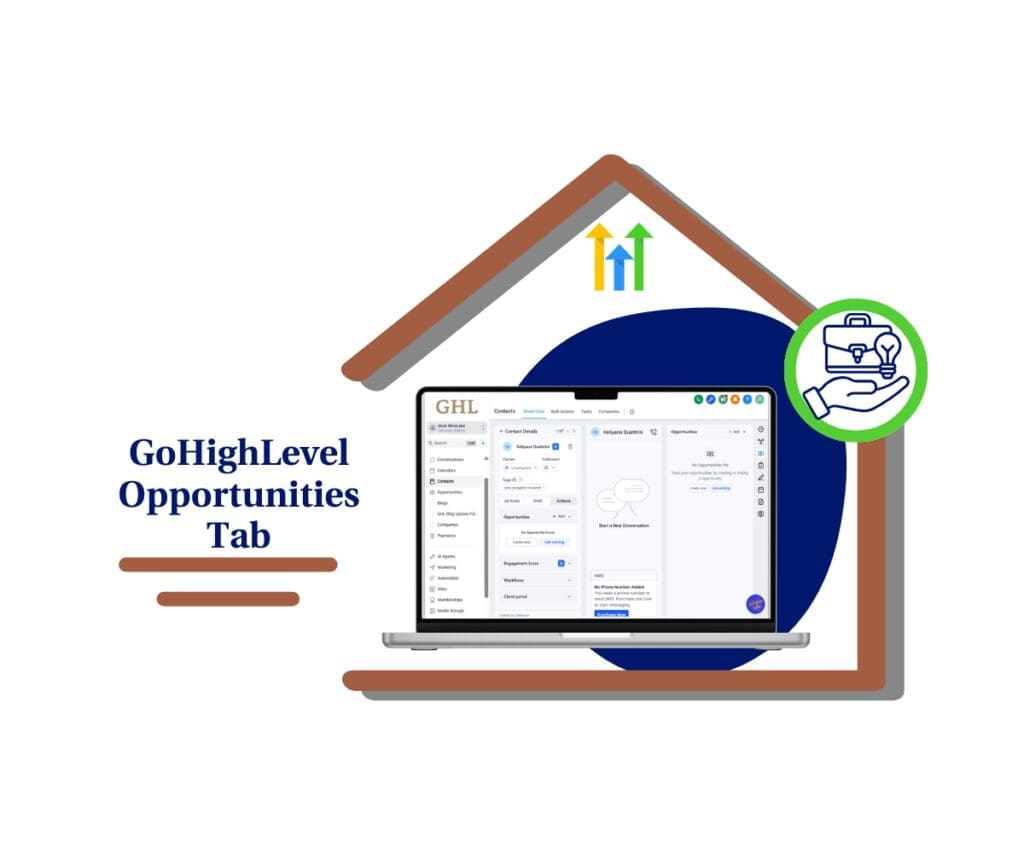
This update puts the Opportunities tab where your team naturally looks first: the contact right panel. You’ll get faster deal context, fewer clicks, and smoother handoffs across sales and support inside GHL.
What’s New: Opportunities tab on the contact page
Opportunities moved to the right panel as a dedicated stand-alone tab. That means your team can find deals faster from inside the contact record without digging through extra menus.
The Opportunities tab now sits below Associations to make it easier to spot and more intuitive for daily workflows like calls, follow-ups, and quick pipeline checks. It’s designed for better visibility and fewer clicks.
This is a view-only layout change. Opportunities are visually decoupled from Associations, but nothing changes about your data, pipelines, or functionality. For now, opportunities are still accessible in two places (Actions and the right panel) during the transition.
Automate marketing, manage leads, and grow faster with GoHighLevel.

What’s Changed: Opportunities tab on the contact page
Before this update, most teams accessed opportunities from the Actions menu on the contact record. It worked, but it wasn’t the most visible or natural place to look when you just needed a quick deal context.
Now, the Opportunities tab is a dedicated tab in the contact page right panel, positioned under Associations. It’s also visually “decoupled” from Associations, meaning it’s no longer bundled together in the UI so it’s easier to spot and click.
Nothing about your opportunity data, pipelines, or functionality changed. This is a view-only layout update, and for now opportunities are still accessible in two places (Actions + right panel) until April 08, 2026, when Actions access will be removed.
Why This Matters for Agencies
When your team is moving fast, the smallest UI friction becomes a daily problem. Putting the Opportunities tab on the contact page right panel cuts out the “click around until you find it” habit and makes deal context instantly visible during calls, follow-ups, and handoffs.
It also makes training easier. VAs, setters, and closers don’t need to remember “where to go” anymore everyone can follow the same path, in the same place, every time. That reduces internal pings, mistakes, and wasted time when someone thinks opportunities “disappeared.”
And because opportunities will be removed from the Actions menu on April 08, 2026, this update gives you a clean runway to update SOPs before it becomes mandatory. If you start reinforcing the right panel workflow now, your team won’t feel that cutoff at all.
How To Use the Opportunities Tab in GHL
The Opportunities tab is handled directly inside the contact record on the contact page right panel in your GHL sub-account. You’re not changing how opportunities work. You’re simply using the new dedicated Opportunities tab to see linked deals faster without relying on the Actions menu.
Here are the steps to find any linked opportunity fast and review deal context with confidence.
- Open the contact record.
- Find and View the Opportunities tab on the right panel.
- Use the Actions menu during the transition period.
To start, make sure you are logged in to your GoHighLevel sub-account.
Step 01 – Open the contact record
- The Contacts area is where you view and manage contact profiles and linked activity.
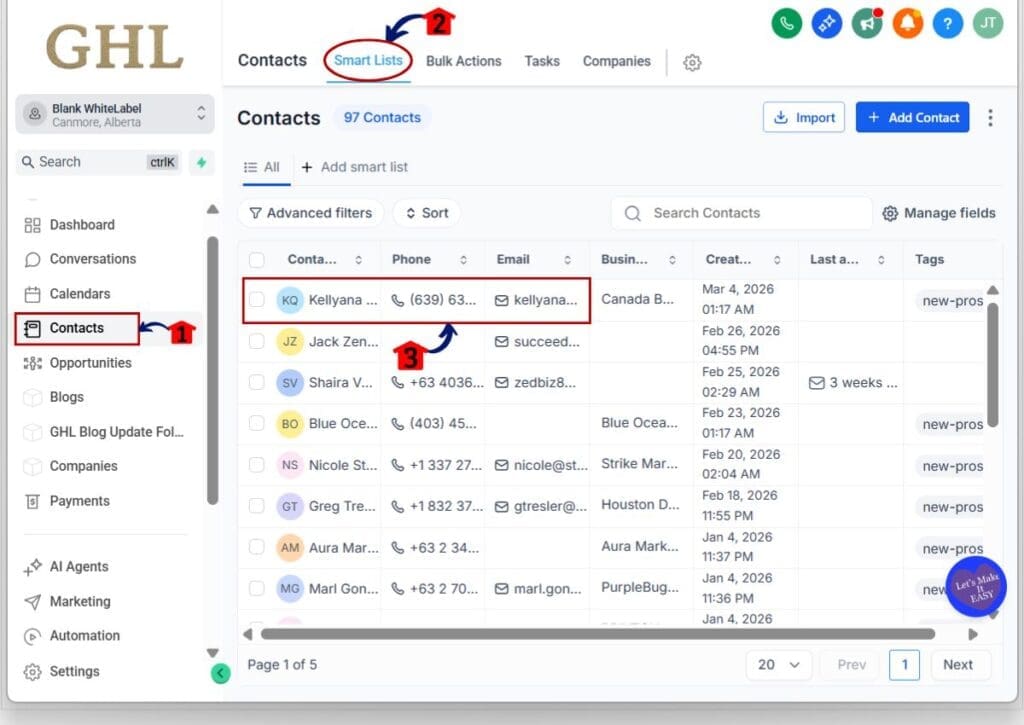
1.1 Click Contacts in the main menu.
1.2 Click Smart lists menu tab.
- This opens your contacts list.
1.3 Click the contact you want to review.
- This opens the contact record where the right panel tabs appear.
Step 02 – Find and View the Opportunities tab on the right panel
- The right panel is where GHL surfaces key linked items like Associations and now opportunities.
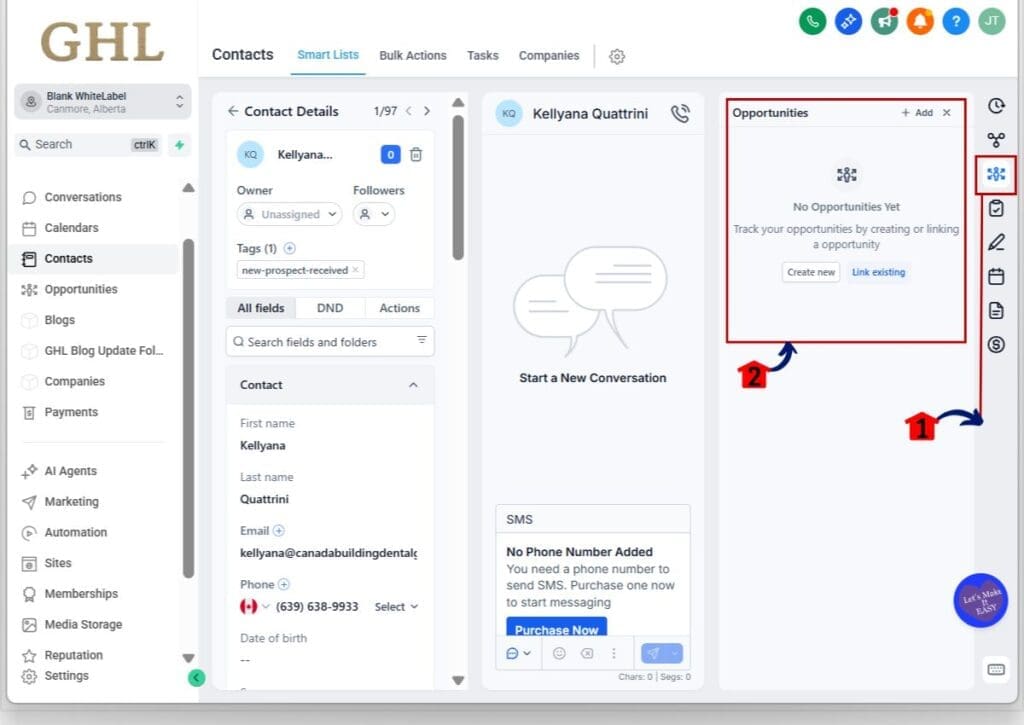
2.1 Look at the right-hand panel on the contact page.
2.2 Click the Opportunities tab directly below Associations.
- A pop-up window will open where you can view the opportunities list on your contact.
2.3 Scan the opportunities listed for that contact.
Step 03 – Use the Actions menu during the transition period
- For now, opportunities are still accessible in two places so nothing breaks while habits shift.
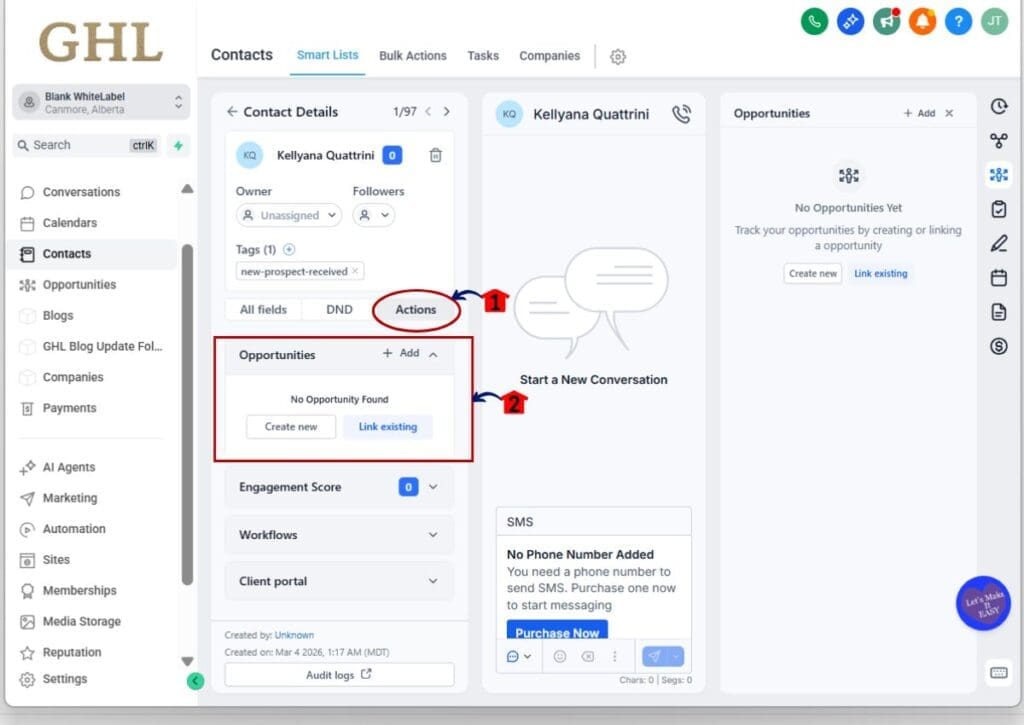
3.1 Click Actions on the contact record.
3.2 Select Opportunities (if your team is still using the old workflow).
- Treat Actions access as temporary training wheels, not the new standard.
Pro / Quick Tips (Opportunities tab)
First, update your internal SOPs now, not later. Anywhere you’ve documented “Actions → Opportunities,” replace it with “Right panel → Opportunities tab,” and swap screenshots so new hires don’t learn the old path by accident.
Next, coach your team to use the Opportunities tab as a pre-call habit. Before they send a follow-up or jump into a conversation, have them glance at the linked opportunities so they’re always speaking to the right pipeline stage and next step.
Finally, set expectations around the April 08, 2026 cutoff. Tell your team the Actions menu access is temporary, so if someone can’t find opportunities later, the answer won’t be “it’s missing,” it’ll be “check the right panel.”
What This Means for Your Business (Opportunities tab)
This is a small UI shift that removes a ton of daily friction. When the Opportunities tab is always in the same place on the contact page right panel, your team spends less time clicking around and more time actually moving deals forward. That matters most in high-volume agencies where reps and VAs are opening dozens (or hundreds) of contact records a day.
It also reduces handoff mistakes. When everyone checks the Opportunities tab in the same spot, it’s easier to confirm the active deal, the current stage, and what should happen next before someone sends a message, books a call, or updates a pipeline. Fewer “wrong stage” updates means cleaner reporting and fewer awkward client moments.
Most importantly, this change helps you avoid disruption on April 08, 2026. Since opportunities will be removed from the Actions menu, agencies that don’t update workflows now will get a wave of internal support tickets later. If you standardize the right panel process today, your team won’t even notice when the Actions option disappears.
Frequently Asked Questions about Opportunities tab
Results You Can Expect (Opportunities tab)
You should see faster deal context inside the contact record right away. When the Opportunities tab is always visible on the contact page right panel, your team spends less time digging and more time acting, especially during calls and rapid follow-ups.
You’ll also notice fewer internal questions and fewer workflow hiccups. This is the kind of UI change that quietly removes “training drag,” because new team members aren’t learning a hidden path through the Actions menu anymore.
And once April 08, 2026 hits, you’ll avoid the usual disruption that happens when a commonly-used menu option disappears. If your agency adopts the right panel workflow now, the cutoff becomes a non-event instead of a scramble.
Wrap-Up: Make the Opportunities Tab the New Habit
This update is a visibility win. The Opportunities tab now lives on the contact page right panel in GHL, right below Associations, so your team can see linked deals faster without digging through the Actions menu.
Nothing about your data or pipelines changed. It’s a view-only layout shift designed to make the contact record feel more intuitive, especially for agencies that need speed, consistency, and fewer training headaches across reps, VAs, and account managers.
Your best next step is simple: update your SOPs and screenshots now, and coach your team to use the right panel as the default workflow. That way, when Opportunities is removed from the Actions menu on April 08, 2026, it won’t feel like a change at all.
Scale Your Business Today.
Streamline your workflow with GoHighLevel’s powerful tools.