

- Connect Instagram accounts directly in GHL, manage messaging from one place, and prepare for future Instagram-native automations without relying only on Facebook Page connections.
- Quick Summary – Instagram Direct Integration Overview
- What Changed in Instagram Direct Integration?
- Before and After Instagram Direct Integration
- Why Instagram Direct Integration Matters
- How to Use Instagram Direct Integration
- Pro Tips for Instagram Direct Integration
- What This Means for Your Business
- Frequently Asked Questions About Instagram Direct Integration
- Conclusion
Connect Instagram accounts directly in GHL, manage messaging from one place, and prepare for future Instagram-native automations without relying only on Facebook Page connections.
Instagram Direct Integration Just Got Easier
Instagram Direct Integration is now easier to use inside GoHighLevel, and that is good news if your business uses Instagram DMs to start real conversations with leads.
With this update, GHL now lets businesses connect Instagram accounts directly through Labs. You no longer have to rely only on a connected Facebook Page to manage Instagram inside GoHighLevel. Facebook Page-based connections still work, but this new direct connection gives users more control and a cleaner setup.
This matters because Instagram is often where leads ask questions, reply to stories, and show buying interest. With Instagram Direct Integration, you can sync Instagram Direct conversations into the CRM, create or manage contacts from those chats, and trigger workflows from Instagram interactions. It also sets the stage for future Instagram-native features like DM-to-followers and Poll Reply automations.

Instagram Direct Integration gives GHL users a simple way to connect Instagram accounts, manage DMs, and control automations from one place. It also helps agencies get ready for future Instagram features like DM-to-followers and Poll Reply automations.
Quick Summary – Instagram Direct Integration Overview
Purpose: Instagram Direct Integration gives GoHighLevel users a cleaner way to connect and manage Instagram accounts inside GHL.
Why It Matters: This update helps teams manage Instagram DMs, contacts, and automations without relying only on a Facebook Page-based setup.
What You Get: You get a dedicated Instagram card under Settings, a centralized account view, direct Instagram connection support, and account-level control for Messaging & Automations.
Time To Complete: Most users can review and set this up in about 5 to 10 minutes, depending on how many Instagram accounts they manage.
Difficulty Level: This is a beginner-friendly update, but agencies should test one account first before rolling it out across client accounts.
Key Outcome: Your team can manage Instagram conversations inside GoHighLevel, keep lead follow-up organized, and prepare for future Instagram-native features.
What Changed in Instagram Direct Integration?
Instagram Direct Integration gives GHL users a cleaner way to connect Instagram. Before this update, many users had to connect Instagram through a Facebook Page. That still works, but now there is a direct option too.
Once the feature is active, go to Settings, then Integrations, then Instagram. You will see an Instagram card and a list of connected accounts. This makes it much easier to see what is connected and ready to use.
Automate marketing, manage leads, and grow faster with GoHighLevel.

GHL now supports two ways to connect Instagram. You can use a direct Instagram connection or a Facebook Page-based connection. You also get a Messaging & Automations toggle for each account. That gives you better control over DMs and workflows without making the setup harder than it needs to be.
Before and After Instagram Direct Integration
Before this update, most Instagram accounts in GoHighLevel were connected through a Facebook Page. That setup still works, so there is no need to panic or rebuild everything. But it did add an extra step for users who only wanted to connect Instagram and manage DMs inside GHL.
Now, Instagram Direct Integration gives users a cleaner path. You can connect an Instagram account directly inside GoHighLevel and manage it from Settings, then Integrations, then Instagram. This makes it easier for agencies and teams to see which accounts are connected, how they are connected, and what is ready for messaging.
One thing to know: when you turn on the direct Instagram connection, GHL will auto-disable the toggle for the Page-based Instagram connection. That keeps the setup from getting messy. Existing workflows and automations should keep working if the same Instagram account is switched between connection methods.
Why Instagram Direct Integration Matters
Instagram Direct Integration matters because many leads start in Instagram DMs. People ask questions, reply to stories, and show interest there. If those chats stay outside your CRM, follow-up can get messy fast.
This update helps bring Instagram DMs into GoHighLevel. Your team can see chats, manage contacts, and use workflows from one place. That means less manual work and fewer missed leads.
This is helpful for agencies, social media managers, VAs, and local businesses. You get a cleaner setup, more control, and a better path for future Instagram tools inside GHL.
How to Use Instagram Direct Integration
Instagram Direct Integration helps you manage your Instagram account connection from one place inside GoHighLevel. In this section, you’ll see how to open Settings, find the Instagram integration card, manage your account, and control messaging and automations. The goal is simple: make sure your Instagram DMs, contacts, and workflows are connected the right way before real leads start coming in.
Here are the steps to set it up:
- Access the Settings area in GoHighLevel.
- Open Integrations and Select Instagram.
- Add or Manage Your Instagram Account.
To start, make sure you are logged in to your GoHighLevel sub-account.
Step 01: Access the Settings Area in GoHighLevel
- Go to the bottom of the Main Menu on the left-hand sidebar.
1.1 Click the Settings gear icon ⚙️.
- This opens the Settings dashboard for your sub-account.

Step 02: Open Integrations and Select Instagram
- Inside the Settings area, you will see a menu on the left-hand side.
2.1 Click Integrations.
- This opens the Integrations page inside your sub-account.
2.2 Find the Instagram integration card.
2.3 Click Manage on the Instagram card.
- This opens the Instagram account connection window.

Step 03: Add or Manage Your Instagram Account
- The Instagram account window shows your connected Instagram accounts in one place.
3.1 Click + Add another account if you need to connect a new Instagram account.
3.2 Review the account list to see which Instagram accounts are already connected.
3.3 Check the connection type under the account name.
- For example, you may see Direct Instagram if the account is connected through the new direct flow.
3.4 Use the Enable messaging + automation toggle to control Instagram messaging and automations for that account.
- Turn this toggle ON if you want Instagram DMs and automations active.
- Turn this toggle OFF if you want to stop both messaging and automation activity for that account.
3.5 Click Save after making your changes.
- This is important. If you do not save, your changes may not apply.
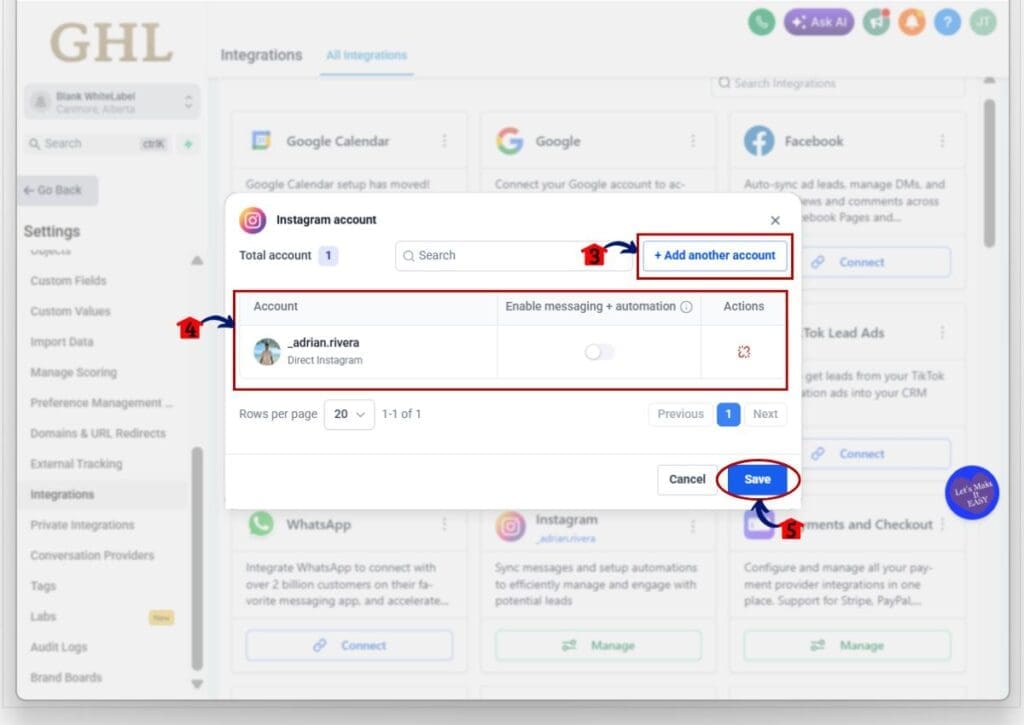
This is the main benefit of the update. Instagram Direct Integration gives you one cleaner place to manage connected Instagram accounts, control messaging, and prepare for future Instagram-native features inside GoHighLevel.
Pro Tips for Instagram Direct Integration
Instagram Direct Integration is easy to use, but start small. Test one Instagram account first. Send a test DM, check the contact record, and make sure your workflows still run.
Watch the Messaging & Automations toggle. If it is off, Instagram DMs and workflows stop for that account. That can be useful when you need control, but it can also cause missed messages if someone turns it off by mistake.
If an account already works through a Facebook Page, do not switch it unless you need to. That setup still works. Use Instagram Direct Integration when you want a cleaner setup, better account control, or access to future Instagram tools.
What This Means for Your Business
Instagram Direct Integration helps your team catch more Instagram leads. When DMs show inside GoHighLevel, your team can reply, track the chat, and manage the contact in one place.
This can help many types of businesses. A gym can answer membership questions. A med spa can handle booking requests. A realtor can reply to home questions. A coach can turn DMs into booked calls.
The main win is less manual work. Your team does not have to copy details from Instagram into the CRM by hand. GHL can help keep the chat, contact, and workflow together, so your team can follow up faster.
Frequently Asked Questions About Instagram Direct Integration
Conclusion
Instagram Direct Integration makes it easier to connect Instagram inside GoHighLevel. You can manage DMs, contacts, and lead chats from one place.
It also gives you more control. You can see which Instagram accounts are connected and turn messaging or automations on or off for each account.
Start with one account first. Send a test DM, check the contact, and make sure your workflows still work. Once everything looks good, you can use it with more confidence.
Scale Your Business Today.
Streamline your workflow with GoHighLevel’s powerful tools.


