- Skip the manual sign-up GHL now auto-creates your developer account so you can start selling instantly.
- Quick Summary – Developer Onboarding Essentials
- Automatic developer profile creation
- Manual signup is gone
- Faster developer onboarding means less friction
- How to Use – Start Developer Onboarding in GHL
- Tips for smooth developer onboarding
- Developer onboarding Frequently Asked Questions
- Developer onboarding just got smarter
- What to expect from better developer onboarding
Skip the manual sign-up GHL now auto-creates your developer account so you can start selling instantly.
Developer onboarding, simplified
Developer onboarding just got a whole lot easier in GoHighLevel. If you’re an agency admin looking to sell on the Marketplace, you no longer need to fill out a separate developer signup form.
Now, GoHighLevel does the work for you. When you click “Sell on Marketplace,” it checks if you already have a developer profile. If not, it creates one instantly using your account details.
All you have to do is enter your password, accept the terms, and verify your email. That’s it. You’re taken straight into your developer account and ready to go.
This update is simple, but it removes a major speed bump. Agencies can now list their AI agents, workflows, or snapshots without delay.
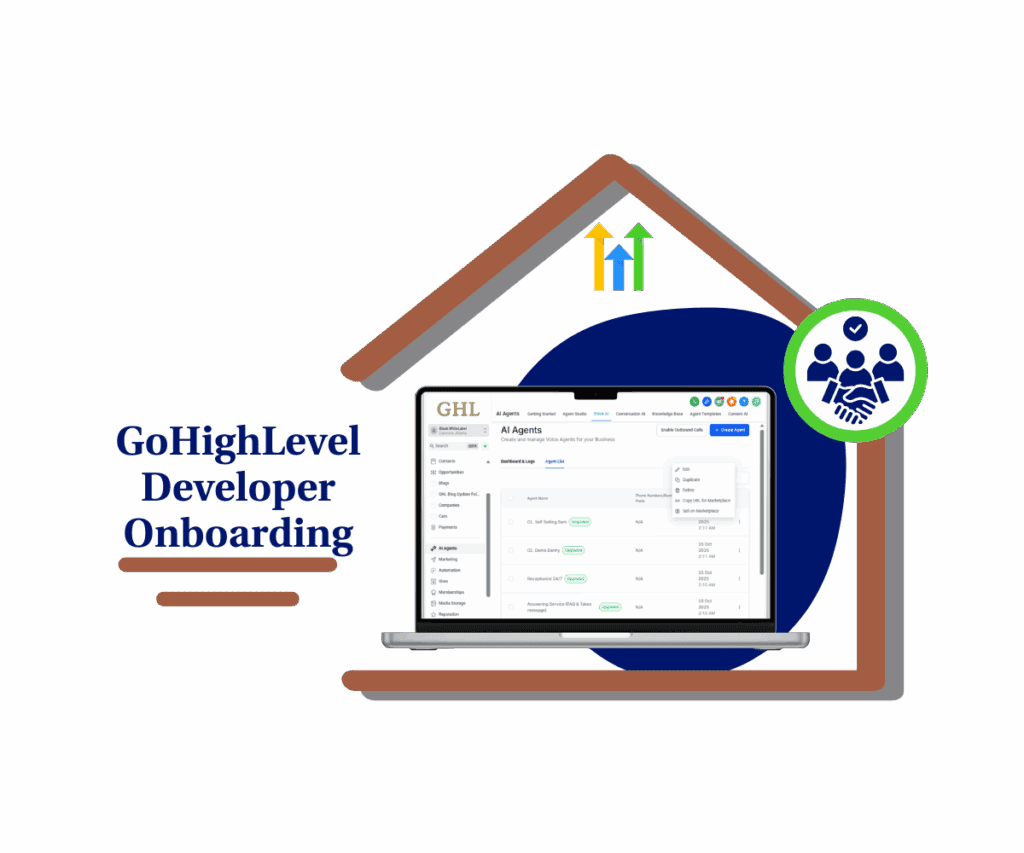
GoHighLevel now makes developer onboarding automatic. When agency admins click “Sell on Marketplace,” a developer profile is created using your existing info. No forms, no delays. Just log in and start listing your assets.
Quick Summary – Developer Onboarding Essentials
Purpose: This update streamlines how agency admins become Marketplace developers in GoHighLevel.
Why It Matters: It removes friction from the developer onboarding process so more agencies can list products faster.
What You Get: Instant profile creation, direct login access, and a simplified setup with no manual forms.
Time to Complete: Less than 2 minutes from click to the developer dashboard.
Difficulty Level: Easy. Just log in and verify.
Key Outcome: Agencies can start selling on the GHL Marketplace without delays or extra steps.
Automatic developer profile creation
GoHighLevel just made developer onboarding a whole lot smoother. If you’re an agency admin and you click “Sell on Marketplace,” the system now checks your account. If it sees that you don’t have a developer profile yet, it creates one for you right away.
This new developer onboarding flow uses the details already linked to your agency admin profile. You don’t need to fill out any forms or wait for approval.
Automate marketing, manage leads, and grow faster with GoHighLevel.

Once your developer account is created, the next step is simple. You log in with your password, agree to the standard terms, and verify your email with a one-time password.
That’s the full developer onboarding process now. No guesswork. No delays. Just a direct path to the tools you need to start listing your offers.
Manual signup is gone
Before this update, developer onboarding was a slow process. You had to click “Sell on Marketplace,” fill out a full registration form, and wait before you could log in and start building.
Now that part’s gone.
With the new developer onboarding flow, GoHighLevel skips the form entirely. The system auto-creates your developer profile the moment you click. It uses the account details you’ve already set up as an agency admin.
You still need to verify your identity and accept the platform’s terms. But those steps are fast. Enter your password. Accept the T&Cs. Confirm the one-time code in your email. Done.
This means faster access, fewer drop-offs, and a cleaner start to building and listing your digital assets.
Faster developer onboarding means less friction
This change isn’t just about convenience. Faster developer onboarding helps more agencies take action right away. Instead of getting stuck at the signup page, you’re in the Marketplace within minutes.
When you remove the need to fill out forms, fewer people drop off. That means more AI agents, workflows, and snapshots are getting listed. And faster.
Developer onboarding has always been a small but critical part of the process. Now it’s seamless. You spend less time on setup and more time building things that make money.
How to Use – Start Developer Onboarding in GHL
This update streamlines the entire developer onboarding flow. Here’s how to go from zero to a live developer profile in just a few clicks.
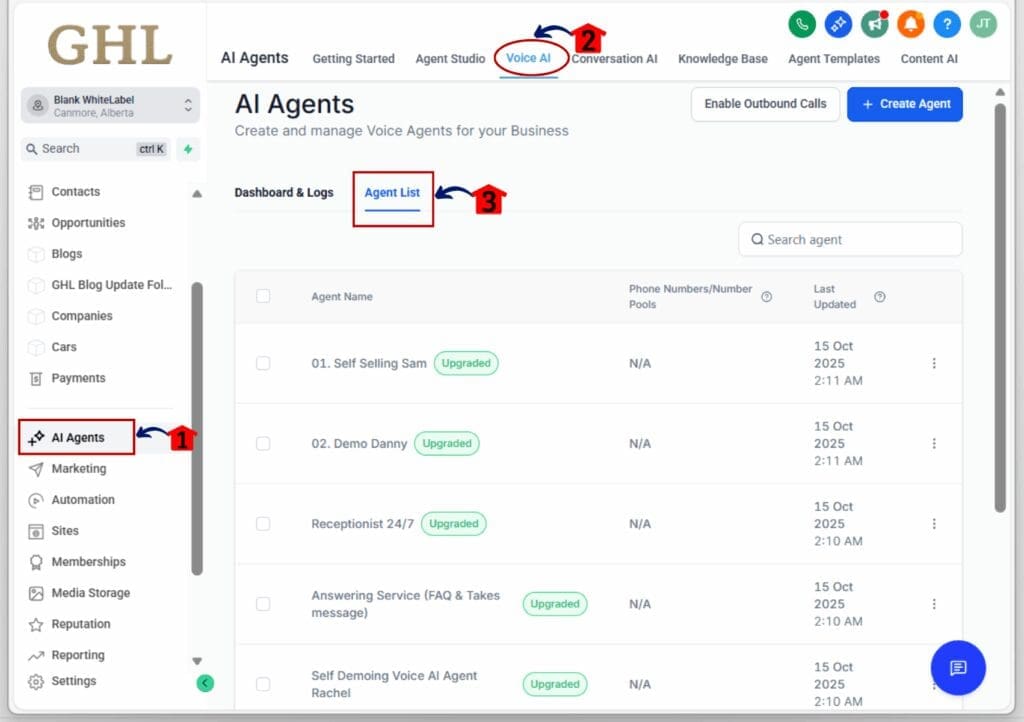
Step 01: Access the Main Left Hand Menu in GoHighLevel
- The Main Menu on the Left side of your screen has all the main areas that you work in when using GHL
1.1 Click on the AI Agents Menu Item.
- Access the ‘AI Agents’ section of GoHighLevel
1.2 Click on the Voice AI
1.3 Click ‘Agent List’ sub menu
- this will open the Agent List Dashboard where you can access the available agent.
Step 02: Access Sell on Marketplace
2.1 Choose the agent you want to sell on the Marketplace, then click the three dots beside its name to open the dropdown menu.
2.2 Click “Sell on Marketplace.”
- This will begin the developer onboarding process.

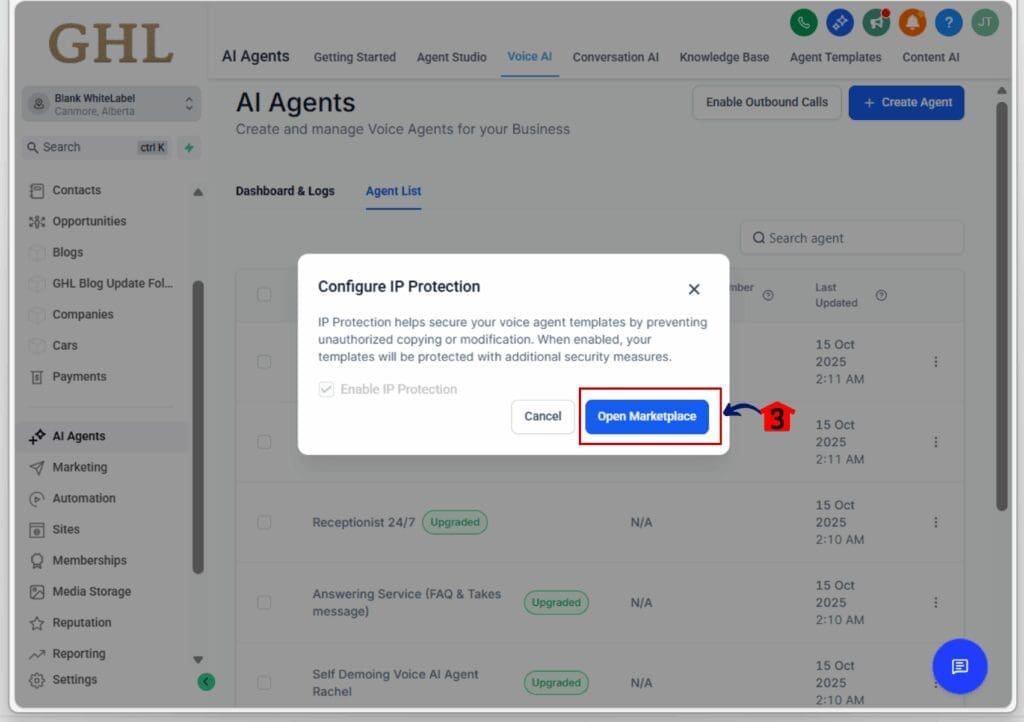
2.3 A pop-up window will appear click Open Marketplace Button
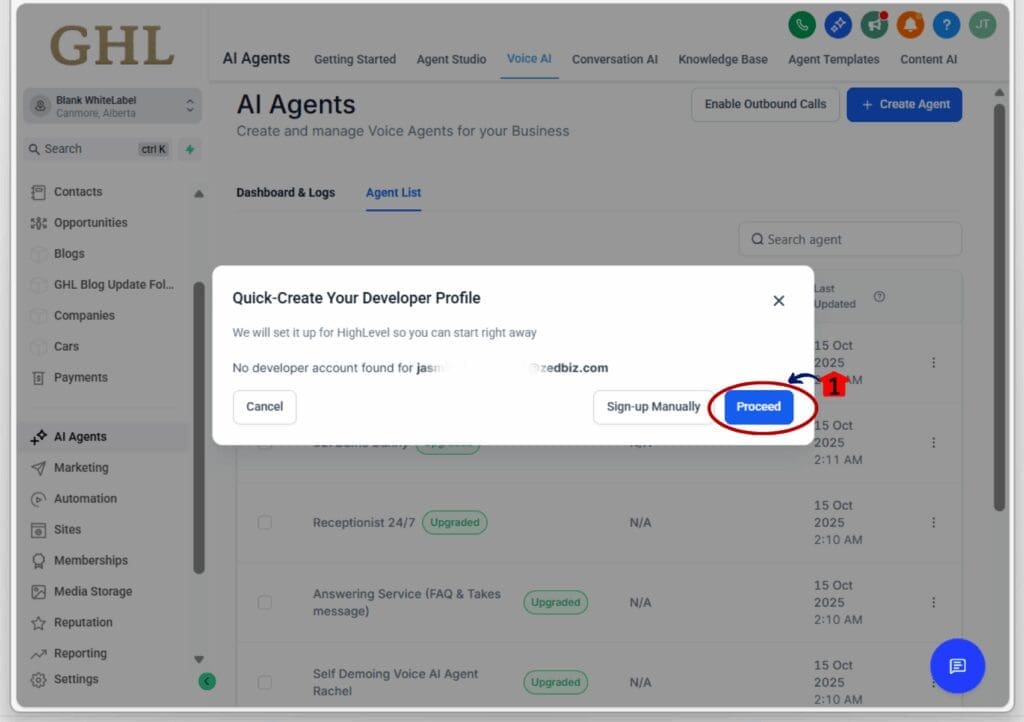
Step 03: Auto-create your developer account
- If you don’t already have a developer profile, GHL will automatically create one for you.
3.1 The system checks your agency admin details and builds your profile in the background.
You don’t need to fill out a signup form.
3.2 Click Proceed Button
3.3 No need to wait for approval.
- You’re taken straight into the login verification screen.
Step 04: Complete the login flow
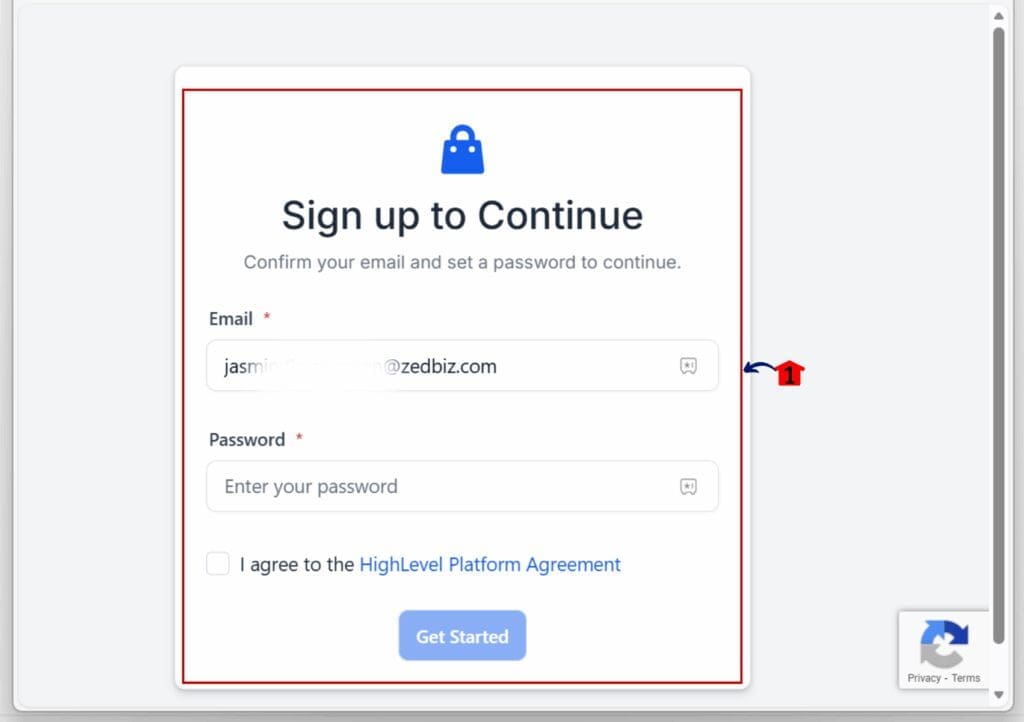
- This is a short and secure three-step process.
4.1 Enter your existing GHL password.
- This confirms you’re the right person for the account.
4.2 Accept the Terms and Conditions.
- Standard agreement for Marketplace access.
4.3 Verify using the one-time code sent to your email.
- Enter the code and you’re done.
Step 05: You’re in the Developer Dashboard
- Your developer onboarding is complete.
5.1 Once verified, you’ll land inside your developer account.
- You can now start listing AI agents, snapshots, or automation tools.
5.2 Your account is active immediately.
- No delays, no extra setup needed.
That’s it. Developer onboarding is now faster, easier, and fully automated for agency admins.
Tips for smooth developer onboarding
Here are a few simple ways to get the most out of this new onboarding flow:
Use your agency admin account.
- Only admins can trigger the automatic developer onboarding flow. Make sure you’re signed in with the right access.
Have your login info ready.
- You’ll need your GHL password and access to your email for the one-time code. This keeps things secure.
Start with one listing.
- Once you’re in, try publishing a simple asset like a snapshot or workflow. This helps you get familiar with the process.
Check your profile settings.
- After your developer profile is created, review the settings and update anything you want to customize before publishing.
Bookmark the Marketplace dashboard.
- It’s where you’ll manage listings, updates, and performance metrics.
Developer onboarding Frequently Asked Questions
Developer onboarding just got smarter
This update shows that GoHighLevel is serious about removing small roadblocks that slow down big ideas.
By automating developer onboarding, GHL is making it easier for agencies to publish tools without getting stuck in admin steps. You don’t have to wonder if you missed a form or if your profile is set up right. The platform handles it.
It’s one less thing to think about, and that’s the goal simplify the path from idea to income.
Expect more updates like this. The Marketplace is becoming more user-friendly, and that means better outcomes for agencies ready to build and sell.
What to expect from better developer onboarding
When the developer onboarding process is this smooth, more agency owners actually complete it. That means more tools get listed, and more ideas make it into the Marketplace.
You can expect:
- Faster setup for new developers
- Fewer drop-offs during onboarding
- More active listings in the Marketplace
- Less time spent on support or manual setup
It’s not just about saving time. It’s about helping more users take action without hesitation. And that’s a win for both agencies and the GoHighLevel ecosystem.
Scale Your Business Today.
Streamline your workflow with GoHighLevel’s powerful tools.