- Give your store a conversion-ready mobile upgrade with better filters, sorting, and product browsing UX
- Quick Summary – Mobile Product Filtering Breakdown
- What’s New – Cleaner Sorting & Filtering on Mobile
- What’s Changed – A Smoother, Smarter Mobile PLP
- Why This Matters – Mobile Filtering = Mobile Conversions
- How to Use Mobile Product Filtering in GHL Stores
- Pro Tips for Store Owners
- Frequently Asked Questions – Your Mobile Filtering Questions Answered
- What This Means – GHL Stores Just Got Mobile-Friendly
- Results You Can Expect – Better Engagement and More Sales
- Simple Mobile Upgrade, Big Sales Impact
Give your store a conversion-ready mobile upgrade with better filters, sorting, and product browsing UX
Mobile Product Filtering Just Got a Major Upgrade
Mobile product filtering is now easier for your customers and better for your business. GoHighLevel has updated how filtering and sorting work on mobile, and it’s a big improvement.
Before this, shopping on mobile could feel frustrating. Filters were clunky. Sorting was buried or missing. It took too many taps to find the right product and most people gave up before they did.
Now, the shopping experience is cleaner and faster. Customers can tap to sort by price, date, or name. They can apply filters like price range and availability without dealing with pop-ups or reloading screens. Everything fits the mobile screen better and works like people expect it to.
This isn’t just a design update. It’s a way to help buyers get to the right product faster. That means fewer bounces, more views, and higher chances of a sale especially on mobile.
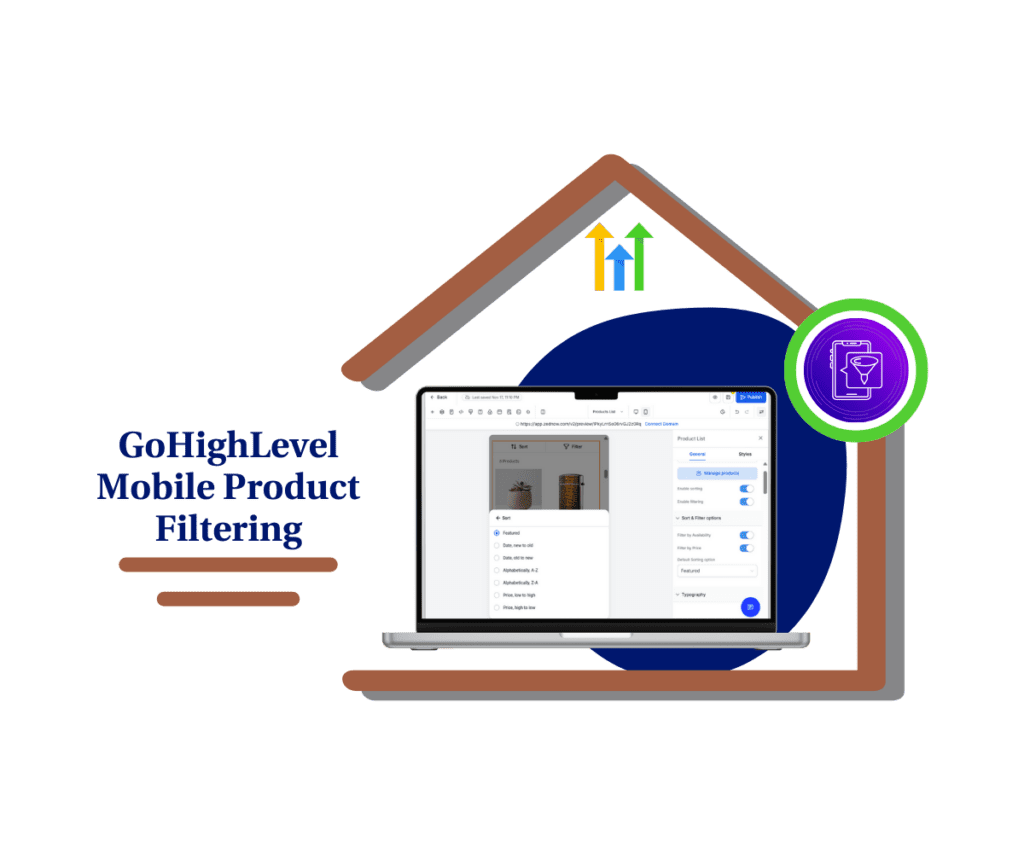
This update delivers a faster, cleaner way for customers to browse your store on mobile. With mobile product filtering and real-time sorting, shoppers find what they need quicker, leading to better conversions, fewer bounces, and a stronger mobile experience for your brand.
Quick Summary – Mobile Product Filtering Breakdown
Purpose: Improve how customers shop from mobile devices by adding smoother mobile product filtering and sorting tools to your store’s Product List Page.
Why It Matters: Mobile users expect fast, easy browsing. This update helps reduce bounce rates and improves the shopping experience on smaller screens.
What You Get: New sort and filter buttons, real-time product count updates, and a full-screen filtering layout built for mobile shoppers.
Time To Complete: About 10–15 minutes to test, style, and adjust your mobile layout inside the GHL builder.
Difficulty Level: Easy. No coding or extra tools needed.
Key Outcome: A faster, more usable mobile store layout that helps shoppers find products quicker, leading to better engagement and more conversions.
What’s New – Cleaner Sorting & Filtering on Mobile
Mobile product filtering just got a big upgrade inside GoHighLevel stores. It’s now faster and easier for customers to sort and filter what they see while shopping on mobile.
The Product List Page has two new buttons at the top: one for Sort and one for Filters. Both are designed to fit the way people use their phones simple taps, clear choices, and no confusion.
Automate marketing, manage leads, and grow faster with GoHighLevel.

Tapping the Sort button opens a bottom menu with clear sorting options like:
- Newest first
- A to Z
- Lowest to highest price
Customers can close it by swiping down or tapping outside. No reloads or page jumps.
The Filters button opens full screen. This is where mobile product filtering really shines. Customers can filter products by stock status (In Stock or Out of Stock) and set a price range using number inputs. It feels like a real shopping app, not a clunky form.
Even better, the Apply and Clear Filters buttons stay fixed at the bottom. So no matter how far someone scrolls, they can take action without hunting for the buttons.
A small badge shows how many filters are active. It updates live, so customers always know what’s in play. This makes mobile product filtering more transparent and user-friendly.
What’s Changed – A Smoother, Smarter Mobile PLP
GoHighLevel gave the Product List Page a serious clean-up. These changes were made to support mobile product filtering and make it feel like a real shopping experience, not a hacked-together version of desktop.
The whole layout is more touch-friendly. Sorting and filtering now fit better on small screens. Every button, menu, and input field has been adjusted so users can tap without zooming or hunting for options.
Mobile product filtering used to feel like work. Now it feels natural. Customers can tap to sort by price or name, set their filters, and see updates right away. They never leave the page or wonder what’s happening.
One helpful change is the sticky footer inside the filter modal. The “Apply” and “Clear Filters” buttons stay visible no matter how far someone scrolls. That might seem small, but it makes a big difference in keeping things easy to use.
Another improvement is the live product count. As customers add or remove filters, the total number of matching products updates instantly. This helps people see results faster and stay focused while they shop.
All of this adds up to a better experience. Mobile product filtering is no longer an afterthought. It’s now a real part of the browsing flow and makes your store easier to shop on any screen.
Why This Matters – Mobile Filtering = Mobile Conversions
Mobile product filtering is more than a design update. It directly affects how people shop and whether they stick around to buy.
Most ecommerce traffic now comes from phones. If your store is hard to browse on mobile, you’re losing sales. When shoppers can’t sort or filter quickly, they give up. They don’t dig through endless product lists. They bounce.
That’s why good mobile product filtering matters. It helps customers find what they want without the usual frustration. A clean layout, working filters, and easy sorting take the stress out of mobile shopping.
If you’re an agency, this also gives your clients an edge. It improves the way their customers move through the store. That leads to more time on page, more product views, and higher chances of converting traffic into buyers.
Better mobile product filtering isn’t just a “nice to have.” It’s a smart step toward getting more out of the traffic you already have. And it works whether you’re running a big store or just getting started.
How to Use Mobile Product Filtering in GHL Stores
Preview and customize mobile filters directly in the builder
Mobile product filtering is already live on the Product List Page for GHL ecommerce stores. There’s nothing to enable. Just follow these steps to test and adjust everything right from the mobile builder preview.
Step 01: Access the Main Left Hand Menu in GoHighLevel
- The Main Menu on the Left side of your screen has all the main areas that you work in when using GHL
1.1 Click on the Sites Menu Item.
- Access the ‘Sites’ section of GoHighLevel
1.2 Click on the Stores Menu
- This shows all the stores available on your dashboard
1.3 Find and click the store you want to edit
- This will open the the pages inside your store

1.4 Click Edit Button to edit the page
- This will open the page builder

Step 02: Open Your Store’s Product List Page in the Builder
- Start inside the mobile builder view for better accuracy
2.1 Switch to mobile preview mode
- This lets you see how the filters and sort menu behave on smaller screens
2.2 Click the List of Products on your builder
- This will open the Product List Settings on the right side
2.3 Toggle on the Enabling Sorting and Enabling Filtering
- This will appear on the header of your product list
2.4 Tap on the Sort and Filter buttons at the top
- They now appear in the header of your product list page
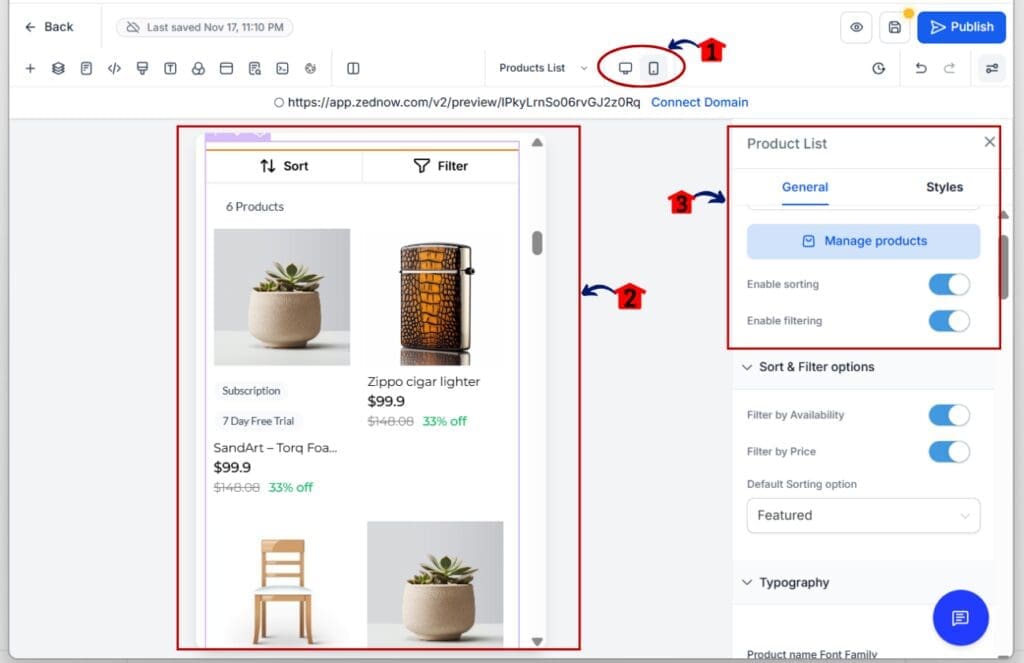
2.5 Open each one to test the new interactions
- Sort opens a po-up menu where you can select the type of sorting.
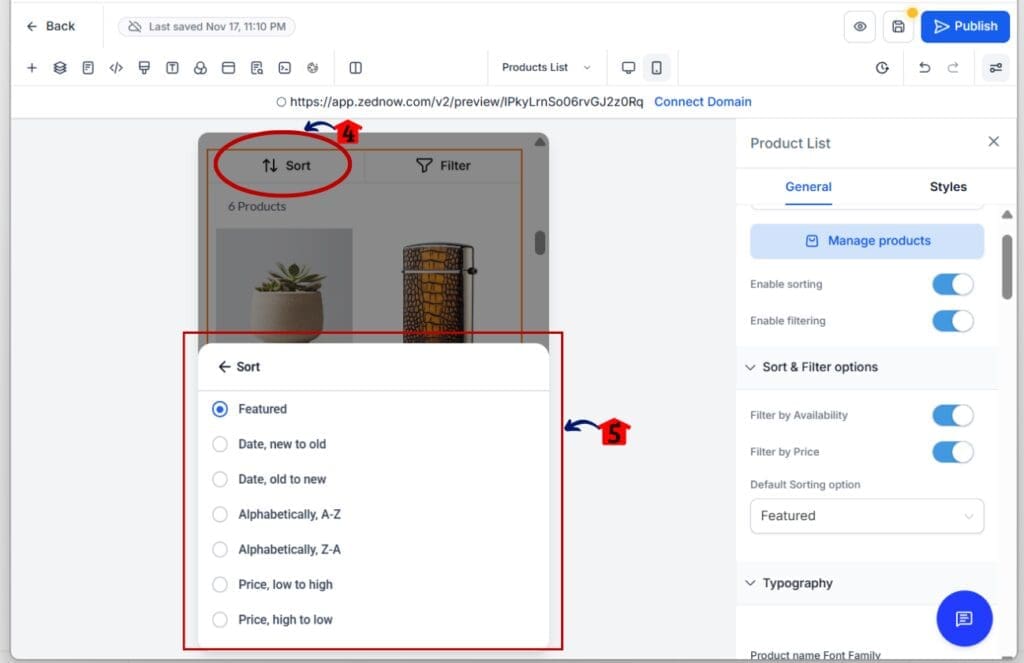
- Filters open in full-screen.

Step 03: Check the Available Filter Options
- Use built-in settings to control which filters show up
3.1 Filter by Availability: In Stock or Out of Stock
- Both options are selected by default
3.2 Filter by Price Range
- Add “From” and “To” price limits using numeric inputs
3.3 Confirm how filters apply in real-time
- Product counts update right as filters are used

Step 04: Test the Full Experience Before You Go Live
- Make sure everything works before your customers see it
4.1 Sort by different values like Price or A-Z
- Check how the list updates with each selection
4.2 Apply and remove filters to test badge counts
- The Filters button will show a count of active filters
4.3 Watch how the product total updates live
- You’ll see the number of visible products change as you filter
That’s it. Mobile product filtering is ready to go. With a few checks and style tweaks, your store will be easier to browse and faster to shop from any phone.
Pro Tips for Store Owners
Mobile product filtering works great as-is, but a few simple changes can make it even better for your customers.
Use filter names that make sense
- If you sell clothing, change generic labels like “Availability” or “Price” to something your buyers know. Try labels like “Size,” “Color,” or “On Sale.” Mobile product filtering is more helpful when it’s easy to understand.
Start with in-stock items only
- You can choose to show both in-stock and out-of-stock items. But if you’re trying to drive conversions, it’s better to start with in-stock products. This keeps the list clean and avoids frustration.
Make price filters match your products
- Mobile product filtering lets users set price ranges. Check your pricing and adjust the range so it fits your catalog. Avoid showing options with no matching items.
Test mobile filters on different phones
- Always preview mobile product filtering on a few devices. What works on a large screen might not feel right on a smaller one. Make sure buttons are easy to tap and text is easy to read.
Pair filters with product groups
- If you use Smart Lists or Collections, make sure filters don’t clash with them. Mobile product filtering should narrow results, not hide them.
Keep styling clean and easy to tap
- Fancy designs can get in the way. Stick to simple buttons with good contrast. Mobile product filtering should feel fast and easy, not like a guessing game.
These quick tips make mobile product filtering more useful and help shoppers find what they need faster.
Frequently Asked Questions – Your Mobile Filtering Questions Answered
What This Means – GHL Stores Just Got Mobile-Friendly
Mobile product filtering is now a real part of the GHL store experience. It gives your customers the tools they need to shop smarter and faster, right from their phones.
This update removes the roadblocks that used to slow people down. Customers can sort products by what matters to them and apply filters that update the results right away. No extra steps, no guesswork.
Mobile product filtering helps your store feel more modern and easier to use. And that makes a difference. Shoppers are more likely to stay, browse, and buy when they feel in control.
If you’re managing stores for clients, this is something they will notice. Faster mobile shopping builds trust and keeps people on the page longer. It can also lead to better sales without changing a single product.
Clean layout, simple controls, and real-time updates make mobile product filtering a smart upgrade. It improves the way your store works and helps customers make faster decisions.
Results You Can Expect – Better Engagement and More Sales
Mobile product filtering helps your store work better for real shoppers. It gives people a way to sort and filter products that actually makes sense on the phone.
Once this update is live, you’ll start seeing changes in how people interact with your store. They’ll spend more time on the page, view more products, and bounce less. That’s because mobile product filtering makes it easier to find the right item without extra effort.
If you have a large catalog, this becomes even more important. Filtering keeps people from feeling lost. It helps them focus on the options that match what they’re looking for.
Better filtering can also lead to more sales. When shoppers don’t have to scroll forever or reload pages, they make decisions faster. Mobile product filtering removes friction from the buying process.
You don’t need a full redesign to improve your store’s performance. This update gives you a smoother layout and better results, just by improving how people search and sort on mobile.
Simple Mobile Upgrade, Big Sales Impact
Mobile product filtering is a small feature with a big return. It improves how your store works on the device most people are using.
This update gives shoppers an easier way to sort and filter products without confusion. It cleans up the layout, removes extra steps, and helps people find what they want faster. That makes your store feel better to use and more likely to convert visits into sales.
You don’t need to build anything new. Just test the mobile view in your builder, adjust the colors and layout, and make sure the filters match your products.
If you run a store or manage them for clients, this is worth your time. Mobile product filtering gives your store a better experience with less effort.
Try it today and see how smoother shopping can lead to better results.
Scale Your Business Today.
Streamline your workflow with GoHighLevel’s powerful tools.