- Now you can list your Snapshots for sale without leaving your workflow no more developer toggles, copy/paste links, or wasted clicks.
- Quick Summary – Sell Snapshots Online at a Glance
- What’s New with Snapshot Listings
- What Changed in the Snapshot Selling Process
- Why This Snapshot Update Matters
- How to Use – Selling Snapshots Online from Your Account
- Quick Pro Tips to Help You Sell Snapshots Online
- Snapshot Marketplace Frequently Asked Questions
- What This Means for Agencies Selling Snapshots
- Results You Can Expect from Selling Snapshots Online
- Selling Snapshots Online Is Now Simple
Now you can list your Snapshots for sale without leaving your workflow no more developer toggles, copy/paste links, or wasted clicks.
Why Selling Snapshots Online Just Got Easier
Selling snapshots online used to take too many steps. You had to copy a link, switch tabs, log in to the Developer Portal, set up an app, and fill out all the settings by hand. It worked, but it was slow and easy to mess up.
Now there’s a better way.
GoHighLevel added a new button called “Sell on Marketplace” right inside Account Snapshots. It opens a simple form that pulls in the info you need. No link copying. No tab jumping. Just one clean workflow.
This update makes it much easier to sell snapshots online without wasting time. You stay in your account, get your link right away, and can move on to the next thing.
If you’re building templates, managing client systems, or running a SaaS offer, this change will save you time and help you publish faster.
Selling snapshots online is now simple. You can list them directly from your GHL account without copying links or opening new tabs.
Quick Summary – Sell Snapshots Online at a Glance
Purpose: This update adds a one-click option to help you sell snapshots online without switching to the Developer Portal.
Why It Matters: You can now create and list your snapshot directly from your GoHighLevel dashboard, saving time and reducing setup errors.
What You Get: A guided modal that pre-fills listing details, links your developer session, and gives you an instant Marketplace link.
Time to Complete: About 30–60 seconds from start to finish.
Difficulty Level: Easy. No developer setup or copy-paste steps required.
Key Outcome: A faster way to turn your snapshots into Marketplace listings with fewer steps and cleaner handoffs.
What’s New with Snapshot Listings
GoHighLevel just added a direct way to sell snapshots online. You’ll now find a “Sell on Marketplace” option inside the three-dot menu in your Account Snapshots view.
Clicking that opens a new modal, already connected to an active developer session. You just fill in your App Name. GoHighLevel fills in the rest of the Marketplace settings for you.
Automate marketing, manage leads, and grow faster with GoHighLevel.

The best part? Your snapshot listing link shows up right away.
There’s no need to bounce over to the Developer Portal or copy and paste anything. This new tool gives you everything you need to list your snapshot without leaving your workflow.
It’s built for speed and clarity. If you’ve been waiting for a faster way to get your assets listed, it’s live now.
What Changed in the Snapshot Selling Process
Before this update, selling snapshots online meant bouncing between tools. You had to:
- Share a snapshot and copy the link
- Open the Developer Portal
- Manually create a new app
- Fill out the listing form
- Enable the Snapshot module
- Paste the link back into the listing
It wasn’t hard, but it was clunky. Every step created room for error. And it broke your workflow.
Now it’s all in one place.
From the Account Snapshots menu, you click “Sell on Marketplace,” and a pre-filled modal pops up. Just type your app name and hit confirm. GHL handles the rest.
You get your Marketplace link right away, and everything is properly set up behind the scenes.
No tabs to switch. No extra accounts to manage. Just one clean action that does it all.
Why This Snapshot Update Matters
If you sell snapshots online, saving time matters. Every extra step slows you down, especially when you’re managing client systems or launching new offers.
Before this update, listing a snapshot meant switching to the Developer Portal, copying links, and setting everything up by hand. It wasn’t hard, but it broke your flow and left room for mistakes.
Now it’s easier to sell snapshots online without leaving your GoHighLevel dashboard. You just click, name your app, and your snapshot is ready to go live on the Marketplace.
This smoother process makes it faster to sell snapshots online and train your team to do the same. There’s no need to explain how the Developer Portal works or track down old links.
Over time, this small change adds up. You spend less time setting up and more time building systems that actually help your clients.
If you want a simple, repeatable way to sell snapshots online, this update gives you that.
How to Use – Selling Snapshots Online from Your Account
This update lets you list your snapshots directly on the GHL Marketplace without switching tools. No Developer Portal. No copying links. Everything happens inside your GoHighLevel account.
Here’s how to sell snapshots online using the new built-in workflow:
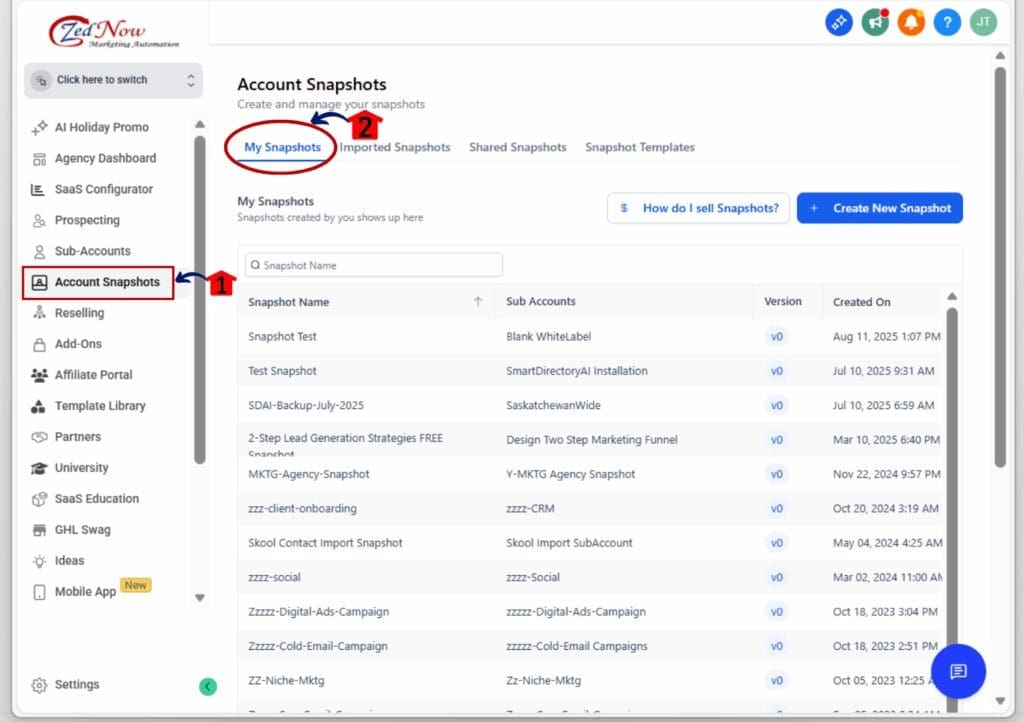
Step 01: Access the Main Left Hand Menu in GoHighLevel
- The Main Menu on the Left side of your screen has all the main areas that you work in when using GHL
1.1 Click on the Account Snapshot Menu Item.
- Access the ‘Account Snapshot’ section of GoHighLevel
1.2 Click on My snapshots menu tab
- This shows all your available Snapshots.
Step 02: Access Account Snapshots
- You’ll manage all your Snapshot tools here.
2.1 Find the Snapshot you want to sell.
- Use the search bar or scroll to locate it.
2.2 Click the three-dot menu to open options.
- This menu holds the new “Sell on Marketplace” feature.
- This is where the new shortcut begins.
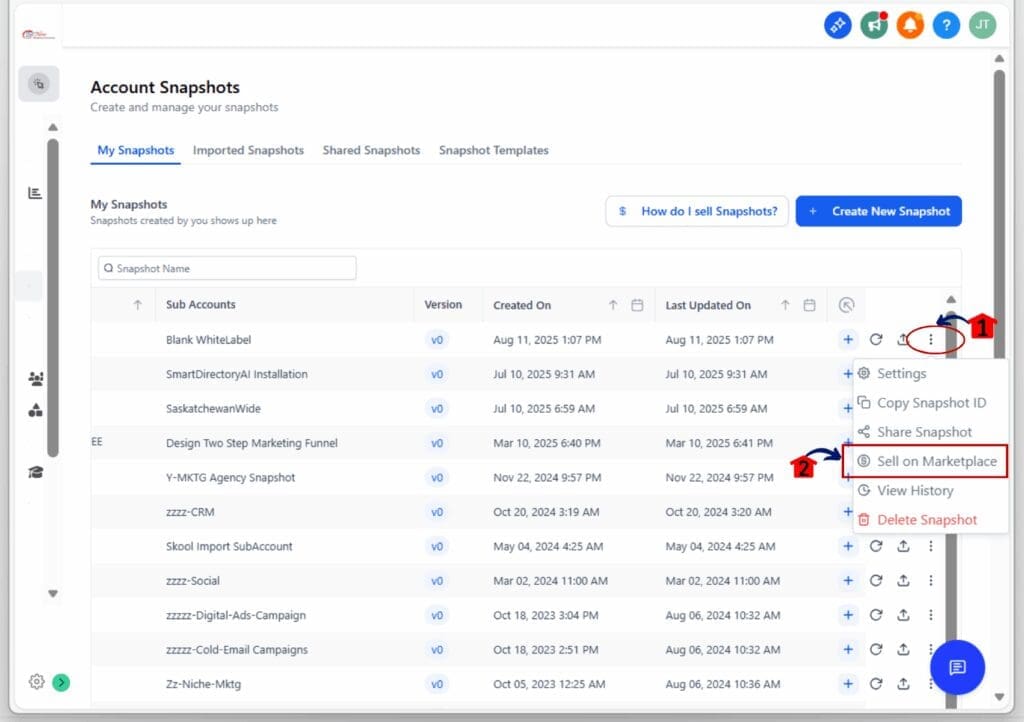
This new flow makes selling snapshots online fast, simple, and ready to go from your dashboard. No more portal logins or extra clicks.
Quick Pro Tips to Help You Sell Snapshots Online
Want better results from your listings? These tips will help you sell snapshots online faster, with less guesswork and more confidence.
1. Name your snapshot clearly
- If people can’t tell what it does, they won’t click. Use a short, benefit-driven name that tells them exactly what to expect. Examples: “Real Estate Lead System” or “Client Onboarding Kit.”
2. Write a strong description
- A solid description makes it easier to sell snapshots online. Tell buyers what problem it solves, who it’s for, and what they get. Keep it short and skip the fluff.
3. Use clear screenshots
- Show what your snapshot looks like. Clean images of forms, workflows, or pipelines help people trust your offer and feel ready to buy.
4. Add real use cases
- Want to sell snapshots online to a specific niche? Call them out directly. Say things like, “Built for agencies, course creators, or local service businesses.”
5. Keep your listing updated
- Every time you improve your snapshot, update the Marketplace listing too. This builds trust and helps you stay competitive.
These small moves can make a big difference when you sell snapshots online, especially in crowded categories or fast-moving niches.
Snapshot Marketplace Frequently Asked Questions
Here are some common questions about the new way to sell snapshots online using GoHighLevel’s built-in Marketplace button:
What This Means for Agencies Selling Snapshots
If you build systems for clients or run a SaaS offer, you know time adds up fast. This update helps you sell snapshots online without switching tools or setting things up in the Developer Portal.
Now you can handle everything in one place. Just click the new option, name your app, and get your live Marketplace link right away.
That means:
- No extra steps
- No new logins
- No guesswork when training your team
This is useful if you package client setups, offer templates, or resell your workflows. The fewer clicks between “idea” and “income,” the better.
It won’t change how you build. But it will change how fast you can list and launch. And that speed makes a difference when you’re working with multiple clients or scaling your offers.
This is a simple way to make your process smoother and more repeatable.
Results You Can Expect from Selling Snapshots Online
This update won’t change what you build, but it will change how quickly you can sell snapshots online. That’s what makes it useful.
Here’s what you’ll likely notice once you start using it:
Less setup time
- You’re not clicking around as much. Most users cut out 4 to 6 steps from their usual process.
Fewer mistakes
- Since the system handles the setup, it’s harder to mess something up. The link works right away, and the snapshot settings are already in place.
You stay focused
- There’s no jumping between tools. You click, list, and move on. Everything happens inside your GoHighLevel dashboard.
Faster to market
- Once you hit publish, your Marketplace link is live. You can use it in emails, workflows, or your website right away.
More time for clients or growth
- This frees up time. You can focus more on building or scaling, instead of copy-pasting your way through another setup.
It’s a small change that gives back time every time you use it.
Selling Snapshots Online Is Now Simple
If you sell snapshots online or plan to start, this update makes it easier to move from idea to live listing. No outside tools. No extra logins. No wasted time.
It’s one clean option inside your account. Just open the menu, click “Sell on Marketplace,” and your listing is handled.
For agencies, SaaS creators, and anyone turning systems into products, this matters. It cuts out the clutter so you can list faster, sell sooner, and get back to building.
You don’t need to rethink your workflow. You just need to try the new button.
Your next snapshot could be live in less than a minute.
Scale Your Business Today.
Streamline your workflow with GoHighLevel’s powerful tools.