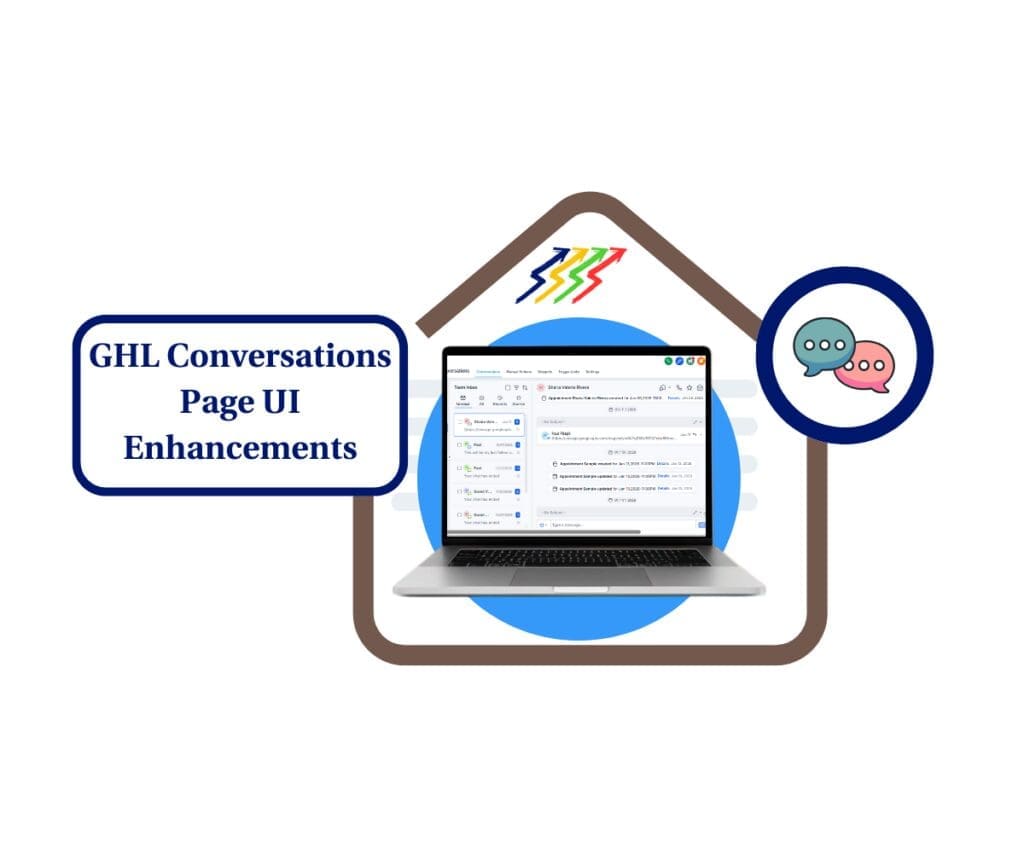
- Plus: A cleaner date format makes your conversation timelines easier to follow than ever
- Quick Summary – Inbox Unread Counter Essentials
- What’s New: Real-Time Inbox Unread Counter
- What’s New: Standardized Date Format
- Why It Matters: Better Workflow, Fewer Misses
- How to Use the Inbox Unread Counter and New Date Format
- Pro Tips for Using the Updated Conversations UI
- Frequently Asked Questions About the New Inbox Features
- Final Thoughts: Small Fixes That Make a Big Difference
Plus: A cleaner date format makes your conversation timelines easier to follow than ever
Clarity + Control in the New Conversations UI
The new inbox unread counter in GoHighLevel is here to help you stay on top of what matters. It’s now easier to see which messages need your attention and when they came in.
Alongside that, there’s a new date format that clears up confusion. No more wondering if “03/04” means March 4 or April 3. Everything’s now shown in a simple, clear layout that works for teams in any time zone.
These updates may seem small, but they solve real problems. If your team juggles dozens of chats, emails, or inboxes a day, you’ll notice the difference right away.
The new inbox unread counter and date format in GoHighLevel make it easier to stay on top of messages. You’ll know what’s unread at a glance and never second-guess a date again.
Quick Summary – Inbox Unread Counter Essentials
Purpose: This update improves how you manage messages in GHL by adding a real-time inbox unread counter and a cleaner date format.
Why It Matters: It helps teams quickly spot unread messages and avoid confusion about when conversations happened.
What You Get: A live-updating inbox unread counter and a clear MMM-dd date format across the Conversations page.
Time to Complete: Less than 2 minutes. Just enable the CRM Redesign in Labs.
Difficulty Level: Easy. No learning curve or setup required.
Key Outcome: A more organized inbox and faster follow-up on every message.
What’s New: Real-Time Inbox Unread Counter
GoHighLevel has added a new inbox unread counter that shows exactly how many messages still need your attention. It updates in real time as new messages come in or as you mark messages read or unread.
The inbox unread counter stays visible no matter what tab you’re looking at. You don’t have to switch back and forth to check what’s new. It gives you a clear view of how many conversations still need a response.
Automate marketing, manage leads, and grow faster with GoHighLevel.

This is especially useful if your team shares inboxes or handles lots of conversations at once. The inbox unread counter helps everyone stay on track and respond faster. It’s a small change that makes a big difference in keeping your workflow clean and your team focused.
What’s New: Standardized Date Format
GoHighLevel has also cleaned up how dates are shown in the Conversations page. Instead of using numbers that could mean different things depending on where you’re from, the new format now shows dates as “MMM-dd.” That means you’ll see something like “Jan 05” instead of “01/05.”
This might seem like a small detail, but it helps avoid mistakes. You no longer have to guess if a message came in on May 1 or January 5. The date format is now clear, consistent, and easy to scan across the entire page.
For agencies working with clients in different time zones or countries, this update removes a common point of confusion. It’s one more way GoHighLevel makes communication a little smoother for your team.
Why It Matters: Better Workflow, Fewer Misses
It’s easy to miss things when your inbox fills up. The inbox unread counter helps by showing what still needs a reply, right when you need to see it. No extra clicks, no guessing.
Because the counter updates in real time, your team always knows where to focus. You don’t need to switch tabs or reload anything. It’s all right there, helping you stay organized.
The new date format helps too. It shows dates clearly, so everyone sees the same timeline no matter where they are. That means fewer mistakes and a smoother experience across the board.
These updates may seem small, but together, they help your team move quicker, stay focused, and handle conversations with less effort.
How to Use the Inbox Unread Counter and New Date Format
This update is part of the new Conversations UI in GoHighLevel. It’s not turned on by default, but you can enable it from the Labs section in your account. Here’s how to activate it and see the changes in action.
Step 1.0 – Access the Settings Area in GoHighLevel
- Go to the left-hand sidebar, look all the way to the bottom.
1.1 Click on the gear icon ⚙️ labeled “Settings.”
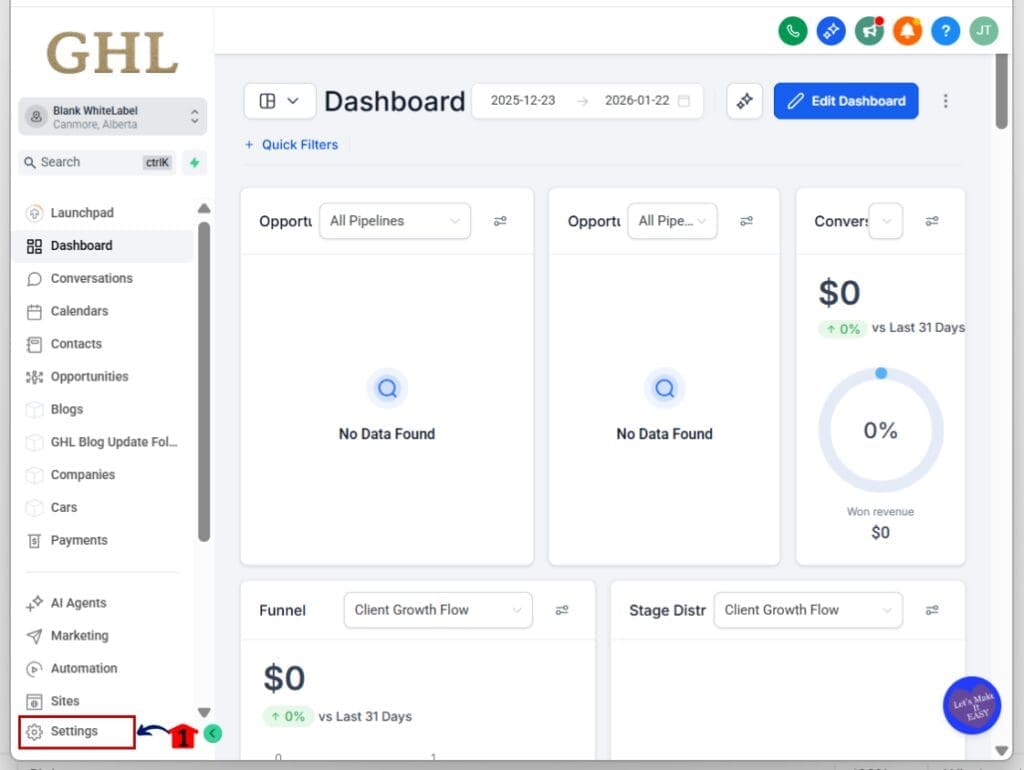
- You’ll now be in the main Settings dashboard, where you can access:
- Business Info
- Billing
- My Staff
- Phone System
- Labs
- and more.
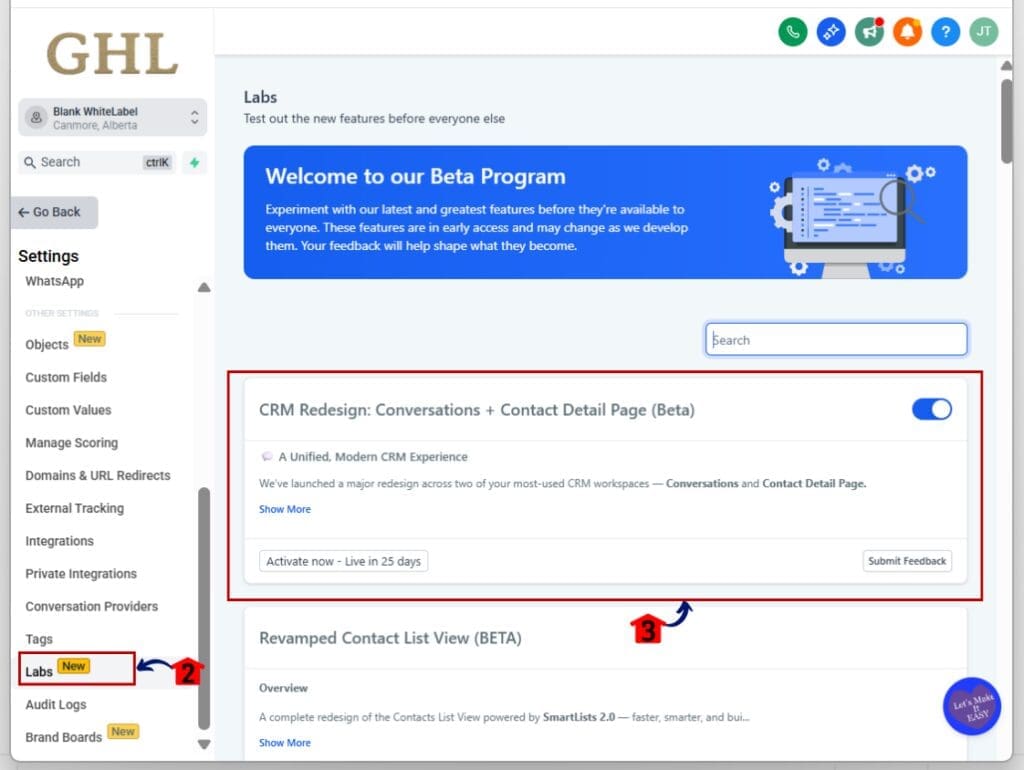
1.2 Click into the Labs
- This is where you toggle on new update features
1.3 Look for CRM Redesign: Conversations and Contacts Detail Page (Beta)
1.4 Toggle it ON
Step 02: Access the Main Left Hand Menu in GoHighLevel
- The Main Menu on the Left side of your screen has all the main areas that you work in when using GHL
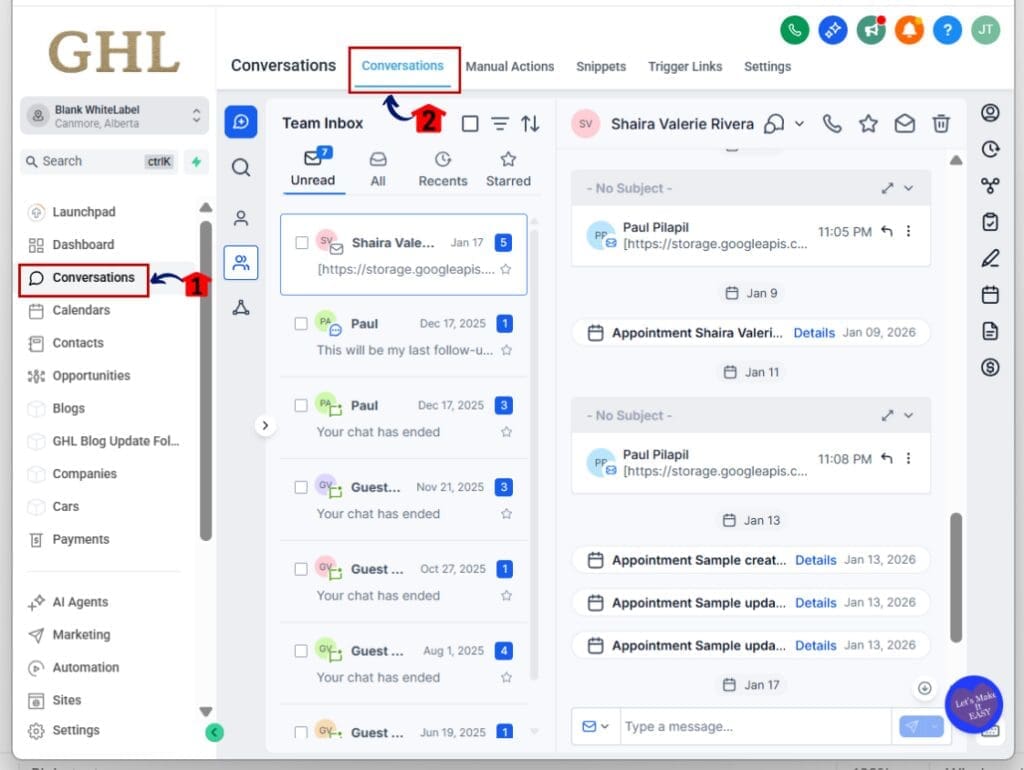
2.1 Click on the Conversations Menu Item.
- Access the ‘Conversations’ section of GoHighLevel
- This shows your Conversations dashboards
2.2 Click on the Conversations Tab
- This will show the existing conversations in your inbox
Step 03: Check the Unread Counter
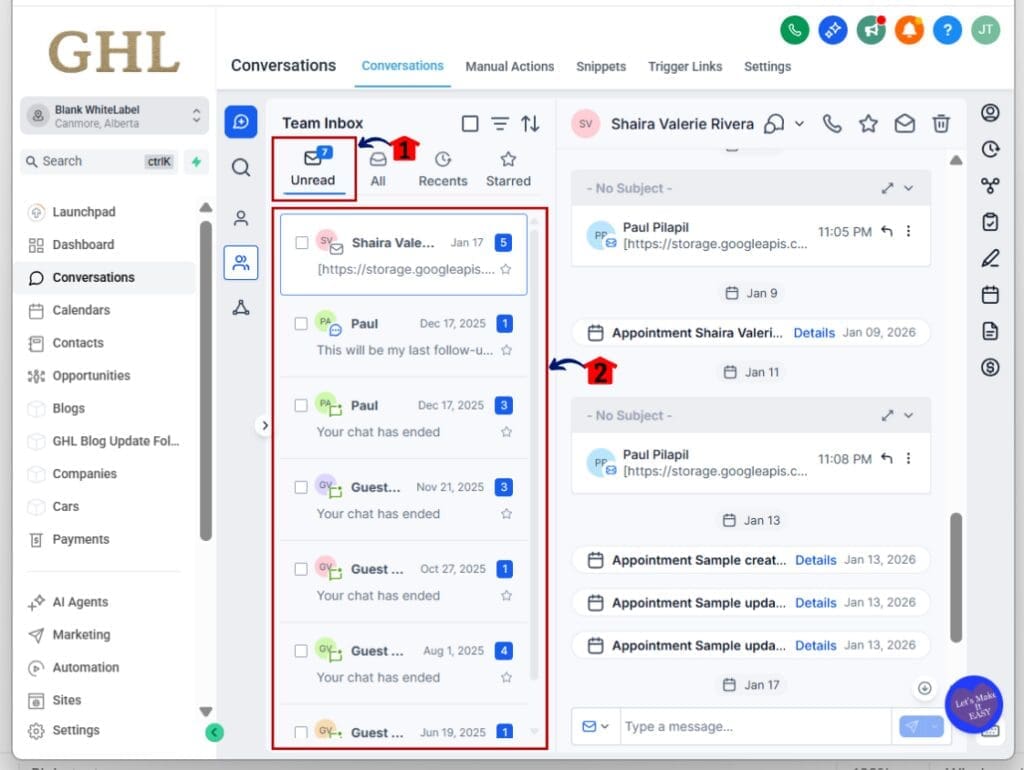
- This is where you’ll see the inbox unread counter and new date format in use.
3.1 Inside the “Conversations” Look at the inbox tabs notice the new unread counters
3.2 Open a few conversations to see the unread numbers update in real time
Step 04: Check the New Date Format
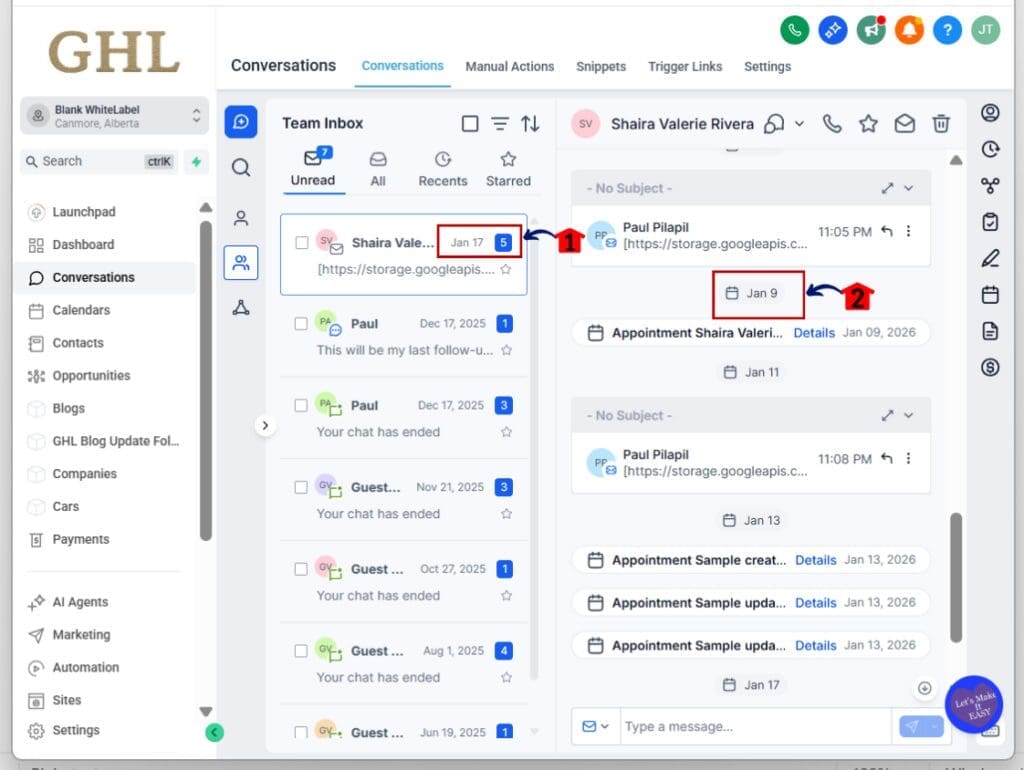
- GHL now uses a clearer date style for all messages.
4.1 Browse through the message list
4.2 Look for dates like “Jan 05” instead of “01/05”
4.3 Confirm the new format is consistent across all threads and inboxes
Step 05: Start Using the New UI as Usual
- There’s nothing extra to install or set up.
5.1 Use your inbox the same way you always have
5.2 Messages will now show real-time unread counts
5.3 All dates will follow the new format, making timelines easier to follow
That’s it. The inbox unread counter and date format improvements are now live. You just use the Conversations page like normal, but with better visibility and fewer mix-ups.
Pro Tips for Using the Updated Conversations UI
The inbox unread counter is a simple tool, but it works best when you use it with purpose. Here are a few ways to make it part of your daily routine.
Use the inbox unread counter to plan your day
- At a glance, you can see how many messages are waiting. Start with the inbox that has the highest unread count and work your way down.
Mark important messages as unread
- If you open a message but can’t reply right away, mark it as unread. The inbox unread counter will remind you to come back to it later.
Keep your most-used inboxes easy to reach
- Pin your busiest tabs so the inbox unread counter stays visible. It’s a small move that saves time and keeps things in order.
Set clear team habits around marking messages
- Decide as a team how to handle read and unread messages. This keeps the inbox unread counter accurate and helps everyone stay on the same page.
Use the inbox unread counter with Smart Lists
- If you’re using Smart Lists or filters, the inbox unread counter gives you another layer of clarity. Together, they make it easier to manage follow-ups and priorities.
These small habits help you get more from the inbox unread counter. Over time, they add up to better communication and fewer dropped messages.
Frequently Asked Questions About the New Inbox Features
Final Thoughts: Small Fixes That Make a Big Difference
The inbox unread counter is a simple tool, but it helps you stay organized. You can see what still needs a response without clicking into every message. It keeps your team focused and saves time.
The new date format also does its job well. You won’t need to second-guess dates or waste time figuring out message timelines. It’s easier to read, and it looks cleaner across the Conversations page.
When used together, the inbox unread counter and the updated date format improve the way you manage conversations. They take away a few small headaches and help your team move faster.
If you use GHL to manage client messages every day, this is an easy win.
Scale Your Business Today.
Streamline your workflow with GoHighLevel’s powerful tools.