

- Open Workflow Builder faster, reduce waiting, and manage complex automations with a smoother GHL experience.
- Quick Summary – Workflow Load Time at a Glance
- What Changed in Workflow Load Time?
- Before and After the Workflow Load Time Update
- Why Faster Workflow Load Time Matters
- How to Test the Faster Workflow Load Time
- Quick Tips for Better Workflow Load Time
- What Faster Workflow Load Time Means for Your Agency
- Frequently Asked Questions About Workflow Load Time
- Conclusion: Faster Workflow Load Time in GHL
Open Workflow Builder faster, reduce waiting, and manage complex automations with a smoother GHL experience.
Faster Workflow Load Time in GoHighLevel
Workflow load time just got a major improvement in GoHighLevel. Workflows can now open up to four times faster from the Workflow list, which means less waiting and a smoother move into Workflow Builder.
The update works in the background by improving how Workflow Builder resources and page elements load. You do not need to change any settings, rebuild your workflows, or turn on a new feature. The biggest improvement should appear during the first load, although speed can still depend on workflow size, browser use, internet connection, and device performance.
For agencies, virtual assistants, and automation teams, faster workflow load time makes daily work easier. You can open workflows, review actions, fix issues, and make updates with less delay. It is a simple change, but when you manage several client accounts, those saved seconds can add up fast.
The improved workflow load time helps GHL users open automations faster, make changes sooner, and spend less time waiting. For agencies managing several client workflows, those small time savings can add up fast.
Quick Summary – Workflow Load Time at a Glance
Purpose: This update improves workflow load time when opening automations from the Workflow list.
Why It Matters: Faster access means less waiting when you review, edit, or troubleshoot workflows.
What You Get: Workflow Builder can open up to four times faster during the first load in many cases.
Time to Complete: No setup is needed because the update works automatically in the background.
Difficulty Level: Easy. Open a workflow as usual and check how quickly the builder becomes ready.
Key Outcome: Your team can move through workflow checks and client updates with less delay.
What Changed in Workflow Load Time?
GoHighLevel improved how Workflow Builder loads when you open a workflow from the main list. The system now loads key resources and builder elements faster, so you can start working sooner.
Before this update, some workflows could take longer to open, especially if they had many steps, branches, or actions. Now, the builder becomes ready much faster in many cases. GoHighLevel reports that the first workflow load can be up to four times faster.
Automate marketing, manage leads, and grow faster with GoHighLevel.

This change does not add new workflow tools or change how your automations run. It simply improves workflow load time and makes the builder feel more responsive. The biggest difference should appear when you open a workflow for the first time. Results may still vary based on workflow size, browser condition, internet speed, and device performance.
Before and After the Workflow Load Time Update
Before this update, opening a large workflow could take longer than expected. Users sometimes had to wait for triggers, actions, and other builder parts to appear before they could start working.
Now, workflow load time is much faster in many cases. GoHighLevel says the first load can be up to four times faster, which makes the move from the Workflow list into the builder feel smoother.
The change is simple, but useful. You can get into a workflow sooner, review the setup, and make changes with less delay. The results may still vary, but the overall experience should feel quicker and more responsive.
Why Faster Workflow Load Time Matters
Faster workflow load time means less waiting during the tasks you repeat every day. When you manage several client accounts, even a small delay can become a real drain on your time.
This update helps agency owners, virtual assistants, and automation teams move through workflows with less friction. You can review triggers, check actions, fix errors, and make client changes sooner.
The biggest benefit is simple. Your team can spend more time improving automations and less time waiting for Workflow Builder to open. That may not sound flashy, but it makes GHL easier to use when your workload gets busy.
How to Test the Faster Workflow Load Time
The faster workflow load time works in the background, so there is nothing to turn on. You can test the update by opening a workflow from the main list and watching how quickly the Workflow Builder becomes ready.
For this guide, we’ll open the Workflows area, choose an existing workflow, and check how fast the builder loads.
Here are the steps we will follow:
- Access the Workflows area in GHL.
- Open the Workflow Builder.
To start, make sure you are logged in to the correct GoHighLevel sub-account.
Step 01 – Access the Workflows Area in GHL
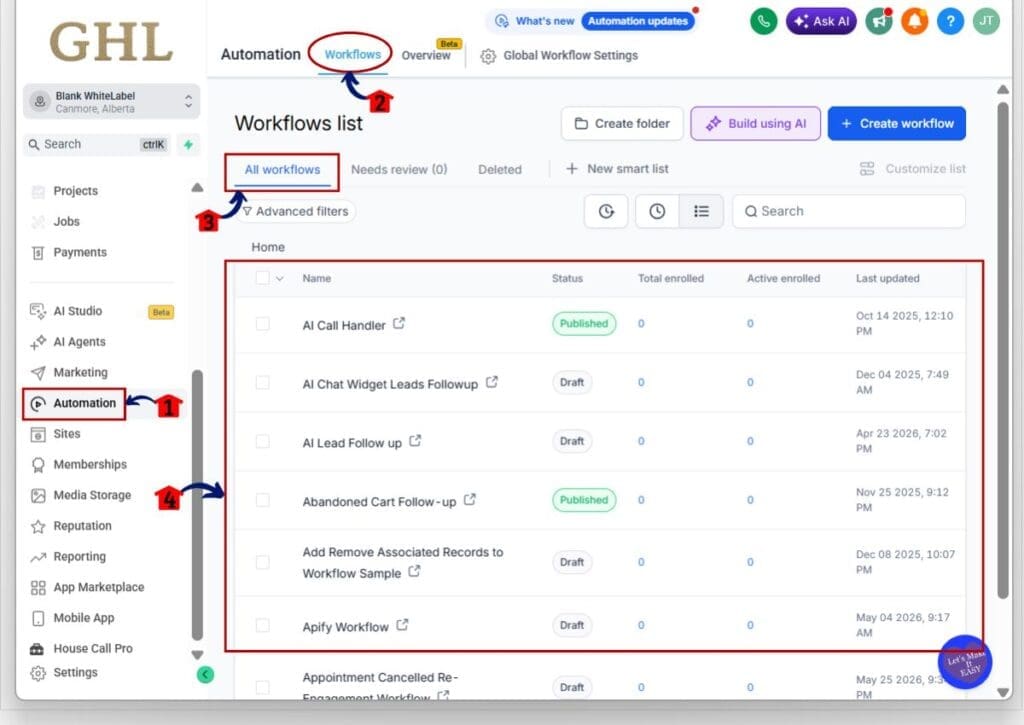
- The main menu on the left side of your screen includes the core areas you use in GoHighLevel.
1.1 Click Automation in the left menu.
- This opens the main Automation section.
1.2 Click Workflows in the top navigation.
- This opens the Workflows list.
1.3 Click All Workflows.
- This displays the workflows available in the sub-account.
1.4 Review the workflow list.
- Choose an existing workflow that you want to open and test.
1.5 Click the name of a workflow in the list.
- GoHighLevel will open the selected workflow in the Workflow Builder.
Step 02 – Open the Workflow Builder
- This is where you can check the improved workflow load time.
2.1 Watch how quickly the builder canvas appears.
- The biggest improvement should be most noticeable during the first workflow load.
2.2 Check when the workflow steps are ready to use.
- The builder is ready when you can view the trigger, actions, and workflow path without waiting for more items to load.
2.3 Confirm that you can review or edit the workflow.
- Clicking a trigger or action should open its settings without a delay caused by the main builder still loading.
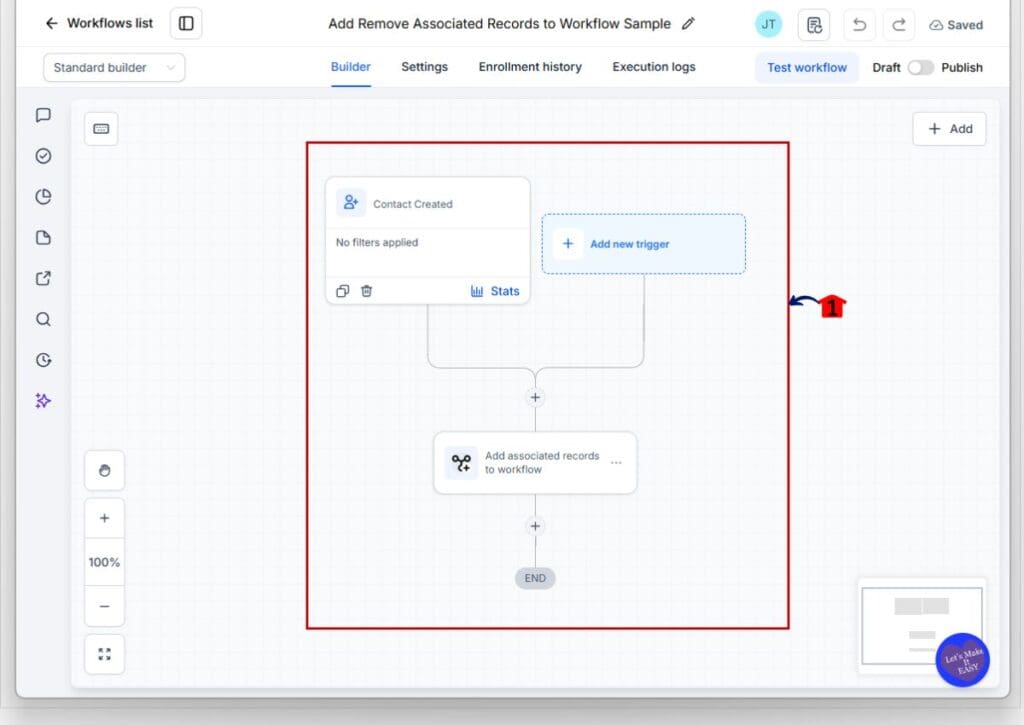
Once the Workflow Builder is open, the test is complete. You do not need to change any settings or update the workflow. The new loading improvements apply automatically.
Your workflow load time may still vary based on workflow size, browser condition, internet speed, and device performance. Larger workflows with more actions and branches may take longer than simple ones, but the overall loading experience should feel faster.
Quick Tips for Better Workflow Load Time
Better workflow load time starts with a few simple habits. Keep workflow names clear, use folders, and remove old steps you no longer need. A cleaner setup makes it easier to find, open, and review the right automation.
Your browser also matters. Close unused tabs, refresh the page when something feels slow, and test another browser if the delay continues. These small checks can help you spot whether the issue comes from the workflow, the browser, or the device.
Large workflows may still take longer to open than simple ones. That is normal. The update should make the overall experience faster, but a well-organized workflow will still be easier to manage and troubleshoot.
What Faster Workflow Load Time Means for Your Agency
Faster workflow load time helps your team move through daily work with less delay. Agency owners, virtual assistants, and automation managers can open workflows, check settings, and make changes without waiting as long for the builder to load.
Those saved seconds matter when your team manages many client accounts. Faster access can make workflow audits, client updates, troubleshooting, and campaign checks feel much smoother.
This update does not change how your automations run. It simply makes the work around them easier, which can help your team stay focused and get more done.
Frequently Asked Questions About Workflow Load Time
Conclusion: Faster Workflow Load Time in GHL
The faster workflow load time is a simple update, but it can make a real difference during a busy day. Workflows can now open much faster, which means less waiting and quicker access to the builder.
You do not need to change any settings or rebuild your automations. Just open your workflows as usual and check how the new loading speed feels in your account.
Scale Your Business Today.
Streamline your workflow with GoHighLevel’s powerful tools.


