

- See how people move from event views to RSVPs and ticket sales.
- Quick Summary – Meta Pixel Tracking at a Glance
- What’s New With Meta Pixel Tracking
- Why Meta Pixel Tracking Matters for Event Campaigns
- How to Use Meta Pixel Tracking in GHL Events
- Pro Tips for Better Meta Pixel Tracking
- What Meta Pixel Tracking Means for Your Business
- Meta Pixel Tracking Frequently Asked Questions for GHL Events
- Final Thoughts on Meta Pixel Tracking
See how people move from event views to RSVPs and ticket sales.
Meta Pixel Tracking Gives GHL Events Better Conversion Data
Meta Pixel Tracking is now available inside GoHighLevel Events, giving you a better way to see what happens after someone visits your event page. You can track key actions like page views, RSVP starts, completed RSVPs, checkout steps, and ticket orders without relying on basic traffic data alone.
This gives you a clearer picture of the full event journey. You can see where people take action, where they drop off, and which campaigns are driving real results. For ticketed events, GHL can also send details such as order value, currency, ticket quantity, and ticket identifiers.
For agencies and event marketers, this means better reporting and fewer blind spots. Instead of guessing which ads are working, you can use real Meta Pixel Tracking data to improve campaigns and make smarter decisions.

Meta Pixel Tracking gives you a clearer view of how people move from an event page to an RSVP or ticket purchase. You can track key actions, spot drop-offs, and measure event results with better conversion data.
Quick Summary – Meta Pixel Tracking at a Glance
Purpose: Meta Pixel Tracking lets you connect GHL Events with Meta so you can track key actions across the attendee journey.
Why It Matters: You can see what happens after someone lands on your event page, including RSVP activity, checkout steps, and completed ticket orders.
What You Get: GHL can send event actions, purchase value, currency, ticket quantity, and ticket details back to Meta.
Time To Complete: Most users should be able to set up the tracking in just a few minutes once they have their Meta Pixel ID ready.
Difficulty Level: Easy. The setup is handled inside the event settings and does not require a complex workflow.
Key Outcome: Meta Pixel Tracking gives you clearer conversion data, better campaign reporting, and a stronger view of which event ads are driving real results.
What’s New With Meta Pixel Tracking
Meta Pixel Tracking now works inside GoHighLevel Events, so you can connect an event directly to your Meta Pixel and track key actions as people move through the event journey. Each event can have its own tracking setup, which gives you more control over how you measure results.
For RSVP events, you can track when someone views the event page, starts the RSVP process, and completes the RSVP. For ticketed events, you can track more steps, including checkout, ticket selection, registration, payment details, and completed orders. Free ticket orders are also counted, so your conversion data stays consistent.
Automate marketing, manage leads, and grow faster with GoHighLevel.

GoHighLevel can also send more purchase details to Meta, such as order value, currency, ticket quantity, and ticket identifiers. Session-based deduplication helps stop the same action from being counted more than once during page refreshes, back navigation, payment redirects, or repeat checks.
Why Meta Pixel Tracking Matters for Event Campaigns
Meta Pixel Tracking gives you a much better view of what people do after they land on your event page. Instead of only seeing clicks or visits, you can follow key actions like RSVP starts, completed sign-ups, checkout steps, and ticket orders.
That helps you spot where people are dropping off. If plenty of people view the event but very few finish an RSVP or purchase, you now have better data to help find the problem. You can then adjust the event page, offer, ad message, or follow-up process.
For agencies and event marketers, this also makes reporting easier. You can connect campaign activity to real event results, including revenue for paid tickets. That makes Meta Pixel Tracking useful for improving ads, building better audiences, and showing clients what their campaigns are actually producing.
How to Use Meta Pixel Tracking in GHL Events
Setting up Meta Pixel Tracking in GoHighLevel Events is simple. You’ll open your event, go to the Link & tracking settings, add your Meta Pixel ID, and then publish the event when your setup is ready.
Here are the main steps to use App QR Code:
- Open Your Event in GoHighLevel.
- Add Meta Pixel Tracking to Your Event.
To start, make sure you are logged in to your GoHighLevel sub-account.
Step 1.0 – Open Your Event in GoHighLevel
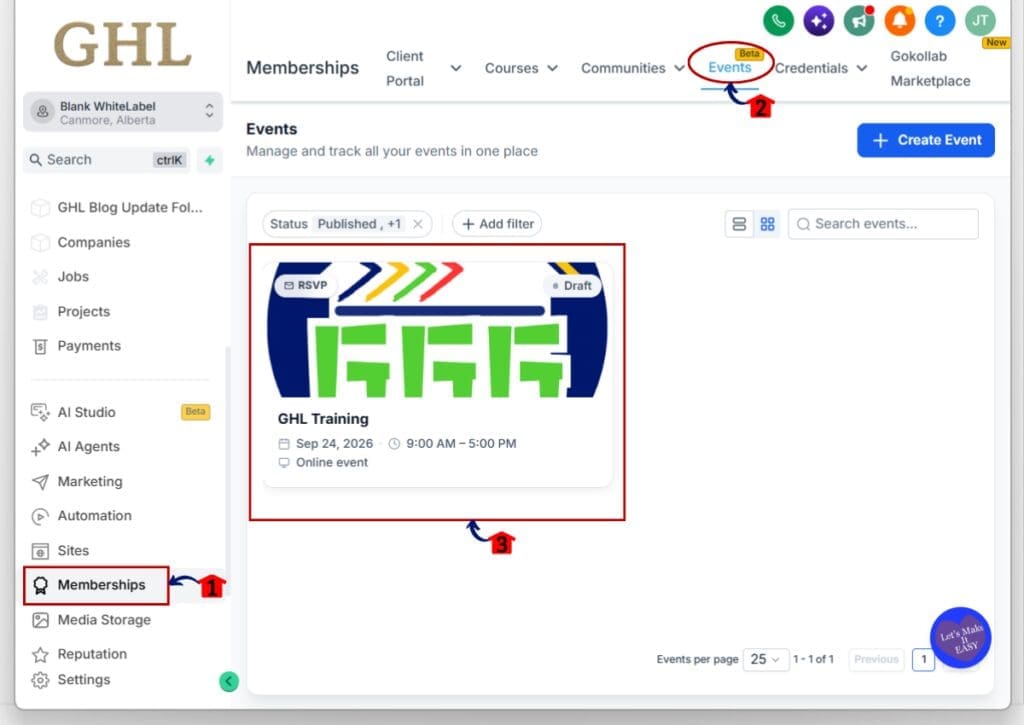
1.1 Click Memberships from the main left-hand menu.
- This opens the Memberships area inside your GoHighLevel sub-account.
1.2 Click Events from the top menu.
- You’ll now see the Events area, where you can manage your existing events or create a new one.
1.3 Click the event you want to track.
- Choose the RSVP or ticketed event where you want to add Meta Pixel Tracking.
- This opens the event editor and gives you access to the event settings.
Step 2.0 – Add Meta Pixel Tracking to Your Event
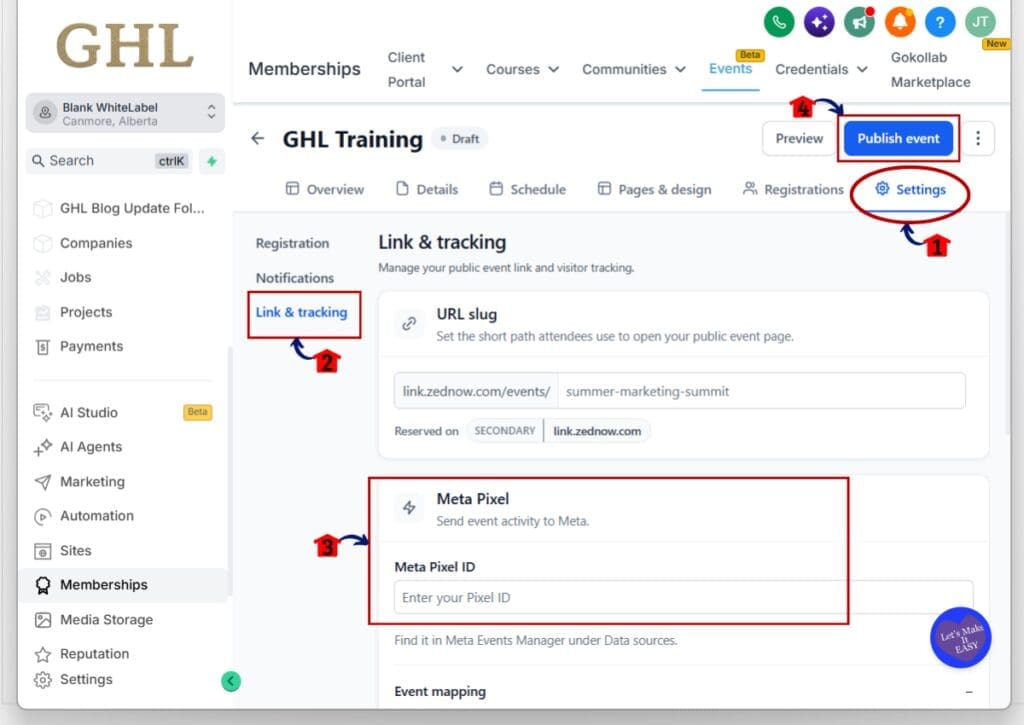
2.1 Click Settings from the event menu.
- This opens the settings area for the selected event.
2.2 Click Link & tracking from the left-side settings menu.
- This section controls the public event link and visitor tracking options.
2.3 Enter your Meta Pixel ID in the Meta Pixel section.
- Paste the Pixel ID you want to use for this event into the Meta Pixel ID field.
- You can find your Pixel ID inside Meta Events Manager under Data Sources.
- Meta Pixel Tracking is configured separately for each GoHighLevel event, so make sure you are adding the correct Pixel ID.
2.4 Review your event settings and click Publish event when ready.
- Publishing makes the event available with your tracking settings in place.
- If the event is already live, review the Meta Pixel setup carefully before making changes.
Pro Tips for Better Meta Pixel Tracking
Meta Pixel Tracking works best when you keep the setup clear and consistent. Use the same event mapping for similar campaigns, and test the full attendee journey before you send paid traffic. Check the event page, RSVP flow, checkout steps, and final conversion so you know the right actions are being sent to Meta.
For ticketed events, focus on completed orders. GoHighLevel can send details like order value, currency, ticket quantity, and ticket identifiers. That gives you a better view of revenue, not just registrations.
Use the data to spot where people drop off. If visitors reach the event page but do not complete an RSVP or ticket order, review the page, offer, or signup flow. Meta Pixel Tracking can help you find weak points without relying on guesswork.
What Meta Pixel Tracking Means for Your Business
Meta Pixel Tracking gives you a clearer way to connect ad activity with real event results. Instead of stopping at clicks and page views, you can see whether people actually start an RSVP, complete a signup, or buy a ticket.
For agencies, this makes client reporting more useful. You can show which campaigns are driving registrations and ticket sales, then use that data to improve the next campaign. For paid events, the added purchase details also help you track revenue more accurately.
The biggest benefit is simple. Meta Pixel Tracking gives you better data to make better decisions. You can spot weak points in the event journey, fix what is not working, and focus more attention on the campaigns that bring real results.
Meta Pixel Tracking Frequently Asked Questions for GHL Events
Final Thoughts on Meta Pixel Tracking
Meta Pixel Tracking gives GoHighLevel users a much clearer view of what happens after someone lands on an event page. You can track key RSVP and ticket actions, see where people drop off, and connect ad activity to real event results.
For agencies and event marketers, that means better reporting and better decisions. You can see which campaigns are driving sign-ups or ticket sales, then use that data to improve future events.
If you use GHL Events, this is a feature worth testing on your next campaign. Have you tried Meta Pixel Tracking yet, and how are you planning to use it?
Scale Your Business Today.
Streamline your workflow with GoHighLevel’s powerful tools.


