

- Reply to Threads comments inside Social Planner
- Quick Summary – Threads Comment Management Essentials
- What’s New With Threads Comment Management
- Why Threads Comment Management Matters
- How to Use Threads Comment Management in GHL
- Quick Tips for Threads Comment Management
- What This Means for Your Business
- Frequently Asked Questions About Threads Comment Management
- Keep Threads Replies in One Simple Inbox
Reply to Threads comments inside Social Planner
Threads Comment Management in GHL
Threads comment management is now available in GHL Social Planner. You can view and reply to Threads comments without leaving GoHighLevel or opening another app.
Threads now sits beside Facebook, Instagram, LinkedIn, TikTok, Communities, and Bluesky in Comment Management. You can reply with text, images, emojis, and location details when Threads supports them.
This update gives agencies and teams one place to manage more social replies. Existing Threads users will need to reconnect their account once so GHL can access the new comment permissions.

Threads comment management helps your team reply faster, stay organized, and manage more social conversations without jumping platforms. It gives GHL users one simple place to handle Threads comments alongside other social channels.
Quick Summary – Threads Comment Management Essentials
Purpose: This update lets you manage Threads comments inside GHL Social Planner.
Why It Matters: Your team can reply faster without switching between apps.
What You Get: You can view comments, send replies, and use text, images, emojis, or location details when supported.
Time to Complete: Most users can set this up and test it in about five minutes.
Difficulty Level: Easy. Existing Threads users may only need to reconnect their account once.
Key Outcome: Threads comment management gives your team one clear place to handle more social conversations.
What’s New With Threads Comment Management
Threads comment management now works inside GHL Social Planner. You can view and reply to Threads comments from the same inbox you already use for other social channels.
Replies can include text, images, emojis, and location details when Threads supports them. Comments also sync through webhook updates, so new activity should appear close to real time.
Automate marketing, manage leads, and grow faster with GoHighLevel.

Threads now joins Facebook, Instagram, LinkedIn, TikTok, Communities, and Bluesky inside Comment Management. Existing Threads users will need to reconnect their account once so GHL can access the new comment permissions.
Why Threads Comment Management Matters
Threads comment management helps your team handle more replies without switching between apps. This saves time and makes it easier to keep track of open conversations.
It also helps agencies stay consistent across client accounts. Social media managers, virtual assistants, and support teams can respond from one inbox instead of checking each platform on its own.
Faster replies can lead to better engagement and fewer missed comments. The main benefit is simple: your team can stay organized while managing more social activity inside GHL.
How to Use Threads Comment Management in GHL
- Threads comment management lets you view and reply to Threads comments inside Social Planner. In this guide, you’ll learn how to open the Threads Comments area and manage replies from one place.
Here are the steps we will follow:
- Access Threads Comments in Social Planner.
To start, make sure you are logged in to the correct GoHighLevel sub-account.
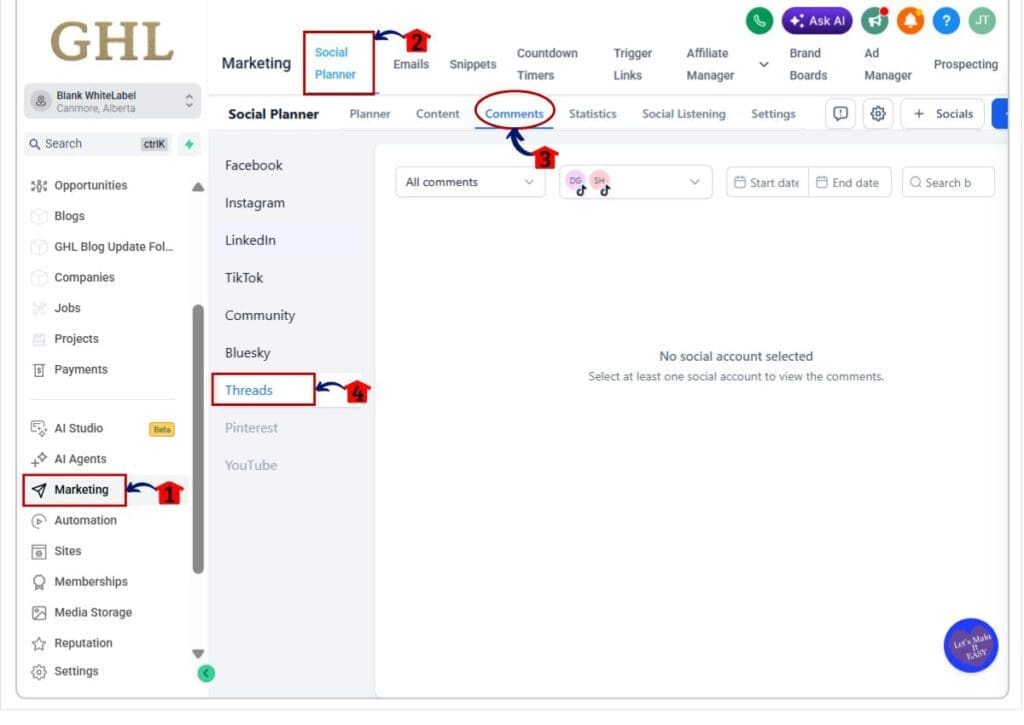
Step 01 – Access Threads Comments in Social Planner
- The main menu on the left side of your screen includes the core areas you use in GoHighLevel.
1.1 Click Marketing.
- This opens the main Marketing section.
1.2 Click Social Planner in the top menu.
- The Social Planner dashboard will open.
1.3 Click Comments.
- This opens the Comment Management area for supported social platforms.
1.4 Click Threads in the left-side platform menu.
- The Threads comment area will open. You can now select a connected Threads account and view its comments.
Quick Tips for Threads Comment Management
Keep your replies short, clear, and personal. A quick reply often works better than a long one, especially when the comment only needs a simple answer.
Check that you have selected the correct Threads account before you reply. This matters even more when you manage several client accounts inside GHL Social Planner.
Existing Threads users should reconnect their account before assigning comment tasks to the team. This helps prevent missing permissions and makes Threads comment management work as expected.
What This Means for Your Business
Threads comment management gives your team one less platform to check each day. You can manage Threads replies beside your other social comments inside GHL Social Planner.
For agencies, this makes client work easier to track. A social media manager or virtual assistant can move between accounts, review comments, and reply without opening several apps.
The real value is better control. Fewer missed comments, faster replies, and a cleaner process can help your team stay consistent as your client list grows.
Frequently Asked Questions About Threads Comment Management
Keep Threads Replies in One Simple Inbox
Threads comment management gives GHL users a simpler way to handle social replies. You can now view and answer Threads comments inside Social Planner without jumping between platforms.
This update helps agencies and teams stay organized, reply faster, and keep more conversations in one inbox. Existing Threads users may need to reconnect their account once before the feature works.
Have you tried Threads comment management in GHL yet? Let us know how it fits into your social media workflow.
Scale Your Business Today.
Streamline your workflow with GoHighLevel’s powerful tools.


