- Snapshot refreshes now auto-clean deleted steps, keeping your workflow automation clean and error-free
- Quick Summary – Snapshot Cleanup at a Glance
- What’s New – Workflow Automation Cleanup on Refresh
- What’s Changed – No More Manual Fixes
- Why This Matters – Save Time, Protect Data, Automate with Confidence
- How to Use It – Watch for the Heads-Up and Log Entry
- Conclusion – A Quiet Upgrade with Big Payoff
Snapshot refreshes now auto-clean deleted steps, keeping your workflow automation clean and error-free
If you’ve ever refreshed a snapshot and watched your workflows break without warning, you’re not alone. One deleted wait step, and boom—contacts get trapped in automation limbo. No messages go out. No updates happen. And unless you’re checking every execution log like a hawk, you might not even realize there’s a problem.
This has been a long-standing pain point for agencies using snapshots across multiple sub-accounts. One change in a master workflow, and suddenly you’ve got dozens—or hundreds—of contacts stuck waiting on steps that no longer exist. Now that’s fixed.Workflow automation cleanup is here to keep things moving automatically. No more digging through logs. No more manual cleanup. No more wondering why your automations stalled.

This update ensures smoother workflow automation by auto-removing contacts from deleted steps during snapshot refreshes—saving you time and preventing errors.
Quick Summary – Snapshot Cleanup at a Glance
Purpose:
Automatically remove stuck contacts when deleted workflow steps are refreshed via snapshot updates.
Why It Matters:
Stuck contacts silently break automations and ruin campaigns. This update prevents that by cleaning things up before problems start.
What You Get:
One-time heads-up alerts in affected workflows, detailed Execution Log entries, and fully automated contact cleanup after snapshot refreshes.
Time to Complete:
Zero setup required — works instantly when you refresh a snapshot.
Difficulty Level:
Beginner. No configuration needed. Just refresh your snapshot and the system handles the rest.
Key Outcome:
Your workflows stay clean, contacts don’t get stuck, and automation continues without disruption — even when steps are removed from templates.
What’s New – Workflow Automation Cleanup on Refresh
GoHighLevel just made a behind-the-scenes upgrade that solves a frustrating automation issue: stuck contacts caused by deleted workflow steps during snapshot refreshes.
Here’s what’s new—anytime you refresh a snapshot and it deletes a step (like a wait step or email action), the system now automatically removes any contacts who were sitting in that step. Instead of leaving them frozen in place, GHL quietly clears them out to keep everything running smoothly.
Automate marketing, manage leads, and grow faster with GoHighLevel.

This new automation cleanup happens instantly after a snapshot refresh. The next time you open that workflow, GHL will show a brief one-time heads-up message letting you know the change occurred—only if that workflow was affected.
You’ll also find a clear audit trail in the Execution Logs. Look for the message “Removed by – Snapshot Refresh” along with the step details. No guesswork, no digging—just clean, instant contact removal where it matters most.
This update only applies to steps deleted as part of a snapshot refresh. If you manually delete a step in an existing workflow, GHL already handles the cleanup (that part hasn’t changed).
What’s Changed – No More Manual Fixes
Before this update, agencies had to play detective every time a snapshot refresh broke a workflow.
If a step got removed—especially something like a delay or condition—and contacts were sitting in it, they didn’t move forward. They didn’t exit. They didn’t trigger the next step. They were just stuck.
Worse, there was no automatic alert. You’d only find out if you checked Execution Logs or noticed a campaign went quiet. The only fix? Manually open the workflow, find the orphaned contacts, and remove them yourself. Multiply that across clients and accounts, and it turned into a huge time suck.
Now, GoHighLevel handles that cleanup for you.
As soon as you refresh a snapshot, the system checks for any deleted steps. If it finds contacts sitting in them, it removes them instantly—no action required.
You’ll only see a heads-up once, the first time you open the workflow after the refresh. It’s subtle but powerful. No more constant monitoring. No more contact rescues. Just clean, reliable automation.
Why This Matters – Save Time, Protect Data, Automate with Confidence
This update might not seem flashy, but it fixes one of the most annoying problems in workflow automation: hidden stalls.
When contacts get stuck in deleted steps, it doesn’t just break your automations—it breaks trust. Leads don’t get follow-ups. Clients don’t get results. And your team wastes hours figuring out what went wrong.
Now, with automated cleanup during snapshot refreshes, you can update your workflows without worrying about the mess behind the scenes. It’s a major win for reliability, especially if you’re managing templates across multiple accounts.
You also get peace of mind. There’s no second-guessing whether a change you made upstream is causing issues downstream. GHL quietly handles the risk for you—and even shows you what changed, so you’re never left in the dark.
Bottom line? This is one of those updates that’s invisible when it works—because everything just runs the way it’s supposed to.
How to Use It – Watch for the Heads-Up and Log Entry
There’s nothing to turn on, activate, or configure—this automation cleanup is built right into GoHighLevel’s snapshot refresh process. But here’s how you can see it in action and verify it’s working:
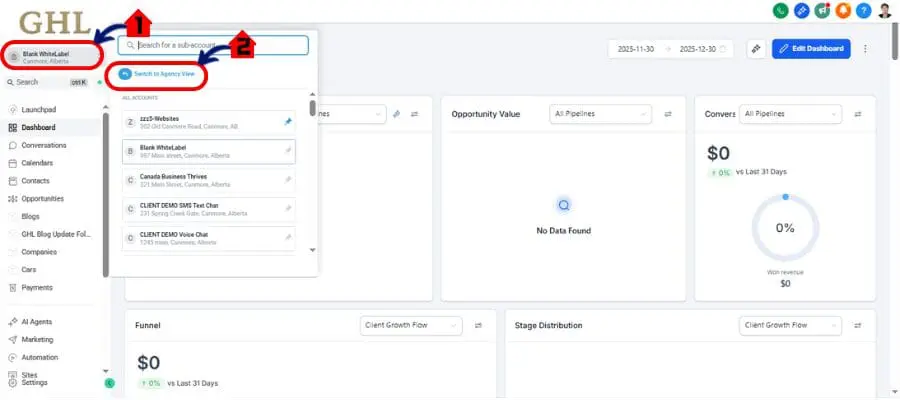
Step 01 – Access the Agency View of GHL Account
- Go to the Upper left-hand sidebar, look all the way to the name of Your SubAccount
1.1 Click the name of your Subaccount
1.2 Switch to Agency View
- You’ll now be in the Agency dashboard, where you can access:
- Agency Dashboard
- SubAccount
- Account Snapshot
- and more.
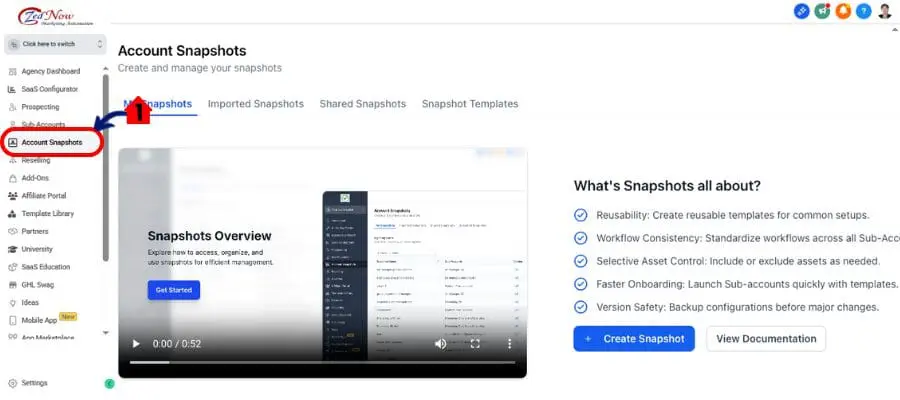
Step 02 – Access the Account Snapshot
2.1 Click Account Snapshot
- If this is your first time here, the new onboarding flow will launch automatically.
- Refresh a Snapshot: Start by updating a snapshot that includes workflow changes—especially if you’ve removed steps like wait timers, emails, or internal actions.
- Open the Workflow: The first time you open any workflow that was affected, you’ll see a brief pop-up message. This is your one-time heads-up that a cleanup occurred. If no steps were deleted, you won’t see anything.
- Check Execution Logs: Want to confirm what happened? Go to the Execution Logs inside the workflow. Look for any entries labeled “Removed by – Snapshot Refresh.” These logs will show which contacts were removed and which step they were stuck in.


That’s it. GHL handles the rest behind the curtain.
Keep in mind—this cleanup only applies to contacts stuck in steps deleted during a snapshot refresh. If you delete a step manually inside the workflow builder, contacts are still removed automatically as they always were.
Pro Tips – Get the Most from Workflow Logs & Snapshots
Even though this update runs silently in the background, there are a few smart ways to get the most out of it—especially if you’re managing high-volume workflows or cloning across accounts.
Tip #1: Check Execution Logs Regularly
Use the logs as your QA tool. After a snapshot refresh, look for the “Removed by – Snapshot Refresh” note. It’s a quick way to catch where steps were deleted and which contacts were affected.
Tip #2: Communicate with Your Team
If your team works across multiple client sub-accounts, make sure they know this change only applies to snapshot refreshes—not manual workflow edits. That way, no one wastes time chasing cleanup that’s already handled.
Tip #3: Use This with Scaling in Mind
If you’re pushing workflows to dozens or even hundreds of accounts via snapshots, this update is a godsend. It means fewer support tickets, less post-refresh maintenance, and faster client onboarding.
Tip #4: Trust the One-Time Notice, Then Move On
The heads-up message only appears once per affected workflow. That’s by design. Once you’ve seen it, you don’t need to worry—GHL has already done the work for you.
Conclusion – A Quiet Upgrade with Big Payoff
This might be one of the most low-key updates to hit GoHighLevel workflows—but it delivers big behind-the-scenes impact.
With automatic workflow automation cleanup during snapshot refreshes, you no longer have to worry about contacts getting stuck in deleted steps. That means cleaner automation, smoother updates, and zero time wasted chasing down issues after you push changes live.
For agencies running high-volume operations, this kind of fix is gold. It protects client campaigns, boosts your team’s efficiency, and helps ensure every automation does what it’s supposed to—without you babysitting it.
Set it. Forget it. GHL’s got your back.
Scale Your Business Today.
Streamline your workflow with GoHighLevel’s powerful tools.