- GHL’s AI Workflow Actions Are Now Easier to Use and Find
- Quick Summary – AI Workflow Actions Essentials
- New GHL Categories for AI Workflow Actions
- New GHL Categories for AI Workflow Actions
- What Changed in AI Workflow Actions
- Why Clean AI Workflow Actions Matter
- How to Use the New AI Workflow Actions in GHL
- Tips to Work Smarter with AI Workflow Actions
- Frequently Asked Questions About AI Workflow Actions
- Why This Change to AI Workflow Actions Matters
- What’s Next for AI Workflow Actions in GHL
GHL’s AI Workflow Actions Are Now Easier to Use and Find
Why AI Workflow Actions Needed Cleanup
Why GHL Cleaned Up AI Workflow Actions
AI workflow actions in GoHighLevel were starting to get messy. The tools worked, but the names didn’t always make sense. Some were called Workflow AI. Others were called AI Actions. It was easy to lose track of what did what.
That’s a problem when you’re building automations fast, especially across multiple clients. The more AI tools GHL added, the harder it got to find the right one.
So GHL cleaned it up.
Now, every AI workflow action has a clear name and lives in the right category. You won’t need to click around or second-guess your tools. It’s all organized in a way that makes sense.
If you’re running automations for your agency or clients, this small change will save you time and headaches.
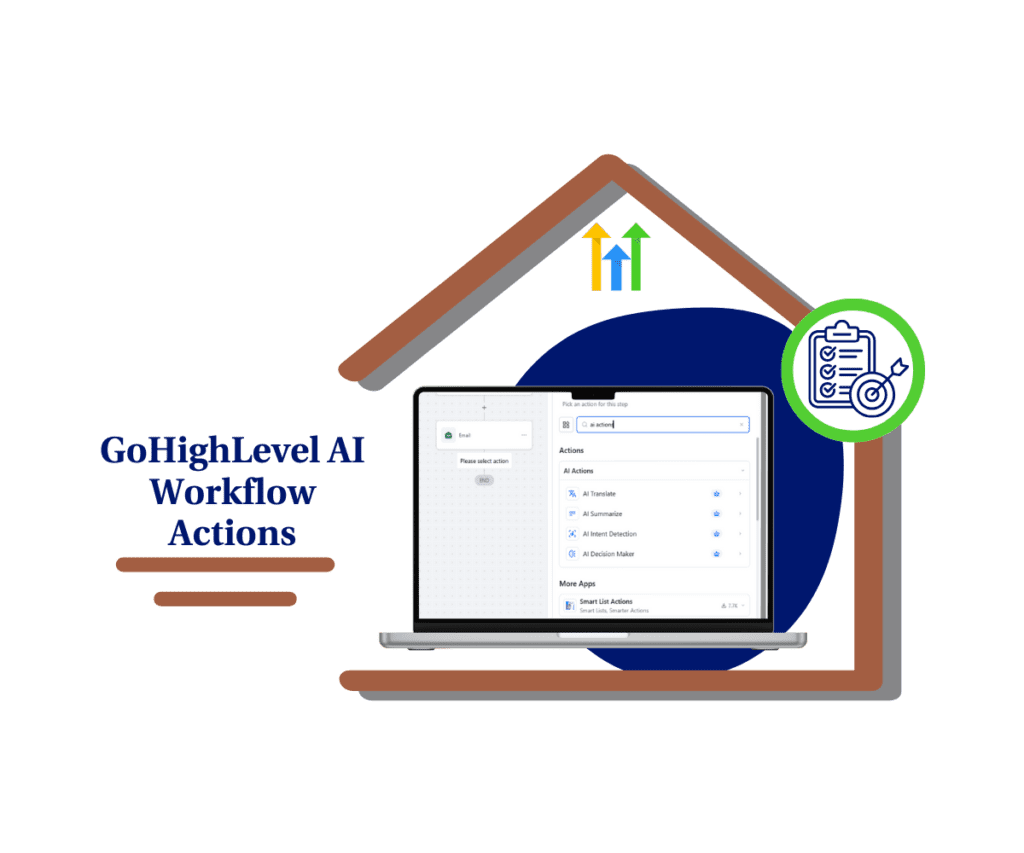
This GHL update makes AI workflow actions easier to use. With clearer names and new categories, you can build smarter, faster, and with less confusion.
Quick Summary – AI Workflow Actions Essentials
Purpose: This update improves how AI workflow actions are named and organized in GoHighLevel workflows.
Why It Matters: Clearer categories and labels reduce confusion and help users build faster without digging through menus.
What You Get: Two new workflow categories: AI Actions and Conversation AI, with renamed tools like AI Translate and AI Summarize.
Time to Complete: Just a few minutes to explore the new layout inside your workflow builder.
Difficulty Level: Very easy. No changes to setup or configuration are needed.
Key Outcome: Smarter, faster workflow builds with AI tools that are now easier to find and use.
New GHL Categories for AI Workflow Actions
AI workflow actions in GHL are now easier to understand and use. This update introduces two new categories inside workflows that make everything more organized.
The first one is called AI Actions. This is where you’ll now find all the core AI workflow actions. These include tools like:
Automate marketing, manage leads, and grow faster with GoHighLevel.

- AI Translate
- AI Summarize
- AI Intent Detection
- AI Decision Maker
Before this change, these were under a category called “Workflow AI.” That label didn’t really explain much. The new names and category give each AI workflow action a clearer place.
The second category is Conversation AI. This is for tools that handle back-and-forth chats or conversations. These used to be mixed in with the rest of the AI tools, which made things confusing.
Now, if you’re looking for an AI workflow action that helps with decisions, summaries, or intent, you know it’s in the AI Actions category. If you’re setting up chat-based flows, Conversation AI is where to go.
This is a simple update, but it makes a big difference when you’re trying to build workflows without wasting time.
New GHL Categories for AI Workflow Actions
AI workflow actions in GHL are now easier to understand and use. This update introduces two new categories inside workflows that make everything more organized.
The first one is called AI Actions. This is where you’ll now find all the core AI workflow actions. These include tools like:
- AI Translate
- AI Summarize
- AI Intent Detection
- AI Decision Maker
Before this change, these were under a category called “Workflow AI.” That label didn’t really explain much. The new names and category give each AI workflow action a clearer place.
The second category is Conversation AI. This is for tools that handle back-and-forth chats or conversations. These used to be mixed in with the rest of the AI tools, which made things confusing.
Now, if you’re looking for an AI workflow action that helps with decisions, summaries, or intent, you know it’s in the AI Actions category. If you’re setting up chat-based flows, Conversation AI is where to go.
This is a simple update, but it makes a big difference when you’re trying to build workflows without wasting time.
What Changed in AI Workflow Actions
GoHighLevel didn’t add new tools in this update, but they did rename and regroup the ones already there. Every AI workflow action now has a name that matches what it actually does. That makes it easier to find the right tool when you’re building.
Here’s how the AI workflow actions were updated:
AI Translate
- Old name: Workflow AI – Translate Content
- New name: AI Translate
- It still translates, but now the name is easier to spot.
AI Summarize
- Old name: Workflow AI – Summarize Text
- New name: AI Summarize
- The function hasn’t changed. The label just makes more sense.
AI Intent Detection
- Old name: Workflow AI – Intent Detection
- New name: AI Intent Detection
- You can still detect what a lead is trying to do, but now it’s quicker to find.
AI Decision Maker
- Old name: Workflow AI – Decision Maker
- New name: AI Decision Maker
- This AI workflow action helps guide logic and choices. Now it’s easier to identify in your workflow builder.
Also, the conversation tools that used to show up as “AI Actions” are now in a new category called Conversation AI. These tools are focused on chats, replies, and message-based actions.
By renaming and organizing all AI workflow actions, GHL has made things simpler. You don’t have to guess what a tool does or search through unrelated actions.
If you use AI in your workflows often, this cleanup saves time every time you build.
Why Clean AI Workflow Actions Matter
When AI workflow actions are hard to find or poorly labeled, it slows everything down. You waste time clicking through menus. You second-guess yourself. And if you’re managing client accounts, those small delays add up fast.
This update fixes that.
Now, each AI workflow action has a clear label and sits in the right category. That means you can build faster and spend less time figuring out where things are. The AI Actions category holds your general tools like Translate and Summarize. Conversation AI has your chat-based tools. Simple.
For agencies, this also makes handoffs easier. When your team can instantly see what each AI workflow action does, you avoid confusion and cut down on mistakes.
It also helps when you’re training new team members. You no longer have to explain why something called “Workflow AI” actually sends summaries or picks decisions. The names now speak for themselves.
This kind of clarity doesn’t just improve usability. It keeps your workflows clean and scalable.
How to Use the New AI Workflow Actions in GHL
GoHighLevel has made it easier to use AI workflow actions by updating the labels and organizing them into two new categories. You’ll now see AI tools grouped in a way that makes sense.
Here’s how to find and use the updated AI workflow actions:
Step 01: Access the Main Left Hand Menu in GoHighLevel
- The Main Menu on the Left side of your screen has all the main areas that you work in when using GHL
1.1 Click on the Automation Menu Item.
- Access the ‘Automation’ section of GoHighLevel
1.2 Click on the Workflows tab
1.3 Open an existing workflow or create a new one
- You’ll be able to edit or start fresh from here.

Step 02: Add a New Action Inside the Workflow
- All AI workflow actions are added as steps in your automation.
2.1 Click the “+” button to add a new step
- This opens the action menu.

2.2 Look for the “AI Actions” categories
- Now you will see the followings AI Actions
- AI Translate
- AI Summarize
- AI Intent Detection
- AI Decision Maker

That’s it. These small changes to AI workflow actions make it easier to build, manage, and explain your automations in GoHighLevel.
Tips to Work Smarter with AI Workflow Actions
If you use AI workflow actions often, a few small changes can help you build faster and stay organized.
Start with AI tools that give quick wins
- AI workflow actions like Translate and Summarize are simple and effective. They’re a great place to start if you want to test things without setting up complex logic.
Match your naming with the new structure
- As you build workflows, name your steps based on the new AI workflow actions. Use clear labels like “AI Translate” or “AI Intent” so your team knows what each step does.
Use bookmarks or templates
- If you use the same AI workflow actions across multiple accounts, save them as part of a template or bookmark your favorites. It makes repeat builds much easier.
Keep logic and chat actions separate
- Use AI workflow actions for tasks like decisions and summaries. Use Conversation AI only for chat replies and messaging. Keeping them separate helps you spot issues quickly later.
Walk your team through the update
- Even though nothing broke, the layout changed. A quick walkthrough will help your team know where to find each AI workflow action and when to use it.
When you work in multiple accounts or manage complex workflows, small habits like these save you hours each week.
Frequently Asked Questions About AI Workflow Actions
Here are quick answers to common questions about the updated AI workflow actions in GoHighLevel.
These changes may seem small, but they make a big difference when you build and manage automations at scale.
Why This Change to AI Workflow Actions Matters
This update is more than just new labels. It’s about making AI workflow actions easier to understand, easier to use, and easier to scale.
When tools are hard to find or poorly named, it slows everything down. You click around more than you should. You second-guess each step. And if you’re working with a team, that confusion spreads fast.
By cleaning up the way AI workflow actions are organized, GHL makes it easier for everyone to work smarter. You can build faster, hand off tasks with less friction, and keep your automations clean.
This also sets things up for future growth. As GHL adds more AI tools, this new layout will make sure they fit right into your workflow without causing clutter or confusion.
Better structure always leads to better systems. And that’s what this update delivers.
What’s Next for AI Workflow Actions in GHL
This update might seem small, but it makes a big difference. By organizing AI workflow actions into clear categories, GoHighLevel has made it easier for you to build, train, and manage automations without wasting time.
There’s nothing you need to fix. All of your current workflows using AI workflow actions will keep working. The tools are the same. The layout just makes more sense now.
If you haven’t checked it out yet, open a workflow and take a look at the new AI Actions and Conversation AI sections. You’ll see how simple it is to find what you need.
This change also sets the stage for more updates. GHL is adding new AI workflow actions, and this structure will keep your workflow builder clean as things grow.
Clear names. Smarter layout. Easier builds. That’s what this update delivers.
Scale Your Business Today.
Streamline your workflow with GoHighLevel’s powerful tools.