- GHL’s New Asana Workflow Automation
- Quick Summary – Asana Workflow Automation
- New Triggers and Actions for Asana Workflow Automation
- No More Zapier—This Is Real-Time Asana Automation
- Why Asana Workflow Automation Changes the Game
- How to Use Asana Workflow Automation in GHL
- Pro Tips for Smarter Asana Workflow Automation
- FAQs About Asana Workflow Automation in GHL
- What This Means for Your Agency’s Tech Stack
- Results You Can Expect From Asana Automation
- GHL + Asana: Your New Automation Power Combo
GHL’s New Asana Workflow Automation
Still relying on Zapier or Make to link GHL and Asana? You don’t need to anymore, this integration is now built straight into your workflows.
GHL now natively integrates with Asana Workflow Automation. That means you can create, update, and sync tasks or projects between the two platforms without third-party tools, delays, or complex webhooks.
This isn’t just another integration. It’s a real-time bridge between your CRM and your project management, so when a lead opts in, a task appears instantly. When a project updates in Asana, you can notify your sales team automatically. It’s fast, clean, and friction-free.
And yes, it works with both free and paid Asana accounts.
Whether you’re managing internal tasks, client projects, or cross-platform ops, this GHL + Asana automation will cut your busywork in half, and give you total control of your workflow stack.

Now that GHL connects directly with Asana, you can finally cut out Zapier and keep your project workflows flowing smoothly. No more missed handoffs or clunky workarounds, just clean, fast automation that actually works.
Quick Summary – Asana Workflow Automation
Purpose: GoHighLevel now offers a native Asana integration inside workflows, allowing users to instantly create, update, and sync tasks or projects without Zapier, Make, or custom webhooks.
Why It Matters: This update helps agencies reduce tool overload, eliminate task handoff delays, and create fully automated project management flows from lead to delivery.
What You Get: You’ll gain access to real-time Asana triggers (like task created, updated, or commented) and powerful actions (like create task, comment, subtask, or section) directly in the GHL workflow builder.
Time to Complete: Setup takes less than 10 minutes for most workflows. Just connect your Asana account, configure fields, and you’re ready to automate.
Difficulty Level: Beginner to Intermediate, No coding or external tools needed. Just map your GHL data to Asana and go.
Key Outcome: Faster task execution, better team coordination, and fully integrated project workflows that scale as your agency grows.
New Triggers and Actions for Asana Workflow Automation
GoHighLevel’s native Asana integration adds a powerful set of real-time triggers and actions directly into the workflows builder. This isn’t a partial sync, it’s full task-level automation from both directions.
Here’s what’s now possible inside GHL:
Automate marketing, manage leads, and grow faster with GoHighLevel.

Instant Triggers (Asana → GHL)
These fire the moment something happens in Asana, no polling delay, no lag:
- Task Created – When a new task is added to any project.
- Task Updated – Detect changes in status, title, description, or custom fields.
- Project Created – Use this to spin up internal sequences in GHL when a new Asana project kicks off.
- Comment Added to Task – Perfect for client updates or internal notifications.
- Task Moved to Section – Run automations based on pipeline-style task movement.
- New User Added – Sync your onboarding when a new Asana user joins the workspace.
- New Attachment Added – Fire a GHL alert when someone uploads key files.
- Coming Soon: Tag Added to Task + New Subtask Created.
New Actions (GHL → Asana)
Create, find, and manipulate Asana objects directly from a GHL workflow:
- Create Task – Auto-create tasks with all relevant info filled in.
- Update Task – Modify any field from contact or form data.
- Create Comment / Story – Post follow-ups or instructions right from GHL.
- Create Subtask – Nest tasks under a parent task dynamically.
- Create Section / Add Task to Section – Organize tasks on the fly.
- Find Task, Comment, or Project – Search by ID or name to take further action.
The result? You can now build an entire project workflow without leaving HighLevel.
No More Zapier—This Is Real-Time Asana Automation
Before this rolled out, tying GHL to Asana was kind of a pain. You either leaned on Zapier, hacked something together in Make, or messed with webhooks, and none of it felt great long term.
That’s done.
Now, with GHL’s native Asana integration, your automations run instantly, triggered by real-time webhooks. When someone creates a task, updates a project, or drops a comment, GHL can take immediate action.
And it’s not just faster. It’s smarter:
- You no longer need to manage Zapier zaps or deal with automation errors from third parties.
- No more webhook testing, time delays, or multi-step patch jobs to keep data in sync.
- GHL workflows can now create and organize Asana tasks with precision, assign to the right team member, set due dates, and even sort into sections.
This update brings native automation to an agency favorite, Asana, without the duct-tape solutions of the past. Less maintenance. More reliability. And one less subscription to worry about.
Why Asana Workflow Automation Changes the Game
If your team’s living in Asana for client work, you already know the drill, manually keeping everything in sync is a time suck. This update clears that up.
Let’s break down why this actually matters:
1. Real-Time Responsiveness
The moment something changes in Asana, GHL jumps on it. No more waiting around for Zapier to catch up. Stuff just happens, instantly.
2. End-to-End Lead to Delivery Automation
You can finally tie your lead forms to your project work. A lead comes in through GHL? You can spin up a task in Asana and keep it moving—no extra steps.
3. Eliminate Manual Handoffs
No more chasing sales for details or pinging ops to follow up. With this setup, the whole process runs on rails, and everyone knows what’s next.
4. Agency Efficiency at Scale
As your client base grows, you need automations that scale with you. With Asana built directly into GHL workflows, your team can handle more projects, with fewer missed steps, and way less back-and-forth.
This is about more than just convenience, it’s about control, speed, and freeing your team to focus on the work that actually moves the needle.
How to Use Asana Workflow Automation in GHL
If you’ve been bouncing between apps just to keep projects moving, this new setup saves you the hassle. GHL can now handle your Asana Workflow Automation natively, no Zapier, no delays, just done. You can add Asana to any GHL Asana Workflow Automation in just a few steps:
Step 01 – Open the Workflow Builder
1.1 Open your GHL account and locate the sidebar menu.
1.2 Select Automation, then tap on Workflows to open your builder.
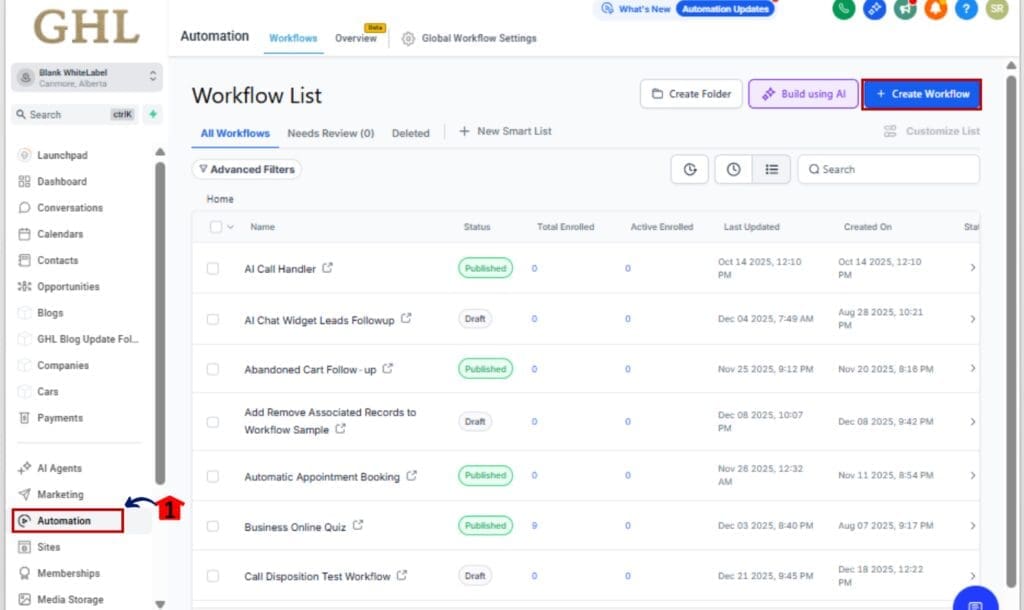
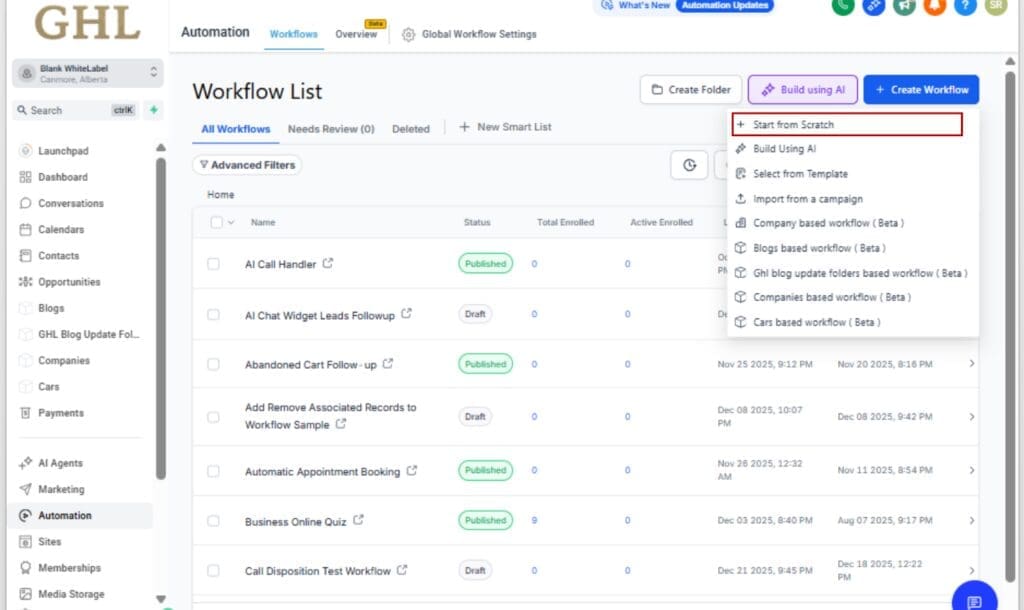
Step 02 – Create or Edit a Workflow
2.1 Hit +Create Workflow to build a new one, or just open an existing workflow you want to plug Asana into.
Step 03 – Add an Asana Trigger or Action
3.1 Click the plus sign to drop in a new step.
3.2 Type Asana into the search box.
3.3 You’ll see options, choose a trigger (like when a task is created) or an action (like creating a new one).

Step 04 – Connect Your Asana Account
4.1 Click Connect Now.
4.2 Enter your Asana login when asked.
4.3 Then select which workspace you want to tie into the workflow.
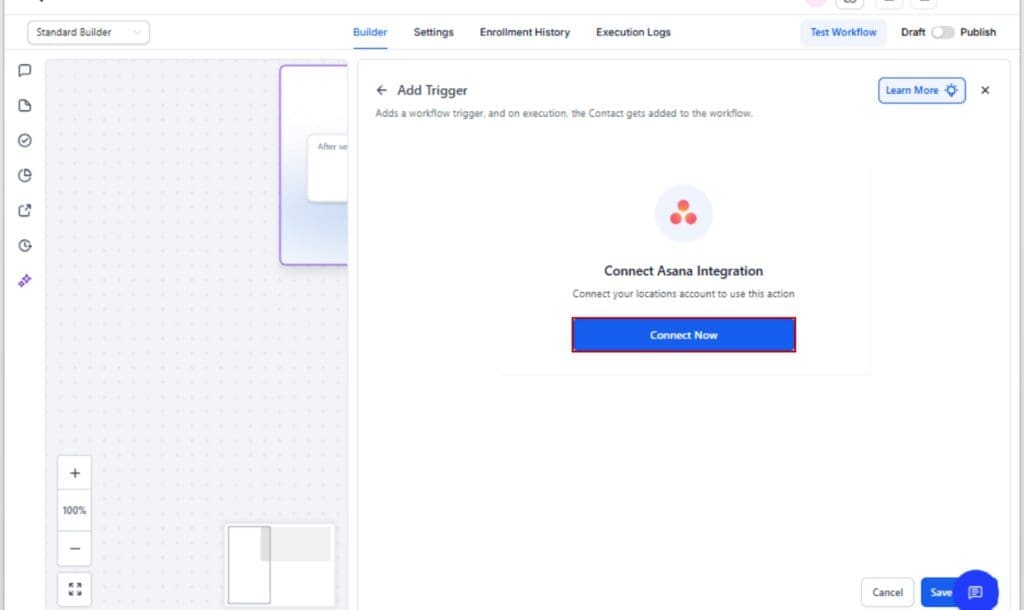
Tip: You can also connect under Settings > Integrations > Asana before building your workflow.
Step 05 – Configure the Task or Trigger Details
5.1 Set required fields like task name, assignee, and project.
5.2 Use dynamic fields from your GHL data (e.g., contact name, form fields, due dates).
5.3 Add advanced options like comments, subtasks, or sections as needed.

Step 06 – Save and Test Your Workflow
6.1 Click Save on your step and Publish your workflow.
6.2 Run a test to ensure tasks are created or triggers are firing properly.

That’s it. You’re now automating project ops between GHL and Asana like a pro, no code, no hacks, no headaches.
Pro Tips for Smarter Asana Workflow Automation
Now that you’re up and running, here are a few advanced tips to help you get the most out of the GHL + Asana combo:
Use “Task Updated” Carefully
This trigger is powerful, but can fire more than you expect. Always pair it with the “Fields Changed” condition inside GHL to avoid looping or unnecessary automation runs. For example, only trigger when “Status” or “Due Date” changes, not every field.
Tag Team Tasks with Smart Filters
Need to route tasks differently depending on where someone is in the pipeline? Drop in conditions to handle that. Say a lead’s in onboarding, send it to your onboarding lead. If it’s further along, pass it to fulfillment.
Combine with Slack for Internal Ops Power
Layer Slack or internal email notifications into your Asana Workflow Automation after task creation. That way, when a lead form creates a task in Asana, your team also gets an instant Slack alert, no one misses the memo.
Subtasks = Micro-Workflows
Use the “Create Subtask” action to break bigger deliverables into smaller, trackable chunks. You can even dynamically name subtasks using form data or contact info from GHL.
Track Projects with GHL Tags
If you want to trace Asana Workflow Automation completion back to GHL, tag contacts with the Asana task ID or project name after it’s created. This makes follow-up sequences and internal tracking much cleaner.
This isn’t just integration, it’s Asana Workflow Automation intelligence. Use these pro moves to scale faster, manage smarter, and keep your team dialed in.
FAQs About Asana Workflow Automation in GHL
What This Means for Your Agency’s Tech Stack
This Asana integration isn’t just a cool add-on, it signals a bigger shift in how GHL is evolving.
GoHighLevel is moving from being a powerful CRM into becoming a central operations hub. By building direct integrations with tools like Asana, GHL is cutting out the middlemen, Zapier, Make, manual workarounds, and giving you native speed and control.
Here’s why that’s a big deal:
- Fewer tools, fewer costs – You don’t need to pay extra to connect platforms.
- Fewer errors – Native Asana Workflow Automation mean no API polling delays or broken zaps.
- Faster scaling – You can launch new clients or projects without custom tech stacks.
This also hints at what’s coming next. Asana is likely just the beginning. Expect more native task and productivity integrations, ClickUp, Notion, Airtable could all be next on the roadmap.
For anyone building a SaaS or client dashboard, native integrations like this make your platform feel polished and pro, not like something you cobbled together.
Results You Can Expect From Asana Automation
The moment you hook up Asana with your GHL Asana Workflow Automation, things start running smoother. Here’s what tends to happen pretty quickly:
Faster Internal Workflows
A new lead shows up, a task gets created, and your team’s already in the loop, no one has to be reminded to drop it into Asana.
Fewer Missed Follow-Ups
When tasks are auto-generated, things don’t get missed, onboarding, delivery, follow-ups… it’s all handled without someone having to remember.
Less Tool Juggling
By eliminating Zapier, Make, and webhook chaos, your stack becomes leaner and more stable. That also means fewer subscriptions to manage.
More Project Visibility
With comments, updates, and task changes flowing into GHL, you get clearer insight into what’s happening post-sale.
Streamlined Scaling
Doesn’t matter if you’ve got 2 new clients or 20, this setup keeps up without breaking a sweat. It’s built to scale.
This integration doesn’t just make you look more organized, it actually helps you operate like a pro-level SaaS agency, even with a small team.
GHL + Asana: Your New Automation Power Combo
This update is a no-brainer.
You now have instant, two-way Asana Workflow Automationation between GHL and Asana, no more Zapier fees, no more waiting, no more dropped tasks.
With this native integration, your agency can:
- Auto-create Asana tasks from any lead, form, or pipeline change
- React instantly to Asana updates with GHL automations
- Keep your entire team in sync, sales, ops, and delivery
- Simplify your tech stack while scaling smarter
If you’ve been manually copying info between platforms, or relying on patchy Zaps to keep things together, this is your sign to stop.
Go create one Asana Workflow Automation today using the new Asana actions or triggers. Just one. You’ll never go back.
Scale Your Business Today.
Streamline your workflow with GoHighLevel’s powerful tools.