- Introduction – Facebook Post Sync in GHL
- Quick Summary – Facebook Post Sync Overview
- Here are this weeks HighLevel Updates
- What’s New with Facebook Post Sync
- What’s Changed in Social Planner
- Why Facebook Post Sync Matters for Agencies
- How to Enable and Use Facebook Post Sync in GHL
- Getting More Out of Facebook Post Sync
- What This Means for Your Business
- Results You Can Expect from Facebook Post Sync
- Frequently Asked Questions About Facebook Post Sync
- Conclusion – Start Using Facebook Post Sync Today
Introduction – Facebook Post Sync in GHL
Before this update, if you wanted to see past Facebook content inside GHL’s Social Planner, you had to do it the hard way. Agencies were either rebuilding old posts manually or bouncing back to Facebook to check performance. It worked… but it wasn’t efficient. Reporting and tracking took longer than they should have.
For agencies onboarding new clients or managing multiple social media accounts, this created unnecessary friction. Valuable historical insights were scattered across platforms, making it harder to evaluate past performance alongside scheduled content. One team member might review analytics directly in Facebook, while another searched for the same data inside GHL, slowing down workflows and increasing the risk of inconsistent reporting.
GHL has now removed that limitation.
Facebook Post Sync pulls your existing Facebook posts straight into Social Planner automatically. That means your old posts, scheduled content, and live posts are all in one spot. No uploading screenshots. No copying and pasting. Just everything visible in one clean view for your team.
What changed: When you turn on Facebook Post Sync, it pulls in your Facebook posts from the past 30 days, right up to today (UTC). In some cases, it can grab even older posts during the first sync. It brings in the full post too, captions, images, videos. Engagement data updates every 24 hours, and once it’s active, everything runs quietly in the background.
Who this is for: Agency owners managing multiple client accounts, social media managers streamlining content workflows, marketers analyzing campaign performance, and any GHL user looking to centralize Facebook content and reporting inside Social Planner.
What we’ll demonstrate: In this guide, we’ll explore what’s new with Facebook Post Sync, explain why it matters, walk you through enabling the feature in Labs, provide step-by-step instructions for using it, and share practical tips to help you improve efficiency, reporting accuracy, and social media performance inside GHL.
The latest GoHighLevel Changelog includes several other GHL feature updates that round out your daily workflow:
- Version History Improvements: View & Restore Versions Across Builders
- [Compliance] Stay compliant with ACH payment on Stripe
- Canva Integration In Media Storage
- Bulk Import for Companies
- AI Builder: 52% Faster Workflow Generation
- Record IDs – Improved Visibility in Lists & Record Details
- Reselling Reporting on Agency Dashboard
- Blogs – Revamped URL Blog Importer Experience 🚀
Keep reading for much more on all these updates and a deep dive into the Facebook Post feature!
Quick Summary – Facebook Post Sync Overview
Purpose:
Facebook Post Sync automatically imports your recent Facebook posts into GHL’s Social Planner so you can manage content and performance in one place.
Why It Matters:
It eliminates manual post recreation, reduces platform switching, and keeps your reporting accurate with automatic 24-hour insight refreshes.
What You Get:
You get synced post text, images, videos, and performance data from the last 30 days, plus extended historical data during the initial sync when available.
Time to Complete:
Setup takes less than 5 minutes. Once enabled in Labs, the sync runs automatically in the background.
Difficulty Level:
Beginner-friendly. If you can connect a Facebook page, you can enable this feature.
Key Outcome:
Centralized Facebook content, cleaner reporting, faster onboarding, and a more scalable social media workflow inside GHL.
Here are this weeks HighLevel Updates
Version History Improvements: View & Restore Versions Across Builders
- What it does:
Access old versions and restore them across builders. - Where in GHL:
Found in Funnels, Websites, and other builders under version history. - Impact:
Quick fixes when changes don’t go as planned. - Who it’s great for:
Agencies and users making frequent updates.
Automate marketing, manage leads, and grow faster with GoHighLevel.

[Compliance] Stay compliant with ACH payment on Stripe
- What it does:
Helps make sure your ACH payments through Stripe follow the right rules by adding compliance checks. - Where in GHL:
You’ll see this when configuring ACH payments in the Payments and Stripe settings. - Impact:
Keeps you protected from potential compliance problems and makes payments more secure. - Who this is for:
Anyone collecting ACH payments, especially agencies and SaaS businesses.
Canva Integration In Media Storage
- What it does:
Allows you to access and import Canva designs directly into GHL’s media storage. - Where in GHL:
Media Library / Storage section when uploading or selecting files. - Impact:
Speeds up content creation by removing the need to download and re-upload assets. - Who this is for:
Marketers, designers, and agencies creating visual assets for funnels, emails, and ads.
Bulk Import for Companies
- What it does:
Enables bulk uploading of company records into GHL instead of adding them one by one. - Where in GHL:
CRM under Companies section (import/upload functionality). - Impact:
Saves time and simplifies onboarding large datasets or migrating client information. - Who this is for:
Agencies, sales teams, and businesses handling large volumes of company data.
AI Builder: 52% Faster Workflow Generation
- What it does:
Improves AI workflow generation speed, cutting build time by over half. - Where in GHL:
AI Workflow Builder inside Automation > Workflows. - Impact:
Speeds up automation creation, allowing faster testing and deployment. - Who this is for:
Agencies, automation builders, and marketers creating workflows frequently.
Record IDs – Improved Visibility in Lists & Record Details
- What it does:
Makes record IDs easier to see within lists and detailed views. - Where in GHL:
CRM records, lists, and detail pages. - Impact:
Improves tracking, integrations, and debugging when working with specific records. - Who this is for:
Developers, advanced users, and teams working with integrations or data tracking.
Reselling Reporting on Agency Dashboard
- What it does:
Adds reporting insights for reselling activities directly in the agency dashboard. - Where in GHL:
Agency Dashboard under reporting/analytics sections. - Impact:
Gives better visibility into revenue and performance from resold services. - Who this is for:
Agencies running SaaS mode or reselling GHL services.
Blogs – Revamped URL Blog Importer Experience 🚀
- What it does:
Improves the blog importer tool for pulling content from URLs into GHL. - Where in GHL:
Sites > Blogs > Import via URL. - Impact:
Makes moving your blogs over quicker and a lot easier to handle. - Who this is for:
Agencies, content marketers, and businesses migrating blogs into GHL.
What’s New with Facebook Post Sync
There’s a new feature inside GoHighLevel called Facebook Post Sync, and it removes a bunch of unnecessary steps. No more recreating posts. No more flipping between Facebook and GHL. Your existing posts just show up inside Social Planner.
It also pulls in your most recent 30 days of Facebook posts, right up to today (UTC). So you’re not waiting around to see what’s performing. During the first sync, GHL may even grab older posts if Facebook allows it, giving you a clearer picture of what’s been working before you even start planning.
Flip it on and forget about it. It keeps everything aligned behind the scenes. No babysitting required. Your published posts and scheduled content live together inside Social Planner, so you’re not bouncing around trying to piece things together.
It doesn’t just pull in captions. Your images and videos come over too. So when you’re reviewing posts inside GHL, you’re seeing the full picture, not just numbers. Whether you manage one brand or a dozen clients, having everything together makes life a lot easier.
Post performance metrics are refreshed every 24 hours. This keeps your reporting data up to date while remaining aligned with Facebook’s API guidelines. The result? More accurate analytics without extra manual effort.
With these enhancements, Facebook Post Sync transforms Social Planner into a fully integrated content and analytics hub, helping you save time, improve reporting accuracy, and make smarter marketing decisions inside GHL.
What’s Changed in Social Planner
Facebook Post Sync changes how Social Planner works inside GHL. Before this, you mainly saw scheduled posts or content you just published. Older Facebook posts weren’t part of the picture.
Now they are.
Your past Facebook posts get pulled in automatically and sit right next to your upcoming and live content. Everything’s in one place instead of scattered between platforms.
That alone makes a difference.
Your team doesn’t need to jump back into Facebook anymore just to see what went live or how it did. Everything’s visible inside GHL. That makes it much easier to notice patterns, keep your messaging aligned, and double down on posts that actually performed well.
Another big shift? The full post comes over. Not just numbers. The caption, images, and videos all show up inside Social Planner. That saves time during onboarding and campaign reviews because you’re not rebuilding content manually.
Engagement metrics also update once a day. So reports stay current without anyone pulling stats by hand. It runs within Facebook’s API limits, which keeps everything stable.
Put together, this turns Social Planner into more than just a scheduling tool. It becomes a full view of your content and performance in one dashboard, cleaner workflows, fewer moving parts.
Why Facebook Post Sync Matters for Agencies
If you run an agency, you already know, time disappears fast. And digging through old Facebook posts just to rebuild reports doesn’t help.
Facebook Post Sync removes that headache. Instead of manually recreating content or pulling historical numbers from Facebook, your posts show up automatically inside Social Planner. Less busywork. More strategy.
Facebook Post Sync fixes that. It pulls past content into Social Planner automatically. No manual recreating. No spreadsheet gymnastics.
It also makes onboarding smoother. Add a new client, and their recent Facebook activity syncs in. You can review what’s been working right away instead of starting from scratch.
Reporting gets easier too. Insights refresh daily, so you’re not manually copying stats into slides. The numbers are already there.
In short, this feature cuts admin time and frees your team up to focus on what actually grows accounts.
How to Enable and Use Facebook Post Sync in GHL
Enabling Facebook Post Sync in GoHighLevel takes only a few steps and is completed inside your sub-account settings. You will activate the feature in Labs, confirm your Facebook connection, and then review your synced posts inside Social Planner.
The steps below walk you through the full setup process so you can start syncing past Facebook posts, viewing performance data, and managing everything from one centralized location inside GHL.
- Access the Social Planner in GoHighLevel.
- Confirm Your Facebook Account Connection.
- View Synced Posts and Insights.
- Reconnect Your Facebook Account if Needed.
This new update is still in GHL Labs, therefore before using this process, please turn on the Social Planner – Facebook Post Sync lab for your sub-account. Go to your Agency View, open Settings, click Labs, find Social Planner – Facebook Post Sync, and activate the feature.
To start make sure you are logged in to your GoHighLevel sub-account.
Step 01 – Access the Social Planner in GoHighLevel
- Before enabling Facebook Post Sync, you need to access the Social Planner settings inside your sub-account.
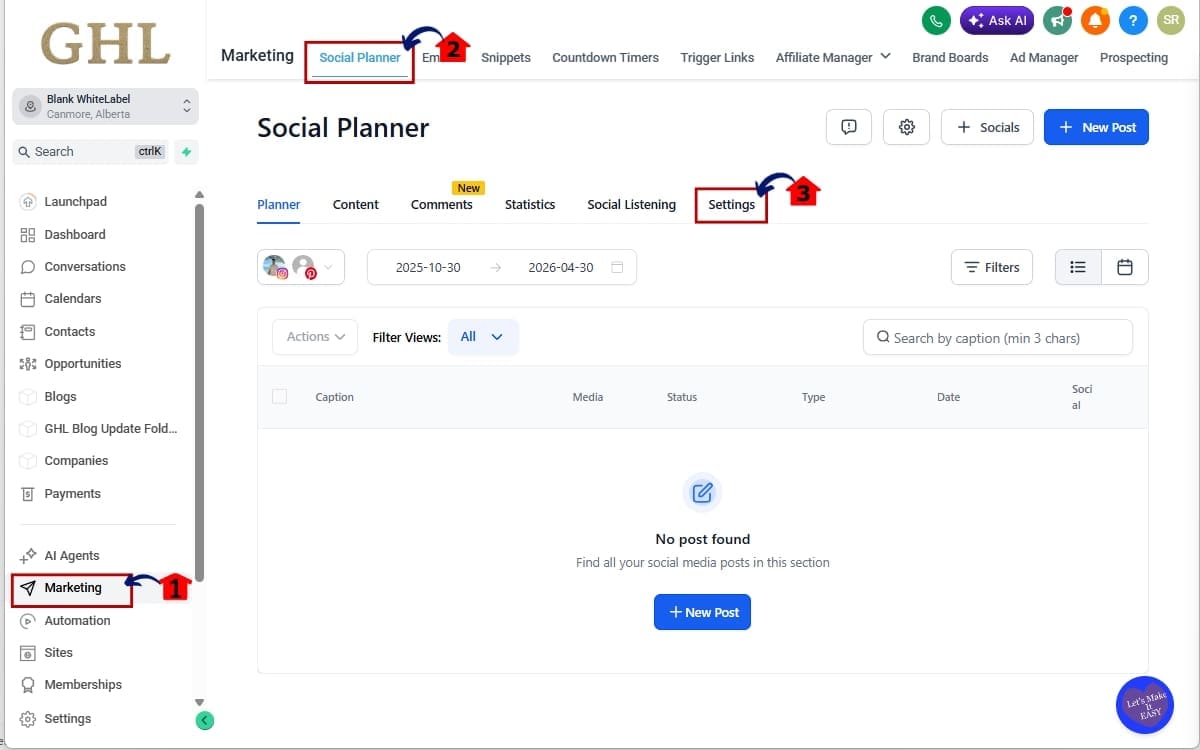
1.1 Navigate to the left-hand menu inside your GHL dashboard and click on Marketing.
- This opens the marketing tools area where your social media management features are located.
1.2 Select Social Planner from the menu.
- This takes you to the dashboard where you can view, schedule, and manage your social media posts.
1.3 Inside Social Planner, click on Settings in the top-right corner.
- This opens the configuration panel where you can manage connected accounts and adjust Social Planner settings.
Step 02 – Confirm Your Facebook Account Connection
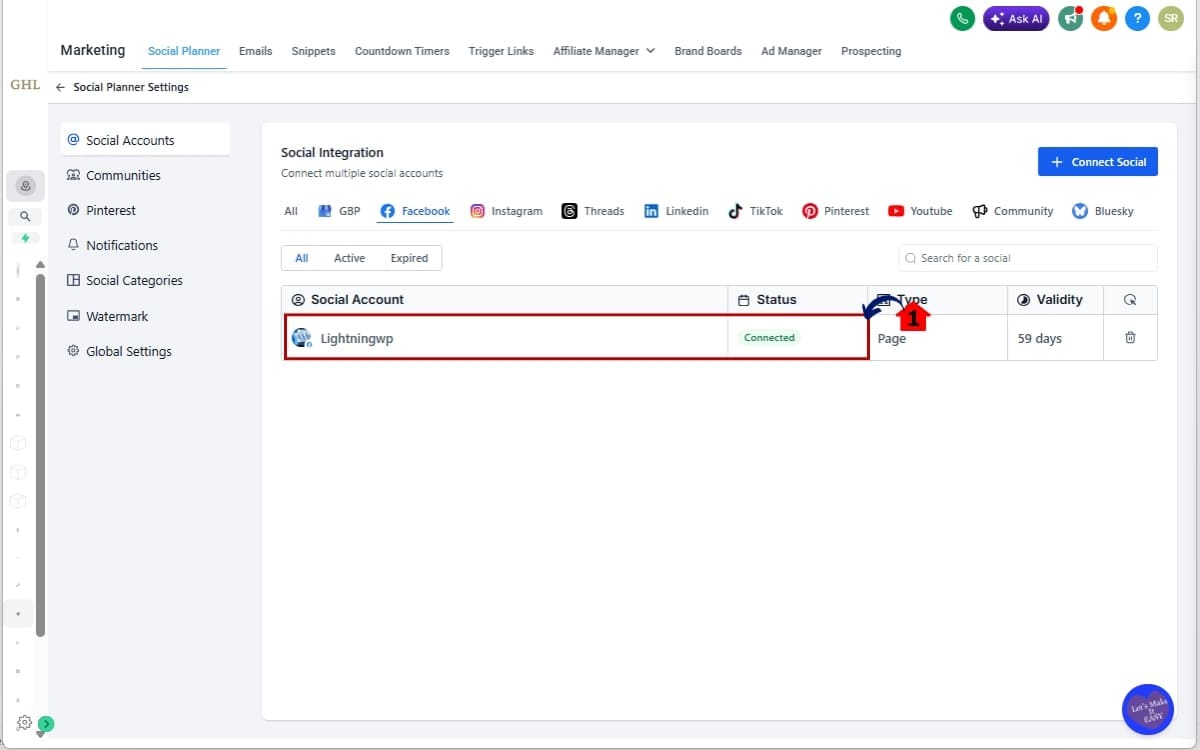
- Before you enable Facebook Post Sync, you must confirm that your Facebook Page is properly connected inside Social Planner.
2.1 Verify that your Facebook Page is connected and active.
- Inside Social Planner Settings, check that your Facebook Page shows as connected. If it is not connected, follow the prompts to log in and authorize access.
Step 03 – View Synced Posts and Insights
- After Facebook Post Sync has finished running, you can review your imported posts and engagement data inside Social Planner.
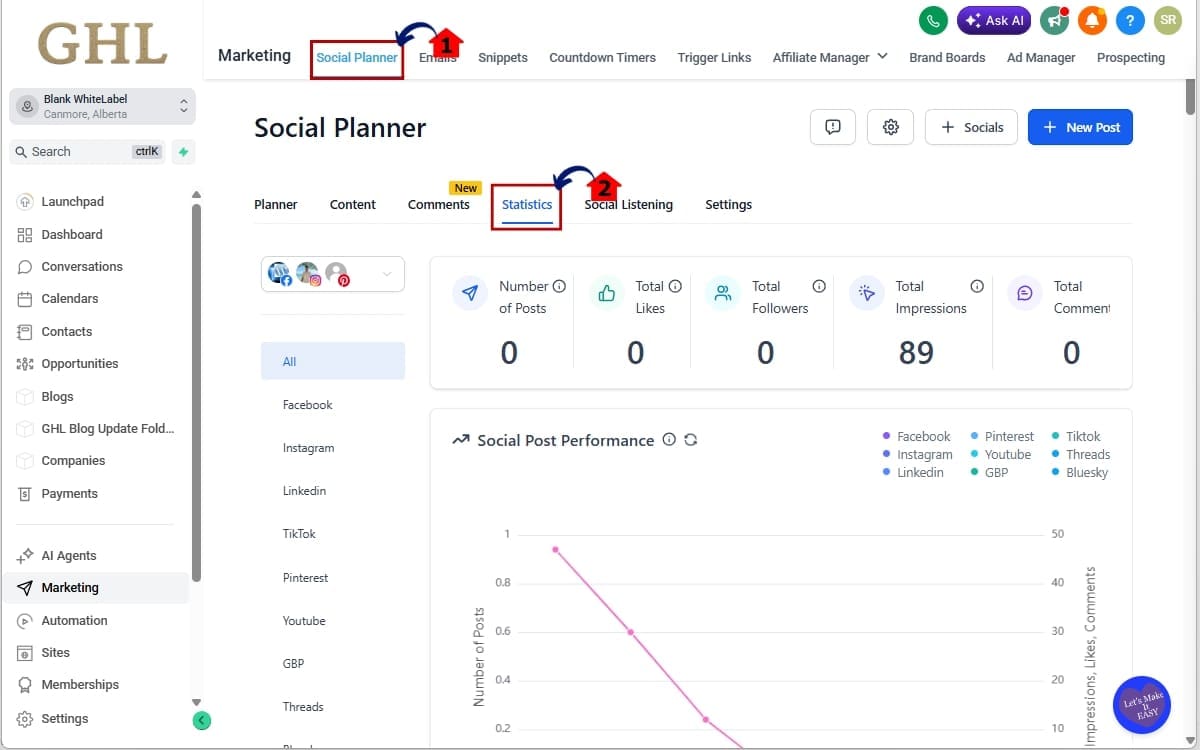
3.1 Return to Social Planner.
- Navigate back to Marketing → Social Planner in your sub-account to access your synced content.
3.2 Click on the Statistics tab to access engagement metrics and performance insights.
- This section displays updated post performance data, including engagement metrics that refresh every 24 hours.
Step 04 – Reconnect Your Facebook Account if Needed
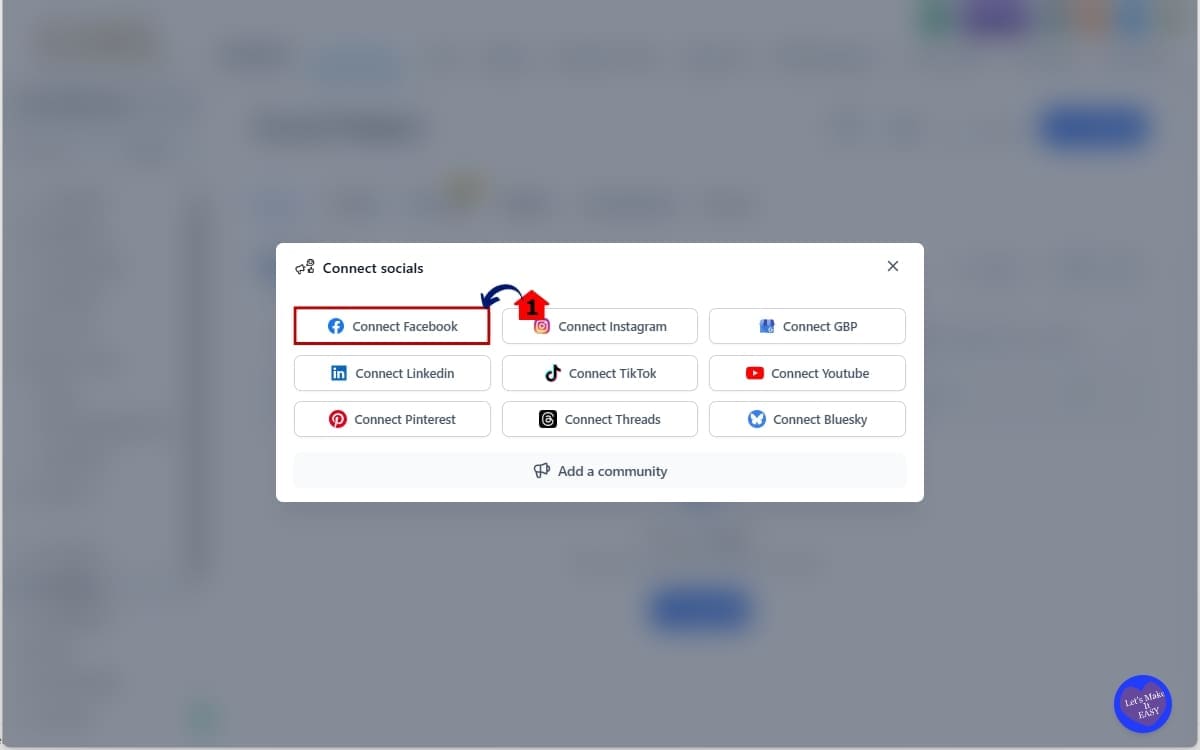
- If your Facebook connection expires, Facebook Post Sync will pause until the account is reauthorized.
4.1 Follow the reconnect prompt displayed inside Social Planner and reauthorize your Facebook account to restore access.
- Click the reconnect notification, log back into Facebook, and approve the required permissions to resume syncing.
By following these steps, you can fully activate Facebook Post Sync and take advantage of automated content management and up-to-date analytics within GoHighLevel. This feature streamlines your workflow, enhances reporting accuracy, and ensures your social media data is always accessible in one place.
Getting More Out of Facebook Post Sync
So you’ve turned on Facebook Post Sync. Good.
Now here’s how to actually use it smart.
First, don’t ignore the insights. They update every 24 hours, which means the data inside GHL stays fresh. Check what posts are getting traction. Look for patterns. Double down on what’s working instead of guessing.
When you onboard a new client, use the synced history immediately. Their last 30 days of content are sitting there. That’s free research. You can quickly see what topics, formats, or offers performed best without digging around Facebook manually.
Make sure the Facebook account stays linked. If it comes undone, the syncing quietly stops. Not a disaster, just annoying. A quick check every so often keeps you ahead of it.
Try reviewing your synced posts while you’re scheduling new ones. Seeing what’s already gone out next to what’s coming up helps keep your messaging aligned and prevents accidental repeats.
And when it comes to reporting, stop exporting numbers from multiple places. The insights are already inside GHL. Use them. It saves time and keeps your reporting cleaner.
When used properly, this isn’t just a background automation. It’s a workflow upgrade.
What This Means for Your Business
The introduction of Facebook Post Sync in GHL is more than just a convenience—it’s a strategic upgrade that directly impacts how efficiently your business manages social media marketing. By centralizing past and current Facebook content inside Social Planner, you gain complete visibility into your social media performance without relying on multiple platforms or manual data entry.
For agencies, this means faster client onboarding and improved service delivery. Instead of spending hours gathering historical content and performance metrics, your team can instantly access synced Facebook posts and analytics. This allows you to develop data-driven strategies more quickly and present accurate, professional reports that strengthen client relationships and trust.
Businesses and marketers also benefit from enhanced workflow efficiency. With automated syncing running in the background, your team can focus on creating engaging content and optimizing campaigns rather than handling repetitive administrative tasks. The ability to view past, scheduled, and published posts in one place ensures consistency across campaigns and reduces the risk of content duplication or missed opportunities.
Another key advantage is improved decision-making. With insights refreshed every 24 hours, you always have access to reliable performance data. This empowers you to identify trends, refine your messaging, and adjust your strategy based on real results. Whether you’re managing a single brand or scaling multiple client accounts, Facebook Post Sync provides the clarity and efficiency needed to grow your business with confidence.
Ultimately, Facebook Post Sync helps you save time, streamline operations, and deliver better marketing outcomes. By automating content management and enhancing reporting accuracy, GHL enables your business to operate more efficiently while maintaining a competitive edge in the ever-evolving digital marketing landscape.
Results You Can Expect from Facebook Post Sync
Facebook Post Sync isn’t just a small tweak inside GHL. It actually changes how you manage social media day to day.
Instead of piecing together performance data from different platforms, everything lives inside Social Planner. Past posts. Current posts. Scheduled content. All visible in one place.
For agencies, that means onboarding gets easier. You’re not digging around for old content or manually pulling stats. It’s already there. That saves time and makes your reports look sharper.
For businesses and marketers, the workflow feels cleaner. The sync runs in the background, so your team can focus on content and strategy instead of admin tasks. Seeing everything together also helps avoid duplicate messaging or scattered campaigns.
Insights update daily, so the data you’re reviewing isn’t stale. That makes decision-making a lot simpler. You can adjust strategy based on what’s actually happening, not guesswork.
At the end of the day, this feature cuts friction. Less manual work. More clarity. Better execution.
Frequently Asked Questions About Facebook Post Sync
Conclusion – Start Using Facebook Post Sync Today
If you’re serious about simplifying your social media workflow, Facebook Post Sync inside GHL is a no-brainer.
Before this update, managing historical Facebook content meant switching platforms, copying data, and wasting time. Now, everything lives inside Social Planner — past posts, scheduled posts, media, and refreshed insights — all in one clean dashboard.
That means:
- Faster client onboarding
- Cleaner reporting
- Less manual work
- Better data-driven decisions
- More scalable agency systems
For agencies, this is a workflow upgrade.
For marketers, it’s a reporting upgrade.
For business owners, it’s a clarity upgrade.
And the best part? Once enabled, Facebook Post Sync runs quietly in the background. No extra steps. No constant maintenance. It just works.
If you haven’t switched it on yet, head into Labs and enable it. After that, jump into Social Planner and you’ll see your past posts start appearing on their own.
At GHL Growth Garage, we’re big fans of features that remove friction and increase efficiency. This one does both.
Have you enabled Facebook Post Sync yet?
What changes have you noticed in your reporting or workflow?
Let us know, and keep checking back for more GoHighLevel feature breakdowns and tactical guides.
Scale Your Business Today.
Streamline your workflow with GoHighLevel’s powerful tools.