

- Recurring Appointment Notifications Get a GHL Upgrade
- Quick Summary – Recurring Appointment Notifications
- Here are this week's HighLevel Updates 🚀
- What’s New With Recurring Appointment Notifications
- One Confirmation for Recurring Appointment Notifications
- Custom Recurring Appointments Get Full Notification Support
- Recurring Appointment Reminders Still Go Out as Needed
- Recurring Appointment Notifications for Changes
- Recurring Appointment Notifications Give More Detail
- Why Recurring Appointment Notifications Are Worth Fixing
- How to Use GHL Recurring Appointment Notifications
- Quick Tips for Cleaner Recurring Appointment Notifications
- Why This Is Good News for Recurring Bookings
- FAQs About Recurring Appointment Notifications
- Recurring Booking Notifications Are Less Clunky Now
Recurring Appointment Notifications Get a GHL Upgrade
Managing recurring appointment notifications in GoHighLevel just got simpler. The latest notification changes are designed to make repeat appointments easier to follow without filling your contacts’ inboxes with unnecessary messages.
Before this update, default recurring appointments could send a separate confirmation for every occurrence in the series. That could quickly fill a client’s inbox with messages that all looked nearly the same.
Custom recurring bookings were a bit of a weak spot before this update. If you set one up manually inside GHL, the notification flow wasn’t always the same. Some messages would go out, while others could be missed depending on how the series was created.
The updated recurring appointment notifications bring these experiences much closer together.
GHL now sends a single confirmation for a recurring booking instead of repeating it for every date in the series. Custom recurring appointments created inside the app are included too. Reminders and follow-ups still go out for each appointment, so contacts won’t miss the next one.
Updating a custom recurring booking is now easier to explain to the contact. GHL can tie the notification to the section of the series you changed and add the recurrence pattern beside the appointment date and time.
Agencies get fewer unnecessary messages, while clients still receive the important reminders for each appointment.
Recurring appointment notifications now give you cleaner series confirmations, reliable occurrence-by-occurrence reminders, and clearer communication when recurring bookings change.
The latest GoHighLevel Changelog includes several other GHL feature updates that round out your daily workflow:
- Wait Action Enhancement: TikTok DM Replies
- India Recurring Mandate Support for Affiliate Indian Signup Pages
- Housecall Pro – More Workflow Actions & Triggers
- Email Services Dashboard for Agencies
- Email Sequences Now Available in Beta Labs
- Group Your Contacts by Source in Dashboards & Reporting
- MMLite Adoption Banner in Conversations
Keep reading for much more on all these updates and a deep dive into the Recurring Appointment Notification feature!
Quick Summary – Recurring Appointment Notifications
Purpose: This GHL update improves recurring appointment notifications so confirmations, reminders, reschedules, cancellations, and custom recurrence details work more consistently.
Why It Matters: Agencies and appointment-based businesses can reduce duplicate-looking messages while still keeping every appointment occurrence supported with the right reminders and follow-ups.
What You Get: You get one confirmation for the recurring series, individual reminders for each occurrence, better support for custom recurring appointments, and clearer change recurring appointment notifications.
Time To Complete: No setup is required, but allow a few minutes to review your existing calendar notification templates and run a test booking.
Difficulty Level: Easy. The update works automatically, so most users only need to review and test their current notification setup.
Key Outcome: Recurring appointment notifications become cleaner, easier to understand, and more consistent across both default and custom recurring bookings.
Here are this week’s HighLevel Updates 🚀
Wait Action Enhancement: TikTok DM Replies
What’s New:
Instead of continuing after a fixed delay, your workflow can pause until someone replies to your TikTok DM.
Where in GHL:
Found in Automation → Workflows using the Wait action after sending a TikTok DM.
Automate marketing, manage leads, and grow faster with GoHighLevel.

Impact:
Your automation responds when someone actually joins the conversation, rather than after a timer runs out.
Recommended For:
Anyone using TikTok DMs to start conversations with potential customers.
India Recurring Mandate Support for Affiliate Indian Signup Pages
What’s New:
Supports recurring payment mandates for Indian affiliates, helping subscriptions comply with local banking requirements.
Where in GHL:
Available on Affiliate Program signup pages for users in India.
Impact:
Creates a smoother signup experience while reducing payment failures for recurring subscriptions.
Recommended For:
Agencies, SaaS businesses, and affiliate programs onboarding customers in India.
Housecall Pro – More Workflow Actions & Triggers
What’s New:
Adds new workflow triggers and actions for the Housecall Pro integration, giving you more ways to automate field service processes.
Where in GHL:
Inside Automation → Workflows when using the Housecall Pro integration.
Impact:
Expands automation possibilities between HighLevel and Housecall Pro, reducing manual work and improving operational efficiency.
Recommended For:
Home service businesses, field service companies, and agencies managing Housecall Pro clients.
Email Services Dashboard for Agencies
What’s New:
Introduces a centralized dashboard where agencies can monitor email services across their accounts.
Where in GHL:
Found in the Agency View under the new Email Services Dashboard.
Impact:
Makes it easier to monitor email health, identify issues, and manage deliverability from one place.
Recommended For:
Agency owners, support teams, and admins managing multiple client email services.
Email Sequences Now Available in Beta Labs
What’s New:
Introduces Email Sequences as a Beta Labs feature, providing another way to create structured email follow-up campaigns.
Where in GHL:
Enable it from Settings → Labs, then access Email Sequences after activation.
Impact:
Cuts down the time spent checking different areas just to see how your email services are performing.
Recommended For:
Marketers, agencies, coaches, and businesses running nurture campaigns or onboarding emails.
Group Your Contacts by Source in Dashboards & Reporting
What’s New:
Lets you organize contact reports based on where your leads originated.
Where in GHL:
Available within Dashboards & Reporting when viewing contact analytics.
Impact:
Makes it easier to compare lead sources and identify which marketing channels are producing the best results.
Recommended For:
Marketing teams, agency owners, and businesses tracking campaign performance across multiple lead sources.
MMLite Adoption Banner in Conversations
What’s New:
Displays a helpful banner inside Conversations to encourage users to adopt the new MMLite messaging experience.
Where in GHL:
Appears within the Conversations module for eligible accounts.
Impact:
Helps users discover and transition to MMLite while highlighting its benefits directly inside the messaging interface.
Recommended For:
Current HighLevel users exploring the latest messaging experience and teams preparing to migrate to MMLite.
What’s New With Recurring Appointment Notifications
Recurring appointment notifications in GHL now work more consistently across both default and custom recurring bookings.
The biggest change is simple: confirmation messages are cleaner. For default recurring appointments, GHL now sends one confirmation or unconfirmed notification for the entire booking series instead of sending one for every single occurrence.
That means if someone books a weekly appointment for eight weeks, they won’t get eight nearly identical confirmation messages right away. They get one message that covers the series.
Custom recurring appointments are also getting a major upgrade.
Custom recurring bookings created in GHL now get their own series-level confirmation. Before, those bookings didn’t follow the same calendar notification flow as the standard recurring setup.
Reminders and follow-ups still work differently from confirmations.
Reminders and follow-ups still go out one appointment at a time. That makes sense because the series only needs one booking confirmation, but each session still needs its own heads-up.
Custom recurring appointments now handle changes more cleanly in GHL. If you reschedule or cancel, the notification can follow the exact part of the series you chose to update.
The result is a much more consistent notification experience without overloading your contacts with unnecessary messages.
One Confirmation for Recurring Appointment Notifications
One of the biggest improvements to recurring appointment notifications is the way GHL now handles confirmations.
For default recurring appointments, the confirmation or unconfirmed notification now goes out once for the full booking series. Before this update, GHL could send a separate confirmation for every occurrence.
That might not sound like a big deal until you look at a real booking.
A weekly consultation over eight weeks could previously create eight different confirmation messages. For the client, that was a lot to receive all at once for a schedule they had already agreed to.
Now, GHL sends one confirmation that covers the series.
That keeps the first touchpoint much cleaner and makes the booking feel more professional. The contact still knows the recurring series is scheduled, but they aren’t flooded with duplicate-looking messages.
This change also makes recurring appointment notifications easier for agencies to manage across multiple client accounts. You don’t have to worry as much about a recurring booking creating a pile of unnecessary confirmation messages.
The important part is that this does not remove the reminders that matter later.
Each appointment still keeps its own reminder and follow-up. The series only needs one confirmation up front, then GHL sends the next message when each session is getting close.
That’s a much better balance between clear communication and useful follow-up.
Custom Recurring Appointments Get Full Notification Support
Custom recurring appointments in GHL no longer feel like the odd one out.
Before this update, you could create the series inside the app, but the notification side of things did not always match what happened with a standard recurring booking. The appointments were there, but the communication around them could be patchy.
That is what has changed.
A custom recurring series can now get a single confirmation message in GHL. Rather than sending one notice per appointment, the platform can confirm the booking as one complete series.
Reminders and follow-ups still happen around each individual appointment, so contacts continue to get useful notices as each session gets closer.
Reschedules and cancellations are handled more clearly too.
The notification can now reflect exactly what part of the recurring series you changed. That might be just one appointment, every appointment in the series, or the current booking and all future dates.
This makes custom recurring bookings feel far less awkward to manage. Agencies can use them without having to explain why the messages look different from the usual recurring appointment setup.
Recurring Appointment Reminders Still Go Out as Needed
GHL has changed the way recurring appointment messages are handled, but it hasn’t lumped everything together.
The booking confirmation is now handled once for the whole series. Reminders and follow-ups are different. Those still belong to the individual appointments.
That’s how it should work.
If a client has six Thursday appointments booked, there’s no real value in sending six confirmations at the same time. One clear message can cover the full series.
But when the next Thursday rolls around, a reminder is still useful.
GHL continues to send those messages based on each appointment in the series. Follow-ups can work the same way, giving every session its own communication when needed.
Custom recurring appointments are now included in this too.
Previously, those custom schedules didn’t get the same reminder and follow-up treatment. With this update, they can now stay in the same communication flow as regular recurring appointments.
That makes life easier for agencies managing different types of recurring calendars. You can cut down the unnecessary messages at the beginning without losing the reminders people actually pay attention to later.
One thing hasn’t changed: this is a calendar notification update. Your GHL workflows are separate and won’t be changed by it.
Recurring Appointment Notifications for Changes
GHL now gives you a clearer way to handle messages when a custom recurring booking gets moved or cancelled.
The key change is that GHL can send the notification based on the scope of the change you select.
If you choose “This appointment,” the notification only applies to that one occurrence. This is useful when one session needs to move, but the rest of the series stays the same.
If you choose “All appointments,” GHL sends one notification that covers the full series. That keeps the message clear when the entire recurring booking is being changed.
For reschedules, you can also choose “This and following.” In that case, GHL sends one notification for the affected part of the series starting from that appointment forward.
The person getting the message can now tell more easily what the update actually means.
The contact can now see whether the update is only for one appointment or if it changes more of the schedule.
Default recurring appointments are not changing in the same way. Their reschedule and cancellation notifications stay tied to the specific appointment that was changed.
For agencies, the win is clarity. You can make changes to a custom recurring series and have the notification better match what you actually changed.
Recurring Appointment Notifications Give More Detail
GHL now gives contacts a little more information when something changes in a custom recurring appointment series.
GHL can now add the recurrence pattern next to the date and time for custom recurring appointments. So the person reading the message can immediately see that there are more appointments tied to it.
For example:
October 14, 2026 at 12:00 PM — repeats every Thursday
A little more context there can make the notification much less confusing.
Previously, the message might only point to the date being edited. Without more context, the contact could easily think the whole series had changed.
Now, the recurrence detail gives the message more context.
To make sure that information shows up, check that your calendar notification template includes the appointment date and time custom value.
For agencies, this is a simple but useful improvement. Clients get a better idea of what changed, and there is less chance they will need to reply just to ask what the notification actually means.
Why Recurring Appointment Notifications Are Worth Fixing
A recurring booking should not create more confusion than the appointment itself.
That is really what this update improves.
Before, one series could create too many confirmation messages, while custom recurring appointments did not always follow the same notification pattern as standard ones.
Now, GHL has cleaned that up.
The series can be confirmed once, but reminders still happen around the individual appointments. So contacts are not bombarded at the start, but they still get useful messages when each session is coming up.
Custom recurring bookings also fit into the process more naturally now.
This is useful for agencies because fewer oddball cases means less for the team to keep track of. When calendars behave the same way more often, managing several client accounts gets a lot simpler.
Reschedule and cancellation messages are also easier for contacts to make sense of.
If someone can tell what part of the series changed, they are less likely to reply with questions or assume the wrong appointment was affected.
For businesses running weekly or repeat sessions, that is a practical improvement.
For agencies, it means fewer headaches, fewer explanations, and a booking experience that feels more polished from the customer’s side.
How to Use GHL Recurring Appointment Notifications
Recurring appointment notifications now work more consistently across default and custom recurring bookings in GoHighLevel. You do not need to enable a new feature or turn on an extra setting for this update.
You’ll mainly want to review your existing calendar recurring appointment notifications, check the wording inside your templates, and test how confirmations, reminders, reschedules, and cancellations behave for recurring appointments.
- Review Your Recurring Calendar.
- Review Your Calendar Notifications.
- Check the Notification Template.
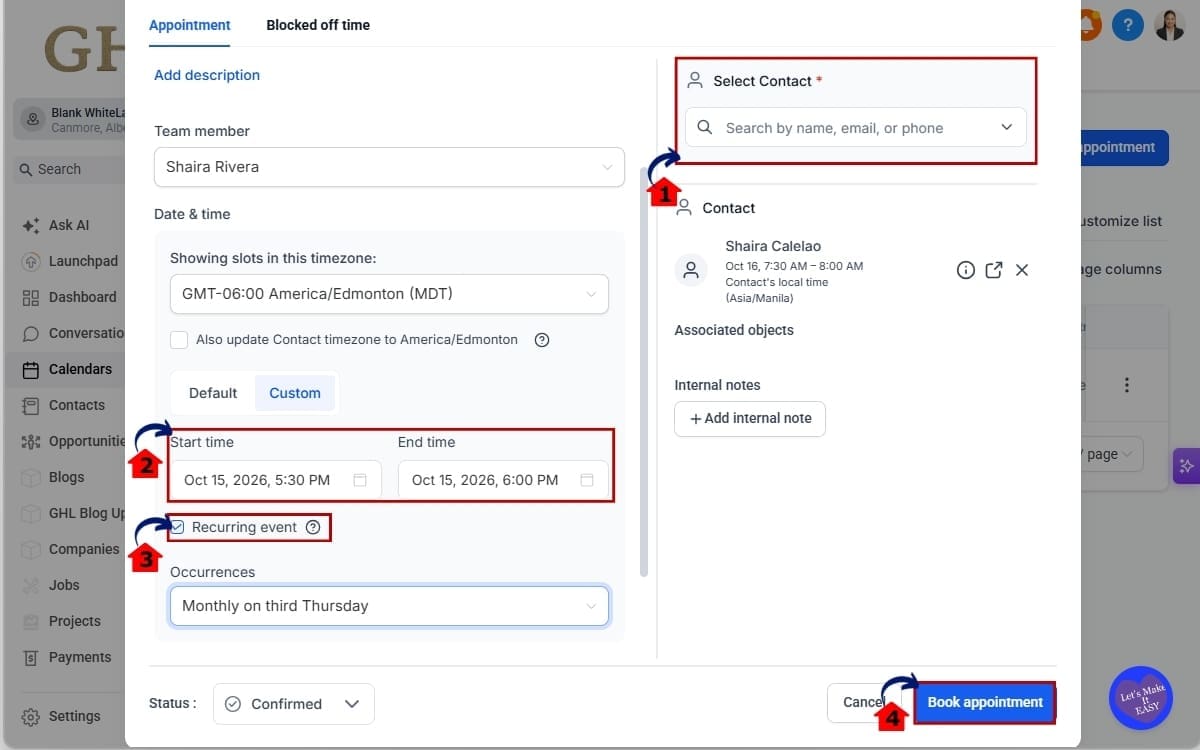
- Create or Edit a Recurring Appointment.
- Test the Recurring Appointment Notifications.
To start, make sure you are logged in to your GoHighLevel subaccount and have access to the calendar you use for recurring appointments.
Step 01 – Review Your Recurring Calendar
- Start inside the subaccount that contains the calendar you want to review.
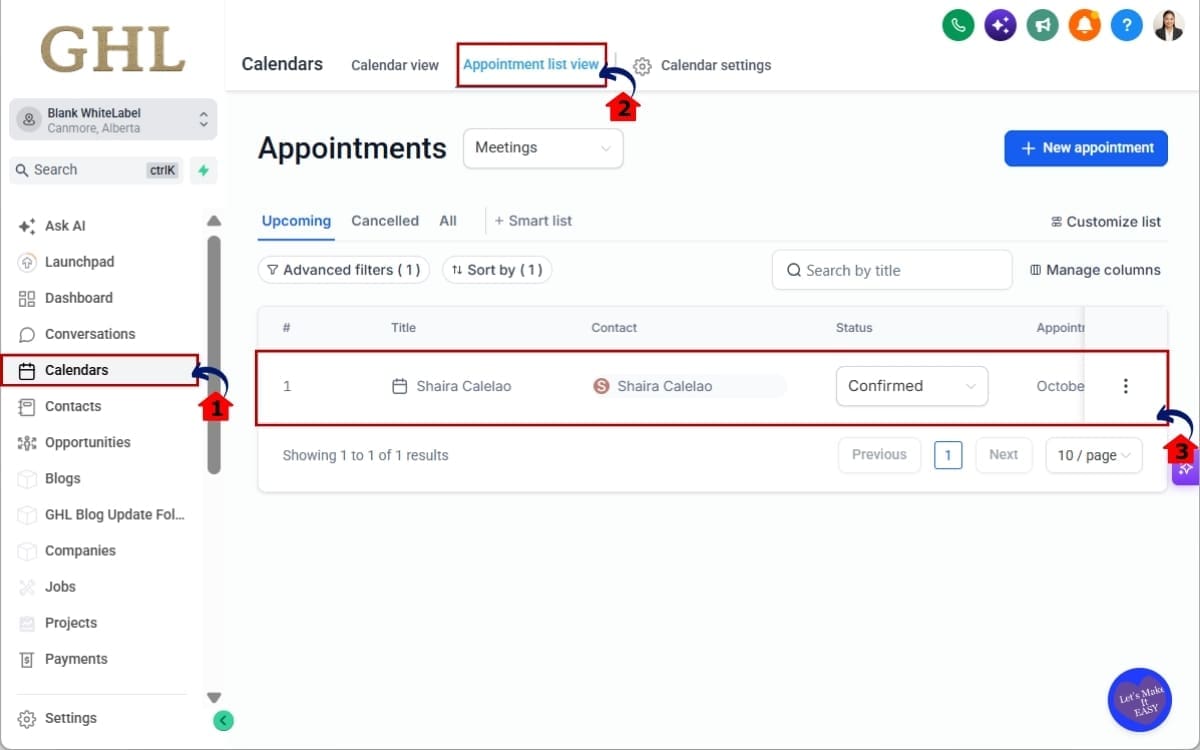
1.1 Open the Calendars area.
- Use the main left-hand menu to access your GoHighLevel calendars.
1.2 Click appointment list view.
- Choose the calendar where customers or staff create recurring appointments.
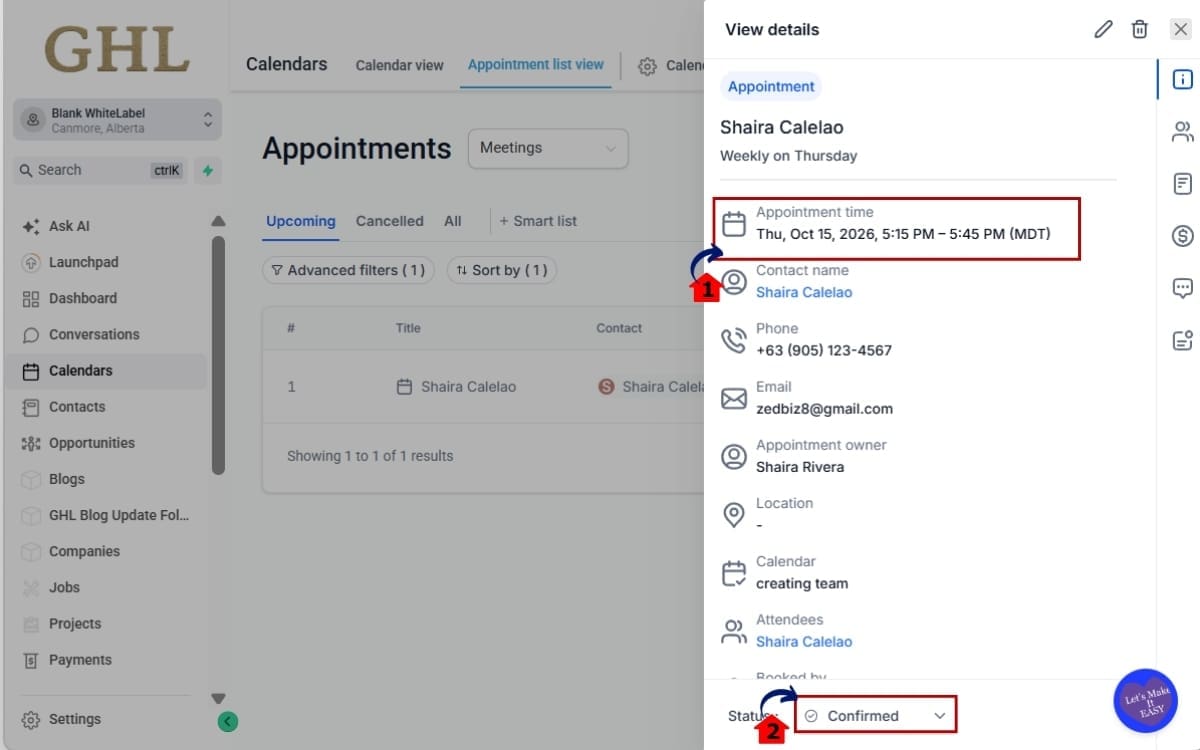
1.3 Review the recurring appointment setup.
- Check whether you are using a default recurring pattern or a custom recurring appointment.
Step 2.0 – Review Your Calendar Notifications
- Check the notifications already connected to your recurring appointment calendar.
2.1 Review the confirmation notification.
- Confirm that your booking confirmation clearly explains that the customer has booked a recurring appointment series.
2.2 Review the unconfirmed notification if you use one.
- Make sure the wording also makes sense when the booking contains multiple appointments.
Step 3.0 – Check the Notification Template
- Your existing calendar notification templates may need a quick wording review.
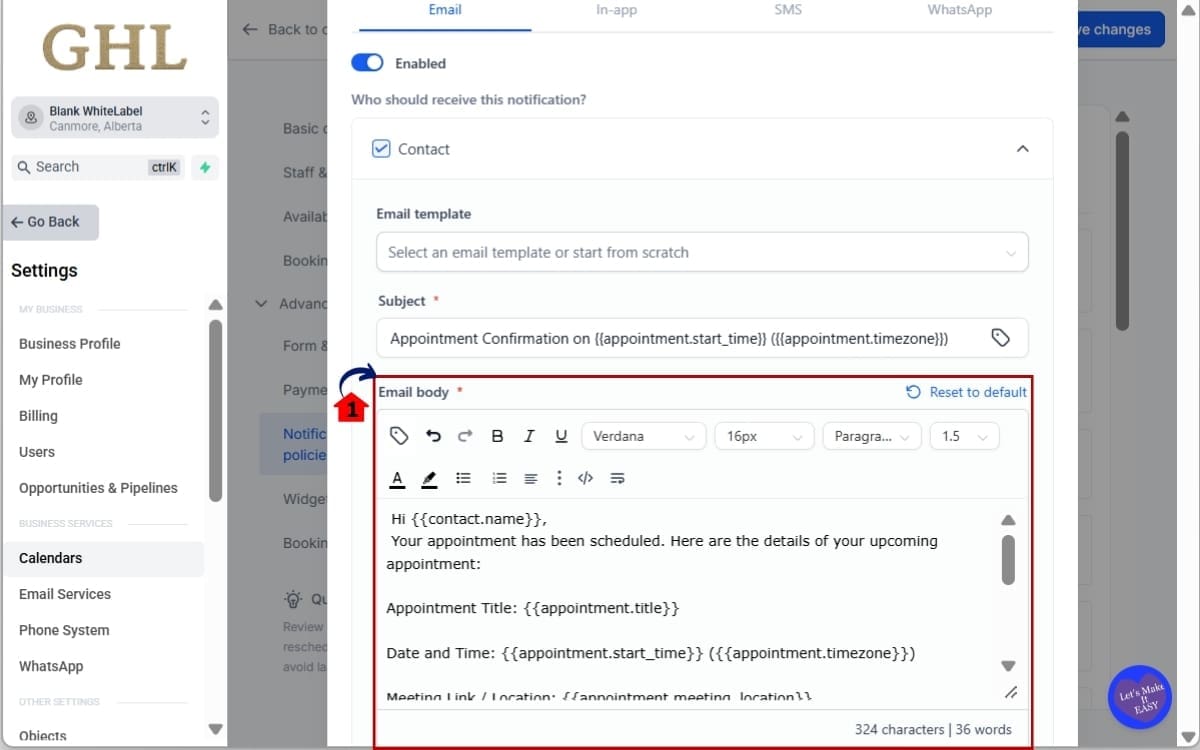
3.1 Check the appointment date and time custom value.
- Make sure the notification template includes the appointment date and time value.
Step 4.0 – Create or Edit a Recurring Appointment
- Create a test appointment or open an existing recurring appointment inside GHL.
4.1 Select the contact.
- Choose the person receiving the appointment and the calendar where the booking should be created.
4.2 Select the appointment date and time.
- Set the first appointment in the recurring series.
4.3 Choose the recurring appointment option.
- Use either the normal recurring pattern or the custom recurrence setup you need.
4.4 Save the recurring appointment.
- For new bookings, GHL will now handle the confirmation based on the recurring series instead of sending a separate confirmation for every occurrence.
Step 5.0 – Test the Recurring Appointment Notifications
- Run a test before relying on the setup for live client bookings.
5.1 Create a recurring appointment using a test contact.
- Use an email address or phone number you can access.
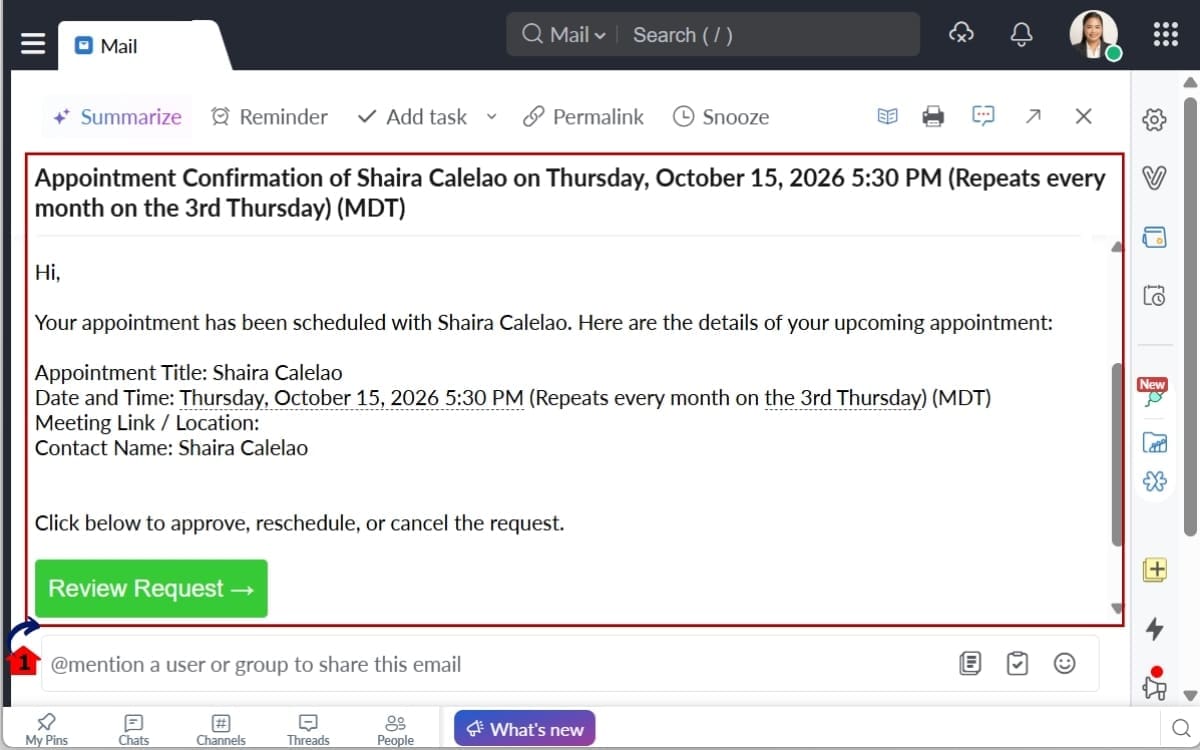
These changes apply to GoHighLevel calendar notifications only. Workflows are not affected. The changelog also confirms that the updated behavior applies automatically to newly booked appointments and appointments that are edited.
Quick Tips for Cleaner Recurring Appointment Notifications
The best recurring appointment notifications get the point across without repeating information the contact has already seen.
Start with the confirmation.
That message now represents the Recurring Appointment Notifications booking as a whole, so make sure the wording sounds like a series confirmation. If the copy reads like a single appointment notice, it may confuse the person receiving it.
Reminders should be much more specific.
Those still run for each appointment, which makes them the right place to highlight the next session date and time.
Take a look at the appointment date and time custom value too.
For custom recurrences, it can show the repeat schedule inside the notification. That can make a reschedule or cancellation message much easier to follow.
Do a few tests before you call the setup finished.
Change one appointment and see what happens. Then test the full series and “this and following.” It is much better to catch confusing wording in a test than after a real client receives it.
Older templates deserve a quick review as well.
If they were written for the previous behavior, some of the language may now feel repetitive or slightly off.
And remember, none of this changes your workflow automation. These improvements only affect calendar recurring appointment notifications.
Why This Is Good News for Recurring Bookings
Repeat appointments are easier to manage when the customer is not being over-notified.
That is the main advantage of this update.
The whole recurring schedule can now be confirmed in one go, instead of sending another confirmation every time an appointment appears in the series.
GHL hasn’t bundled the reminders together. They still go out for each session.
A person does not need six confirmations for six weekly sessions, but they probably do need a reminder before each one.
For agencies, that makes the setup easier to use across different clients.
It also makes custom Recurring Appointment Notifications less of a special case.
Contacts can now get more consistent updates when a custom series is booked or changed later.
A client doesn’t need a separate confirmation for every weekly call in a three-month booking. They can get one for the series, then reminders as the calls approach.
If something gets moved later, the message can be clearer about what changed.
That means fewer unnecessary emails and fewer confused customers.
FAQs About Recurring Appointment Notifications
Recurring Booking Notifications Are Less Clunky Now
GHL has cleaned up a few of the rough edges around Recurring Appointment Notifications messages.
The main improvement is simple. A Recurring Appointment Notifications can now be confirmed once, instead of sending the same type of confirmation again for every date in the series. Reminders and follow-ups still come through for each appointment as needed.
GHL has also filled in some of the missing notification coverage for custom schedules.
Whether you’re confirming the series, reminding someone about a session, following up, or notifying them of a move or cancellation, those messages are now supported. GHL can also include how the series repeats to give later updates more context.
Agencies get a more consistent booking experience, even when one client uses standard repeat appointments and another needs a custom schedule.
Still, give your templates another look.
Look at the confirmation wording, make sure the appointment date and time custom value is there, and test a reschedule and cancellation before you use the setup with live contacts.
The good news is that there is nothing new to activate.
You don’t have to switch anything on. Just walk through a Recurring Appointment Notifications booking and check that the messages make sense from the customer’s side.
Scale Your Business Today.
Streamline your workflow with GoHighLevel’s powerful tools.


