

- GHL now makes it easier to spot Mexico local numbers without SMS support, so you can quickly see what works before you buy or use a number.
- Quick Summary – Mexico SMS Support at a Glance
- What Changed with Mexico SMS Support?
- Why Mexico SMS Support Matters to GHL Users
- How to Check Mexico SMS Support in GoHighLevel
- Mexico SMS Support Quick Tips
- What This Means for Your Business
- Frequently Asked Questions about Mexico SMS Support
- Mexico SMS Support in GoHighLevel
GHL now makes it easier to spot Mexico local numbers without SMS support, so you can quickly see what works before you buy or use a number.
Mexico SMS Support: What Changed in GoHighLevel
Mexico SMS Support has changed for local phone numbers in GoHighLevel. Due to an upstream carrier migration, Mexico local numbers no longer support SMS. To make this easier to spot, GHL now shows an “SMS not supported” status pill next to affected numbers in the Phone Numbers table.
This change matters if you manage Mexico phone numbers for your business or your clients. Before you set up an SMS workflow or buy a new local number, you can quickly check what that number supports. There is no extra setup needed. The status appears automatically on both existing and newly purchased Mexico local numbers.
The change only affects SMS on these local numbers. Voice will continue to work, and WhatsApp can still be used where it is supported. In this guide, we’ll look at what changed, where to find the new status pill, and what you should check before using or buying a Mexico local number in GHL.

The Mexico SMS Support update makes it easier to see which Mexico local numbers can’t send SMS. You can check the status right inside GHL, avoid setup mistakes, and know what each number supports before you use or buy it.
Quick Summary – Mexico SMS Support at a Glance
Purpose: This update helps GHL users quickly see when a Mexico local number does not support SMS.
Why It Matters: The new status pill makes the Mexico SMS Support change clear, so you can avoid using the wrong number in text workflows.
What You Get: You can see the SMS status right inside the Phone Numbers area, along with the other capabilities available for that number.
Time To Complete: It takes less than a minute to check a Mexico local number and confirm its current capabilities.
Difficulty Level: Easy. There is nothing to install or turn on because GHL adds the status automatically.
Key Outcome: You can make better choices when using or buying Mexico local numbers and avoid building SMS workflows around numbers that do not support texting.
What Changed with Mexico SMS Support?
Mexico SMS Support is no longer available on Mexico local phone numbers in GoHighLevel. This change is tied to an upstream carrier migration, so it affects both numbers you already own and new Mexico local numbers you may buy.
To make the change easier to see, GHL now adds an “SMS not supported” status pill beside affected numbers. You can find it in Settings > Phone Numbers > Manage Numbers > Phone Numbers. If several status pills appear on one number, GHL will now wrap them inside the column so the table stays clean and easy to read.
Automate marketing, manage leads, and grow faster with GoHighLevel.

Before this update, the SMS limit was not as clear when viewing your phone numbers. Now, you can see the Mexico SMS Support status at a glance. There is nothing to enable or change. The label appears automatically, while voice and WhatsApp can still work where supported.
Why Mexico SMS Support Matters to GHL Users
The Mexico SMS Support change matters because it can affect how you plan calls, text messages, and client follow-up. If you manage Mexico local numbers in GHL, you now have a clear way to see when SMS is not available before you build a workflow around that number.
This is especially useful for agency owners, admins, and teams working with clients in Mexico. You can check the number first, confirm what it supports, and avoid setting up SMS steps that will not work. It also helps when buying a new number because you can review its available features before you make a choice.
The main benefit is simple. You get better visibility with less guesswork. GHL now shows the SMS status right where you manage your phone numbers, while voice and WhatsApp can still be used where supported.
How to Check Mexico SMS Support in GoHighLevel
Mexico SMS Support is now easy to check inside the GoHighLevel Phone System. In this section, you’ll see how to open your account settings, access the Phone Numbers area, and check whether a Mexico local number supports SMS.
The goal is simple: know what your number can do before you use it for client communication or connect it to an SMS workflow. There is nothing to enable. GHL shows the status automatically on affected numbers.
Here are the main steps to check Mexico SMS Support:
- Access the Settings Area in GoHighLevel.
- Open the Phone Numbers Area.
To start, make sure you are logged in to the correct GoHighLevel sub-account.
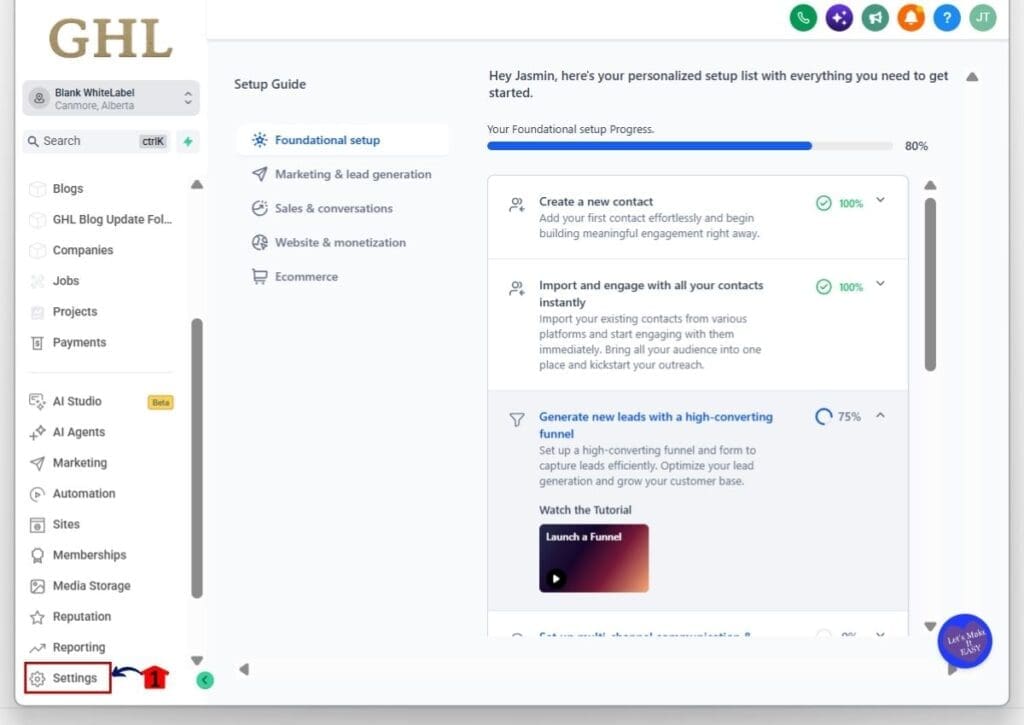
Step 01: Access the Settings Area in GoHighLevel
- Go to the bottom of the Main Menu on the left-hand sidebar.
1.1 Click the Settings gear icon ⚙️.
- This opens the main Settings area for your sub-account.
- From here, you can access the phone settings and other account controls.
Step 02: Open the Phone Numbers Area
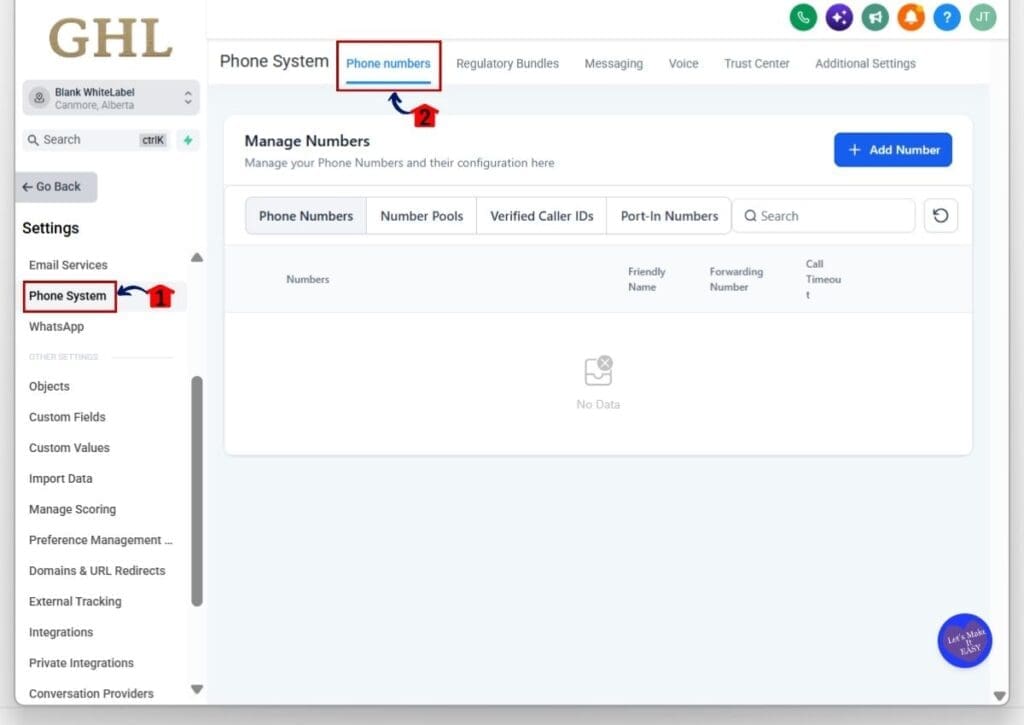
- Inside Settings, use the menu on the left-hand side.
2.1 Click Phone System.
- This opens the Phone System settings for the sub-account.
2.2 Click Phone numbers from the menu across the top.
- This opens the Manage Numbers area.
- Your current phone numbers are listed under the Phone Numbers tab.
2.3 Find the Mexico local number you want to check.
- If you have a Mexico local number, you’ll see the “SMS not supported” pill when SMS is unavailable.
- Hover over the pill to view the tooltip for more context.
- The voice continues to work as normal.
- WhatsApp can also continue to work where applicable.
2.4 Review the number capabilities before you buy.
- The process for buying phone numbers has not changed.
- Numbers affected by this carrier-side limitation will show available capabilities other than SMS.
- Check the capabilities before you complete the purchase.
- If SMS is important to your setup, make sure the number you choose supports it.
That’s it. The Mexico SMS Support status appears automatically, so there is no setting to turn on. Check the status and available capabilities before using or buying a Mexico local number so you know which communication options are available.
Mexico SMS Support Quick Tips
The Mexico SMS Support change does not require any setup, but it is worth checking your numbers. If you manage Mexico local numbers for your business or clients, look for the “SMS not supported” pill before you add a number to an SMS workflow.
When buying a new number, check its capabilities before you complete the purchase. Do not assume a Mexico local number supports texting. If SMS is important to your setup, confirm that first. Voice will continue to work, and WhatsApp can still work where applicable.
It is also a good idea to review Mexico local numbers already in your client accounts. The new status pill gives you a quick way to spot numbers that cannot send SMS. A simple check now can help you avoid using the wrong number in future campaigns and follow-up workflows.
What This Means for Your Business
The Mexico SMS Support change gives you a clearer view of what each local number can actually do. That matters when you are setting up client accounts, building follow-up, or choosing a number for a new campaign.
For agencies, the biggest benefit is fewer setup mistakes. You can spot numbers that do not support SMS before you connect them to a text workflow. That means less rework, fewer failed messages, and a cleaner setup from the start.
Voice can still be used, and WhatsApp may still be available where supported. The key is to check the number first, then build your communication plan around the channels that are actually available.
Frequently Asked Questions about Mexico SMS Support
Mexico SMS Support in GoHighLevel
The Mexico SMS Support change is simple, but it is important if you manage local numbers in GHL. SMS is no longer supported on Mexico local numbers, and the new status pill now makes that clear inside the Phone Numbers area.
For agencies, this means fewer surprises when setting up client accounts. Check the number first, review its capabilities, and only build workflows around the channels that are available. Voice still works, and WhatsApp may also be available where supported.
Before you buy or use a Mexico local number, take a quick look at its status. That small check can save you time later and help you avoid building an SMS setup that will not work.
Scale Your Business Today.
Streamline your workflow with GoHighLevel’s powerful tools.


