- Move GHL React projects to TanStack Start for server rendering, server functions, and secrets without changing your live site first.
- Quick Summary – GoHighLevel React SSR Migration at a Glance
- What’s New With GoHighLevel React SSR Migration
- Why GoHighLevel React SSR Migration Matters
- How GoHighLevel React SSR Migration Keeps Your Live Project Safe
- How to Run GoHighLevel React SSR Migration
- What Happens During GoHighLevel React SSR Migration
- What to Check Before Publishing GoHighLevel React SSR Migration
- Pro Tips for GoHighLevel React SSR Migration
- What GoHighLevel React SSR Migration Means for Your Business
- GoHighLevel React SSR Migration gives existing AI Studio projects a much safer way to move onto a stronger server-side stack.
Move GHL React projects to TanStack Start for server rendering, server functions, and secrets without changing your live site first.
GoHighLevel React SSR Migration gives existing AI Studio React projects a safer way to move onto a more powerful server-side setup. If your current project needs server rendering, server functions, or secrets, you no longer have to rebuild everything from scratch just to get those features. Before this update, those newer capabilities were mainly available to new projects. Existing React projects could keep working as they were, but there wasn’t a clean upgrade path when you needed more advanced backend features. That’s what makes the GHL React SSR Migration useful. Instead of changing your live project, GoHighLevel creates a second project inside the same sub-account.
Your pages are copied over, the new project is upgraded to TanStack Start, and your original published site stays exactly where it is. That also means your current domains stay connected to the original project while you test the new one. For agencies, this removes a lot of the risk that normally comes with a major technical upgrade. You can review the new version, fix anything that needs attention, and only make a publishing or domain change when you’re ready. GoHighLevel React SSR Migration gives you a practical path to stronger server-side features without putting the live site on the chopping block.

GoHighLevel React SSR Migration gives existing AI Studio projects a safer path to server rendering, server functions, and secrets without rebuilding or changing the live project first. GHL creates a separate TanStack copy so you can test the upgraded stack before deciding to publish it.
Quick Summary – GoHighLevel React SSR Migration at a Glance
Purpose: GoHighLevel React SSR Migration lets you move an existing AI Studio React/Vite project onto the newer TanStack SSR stack without changing the live project first.
Why It Matters: You can add server rendering, server functions, and secrets while keeping the original published site and its domains in place.
What You Get: GHL creates a separate TanStack copy of the project, carries the pages across, and runs the migration inside the new copy.
Time To Complete: The setup only takes a few steps, but the full migration and testing time will depend on the size and complexity of the project.
Difficulty Level: Intermediate. The migration itself is guided by AI Studio, but you still need to understand what to test before publishing the new project.
Key Outcome: You get a safer way to upgrade an existing React project to more advanced server-side capabilities without forcing an immediate cutover.
Best Practice: Treat the migrated copy like a staging project. Test the pages, server features, workflow connections, and domain setup before you publish.
What’s New With GoHighLevel React SSR Migration
GoHighLevel React SSR Migration adds a new upgrade path for existing AI Studio projects built with React and Vite. Instead of forcing users to rebuild a project from scratch, GHL can now create a separate copy and move that copy onto the newer TanStack Start stack.
You’ll find the new Migrate to SSR option inside Project Settings. It is marked as an Advanced action and appears on eligible React/Vite projects when you have permission to edit the project.
Automate marketing, manage leads, and grow faster with GoHighLevel.

Projects already running on TanStack do not show this option. Existing React projects also stay on React unless someone manually starts the migration.
When you confirm the migration, GoHighLevel creates a second project inside the same sub-account. Your pages are copied into the new project, while the original project remains unchanged.
GHL suggests naming the new copy using this format:
“Project Name (TanStack)”
You can change that name before starting the migration.
The new project begins as a draft and starts with a fresh AI Studio chat. Previous versions remain attached to the original project, so your existing version history does not move across with the copy.
Most importantly, the live project does not get replaced during this process. Your published site and connected domains stay on the original React project until you decide to make a separate publishing or domain change.
That makes GoHighLevel React SSR Migration much safer than trying to perform a major framework change directly inside a live client project.
Why GoHighLevel React SSR Migration Matters
GoHighLevel React SSR Migration matters because it gives existing AI Studio projects a safer path to features that older React projects could not easily access before.
The biggest reason to migrate is server-side capability.
Server rendering can help a project generate pages on the server instead of relying only on the browser. For certain projects, that can create a better foundation for more advanced functionality and server-driven experiences.
Server functions are another major benefit. They give your project a real backend layer for logic that should not run only in the browser.
Then there are secrets.
If a project needs private credentials, API keys, or other sensitive values, you do not want those exposed inside front-end code. Moving to the newer stack gives eligible projects access to these more advanced capabilities.
The important part is how GHL handles the upgrade.
Instead of taking your current live project and ripping it apart, GoHighLevel React SSR Migration works on a separate copy. Your original React project stays in place while the new TanStack version is created and tested.
That is a big deal for agencies managing client websites.
You can upgrade the technology without creating an immediate cutover. The live site can keep running while you inspect the new project, test important pages, review functionality, and fix anything that did not migrate perfectly.
And if the project does not need server rendering, server functions, or secrets?
Leave it on React.
This update is not about forcing every project onto a new stack. It gives GHL users a migration path when the extra server-side features are actually worth using.
How GoHighLevel React SSR Migration Keeps Your Live Project Safe
One of the biggest advantages of GoHighLevel React SSR Migration is that it does not rebuild your live project in place.
Instead, GHL creates a second project inside the same sub-account.
Your original React project stays where it is. Your published site stays live. Your connected domains stay attached to the original project unless you later decide to move them.
That separation gives you room to test the new TanStack version without putting the working site at risk.
Your pages are copied into the new project, but the previous version history stays with the original. The copied project also starts with a new AI Studio chat, so the migration work is handled separately from the original project history.
This is especially useful for agencies working on client sites.
You can treat the new project like a staging version. Check the pages. Test the new server-side features. Review anything the AI migration changed. Fix problems before you even think about publishing.
If you decide the migration is not ready, you can simply leave the copy alone or delete it.
The original project was never edited.
That makes GHL React SSR Migration a much safer option than trying to convert a live React project directly. You get a separate environment to work in, while the client-facing site keeps running as normal.
How to Run GoHighLevel React SSR Migration
The GoHighLevel React SSR Migration process lets you upgrade an existing React/Vite AI Studio project without rebuilding or changing the live project first. You will start inside the existing React project, open its Project Settings, create a separate TanStack copy, and then let AI Studio run the migration inside the new project.
This process is designed to protect the original project while the new SSR version is being created. Your published site and connected domains stay on the original project until you decide to publish the new copy or move a domain.
Here are the steps you will follow:
- Access the React Project in AI Studio
- Access the Project Settings section
- Open the Migrate to SSR section
- Set the New Project Name
- Review the Migration Notes
- Start the React SSR Migration
- Monitor the Migration in AI Studio
- Review the Migrating to SSR Project
- Continue an Incomplete Migration
- Test the Completed TanStack Project
To start make sure you are logged in to your GoHighLevel sub-account.
Step 01 – Access the React Project in AI Studio
The Main Menu on the left side of your screen includes the main areas you work in when using GHL.
1.1 Click the AI Studio main menu item.
- This will open the AI Studio project area where you can view the projects inside the current sub-account.

1.2 Click the React/Vite project that you want to upgrade.
- Open the existing project that needs server rendering, server functions, or secrets.
- You must have permission to edit the project before the migration option will be available.
- Projects already using TanStack do not need this migration and will not show the migration action.
Step 02 – Access the Project Settings section
2.1 Click Project Settings inside the Ai Studio
- Click the “Three Dot” on the lower right corner of your Ai Studio Project
- This opens the settings for the current AI Studio project.
- These settings control project-level options, including the new SSR migration action.

Step 03 – Open the Migrate to SSR section
3.1 Find the Migrate to SSR option inside Project Settings.
- The option is marked Advanced.
- It only appears on eligible React/Vite projects when you have permission to edit the project.
- Your React project will remain on React unless you manually start this process.
3.2 Click Migrate next to Migrate to SSR.
- This opens the migration confirmation section.
- GoHighLevel has not changed your original project at this point.

Step 04 – Set the New Project Name
The migration creates a second project inside the same sub-account instead of converting the original project.
4.1 Review the suggested project name.
- GoHighLevel suggests using the original project name followed by “(TanStack).”
- Example: “Project Name (TanStack).”
4.2 Click inside the project name field if you want to change the name.
- Use a name that makes it easy to tell the new TanStack project apart from the original React project.

4.3 Confirm the new project name.
- Your existing pages will be copied into this new project.
- The original project and its earlier versions remain separate.
Step 05 – Review the Migration Notes
Before GHL creates the new project, review the migration information carefully.
5.1 Review the migration notes shown by GoHighLevel.
- The new project will begin as a draft.
- Your original published project stays unchanged.
- Your existing domains stay connected to the original project.
- Earlier project versions stay with the original React project.
- The new project starts with a separate AI Studio chat.
- The migration is handled by AI agents.
- The conversion is charged like a normal build.
5.2 Accept the migration notes.
- Only continue after you understand that the new project is a separate copy and will need to be tested before publishing.
5.3 Click Migrate.
- GoHighLevel creates a new project beside the original project inside the same sub-account.
- Your original React project remains untouched.

5.4 Wait for the new project to open.
- GHL automatically takes you into the newly created project.
- The migration begins through the new project’s AI Studio chat.
Step 06 – Monitor the Migration in AI Studio
Once the new project opens, AI Studio begins converting the copied React project onto TanStack Start.
6.1 Review the AI Studio chat.
- The AI agent reads the copied application and begins rewriting it for the new TanStack SSR stack.
- Follow the chat so you can see what the agent is changing and whether it needs additional input.
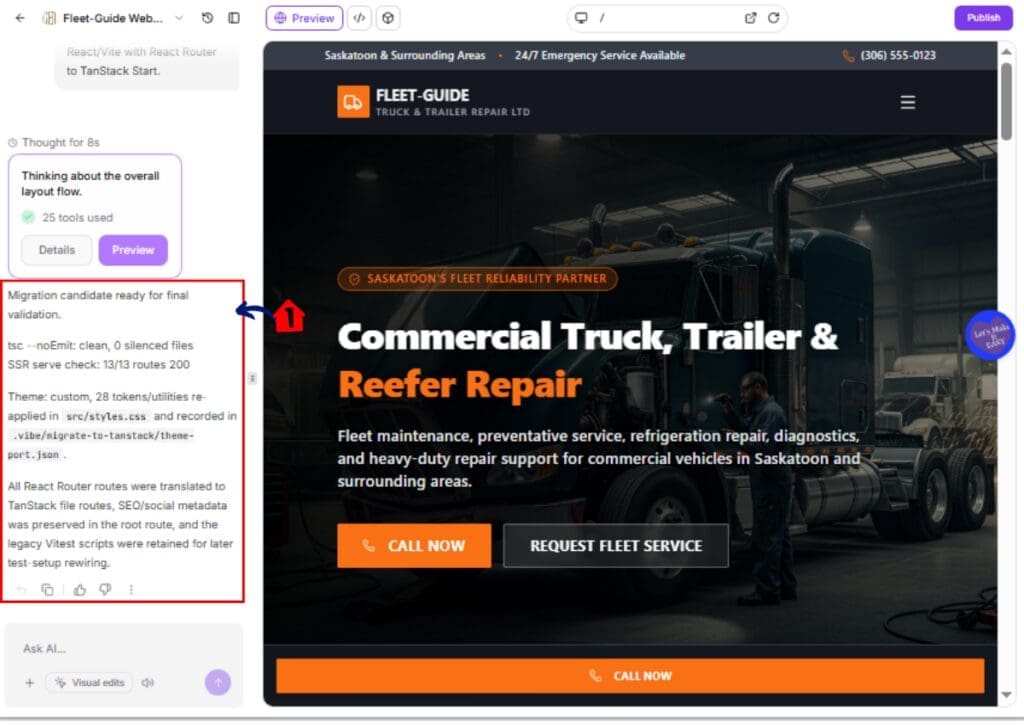
6.2 Allow the migration to continue until the conversion finishes.
- Do not treat the project as ready to publish simply because the copy has been created.
- The migration must complete before the project becomes a normal SSR project.
Step 07 – Review the Migrating to SSR Project
While the conversion is running, the new project is placed into a temporary migration state.
7.1 Look for the Migrating to SSR status on the project card.
- This status remains visible while GHL is still converting the copied project.
7.2 Use Preview when you want to inspect the project during the migration.
- Preview remains available while the migration is running.
- Chat and Delete also remain available.

7.3 Do not attempt actions that GHL blocks during the migration.
- Publishing is blocked.
- Code saves are blocked.
- Version restores are blocked.
- Domain changes are blocked.
- Slug changes are blocked.
- Remix is blocked.
- These restrictions help protect the copied project while AI Studio is changing its underlying framework.
Step 08 – Continue an Incomplete Migration
A migration may occasionally stop before the conversion is finished. If that happens, continue working inside the existing copy instead of starting over.
8.1 Check whether the Migrating to SSR badge is still showing.
- If the badge remains, the migration has not fully completed.
8.2 Open the AI Studio chat inside the copied project.
- Stay inside the TanStack migration copy that GHL already created.
8.3 Enter “continue the migration” into the chat.
- The AI agent will continue working on the same copied project.
8.4 Do not start Migrate again from the original project unless you intentionally want another copy.
- Starting the migration again from the original React project creates another separate migration project.
Step 09 – Test the Completed TanStack Project
When the migration completes, the Migrating to SSR badge clears and the copied project becomes a normal TanStack SSR project.
9.1 Open Preview and walk through the new project.
- Review each important page.
- Check navigation and links.
- Test interactive elements.
- Confirm the layout still matches the original project.
9.2 Test any server-side functionality added to the project.
- Check server rendering where applicable.
- Test server functions.
- Confirm any secrets or private values are configured correctly.
9.3 Review workflow connections that depend on the original project.
- Workflow triggers continue listening to the original project until you intentionally point them at the new project.
- Do not assume the migration automatically transfers every connected workflow relationship.
9.4 Review the project before publishing or moving a domain.
- The AI migration can leave something that needs to be corrected.
- Publishing the TanStack copy is a separate action.
- Moving an existing domain to the new project is also a separate action.
The safest approach is to treat the migrated project like a staging project until you have tested it from top to bottom.
Your original React site stays live throughout this process. If you decide not to use the migrated copy, you can leave it or delete it without affecting the original project.
What Happens During GoHighLevel React SSR Migration
GoHighLevel React SSR Migration puts the copied project into a temporary migration state while AI Studio converts it to TanStack Start.
During this time, GHL limits several actions inside the new project. That is intentional. The goal is to stop you from making changes that could interfere with the migration while the framework is being rewritten.
You can still use Preview, continue working in Chat, or delete the copied project if you no longer need it.
However, while the Migrating to SSR status is active, GHL blocks publishing, code saves, version restores, domain changes, slug changes, and remix.
This means you should treat the new project as a work-in-progress until the migration badge clears.
If the migration stops before finishing, do not panic and do not immediately restart the process from the original React project.
Open the copied project and use the AI Studio chat to enter “continue the migration.”
That lets GoHighLevel continue working on the same copy.
Starting Migrate again from the original project creates another separate copy, so only do that if you actually want to start a second migration.
Once the Migrating to SSR status disappears, the copied project becomes a normal TanStack SSR project.
At that point, you can move into testing and review. The migration may be technically complete, but you should still check the project before publishing or moving any live domains.
What to Check Before Publishing GoHighLevel React SSR Migration
GoHighLevel React SSR Migration gives you a separate TanStack copy, but that does not mean you should publish it the moment the migration finishes.
You need to walk through the new project first.
The AI migration can complete successfully and still leave something that needs attention. That could be a page layout, a connection, a server function, or another part of the project that needs to be reviewed before you put it live.
Start by checking the important pages in Preview.
Make sure navigation works, links go where they should, and the main parts of the site still look and behave the way you expect.
Next, test any server-side features that were the reason for the migration in the first place.
If you need server functions, make sure they work correctly.
If you are using secrets, confirm that the values are set up properly and are not exposed in front-end code.
You should also review your workflow connections.
Workflow triggers continue to listen to the original project until you point them at the new one. The migration does not automatically move those connections for you.
Domains need the same level of care.
Your live domain stays on the original React project during the migration. Publishing the copied project or moving a domain is a separate decision, so do not make that change until you are happy with the new version.
For agencies, the safest approach is simple.
Treat the migrated TanStack project like a staging site.
Test it. Fix it. Review the important connections. Then decide whether you are ready to publish it or move a live domain.
The big advantage of GoHighLevel React SSR Migration is that you can do all of this without changing the original live project first.
Pro Tips for GoHighLevel React SSR Migration
GoHighLevel React SSR Migration is powerful, but you do not need to use it on every React project.
The best time to use it is when the project actually needs server rendering, server functions, or secrets. If the current React project already does everything you need, leaving it on React is completely fine.
Treat the migrated TanStack project like a staging environment.
Do not rush to publish just because the migration badge disappears. Walk through the project, test the pages, check your links, and make sure the server-side features work the way you expect.
Pay close attention to workflow triggers.
GHL keeps those connected to the original project until you point them at the new one. This is easy to miss, especially if the new project looks finished on the surface.
Be careful with domains too.
Your live domain stays on the original project during the migration. That gives you a safety net.
What GoHighLevel React SSR Migration Means for Your Business
GoHighLevel React SSR Migration gives agencies and businesses more room to improve older AI Studio projects without putting the live version at risk.
That matters when a client site has grown beyond a basic front-end project.
You may need server rendering. You may need backend logic through server functions. You may need a safer way to use secrets or private credentials. Before this update, getting those capabilities into an existing React project could mean rebuilding the project or working around the limitations.
Now, GHL gives you another option.
You can create a separate TanStack version, test the new setup, and keep the original project live while you work.
For agencies, this can make client upgrades easier to manage.
Instead of telling a client that a working project needs to be rebuilt before you can add more advanced functionality, you can create the migrated copy first and prove that the new version works before making the final switch.
It also gives your team more control over timing.
You can review pages, test server-side features, check workflow connections, and decide when the new version is ready. Publishing and domain changes stay separate from the migration itself.
That means less pressure to make everything perfect in one move.
The practical benefit is simple: GoHighLevel React SSR Migration gives you a safer upgrade path when a project needs more advanced server-side capabilities, while projects that do not need them can stay exactly where they are.
GoHighLevel React SSR Migration gives existing AI Studio projects a much safer way to move onto a stronger server-side stack.
Instead of rebuilding the live project or risking the current site, GHL creates a separate TanStack copy inside the same sub-account. Your published React project, domains, and earlier versions stay where they are while the new version is created and tested.
That gives you room to add server rendering, server functions, and secrets without forcing an immediate cutover.
The smart move is to treat the migrated copy like a staging project. Test every important page. Check your server-side features. Review workflow triggers. Confirm your domain plan. Then publish only when the new version is ready.
And if your current React project does not need those extra capabilities, there is no reason to migrate it just because the option is there.
That is the real value of this update. GoHighLevel React SSR Migration gives you a clear upgrade path when you need it, without forcing every existing project onto a new stack.
Have you tried migrating an existing AI Studio React project to TanStack yet? I’d be interested to know how smoothly the process worked for your project.
Scale Your Business Today.
Streamline your workflow with GoHighLevel’s powerful tools.