

- Introduction Localized Notification Templates Multilingual
- Quick Summary – Localized Notification Templates
- Here are this week's HighLevel Updates 🚀
- What’s New with Localized Notification Templates
- What’s Changed for New and Existing Setups
- Why Localized Notification Templates Matter
- How to Use Localized Notification Templates in GHL
- Quick Tips for Localized Notification Templates
- What Localized Notification Templates for Your Business
- Results Expect Localized Notification Templates
- FAQs About Localized Notification Templates
- Conclusion – Localized Notification Templates
Introduction Localized Notification Templates Multilingual
Localized Notification Templates are finally here in GoHighLevel, and this is a big win for businesses working across different languages. Instead of manually translating every default notification, GHL can now match those templates to the Platform Language set inside the Business Profile.
This update works with Calendars, Services, and Rentals, with notifications supported through Email, SMS, and WhatsApp where available.
The best part is how GoHighLevel handles your existing work. If you’ve already customized a notification template, GHL leaves it alone. It won’t overwrite it, retranslate it, or quietly replace the content you’ve already built.
For new calendars, services, and rental locations, Localized Notification Templates appear automatically in the Business Profile Platform Language. There’s nothing extra to turn on.
Existing setups work a little differently. Their current notification templates stay exactly as they are until you choose to reset them to the default. That gives you control over when localized content goes live instead of forcing a sudden change across your account.
If you’re managing clients across different languages, this should save time on setup and reduce the amount of translating you have to do by hand.
The latest GoHighLevel Changelog includes several other GHL feature updates that round out your daily workflow:
- Wait Action Enhancement: TikTok DM Replies
- India Recurring Mandate Support for Affiliate Indian Signup Pages
- Housecall Pro – More Workflow Actions & Triggers
- Email Services Dashboard for Agencies
- Email Sequences Now Available in Beta Labs
- Group Your Contacts by Source in Dashboards & Reporting
- MMLite Adoption Banner in Conversations
Keep reading for much more on all these updates and a deep dive into the Localized Notification Templates feature!

Quick Summary – Localized Notification Templates
Purpose: Localized Notification Templates help GoHighLevel users automatically match default notification content to the Business Profile Platform Language across Calendars, Services, and Rentals.
Why It Matters: This reduces manual translation work and makes multilingual client setups easier to manage without forcing changes to existing custom templates.
What You Get: New Calendars, Services, and Rentals receive localized default notifications automatically, while existing setups can switch to localized defaults using Reset to Default.
Time To Complete: Most users can review their Business Profile language and update existing notification templates in just a few minutes.
Difficulty Level: Easy. The main thing to understand is the difference between new setups, which localize automatically, and existing setups, which need to be reset manually.
Key Outcome: You get faster multilingual setup, more consistent customer messaging, and better control over which notification templates are changed.
Here are this week’s HighLevel Updates 🚀
Wait Action Enhancement: TikTok DM Replies
What’s New:
Instead of continuing after a fixed delay, your workflow can pause until someone replies to your TikTok DM.
Where in GHL:
Found in Automation → Workflows using the Wait action after sending a TikTok DM.
Automate marketing, manage leads, and grow faster with GoHighLevel.

Impact:
Your automation responds when someone actually joins the conversation, rather than after a timer runs out.
Recommended For:
Anyone using TikTok DMs to start conversations with potential customers.
India Recurring Mandate Support for Affiliate Indian Signup Pages
What’s New:
Supports recurring payment mandates for Indian affiliates, helping subscriptions comply with local banking requirements.
Where in GHL:
Available on Affiliate Program signup pages for users in India.
Impact:
Creates a smoother signup experience while reducing payment failures for recurring subscriptions.
Recommended For:
Agencies, SaaS businesses, and affiliate programs onboarding customers in India.
Housecall Pro – More Workflow Actions & Triggers
What’s New:
Adds new workflow triggers and actions for the Housecall Pro integration, giving you more ways to automate field service processes.
Where in GHL:
Inside Automation → Workflows when using the Housecall Pro integration.
Impact:
Expands automation possibilities between HighLevel and Housecall Pro, reducing manual work and improving operational efficiency.
Recommended For:
Home service businesses, field service companies, and agencies managing Housecall Pro clients.
Email Services Dashboard for Agencies
What’s New:
Introduces a centralized dashboard where agencies can monitor email services across their accounts.
Where in GHL:
Found in the Agency View under the new Email Services Dashboard.
Impact:
Makes it easier to monitor email health, identify issues, and manage deliverability from one place.
Recommended For:
Agency owners, support teams, and admins managing multiple client email services.
Email Sequences Now Available in Beta Labs
What’s New:
Introduces Email Sequences as a Beta Labs feature, providing another way to create structured email follow-up campaigns.
Where in GHL:
Enable it from Settings → Labs, then access Email Sequences after activation.
Impact:
Cuts down the time spent checking different areas just to see how your email services are performing.
Recommended For:
Marketers, agencies, coaches, and businesses running nurture campaigns or onboarding emails.
Group Your Contacts by Source in Dashboards & Reporting
What’s New:
Lets you organize contact reports based on where your leads originated.
Where in GHL:
Available within Dashboards & Reporting when viewing contact analytics.
Impact:
Makes it easier to compare lead sources and identify which marketing channels are producing the best results.
Recommended For:
Marketing teams, agency owners, and businesses tracking campaign performance across multiple lead sources.
MMLite Adoption Banner in Conversations
What’s New:
Displays a helpful banner inside Conversations to encourage users to adopt the new MMLite messaging experience.
Where in GHL:
Appears within the Conversations module for eligible accounts.
Impact:
Helps users discover and transition to MMLite while highlighting its benefits directly inside the messaging interface.
Recommended For:
Current HighLevel users exploring the latest messaging experience and teams preparing to migrate to MMLite.
What’s New with Localized Notification Templates
Calendars, Services, and Rentals can now pull their default notification language from the Business Profile. So if the Platform Language is changed, the default content doesn’t have to stay stuck in English.
Email, SMS, and WhatsApp are all part of the update where those channels are available. The options can vary by product, but they now follow the same language setting.
Calendars includes templates for Assigned Users, Additional Email, Additional Phone, Contacts, and Guests. Services and Rentals also use localized defaults across the notification recipients they support.
The biggest change is consistency. GHL now uses the Business Profile Platform Language as the single source for default notification language across these areas.
That makes Localized Notification Templates easier to manage, especially if you run several sub-accounts for different regions or languages.
Just as important, GHL does not touch any notification template you’ve already customized. If you changed the wording yourself, that version stays exactly as saved.
You get the convenience of localized defaults without losing the custom messages you’ve already taken the time to set up.
What’s Changed for New and Existing Setups
Localized Notification Templates behave differently depending on whether you’re working with a new setup or an existing one.
For new Calendars, Services, and Rentals locations, the change is automatic. GHL creates the default notification templates using the Platform Language set in the Business Profile. You don’t need to translate anything or turn on an extra setting.
Existing setups are handled more carefully. Their current notification content stays in place, even if it’s still using the original English default.
That means GoHighLevel won’t suddenly change live messaging across your account.
If you want an existing notification to use the new localized default, you need to open that template and click Reset to Default. That reset is what pulls in the translated version based on the Business Profile Platform Language.
Custom templates are protected too. If you’ve edited a notification before, GHL keeps your saved version exactly as it is. It won’t overwrite, retranslate, or reset your custom content automatically.
This is a smart approach for agencies. You get the benefit of Localized Notification Templates without risking unexpected changes to messaging that clients are already using.
Why Localized Notification Templates Matter
Localized Notification Templates remove a lot of repetitive work for agencies and businesses serving customers in different languages.
Before this update, default notification templates were only available in English. That meant businesses had to manually translate messages for calendars, services, rentals, and each supported channel.
Now, GoHighLevel can use the Business Profile Platform Language to handle the default language for you.
That matters because it creates one clear source of truth. Instead of checking different settings across different tools, the Business Profile controls the language used for default notification templates.
For agencies, this can make onboarding much faster. If you manage clients in different countries or language markets, you can set the right Platform Language and let GHL handle the default notification language from the start.
It also reduces mistakes. You’re less likely to end up with one notification in English, another in a second language, and a third using outdated wording.
The good thing is your edited templates stay put. You can let GHL handle the default language where it helps, without giving up the custom messages you’ve already built.
How to Use Localized Notification Templates in GHL
Localized Notification Templates are controlled by the Platform Language set inside your GoHighLevel Business Profile. New Calendars, Services, and Rentals use that language automatically for their default notification templates.
For existing Calendars, Services, and Rentals, the current notification content stays in place until you choose Reset to Default. That reset is what pulls in the localized version based on your Business Profile Platform Language.
- Check Your Business Profile Language.
- Access Calendar Settings in GHL.
- Access Calendar Notification Templates.
- Reset an Existing Calendar Template.
- Update Services and Rentals Notifications.
To start, make sure you are logged in to your GoHighLevel sub-account.
Step 01 – Check Your Business Profile Language
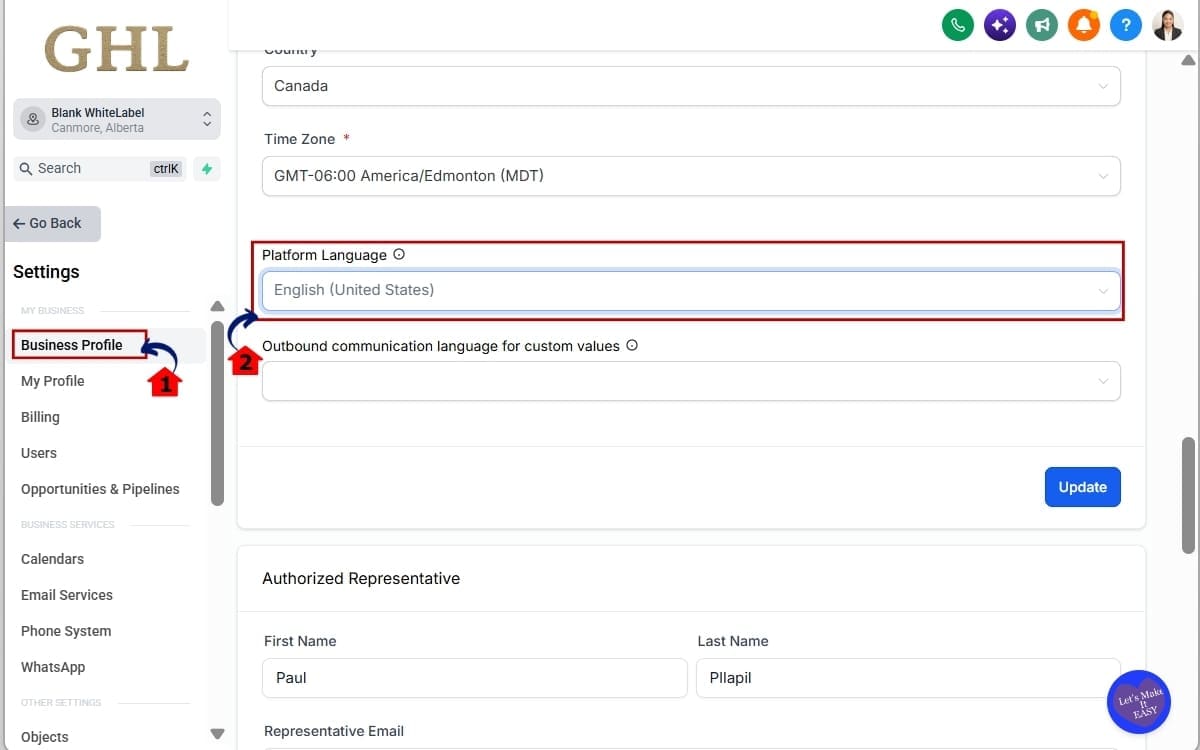
- Go to the left-hand sidebar and click Settings. This opens the main Settings area for your GoHighLevel sub-account.
1.1 Open your Business Profile.
- This is where GHL stores the Platform Language used as the language source for Localized Notification Templates.
1.2 Update the Platform Language if needed.
- New Calendars, Services, and Rentals will use this language when their default notification templates are created.
Step 2.0 – Access Calendar Settings in GHL
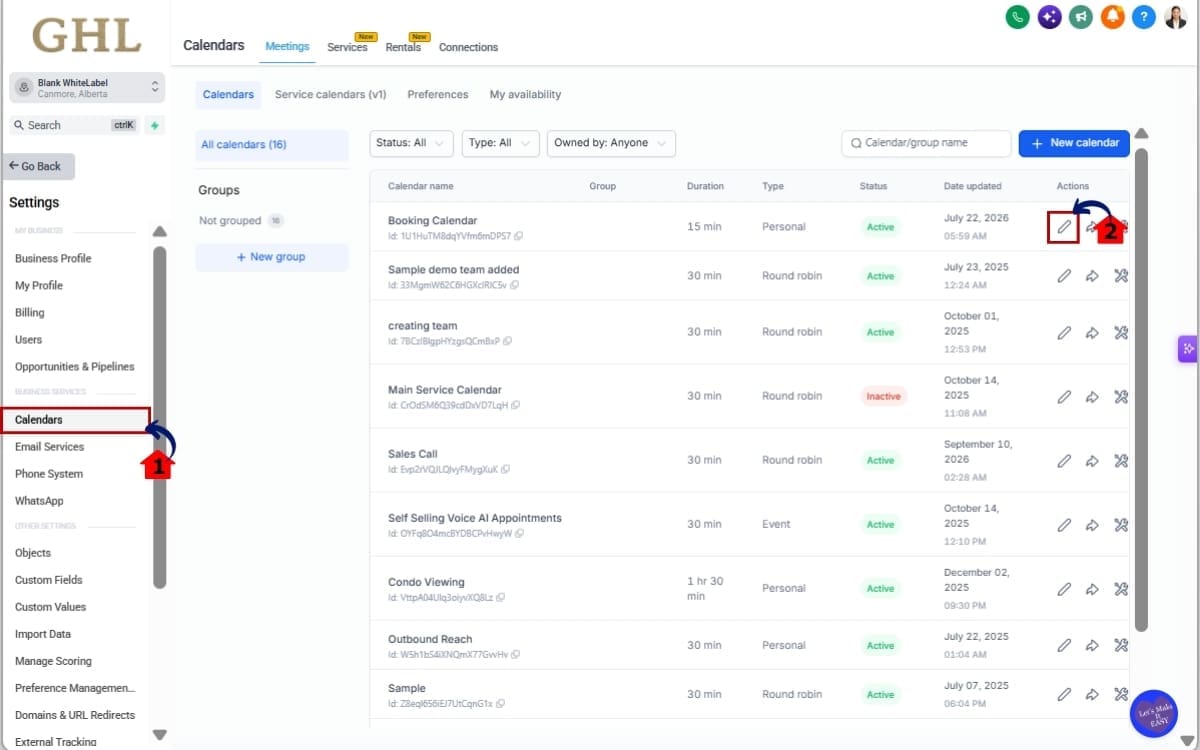
2.1 Go to Calendar Settings.
- This is where you can manage individual Calendar settings, including notifications.
2.2 Select the Calendar you want to update.
- Choose the Calendar with the notification templates you want to review or localize.
Step 3.0 – Access Calendar Notification Templates
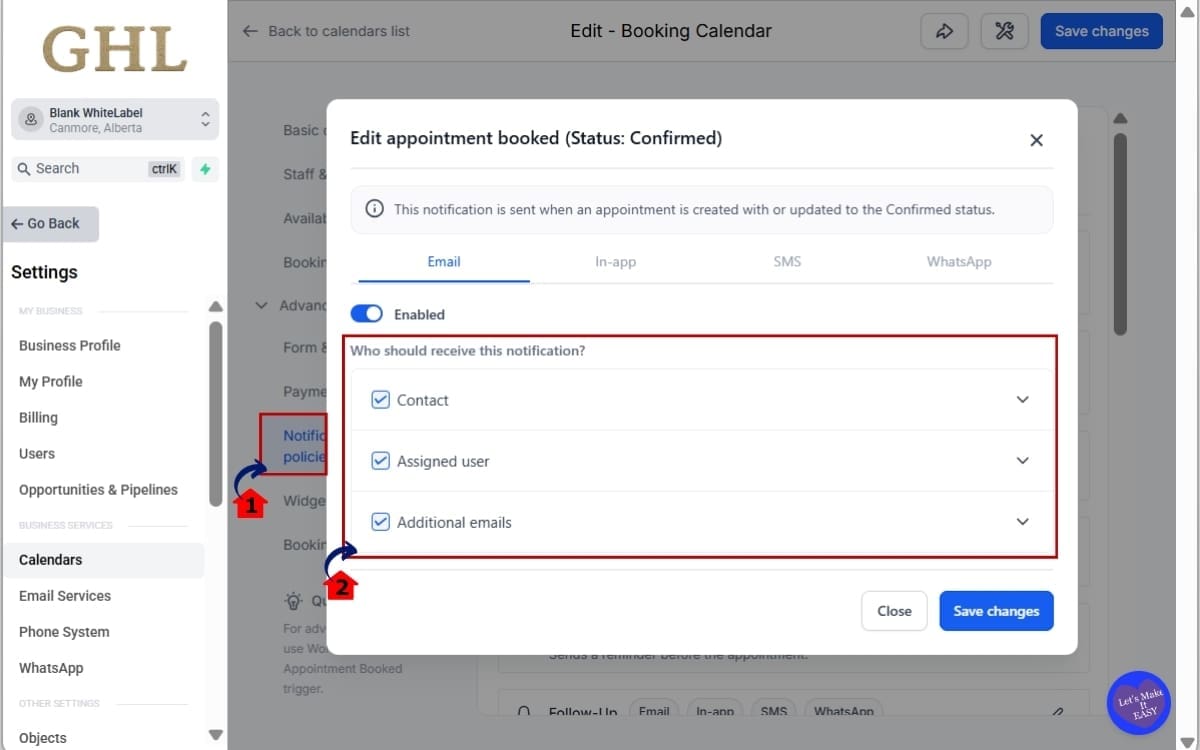
3.1 Open Notifications.
- This section contains the notification templates available for that Calendar.
3.2 Choose the notification template you want to review.
- Calendar notifications can include templates for Assigned Users, Additional Email, Additional Phone, Contacts, and Guests.
Step 4.0 – Reset an Existing Calendar Template
- Existing Calendar templates keep their current content until you manually reset them.
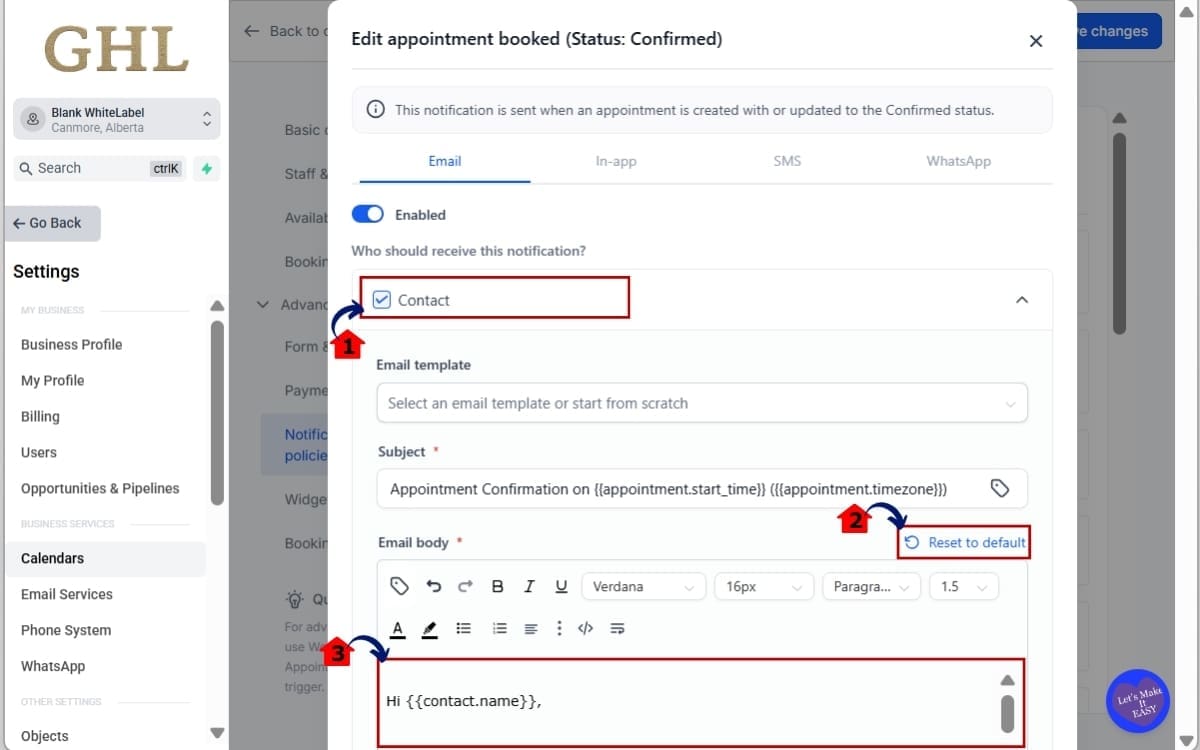
4.1 Open the notification template you want to localize.
- Review the current message before making any changes.
4.2 Click Reset to Default.
- This is what triggers GHL to load the default version in the Business Profile Platform Language.
4.3 Review the localized template.
- Check the content before using it for live customer or staff notifications.
Note: If you’ve already customized a notification template, GHL will not automatically overwrite or retranslate it. Only use Reset to Default if you want to replace the current version with the localized default.
Step 5.0 – Update Services and Rentals Notifications
- Services and Rentals use their own notification area, but the localization behavior works the same way.
5.1 Go to Rentals and Open Notifications.
This is where you can access notification settings for Services and Rentals. You’ll see the notification templates available for these products.
5.2 Select the notification template you want to review.
- Choose the relevant recipient and notification type.
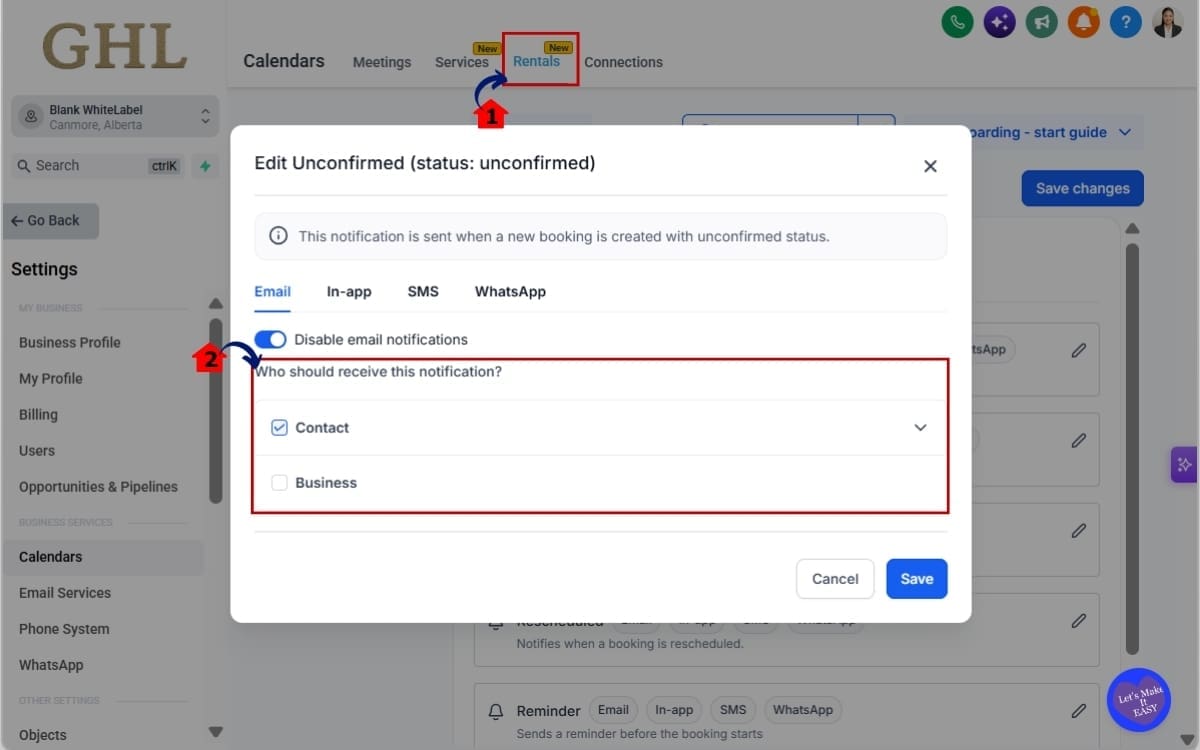
Note: The changelog confirms that the Business Profile Platform Language controls the localized defaults, new setups receive localized defaults automatically, and existing setups require Reset to Default. It does not provide every current button label or configuration field beyond those areas, so the steps above avoid adding unsupported interface details.
Quick Tips for Localized Notification Templates
Localized Notification Templates can save a lot of setup time, but a few smart checks will help you avoid mistakes.
Start with the Business Profile Platform Language. That setting controls the default language GHL uses, so confirm it before creating new Calendars, Services, or Rentals.
Got an older setup? Check the notification first. Reset to Default will replace what’s there now, so don’t click it if that message needs to stay as-is.
For agencies with multiple clients, it’s worth checking Platform Language right at the start. Doing it early can save a lot of backtracking.
Don’t assume every channel works exactly the same. Email, SMS, and WhatsApp can each have their own content and layout depending on where you’re using them.
After resetting a template, test it before relying on it with real customers. Make sure the right language appears and the message still makes sense for that audience.
And remember, localized defaults are a starting point. You can still customize the wording, branding, links, and instructions after the default language is in place.
What Localized Notification Templates for Your Business
If you work with clients in more than one language, this update removes a job you probably didn’t enjoy doing anyway.
New Calendars, Services, and Rentals can now start with notification copy that follows the language set in the Business Profile.
This is useful when your agency handles clients in different countries or language markets. One account might need English, while another needs Spanish, and each can use its own Platform Language for the default notifications.
You’re not stuck translating the same basic booking messages over and over.
It also cuts down on those awkward language mismatches. Customers are more likely to get the right wording from booking through follow-up.
Already customized a few templates? Leave them alone. GHL won’t swap them out just because localized defaults are available.
For agencies adding more clients, this is one less repetitive setup job to deal with.
The defaults won’t replace the need for good copy, but they give you a much better place to start.
Results Expect Localized Notification Templates
Localized Notification Templates should make multilingual setup faster and more predictable inside GHL.
This takes a chunk of translation work off your plate. New Calendars, Services, and Rentals can come in with default messages that already match the account’s language setting.
That can cut down setup time, especially for agencies managing clients across different countries or language markets.
You can also expect more consistency. Because GHL uses one language source, there’s less chance of different notification areas using mismatched default languages.
Existing custom work stays protected too. Since GHL doesn’t overwrite edited templates automatically, you can keep client-specific messaging in place while still using localized defaults where they make sense.
This gives agencies less cleanup to do during onboarding and fewer little translation issues to catch later.
The overall win is simple: faster setup, better consistency, and more control over how multilingual notifications are handled across GoHighLevel.
FAQs About Localized Notification Templates
Conclusion – Localized Notification Templates
Localized Notification Templates take a lot of the repetitive work out of setting up multilingual accounts in GoHighLevel.
When you create a new Calendar, Service, or Rental, GHL can use the Platform Language in the Business Profile to decide which default notification language to use. That means less time spent translating the same basic messages for every new setup.
Older templates are handled differently. They stay exactly where they are until you choose Reset to Default, so nothing changes behind the scenes.
For agencies, that makes this update useful without being disruptive. You get a faster starting point for new accounts, while keeping the custom messages you’ve already built.
If you work with clients in different languages, check the Platform Language first and then review the notifications you already have in place.
Are you planning to use this across your client accounts?
Scale Your Business Today.
Streamline your workflow with GoHighLevel’s powerful tools.


