- GHL revamps first-time workflow setup with AI-powered builds, templates, and a smoother path to automation.
- Quick Summary – Workflow Automation Builder at a Glance
- What’s New – Landing Page Revamp
- AI Workflow Builder – Describe and Deploy
- Browse Templates – Quick Wins from Proven Flows
- Start from Scratch – Build Like a Pro
- Why This Matters – Faster Wins for Agencies
- How to Use – 3 Ways to Launch Your Workflow
- Conclusion – GHL Just Made Onboarding Easier
GHL revamps first-time workflow setup with AI-powered builds, templates, and a smoother path to automation.
If workflows are the heart of your GHL setup, the new landing page just gave it a massive shot of adrenaline. Whether you’re onboarding new clients or teaching team members how to automate, GoHighLevel has made it dramatically easier to get started—especially for first-time users.
The latest update revamps the entire first-time user experience for the workflow automation builder. It’s cleaner. Smarter. Faster. And AI is now the star of the show. So if you’ve been hand-holding clients through their first automations or fumbling with long how-to videos, this update is for you.
GHL’s redesigned workflow automation builder makes it easier than ever to get started. Whether you use AI, templates, or build from scratch, this update helps you launch automations faster and onboard clients smoother.
Quick Summary – Workflow Automation Builder at a Glance
Purpose:
Help new users launch workflows faster inside GoHighLevel with a revamped landing page that highlights AI, templates, and manual build options.
Why It Matters:
New users often get stuck at the first step. This update removes confusion and creates momentum by offering guided entry points into automations.
What You Get:
A streamlined first-time user interface with 3 ways to build workflows—AI Builder, Template Library, or Start from Scratch.
Time to Complete:
5–15 minutes to launch your first automation depending on the method you choose.
Difficulty Level:
Beginner-friendly with pro-level flexibility for advanced users.
Key Outcome:
Faster onboarding, more clients activating workflows, and less time spent explaining “how to build an automation.”
What’s New – Landing Page Revamp
GoHighLevel didn’t just make a few tweaks—they overhauled the entire Workflow entry experience. The moment you click into “Workflows” as a new user, you’re greeted with a clean, focused layout designed to help you take immediate action.
Here’s what’s changed:
Automate marketing, manage leads, and grow faster with GoHighLevel.

- AI Builder is now the default call-to-action — it’s the first thing you see, encouraging you to describe your automation in natural language.
- Templates are now browsable right from the landing page, with a clearer grid layout to explore your options.
- “Start from Scratch” is still available, but it no longer overwhelms beginners on first click.
This update removes the “where do I start?” confusion for new users. Instead of getting lost in triggers and actions, you’re guided into the method that fits your comfort level—AI, template, or full manual.
In short, GHL is meeting users where they are. And that’s a win for both agencies and their clients.
AI Workflow Builder – Describe and Deploy
The AI Builder is now front and center—and it’s not just a design choice. It’s a strategy.
Instead of starting from a blank slate, users can now describe what they want in plain English. No triggers, no filters, no “how do I set this up?” Just a simple prompt like:
- “Send a thank-you email after someone fills out my form”
- “Text a lead when they book an appointment”
- “Tag a contact after they click a link in an email”
The AI takes it from there—generating an entire automation workflow in seconds. You can review, tweak, or launch it as-is.
This feature isn’t just helpful for newbies—it’s a massive time-saver for agencies, too. You can generate starter workflows faster, test ideas more quickly, and get clients into motion without needing to explain every trigger or condition.
Bottom line: if you can describe it, AI can build it.
Browse Templates – Quick Wins from Proven Flows
Not ready to type out your automation in plain English? No problem. GHL’s updated landing page also makes it easier than ever to browse and deploy templates.
With just one click, you can:
- Explore categorized workflow templates
- Preview what each automation includes
- Instantly clone it into your account
Templates are gold for agencies. Whether you’re onboarding a new chiropractor, a real estate client, or an ecommerce brand, there’s likely a workflow that fits the job—or at least gives you a head start.
No more digging through folders or jumping tabs. Everything’s accessible from one screen.
It’s especially handy for onboarding new sub-accounts. Pick a niche-relevant template, tweak it, and you’re live in minutes.
Templates now feel less like “optional content” and more like “standard operating procedure.” And that’s exactly how they should be used
Start from Scratch – Build Like a Pro
For the seasoned GHL power users, don’t worry—your favorite option hasn’t gone anywhere. The “Create Workflow” button is still alive and well, giving you full control to build your automations from the ground up.
This mode is perfect when:
- You already know what you want and how to build it
- You need complex logic or multi-path sequences
- You’re building client-specific automations that templates or AI can’t fully cover
While AI and templates are great for speed, starting from scratch is still the go-to for pros who want full flexibility.
And here’s the thing: you’re not locked into one path. Even if you start with a template or AI suggestion, you can immediately switch into manual mode and start customizing. Think of it like scaffolding—you can delete, modify, or expand however you want.
GHL isn’t forcing you into automation training wheels. They’re just offering them for those who need it.
Why This Matters – Faster Wins for Agencies
This update isn’t just a visual polish. It’s a strategic move that directly impacts how fast agencies can launch, onboard, and scale.
Here’s what this revamp actually solves:
- First-time users stop freezing up when they hit the workflows section
- Agencies spend less time explaining basics and more time delivering results
- Clients get early wins—they see automations working without waiting days for setup
Think about it: if a client logs in and immediately sees an AI option or a template relevant to their business, they’re way more likely to engage, experiment, and activate. That means fewer “I don’t get it” support requests and more automation in motion.
Plus, for white-label agencies, this gives your brand a stronger first impression. Your platform now feels like a guided experience, not just a tool.
This change reduces churn, increases activation, and improves onboarding—all from one smart landing page redesign.
How to Use – 3 Ways to Launch Your Workflow
Whether you’re helping a new client or building for your own agency, the new landing page offers three clear paths to get your automation live—fast.
Step 1.0 – Access the Main Left Hand Menu in GoHighLevel
- The Main Menu on the Left side of your screen has all the main areas that you work in when using GHL
1.1 Click on the Automation Menu Item.
- Access the ‘Automation’ section of GoHighLevel
- You’ll now be in the ‘Automation’ section of GHL, where you can access the Worflow section from the top menu:
1.2 Click on the ‘Workflow’ menu link.
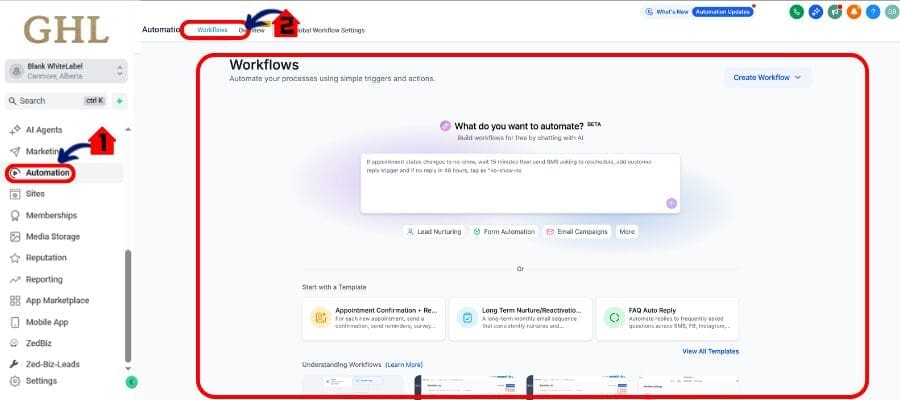
Option 1: Use AI Builder (Fastest & Easiest)
- Click “Use AI Builder” on the workflow landing page.
- Type what you want your automation to do, like:
- “Send email after form submission”
- “Text lead after booking appointment”
- “Tag cold leads and remove them from list”
- Hit “Generate Workflow.”
- Review the AI-generated steps and make edits if needed.
- Click “Save & Publish.”

Option 2: Browse Templates (Fast Setup with Structure)
- Click “Browse Templates.”
- Use search bar or filters (niche, category, use-case).
- Select a template that matches your goal (e.g. Lead Nurture, Missed Call Text Back).
- Click “Use Template” to clone it into your account.
- Open the workflow and customize any step you want.
- Click “Save & Publish.”

Option 3: Start from Scratch (Full Control)
- Click “Create Workflow.”
- Add your first trigger (e.g., Form Submitted, Appointment Booked).
- Drag in actions like “Send Email,” “Wait,” or “Add Tag.”
- Build out your logic manually.
- Use folders, conditional logic, and workflow notes to stay organized.
- Click “Save & Publish.”

This new layout doesn’t limit your options—it just simplifies them. Use the method that matches your skill level and your workflow’s complexity.
Bonus tip: You can always start with AI or a template, then customize manually. It’s not either/or—it’s “best of all worlds.”
Pro Tips – When to Use Which Option
Not sure which path to pick? Here’s how to decide based on your use case, skill level, and client type:
Use AI Builder when…
- You want to build something simple, fast
- Your client is non-technical and just needs a working automation
- You’re prototyping or brainstorming ideas for automations
Use Templates when…
- You’re onboarding a niche client (e.g., chiropractor, real estate, med spa)
- You want a proven framework to customize instead of starting from scratch
- You’re building the same set of automations across multiple accounts
Start from Scratch when…
- You need advanced logic, multiple triggers, or deep personalization
- You’re building multi-step client journeys or integrating with custom fields/objects
- You want total creative control and already know the automation structure
Best Practice: Combine Methods
- Start with AI for the base
- Load a template to get advanced structure
- Customize with manual tweaks as needed
This modular approach lets you move faster without sacrificing flexibility. And if you’re training clients or team members, show them all three so they can pick what feels best.
Conclusion – GHL Just Made Onboarding Easier
This update may seem small on the surface—a refreshed landing page for workflows—but it delivers a big win where it counts: user activation.
By giving new users three simple, guided paths (AI, Templates, Scratch), GHL has removed the #1 bottleneck to launching automation: confusion.
And for agencies? This means:
- Faster client onboarding
- Less time spent on hand-holding
- More automations launched in less time
The AI Builder alone is worth showing off to every new client—it makes you look cutting-edge, even if they’re just sending a thank-you email.
Templates give you a repeatable system. And manual mode keeps your power user freedom intact.
Bottom line? GoHighLevel just made workflows more accessible—and your agency more scalable.
Scale Your Business Today.
Streamline your workflow with GoHighLevel’s powerful tools.