

- See published posts, track engagement, and manage more of your social content from one GoHighLevel calendar.
- Quick Summary – Social Post Sync at a Glance
- What’s New with Social Post Sync
- Why Social Post Sync Matters
- How to Enable Social Post Sync in GoHighLevel
- LinkedIn and TikTok Beta Limits
- Pro Tips for Social Post Sync
- What Social Post Sync Means for Your Business
- Frequently Asked Questions About Social Post Sync
- Social Post Sync Makes Social Reporting Easier
See published posts, track engagement, and manage more of your social content from one GoHighLevel calendar.
Social Post Sync Brings Your Content Together
Social Post Sync is now available in Beta for LinkedIn and TikTok inside GoHighLevel Social Planner. It pulls recent published posts into the planner, so you can see past content beside scheduled posts without checking each platform one by one.
For LinkedIn, you can track reactions, comments, and shares. For TikTok, you can review likes, comments, shares, and views. The data refreshes every 24 hours, which gives you a clear view of performance without adding more manual work.
This update is useful for agencies, social media managers, and business owners who want a simpler way to manage content. Social Post Sync brings more of your publishing history into one place, which makes reporting easier and helps you spot what content is working.

Social Post Sync gives agencies and businesses one place to review published LinkedIn and TikTok content, track key engagement metrics, and manage social history beside scheduled posts. That means less app switching, faster reporting, and a clearer view of what content is working.
Quick Summary – Social Post Sync at a Glance
Purpose: Social Post Sync brings recent LinkedIn and TikTok posts into GHL Social Planner so you can review published and scheduled content in one place.
Why It Matters: It cuts down on platform switching and makes simple reporting easier for agencies, social media managers, and business owners.
What You Get: You can view synced posts, check key engagement data, and keep more of your publishing history inside one calendar.
Time to Complete: Setup should only take a few minutes once the correct LinkedIn or TikTok account is connected.
Difficulty Level: Beginner-friendly. The feature only requires you to open Social Planner Settings and turn on the Sync posts toggle.
Key Outcome: You get a clearer view of past content and recent performance, which helps your team plan future posts with better information.
What’s New with Social Post Sync
Social Post Sync now brings published LinkedIn and TikTok content into GoHighLevel Social Planner. This means you can see older posts beside scheduled content and get a clearer view of what has already gone live.
For LinkedIn, the feature can sync posts from Organization Pages and show reactions, comments, and shares. For TikTok, it can pull in published videos and show likes, comments, shares, and views. TikTok works with both Personal and Business accounts.
Automate marketing, manage leads, and grow faster with GoHighLevel.

The update also refreshes engagement data every 24 hours. It is not real-time, but it gives agencies and businesses a simple way to keep track of recent results without checking each social platform by hand.
Why Social Post Sync Matters
Social Post Sync saves you from checking LinkedIn and TikTok one post at a time. You can review published content, scheduled posts, and key results inside GoHighLevel instead of jumping between apps.
This is a real help for agencies that manage several client accounts. Your team can see what has gone live, check basic engagement, and keep reporting more organized without adding more manual work.
It also makes future planning easier. When past posts sit beside scheduled content, you can spot strong ideas, avoid weak ones, and make better choices about what to publish next.
How to Enable Social Post Sync in GoHighLevel
- Social Post Sync brings recent LinkedIn and TikTok posts into GoHighLevel Social Planner. In this guide, you’ll learn how to open Social Planner Settings and turn on post syncing for a connected social account.
Here are the steps we will follow:
- Access Social Planner Settings in GHL.
- Turn on Sync Posts.
To start, make sure you are logged in to the correct GoHighLevel sub-account.
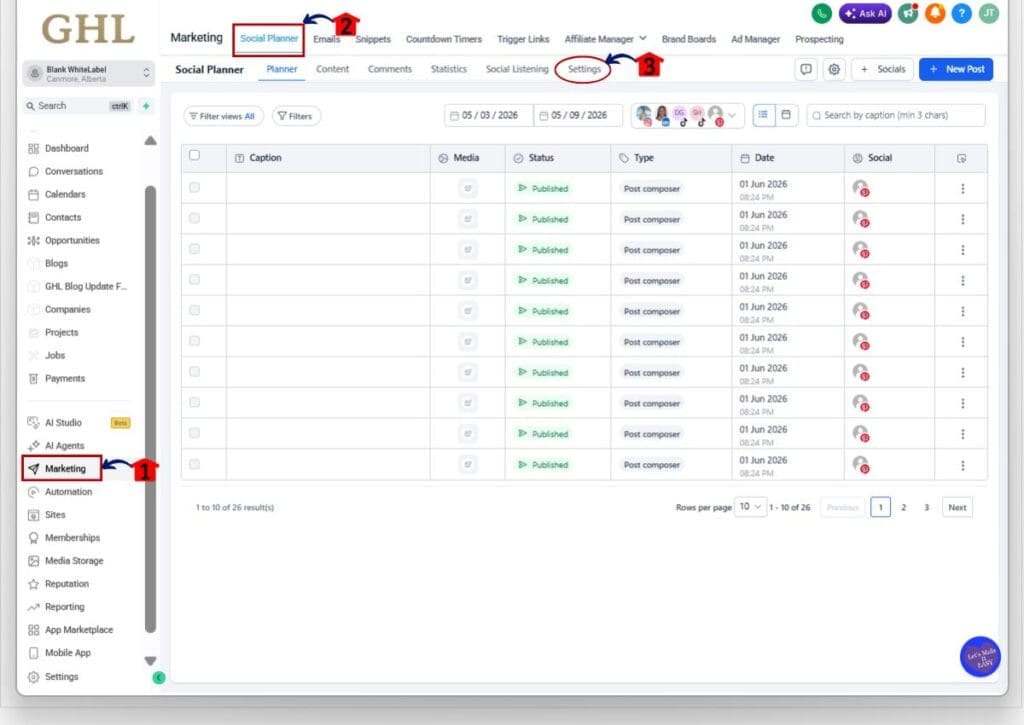
Step 01 – Access Social Planner Settings in GHL
- The main menu on the left side of your screen includes the main areas you use in GoHighLevel.
1.1 Click Marketing.
- This opens the main Marketing section.
1.2 Click Social Planner in the top menu.
- The Social Planner area will open.
1.3 Click Settings.
- This opens the Social Planner Settings page.
Step 02 – Turn On Sync Posts
- The Social Accounts page shows your connected accounts and the available sync settings.
2.1 Click Social accounts in the left menu.
- The Social Integration page will open.
2.2 Find the LinkedIn or TikTok account you want to sync.
- Check the account name, status, and type before changing the setting.
2.3 Turn on the toggle under Sync posts.
- The toggle will turn blue when post syncing is active.
- Repeat this step for each supported LinkedIn or TikTok account you want to sync.

Once Social Post Sync is active, GHL will begin bringing recent published posts into Social Planner. Engagement details will refresh every 24 hours, so the data will not update in real time.
LinkedIn and TikTok Beta Limits
Social Post Sync is still in Beta, so there are a few limits to know before you use it for client reporting. These limits come from LinkedIn and TikTok API rules, not from a missing setup step inside GHL.
For LinkedIn, only Organization Pages are supported. Personal profiles do not work with this feature. PDF, Event, Poll, and Article posts can sync, but they will not show an in-app preview. Mentions, highlighted hashtags, and tagged-user details are also not available.
For TikTok, both Personal and Business accounts are supported. Synced videos use TikTok’s hosted player, but they cannot be cloned into a new post. Music details, location tags, and tagged users are not included. Deleted posts on either platform may still appear in Social Planner because Social Post Sync only pulls data into GHL.
Pro Tips for Social Post Sync
Social Post Sync works best when your accounts are clean, connected, and easy to identify. Before turning it on, check the account name, status, and type. That simple step can save you from syncing the wrong LinkedIn Page or TikTok account.
Use the 24-hour refresh as part of your normal reporting routine. Do not expect live numbers. Check results on the same day each week, then compare what changed. This gives your reports a more consistent view.
Also, keep access to the native LinkedIn and TikTok apps. GHL gives you a useful overview, but some details will still be missing because of API limits. Use Social Planner for quick checks and planning, then open the native platform when you need deeper post details.
What Social Post Sync Means for Your Business
Social Post Sync gives your team a clearer view of what has been posted and what is still planned. That matters when you manage several client accounts and need to keep content, results, and reports in order.
For example, an agency can review recent LinkedIn and TikTok posts inside Social Planner before a client call. The team can check basic engagement, compare past content, and plan the next round of posts without opening each social app.
This does not replace every tool inside LinkedIn or TikTok. It does make daily checks and simple reporting easier. You spend less time hunting for data and more time using it to make better content choices.
Frequently Asked Questions About Social Post Sync
Social Post Sync Makes Social Reporting Easier
Social Post Sync gives GHL users a simpler way to review LinkedIn and TikTok content from one place. You can see published posts beside scheduled content, check key engagement data, and keep your social calendar easier to manage.
The feature is still in Beta, so a few limits remain. LinkedIn only supports Organization Pages, some post details are not available, and engagement data refreshes every 24 hours. Even with those limits, it can still save time for agencies and teams that manage several social accounts.
Turn on Social Post Sync for one account and see how it fits into your current process. Have you tried the update yet, and will it make your reporting easier?
Scale Your Business Today.
Streamline your workflow with GoHighLevel’s powerful tools.


