- Meta Chat Widget Now Built Into GHL
- Quick Summary – Meta Chat Widget Essentials
- Facebook & Instagram Chat Widgets Now in GHL
- New Setup & Integration Flows for Meta Chat Widget
- Smarter Meta Messaging for Agencies
- How to Use the Meta Chat Widget in GHL
- Best Practices for Meta Chat Widget
- Meta Messaging, Your Way
- Higher Response Rates, Better Engagement
- FAQs About the Meta Chat Widget
- GHL Just Leveled Up Meta Messaging
Meta Chat Widget Now Built Into GHL
Meta just moved into your website, and it’s not just watching. With GoHighLevel’s new Meta chat widget types, you can now connect website visitors directly to Facebook Messenger or Instagram DM. It’s the fast lane to real-time conversations on the platforms your leads already live in.
Until now, GHL’s chat widgets gave you direct-to-text or WhatsApp options. But Facebook and Instagram? Those were stuck behind clunky workarounds. That’s over.
This update adds native Meta messaging support, without breaking your current flow, brand, or layout.

GoHighLevel’s new Meta chat widget makes it easy to add Facebook and Instagram messaging to your website. With just a few clicks, you can redirect visitors into Messenger or IG DMs, boosting response rates and creating instant connections on the platforms your leads already trust.
Quick Summary – Meta Chat Widget Essentials
Purpose: This blog covers how to use the new Meta chat widget in GHL to embed Facebook Messenger and Instagram DM directly into your website or funnel.
Why It Matters: It gives agencies and businesses a frictionless way to connect with leads through their preferred messaging platforms, Messenger and IG DMs.
What You Get: Two new chat widget types, an updated setup flow, native Meta integration, and the ability to drive more real-time conversations.
Time to Complete: Setup takes about 10 minutes from widget creation to embedding on your site.
Difficulty Level: Beginner-friendly. If you can use GHL’s chat builder, you can activate this in just a few clicks.
Key Outcome: More conversations, higher engagement, and smarter messaging with no extra tools required, just GoHighLevel and your Meta accounts.
Facebook & Instagram Chat Widgets Now in GHL
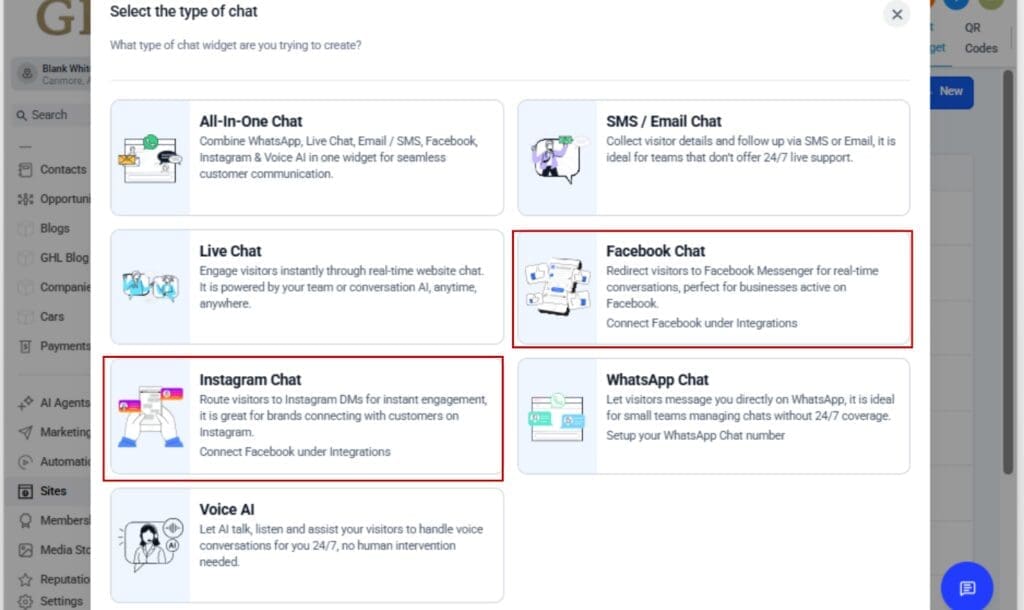
GHL just dropped two brand-new Meta Chat Widget types, and they’re designed for social-first engagement. You can now choose Facebook Chat or Instagram Chat as standalone options when building your website or funnel widget.
Here’s what just landed:
Automate marketing, manage leads, and grow faster with GoHighLevel.

- Facebook Chat Widget: Instantly routes visitors into a Messenger conversation with your connected Facebook Page.
- Instagram Chat Widget: Opens a direct message window to your linked Instagram business account.
These appear right inside the “Select the type of chat” modal, alongside your standard GHL and WhatsApp widget options. The UI got a nice polish too, updated subtext and clean visual icons make the differences between widget types crystal clear.
Now you, or your clients, can start conversations right where your audience already hangs out, no need for clunky forms or chasing down DMs manually.
It’s a cleaner, more direct way to start the conversation, and it’s all baked into the widget builder you already know.
New Setup & Integration Flows for Meta Chat Widget
The real magic in this update isn’t just the new widget types, it’s how smooth the setup has become. GoHighLevel didn’t just bolt on Instagram and Facebook links. They rebuilt the integration flow so your entire setup process stays inside the widget builder.
Here’s what changed:
- New Setup Sections in Widget Builder:
Under the “Chat Window” tab, you’ll now see dedicated accordion sections for both Facebook Chat and Instagram Chat. Each lets you select a connected Meta account directly, no digging through separate menus. - Smarter Account Linking Modals:
If no Facebook Pages or Instagram accounts are connected yet, you’ll see a “Connect a linked account” button. Click it and you’ll stay right inside the builder while a new Meta connection modal appears.
This upgraded modal lets you:
- View all available Facebook Pages or IG Business accounts
- See which ones are already connected
- Connect new ones, without leaving the setup flow
The Style and Messaging tabs? Those stay the same. GHL kept it clean and familiar, just smarter under the hood.
It’s a smart design tweak that makes setup faster and easier for everyone involved.
Smarter Meta Messaging for Agencies
This update isn’t just about convenience, it’s a real upgrade for agencies who live and die by conversion. Why? Because it puts the world’s most-used messaging platforms directly into your funnel and website flows.
Here’s why that matters:
- Real-time engagement, no friction:
Your leads don’t need to fill out a form or wait for a callback. They click, and boom, they’re in a Messenger or Instagram DM thread with your business. That means faster convos, fewer drop-offs, and more booked calls. - Build trust using familiar platforms:
Facebook and Instagram are platforms your prospects already trust. Starting the Meta Chat Widget on home turf builds instant credibility—especially for local businesses with strong social presence. - Agencies get more flexibility:
Want to offer custom Meta Chat Widget setups for each client’s channel of choice? Now you can. Use IG for influencers, Messenger for service pros, WhatsApp for international, GHL gives you all three, white-labeled and native. - Unified experience across channels:
This brings Facebook and Instagram up to par with the WhatsApp Meta Chat Widget experience. Predictable, reliable, and all inside one platform.
If your agency builds sites or funnels for clients, this feature makes it way easier to support Meta-first lead gen. And if you’re the client? It’s the easiest win you’ll activate this month.
How to Use the Meta Chat Widget in GHL
Want to give website visitors a direct line into your DMs? Now you can, with just a few clicks. GoHighLevel’s new Meta chat widget types let you route traffic straight into Facebook Messenger or Instagram DM, using a clean, built-in setup flow. Here’s how to set it up:
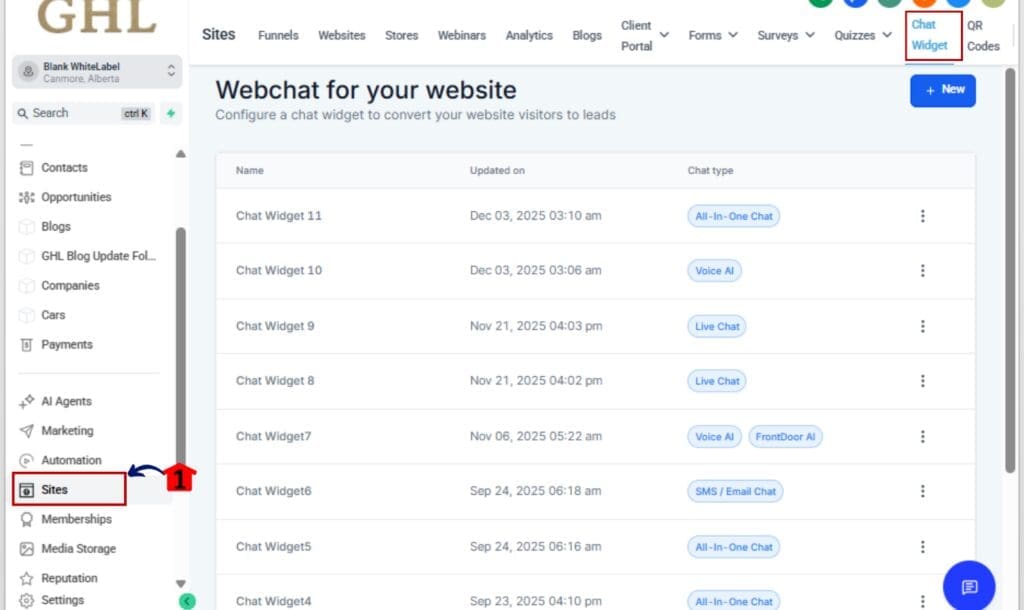
Step 01 – Go to Chat Widgets in Your GHL Account
1.1 In your left-hand menu, go to Sites > Chat Widgets
1.2 Click + New Widget to create a fresh one.
Step 02 – Choose the Meta Chat Widget Type
2.1 In the widget type selection modal, choose:
– Facebook Chat to redirect to Messenger
– Instagram Chat to redirect to IG DMs
2.2 Click Continue to move into the widget builder.
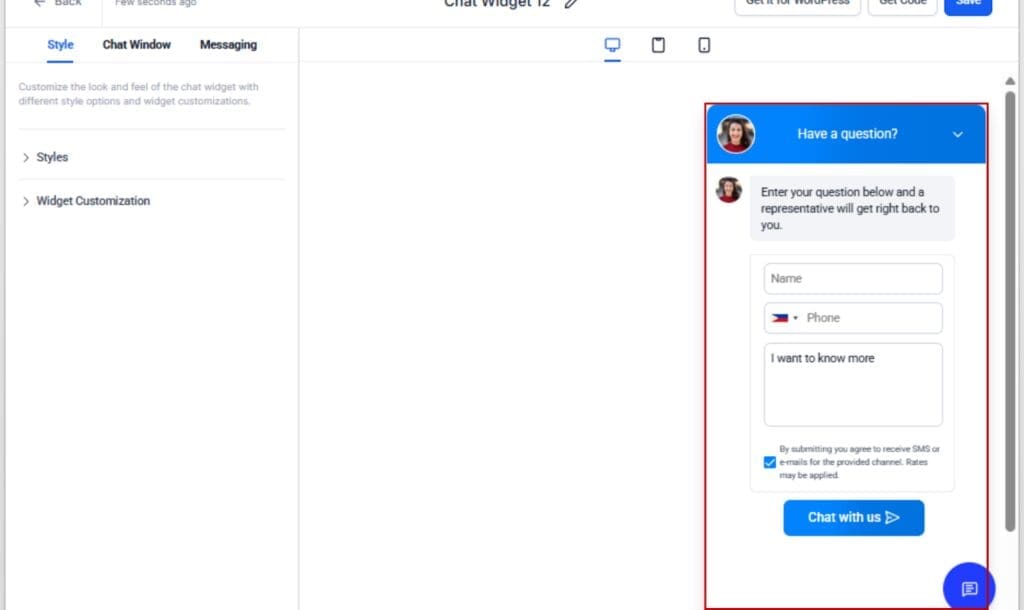
Step 03 – Go to the Chat Window Tab
3.1 In the widget builder, navigate to the Chat Window tab.
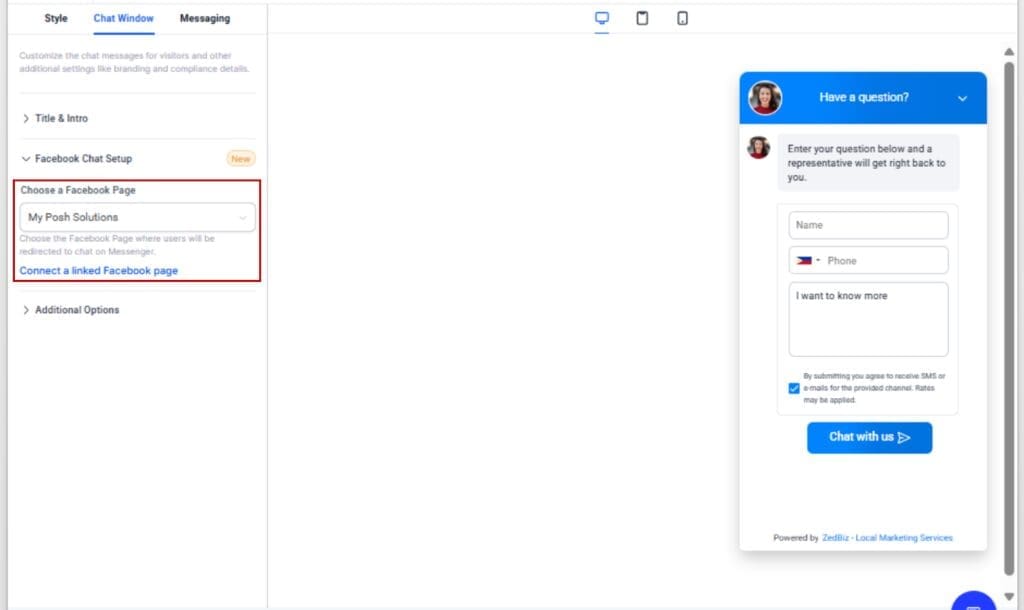
3.2 You’ll now see an accordion labeled either Facebook Chat Setup or Instagram Chat Setup, depending on your selection.
Step 04 – Connect or Select a Meta Account
4.1 If you’ve already linked Facebook or Instagram accounts under Integrations, select one from the dropdown.
4.2 If not, click Connect a linked Facebook/Instagram account.
4.3 A new modal opens directly inside the builder (no popups). From here, you can:
– View all available Meta pages/accounts
– See which are already linked
– Add new accounts
– Sync changes without leaving the setup flow
Step 05 – Save and Grab the Embed Code
5.1 Once your Meta account is selected, click Save Widget
5.2 Then click Get Code and copy the embed script.

Step 06 – Add the Widget to Your Website or Funnel
6.1 Paste the embed code into your website footer or funnel page settings.
6.2 Publish your site or funnel.

That’s it. You’ve now got a fully functional Messenger or Instagram DM button on your website, ready to capture leads where they already hang out.
Best Practices for Meta Chat Widget
Getting these new Meta Chat Widget live is only half the job, here’s how to make them work smarter, convert better, and keep the experience smooth from the start.
1. Pre-connect your Meta accounts
Before you build the widget, head to Settings > Integrations in your sub-account and connect the correct Facebook or Instagram profiles. This avoids any last-minute setup snags.
2. Use compelling CTA language
Generic “Chat Now” buttons are fine, but try platform-specific CTAs like:
- “Message us on Facebook”
- “DM us on Instagram”
This improves click-throughs by setting expectations upfront.
3. Customize placement by channel
Use the Facebook widget on pages where you promote Facebook ads or events. Use Instagram widgets on mobile-first pages where social DMs make more sense. Match the widget to the audience’s likely behavior.
4. Layer with GHL automation
Even though Messenger/DMs live outside of GHL, you can track lead sources using UTM parameters, tags, or by embedding hidden URLs. Pair it with a GHL workflow to auto-tag leads based on entry point.
5. Offer multiple widget types across your site
Some visitors love IG DMs. Others prefer old-school chat bubbles. Offer both by placing different widgets on different pages. Just be sure to clarify what each one does.
6. White-label it for your clients
Agencies: This is a slick, high-value feature that feels premium. Set it up once, show your clients the Meta-driven leads coming in, and roll it into your recurring offer stack.
Meta Messaging, Your Way
This update isn’t just a bonus feature, it changes the way you connect with people online.
Dropping Messenger and IG DMs onto your site isn’t just about adding a chat button, it’s about starting real conversations on platforms your audience already feels comfortable with.
Here’s what it unlocks:
- Agency flexibility: Run lead gen on Instagram? Great. Now your landing pages can DM people instantly. Prefer Facebook for local service offers? Covered. Each widget is channel-specific, white-labeled, and purpose-built.
- Client-ready packaging: These widgets are tailor-made to be part of your service bundles. Instead of a one-size-fits-all chat plugin, you can offer Meta messaging based on what actually works for the client’s niche.
- Faster funnel conversions: Instead of waiting for a form fill or inbox reply, your leads are in a real conversation right away. That means more booked calls, quicker close times, and happier customers.
- Full-stack messaging presence: WhatsApp, FB Messenger, Instagram DMs, GHL now supports all three inside a single unified Meta Chat Widget system. That’s the kind of multi-channel power that most platforms can’t match.
In short? You now have control over where and how those conversations start. And that’s a massive edge.
Higher Response Rates, Better Engagement
The moment someone clicks your chat button, the clock’s ticking. The Meta widget helps you start that convo faster, before their attention drifts.
Here’s what you can expect when you roll this out:
1. More Conversations = More Conversions
Letting folks reach out through apps they already scroll daily makes it easier for them to reply, and easier for you to start a real conversation.
2. Cleaner User Experience
No popups, no clunky redirects, no confusion. Just a native-feeling click that opens a DM thread in the platform they trust. It’s faster, smoother, and feels natural for the user.
3. Faster Lead Qualification
Because these chats happen in real time, you (or your client’s team) can qualify leads immediately. No waiting around for form follow-ups or email replies.
4. Improved Support for Social-Heavy Brands
If your clients run ad campaigns on Facebook or have strong Instagram followings, this gives them a frictionless bridge between those platforms and their website or funnels.
5. Easier Reporting & Tracking
Want to know how these widgets are performing? With a little tagging and URL structure, you can track source performance right in GHL, and optimize accordingly.
Bottom line? This isn’t just a Meta Chat Widget. It’s a revenue tool.
FAQs About the Meta Chat Widget
GHL Just Leveled Up Meta Messaging
This isn’t just another Meta Chat Widget update. It’s GoHighLevel giving you, and your clients, the keys to real-time engagement on two of the most powerful platforms on the internet.
Whether you’re driving traffic from Facebook Ads, building an Instagram-first brand, or just trying to remove friction from your lead capture process, the Meta chat widget gets the job done. Fast. Seamless. Familiar.
No extra tools. No third-party workarounds. Just clean, native integration that launches a direct message thread right from your site or funnel.
So if you’re ready to boost response rates, streamline conversations, and give clients a smarter way to connect, get the widget live. Today.
Scale Your Business Today.
Streamline your workflow with GoHighLevel’s powerful tools.